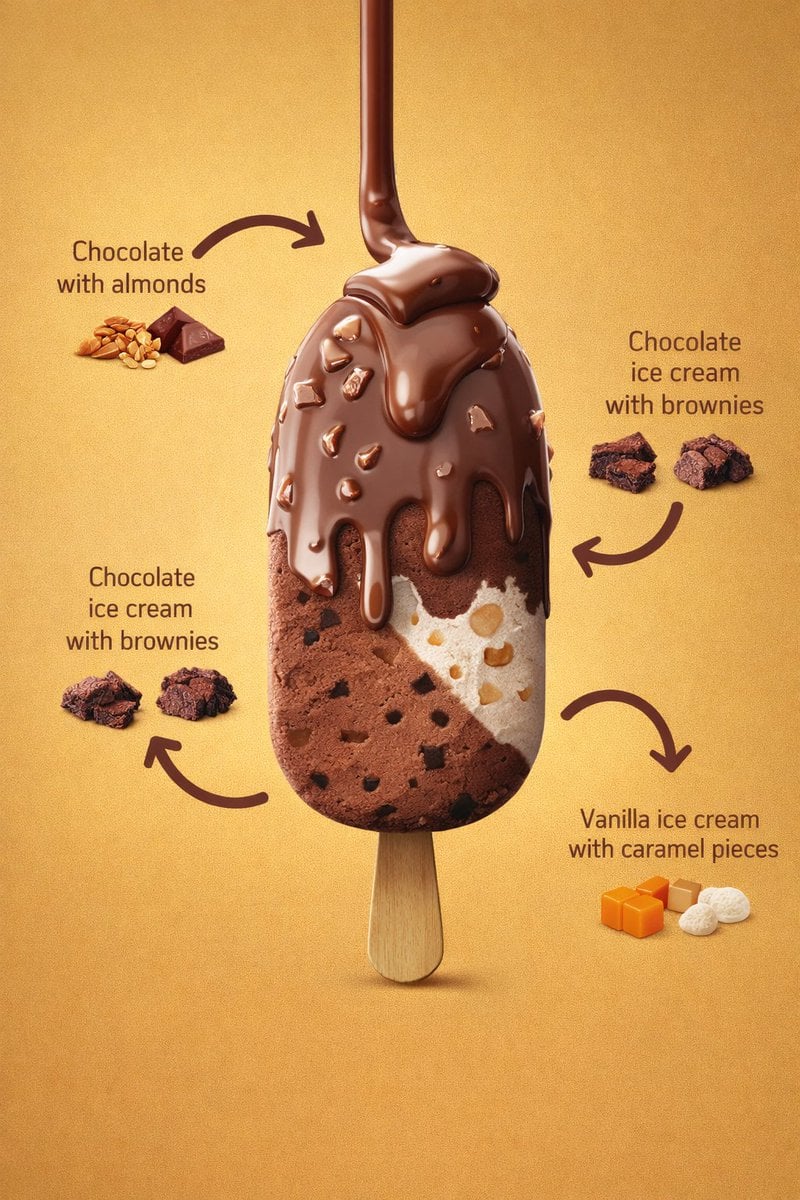
초콜릿 아이스크림 바 성분 라벨 템플릿
추천 모델, 활용 사례, 사용 단계를 먼저 확인한 후 적용 방법을 결정하세요.
이 유형의 템플릿은 화면 구조를 먼저 유지한 뒤 피사체, 스타일 또는 비즈니스 요구 사항을 바꾸는 방식에 적합합니다. Google Imagen4(으)로 먼저 시작한 뒤 결과에 따라 같은 유형의 다른 모델로 전환해 보세요.
어떤 모델부터 사용할지 모르겠다면 작성자가 추천한 모델에서 시작해 보세요.
프롬프트 내용
추천 모델, 활용 사례, 사용 단계를 먼저 확인한 후 적용 방법을 결정하세요.
8K, 3:4 photorealistic commercial product render를 만드세요. 주인공은 vertically centered ice cream bar on a wooden stick이며 upright, front-facing, slightly elevated perspective입니다. single product를 중앙에 두고 주변에 ingredient callouts와 curved arrows를 배치합니다. 배경은 warm golden-yellow gradient, smooth matte, evenly lit이며 가장자리에 subtle vignette가 있습니다. studio lighting은 soft frontal light로 chocolate gloss를 강조하고 balanced fill로 texture detail을 유지하며 melted chocolate coating에는 specular highlights, stick 아래에는 soft shadow를 둡니다. 아이스크림 바는 rounded rectangular bar, surface는 smooth with visible embedded inclusions입니다. top coating은 milk chocolate, melted and dripping, glossy thick fluid, multiple chocolate drips, irregular almond pieces, rounded drip edges입니다. left interior는 dense creamy chocolate ice cream과 small dark brownie chunks, outer layer보다 matte한 질감입니다. right interior는 smooth and creamy vanilla ice cream과 visible caramel pieces, light beige caramel chunks입니다. stick은 light natural wood, smooth with subtle grain, rounded edges, flat profile, fully exposed입니다. Ingredient callouts는 curved thick dark brown arrows, dark brown text, clean sans-serif로 제품 주위에 균형 있게 배치합니다. labels는 Chocolate with almonds, Chocolate ice cream with brownies, Vanilla ice cream with caramel pieces이고 whole almonds, small chocolate squares, brownie chunks, caramel cubes, white vanilla pieces를 함께 둡니다. primary colors는 milk chocolate brown, golden yellow, cream white, secondary colors는 dark brownie brown, light caramel orange, almond beige입니다. render는 extreme micro-detail visibility, high texture fidelity, noise none, moderate depth of field, product fully in focus이며 style은 luxury dessert advertising, hyper-realistic food photography, commercial product render, clean studio composition입니다.
사용 방법
이 순서대로 진행하면 prompt를 그대로 복사하는 것보다 활용도 높은 결과를 얻기 쉽습니다.
특별히 선호하는 모델이 없다면 Google Imagen4(으)로 시작하는 것이 대체로 안정적입니다.
구도, 조명, 재질, 스타일 구조를 먼저 유지하고 피사체, 브랜드 정보, 사용 장면을 바꾸세요.
이미지 템플릿의 가장 큰 장점은 시행착오를 줄이는 것이므로 한 장만 생성한 뒤 결정하지 마세요.
템플릿 정보
현재 작업에 적합한 템플릿인지 빠르게 판단할 수 있습니다.
추천 활용 사례
이 템플릿은 다음과 같은 작업에 더 적합합니다.
포스터 및 표지
제품 및 브랜드 이미지
캐릭터 및 스타일 탐색
추천 모델
어떤 모델부터 사용할지 모르겠다면 작성자가 추천한 모델에서 시작해 보세요.
이 유형의 템플릿은 화면 구조를 먼저 유지한 뒤 피사체, 스타일 또는 비즈니스 요구 사항을 바꾸는 방식에 적합합니다. Google Imagen4(으)로 먼저 시작한 뒤 결과에 따라 같은 유형의 다른 모델로 전환해 보세요.
이 유형의 템플릿은 화면 구조를 먼저 유지한 뒤 피사체, 스타일 또는 비즈니스 요구 사항을 바꾸는 방식에 적합합니다. Google Imagen4(으)로 먼저 시작한 뒤 결과에 따라 같은 유형의 다른 모델로 전환해 보세요.
이 유형의 템플릿은 화면 구조를 먼저 유지한 뒤 피사체, 스타일 또는 비즈니스 요구 사항을 바꾸는 방식에 적합합니다. Google Imagen4(으)로 먼저 시작한 뒤 결과에 따라 같은 유형의 다른 모델로 전환해 보세요.
관련 템플릿
같은 유형의 템플릿을 비교하면 원하는 prompt 방향에 더 잘 맞는 템플릿을 찾기 쉽습니다.
평점 및 후기
먼저 로그인해 주세요