الانتقال إلى المحتوى الرئيسي
نموذج صور بالذكاء الاصطناعي
Google
Google Imagen

Google Imagen4 Ultra

توليد الصور بالنص. 12 نقاط / الطلب. 5,000 حرف. نسبة العرض إلى الارتفاع: 1:1, 16:9, 9:16, 3:4, 4:3, Auto.

القدرة
توليد الصور بالنص
استهلاك النقاط
12 نقاط / الطلب
حد المطالبة
5,000 حرف
إدخال الصور
غير مدعوم
تعرّف عليه في 30 ثانية
  • حد إدخال النص والمطالبة الرئيسية البالغ 5,000 حرف وإخراج صورة واحدة ثابتة واضح.
  • نسبة العرض إلى الارتفاع: 1:1, 16:9, 9:16, 3:4, 4:3, Auto.
  • كيف تقارن نقاط Google Imagen4 Ultra بنقاط Imagen4 Fast؟ تفرض Kyeo حاليًا 12 نقاط ثابتة لكل مهمة صورة واحدة من Google Imagen4 Ultra؛ ولا تغيّر النسبة أو المطالبة العكسية أو seed رصيد Kyeo المطلوب.

عمليات البحث الشائعة: كيفية استخدام Google Imagen4 Ultra في Kyeo · كم نقطة يستهلكها Google Imagen4 Ultra لكل طلب؟ · ما الحد الأقصى للمطالبة في Google Imagen4 Ultra؟

أمثلة

Visual concept

Visual concept

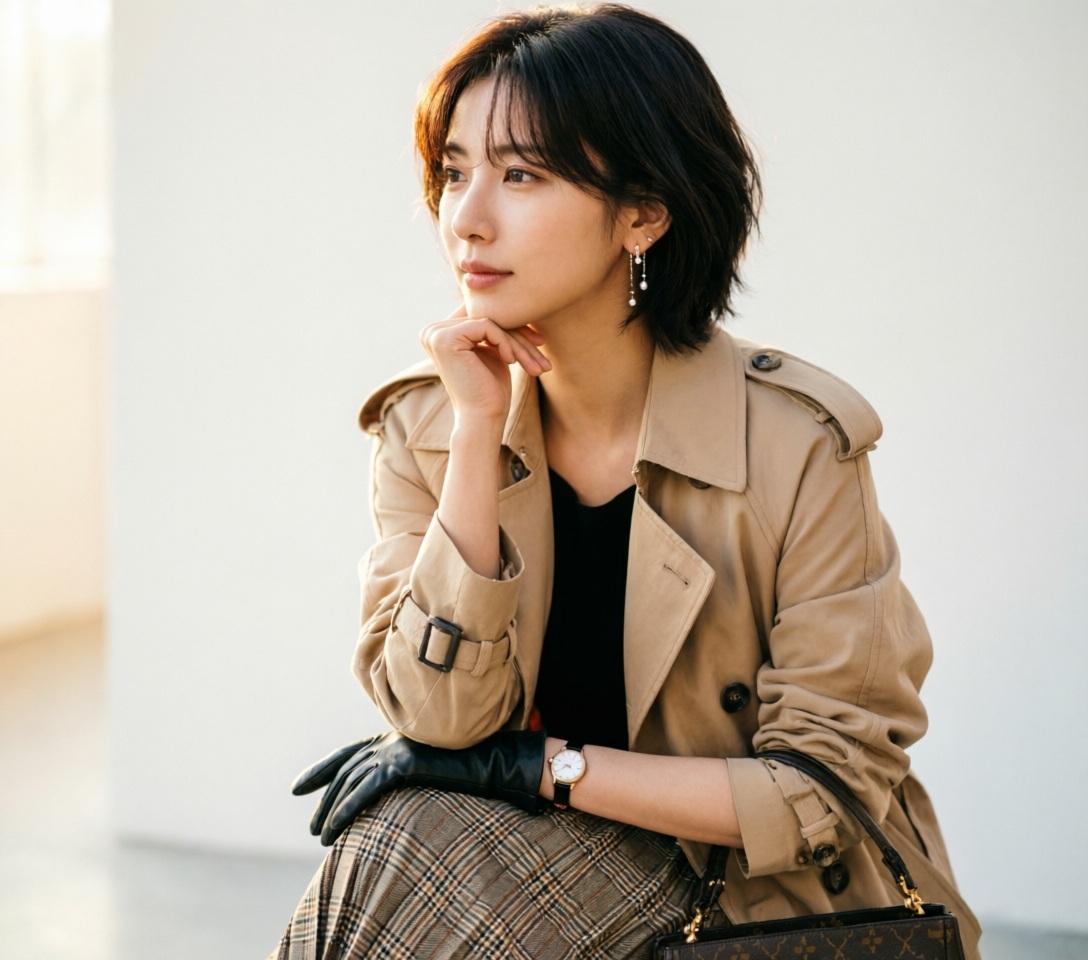
Use ONLY the facial identity from the uploaded reference image. Preserve the face exactly. Match hairstyle, hair color, hair texture, and bangs from the uploaded reference image. Ultra-realistic DSLR fashion portrait, beautiful young woman, standing in a graceful side profile with her body facing left while her face remains naturally visible, chin gently resting on the back of her hand, relaxed posture, elegant slim body, long layered beige trench coat over a black top, pleated plaid midi skirt, black gloves, luxury handbag, delicate earrings, wristwatch, calm thoughtful expression, soft feminine emotion, refined fashion editorial, minimal clean background, warm natural soft light, realistic skin texture, shallow depth of field, 85mm lens, f/1.8, ultra detailed, masterpiece, photorealistic, 8k. negative: low quality, worst quality, blurry, cartoon, anime, illustration, painting, CGI, 3D, doll, fake skin, deformed body, bad anatomy, bad hands, extra fingers, missing fingers, fused fingers, duplicate body, multiple people, cropped face, out of frame, closed eyes, exaggerated expression, muscular body, child, old woman, fat body, watermark, logo, text, signature, oversaturated, noisy, overexposed, underexposed
Editorial design

Editorial design

Editorial design

Editorial design

Visual concept

Visual concept

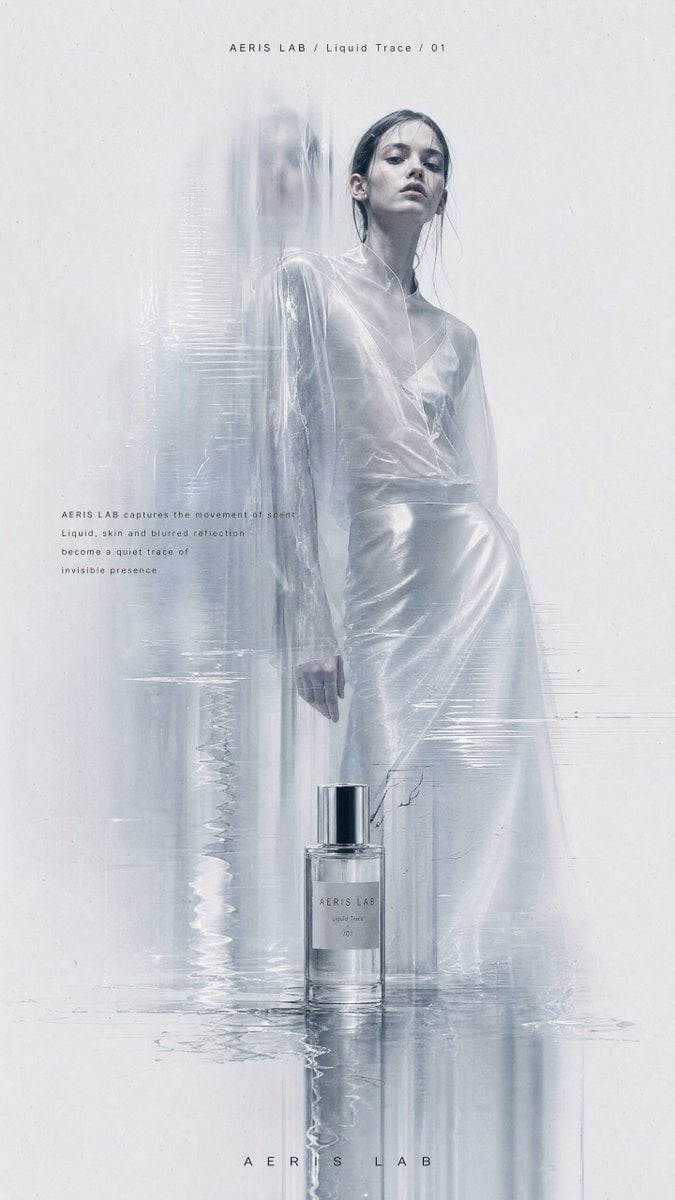
Create a vertical high-resolution experimental fashion editorial poster. 【Theme】: [Your Theme] 【Brand name】: [Your Brand Name] 【Collection title】: [Collection Title] 【Fashion / product direction】: [Fashion Product Direction] 【Main color palette】: [Main Color Palette] 【Model direction】: [Model Direction] 【Editorial copy】: [Editorial Copy] The image should feel like a high-end, cold, minimal and experimental fashion magazine poster. Use a large pale grey-white negative-space background with subtle paper grain, low-contrast noise and printed editorial texture. Avoid clean plastic white backgrounds or commercial studio backdrops. The main subject is [Model Direction], shown in a full-body or nearly full-body pose, placed slightly right of center. The pose should feel quiet, restrained, distant and editorial. The model should have a calm expression and high-fashion presence. Avoid influencer posing, exaggerated performance or commercial catalog energy. The clothing or product must have strong design value, clear silhouette and rich material details: sheer fabric, crinkled texture, soft volume, leather reflection, knit texture, structured tailoring, transparent layers, natural folds or subtle shine. Keep the person realistic, with natural skin texture and no plastic AI face. Add a controlled “ghost scan blur” effect: vertical motion trails, translucent afterimages, stretched scan lines, slight glitch displacement and soft dissolving blur around the left side of the body, lower garment edges, arms, shoes or product edges. The effect should look like the person, garment or product has been optically scanned, folded by paper texture, or dragged by memory. Important: keep the face or upper body relatively clear as the visual anchor. Do not blur the entire person. The key contrast is: clear emotional anchor + blurred ghost trace around the edges. If the theme includes a product such as perfume, jewelry, bags or shoes, place it subtly near the model, at the bottom of the poster or in the foreground. Connect the product with the model through reflection, transparent blur, liquid trace, glass distortion or scan-like afterimages. Do not make it look like a normal e-commerce product image. Use a minimal fashion magazine layout: small English title at the top, such as “[Brand Name] / [Collection Title]”; a small paragraph of editorial copy near the body or product; and a tiny abstract logo at the bottom. Typography should be clean, restrained, small, high-end and sans-serif. Avoid large promotional text, loud fonts or ad-like design. Overall mood: low saturation, low contrast, cold, quiet, premium, experimental, editorial, archive-like, independent designer lookbook, avant-garde fashion magazine, artistic brand campaign. Avoid: cartoon, illustration, cheap poster design, e-commerce ad, promotional banner, large text, complex background, multiple random people, collage grid, over-sharpening, over-retouched skin, obvious AI look.

Visual concept

Visual concept

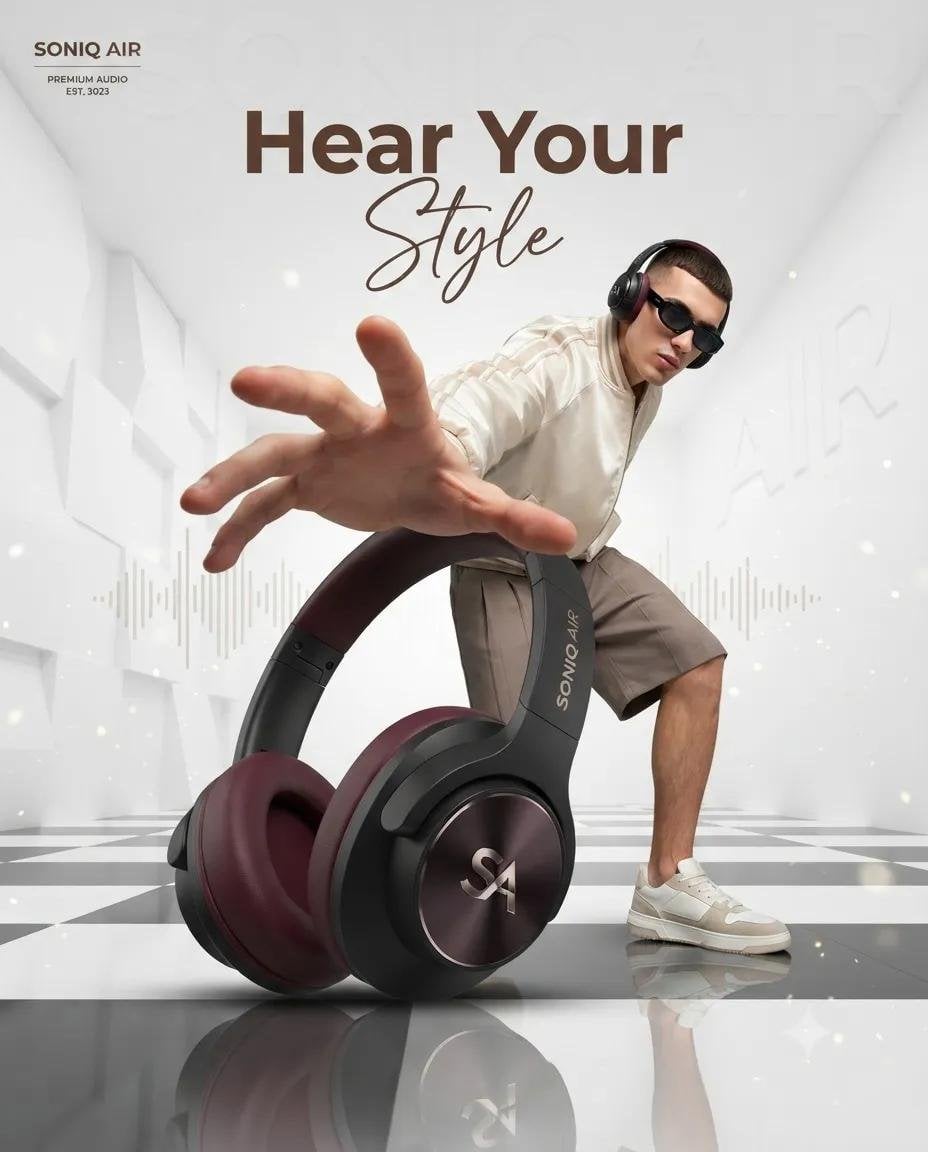
Ultra-realistic luxury product advertising campaign, a futuristic white architectural room with tall geometric walls and a glossy black-and-white checkered reflective floor. A giant premium over-ear headphone in the foreground (black matte body with deep burgundy ear cushions), positioned as the hero product using forced perspective. Behind it, a stylish young male fashion model wearing black sunglasses, a cream bomber jacket, beige shorts, and white sneakers crouches dynamically, reaching one hand toward the camera with exaggerated perspective. Clean luxury lighting, soft volumetric glow, floating dust particles, subtle audio waveform graphics in the background, minimal premium aesthetic, editorial fashion photography, commercial product render, ultra-sharp details, cinematic composition, depth of field, 8K, Octane Render, photorealistic. Leave space at the top for branding and the headline "Hear Your Style" in elegant modern typography. Prompt 2 – Perfume Advertisement: Luxury perfume commercial, minimalist white architectural interior with tall pillars, glossy black-and-white checkered reflective floor. A large amber glass perfume bottle with a gold cap dominates the foreground using dramatic forced perspective. In the background, a fashionable young male model wearing black sunglasses, a beige varsity jacket, matching shorts, white socks, and sneakers leans forward as if reaching for the bottle, creating an energetic lifestyle pose. Bright soft daylight, premium fashion campaign, clean luxury aesthetic, realistic reflections, subtle sparkles, high-end editorial photography, photorealistic, cinematic lighting, depth of field, ultra-detailed, 8K, Octane Render, luxury branding look. Leave negative space at the top for the headline "Own the Moment" and logo placement.

Visual concept

Visual concept

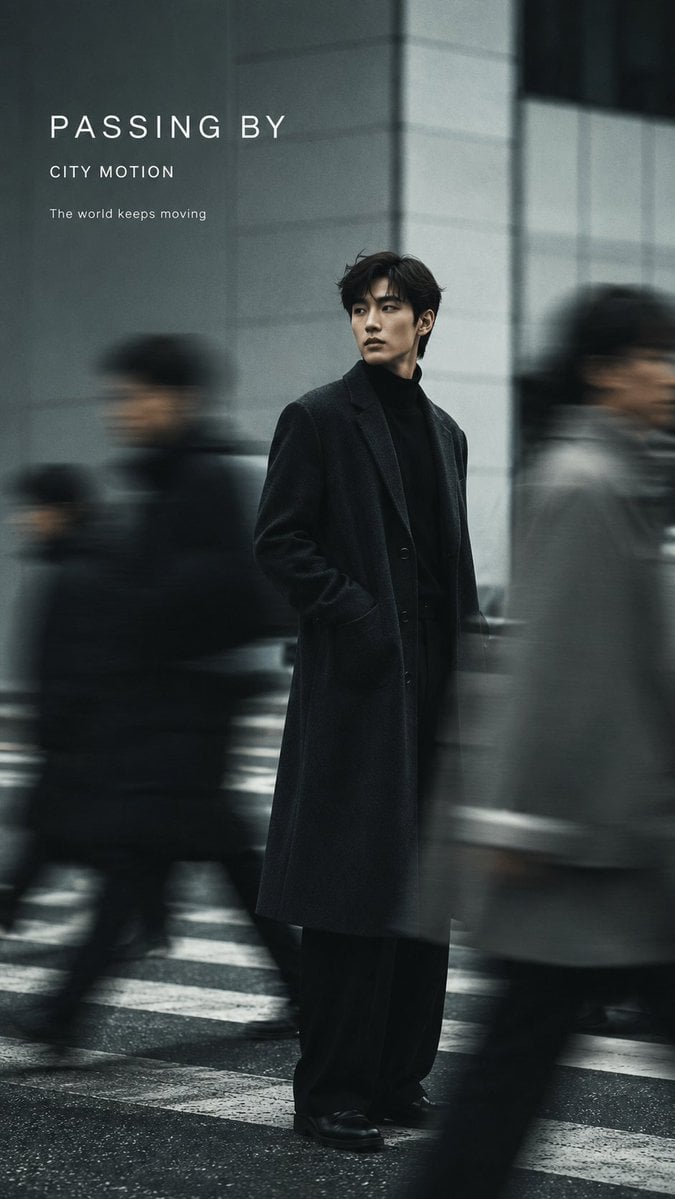
Create a 9:16 vertical fashion editorial poster with realistic slow-shutter photography and elegant minimal typography. Subject: [Person / Gender / Appearance] Outfit: [Fashion Styling] Scene: [Street / Minimalist Studio / Interior] Color palette: [Main Colors] Motion effect: [Moving Crowd / Walking Motion Blur / Layered Afterimages / Double Exposure] Title: [Main Title] Subtitle: [Short Subtitle] Keep one clear visual anchor while using authentic directional motion blur, ghosting, long-exposure trails, or layered afterimages to show movement and the passage of time. The motion should feel photographic rather than like a digital special effect. Preserve realistic anatomy and recognizable facial features while allowing moving figures, clothing, or surrounding people to dissolve naturally into soft blur. Use a clean, restrained background with generous negative space. Add subtle film grain, soft focus, imperfect exposure, low saturation, and natural light for an editorial photography feel. Typography should be minimal and integrated into the composition: only the main title and one short subtitle, using clean modern sans-serif typography. Do not include VOL numbers, dates, image numbers, or unnecessary information. Overall aesthetic: experimental fashion photography, slow-shutter motion blur, editorial magazine poster, cinematic and understated, realistic photography, refined but not overly commercial.

خلاصة في جملة

كيف يبدو هذا النموذج؟

الحد الأقصى للمطالبة العكسية 5,000 حرف، ولـseed النصي 500 حرف. توليد الصور بالنص.

ما الذي يتقنه؟
يدعم التوليد بالنص فقط؛ لا تقبل Kyeo الصور ولا تفتح التحرير أو عدد المخرجات أو الدقة أو الصيغة أو إعدادات الأمان أو إعادة صياغة المطالبة.
لمن يناسب؟
ابدأ بتوليد مربع بالقيمة الافتراضية، ثم قارن بالوصف نفسه النسب الأفقية والرأسية و3:4 و4:3؛ وافحص موضع الموضوع والقص والنص والمساحات الفارغة وفق موضع الاستخدام الفعلي. Auto.
لماذا تستخدمه في Kyeo AI؟
استهلاك النقاط: تفرض Kyeo حاليًا 12 نقاط ثابتة لكل مهمة صورة واحدة من Google Imagen4 Ultra؛ ولا تغيّر النسبة أو المطالبة العكسية أو seed رصيد Kyeo المطلوب.

المعلمات الأساسية

يساعدك على تقييم مدى ملاءمة النموذج لسيناريو عملك بسرعة.

فئة النموذج
نموذج صور بالذكاء الاصطناعي
المورّد
Google
عائلة النموذج
Google Imagen
طريقة التشغيل
مهمة غير متزامنة
حد المطالبة
5,000 حرف
إدخال الصور
غير مدعوم

أسماء أخرى

قد يحمل النموذج نفسه أسماء مختلفة في الوثائق الرسمية ونقاشات المجتمع وطبقة تكامل API؛ نجمعها هنا بصورة موحدة.

Google Imagen4 Ultra
Google Imagen 4 Ultra

أسئلة المستخدمين الشائعة

تركز هذه الأسئلة العملية على المهمة وشروط الإدخال والنتيجة التي ينبغي تأكيدها قبل الاختيار.

كيفية استخدام Google Imagen4 Ultra في Kyeo
كم نقطة يستهلكها Google Imagen4 Ultra لكل طلب؟
ما الحد الأقصى للمطالبة في Google Imagen4 Ultra؟
ما النسب التي يدعمها Google Imagen4 Ultra؟
هل يدعم Google Imagen4 Ultra إدخال الصور؟
ما الحد الأقصى لطول المطالبة العكسية في Google Imagen4 Ultra؟
ما الحد الأقصى لطول seed في Google Imagen4 Ultra؟
كم صورة يخرجها Google Imagen4 Ultra في الطلب الواحد؟
ما الفرق بين Google Imagen4 Ultra وFast؟
ما عناصر التحكم في Imagen4 Ultra التي تتيحها Kyeo؟

دليل الاختيار

هل ما زلت مترددًا في اختيار النموذج؟ ابدأ بهذه النقاط الأساسية.

1
اختره عند الحاجة إلى النص وقيمة 1:1 الافتراضية

توليد الصور بالنص. 12 نقاط / الطلب. 5,000 حرف. نسبة العرض إلى الارتفاع: 1:1, 16:9, 9:16, 3:4, 4:3, Auto. تفرض Kyeo حاليًا 12 نقاط ثابتة لكل مهمة صورة واحدة من Google Imagen4 Ultra؛ ولا تغيّر النسبة أو المطالبة العكسية أو seed رصيد Kyeo المطلوب.

2
بدّل النموذج عند الحاجة إلى تحرير الصور أو تحكم إخراج أوسع

لا يقبل هذا المدخل الصور، ولا يوفر التحكم في عدد المخرجات أو الحجم أو الصيغة أو إعدادات الأمان. عند الحاجة إلى إبقاء موضوع الصورة الأصلية أو تعديل جزء منها أو تكبيرها أو تحديد صيغة الإخراج، اختر نموذجًا يعلن هذه عناصر التحكم صراحة.

3
اختبر حدود المطالبة العكسية وseed النصي معًا

اختبر حدود المطالبة العكسية وseed النصي معًا: الحد الأقصى للمطالبة العكسية 5,000 حرف، ولـseed النصي 500 حرف.

المقارنات الشائعة في البحث

قارن البدائل الشائعة في المهمة نفسها لتوضيح الفروق في المدخلات والتحكم والتكلفة.

ما اختلاف معلمات Kyeo بين Google Imagen4 Ultra وImagen4 Fast؟
كيف تقارن نقاط Google Imagen4 Ultra بنقاط Imagen4 Fast؟
ما اختلاف النسبة الافتراضية بين Google Imagen4 Ultra وUltra؟

جدول مقارنة النماذج

هل تتردد بين الخيارات؟ يوضح هذا الجدول أهم الفروق بين النموذج الحالي وبدائله بنظرة واحدة.

إدخال Kyeo وإخراجه
Google Imagen4 Ultra
إدخال نصي، إخراج صورة واحدة ثابتة
Google Imagen4
إدخال نصي، إخراج صورة واحدة ثابتة
Google Imagen4 Fast
إدخال نصي، إخراج صورة واحدة ثابتة
النسبة الافتراضية
Google Imagen4 Ultra
1:1
Google Imagen4
1:1
Google Imagen4 Fast
16:9
نقاط Kyeo
Google Imagen4 Ultra
12 ثابتة
Google Imagen4
8 ثابتة
Google Imagen4 Fast
4 ثابتة

تجربة الاستخدام الفعلية

إرشادات عملية تستند إلى مصادر عامة وحدود الموقع الحالية ومهام تمثل الاحتياجات الشائعة.

Google Imagen

Google Imagen: تفرض Kyeo حاليًا 12 نقاط ثابتة لكل مهمة صورة واحدة من Google Imagen4 Ultra؛ ولا تغيّر النسبة أو المطالبة العكسية أو seed رصيد Kyeo المطلوب. الحد الأقصى للمطالبة العكسية 5,000 حرف، ولـseed النصي 500 حرف. نسبة العرض إلى الارتفاع: 1:1, 16:9, 9:16, 3:4, 4:3, Auto.

نسبة العرض إلى الارتفاع

Google Imagen: نسبة العرض إلى الارتفاع: 1:1, 16:9, 9:16, 3:4, 4:3, Auto. القيمة الافتراضية: 1:1.

تفاصيل القدرات

القدرة

القدرة: حد إدخال النص والمطالبة الرئيسية البالغ 5,000 حرف وإخراج صورة واحدة ثابتة واضح.

نسبة العرض إلى الارتفاع

نسبة العرض إلى الارتفاع: نسبة العرض إلى الارتفاع: 1:1, 16:9, 9:16, 3:4, 4:3, Auto. القيمة الافتراضية: 1:1.

البذرة العشوائية

البذرة العشوائية: الحد الأقصى للمطالبة العكسية 5,000 حرف، ولـseed النصي 500 حرف.

الاستخدامات المناسبة

مقارنة النسب بدءًا من 1:1

مقارنة النسب بدءًا من 1:1: ابدأ بتوليد مربع بالقيمة الافتراضية، ثم قارن بالوصف نفسه النسب الأفقية والرأسية و3:4 و4:3؛ وافحص موضع الموضوع والقص والنص والمساحات الفارغة وفق موضع الاستخدام الفعلي. Auto.

مقارنة المطالبة العكسية وseed

مقارنة المطالبة العكسية وseed: الحد الأقصى للمطالبة العكسية 5,000 حرف، ولـseed النصي 500 حرف.

Google Imagen: ما اختلاف معلمات Kyeo بين Google Imagen4 Ultra وImagen4 Fast؟

Google Imagen: ما اختلاف معلمات Kyeo بين Google Imagen4 Ultra وImagen4 Fast؟: تفرض Kyeo حاليًا 12 نقاط ثابتة لكل مهمة صورة واحدة من Google Imagen4 Ultra؛ ولا تغيّر النسبة أو المطالبة العكسية أو seed رصيد Kyeo المطلوب.

نصائح الموجّه

اكتب العناصر المرئية أولًا في المطالبة الرئيسية

اذكر بالترتيب الموضوع والحركة والبيئة والتكوين والإضاءة وأي نص يجب أن يظهر.

المطالبة العكسية / البذرة العشوائية

المطالبة العكسية / البذرة العشوائية: الحد الأقصى للمطالبة العكسية 5,000 حرف، ولـseed النصي 500 حرف.

غيّر متغيرًا واحدًا فقط عند اختبار seed

غيّر متغيرًا واحدًا فقط عند اختبار seed: الحد الأقصى للمطالبة العكسية 5,000 حرف، ولـseed النصي 500 حرف.

أسباب اختياره

Google Imagen: حد إدخال النص والمطالبة الرئيسية البالغ 5,000 حرف وإخراج صورة واحدة ثابتة واضح.
القيمة الافتراضية: 1:1: نسبة العرض إلى الارتفاع: 1:1, 16:9, 9:16, 3:4, 4:3, Auto.
تظل التكلفة 12 نقاط لكل طلب ولا تتغير بالمعلمات المفتوحة.

ما يجب معرفته قبل الاستخدام

أوقفت Google `imagen-4.0-generate-001` وتوصي بالترحيل.
بدّل النموذج عند الحاجة إلى تحرير الصور أو تحكم إخراج أوسع: يدعم التوليد بالنص فقط؛ لا تقبل Kyeo الصور ولا تفتح التحرير أو عدد المخرجات أو الدقة أو الصيغة أو إعدادات الأمان أو إعادة صياغة المطالبة.
ما اختلاف النسبة الافتراضية بين Google Imagen4 Ultra وUltra؟ الحد الأقصى للمطالبة العكسية 5,000 حرف، ولـseed النصي 500 حرف.

المعلمات القابلة للضبط

يساعدك على تقييم مدى ملاءمة النموذج لسيناريو عملك بسرعة.

المطالبة العكسية
اختياري
نوع المعلمة: text
5,000 حرف
نسبة العرض إلى الارتفاع
اختياري
نوع المعلمة: select
القيمة الافتراضية: 1:1
1:1
16:9
9:16
3:4
4:3
Auto
البذرة العشوائية
اختياري
نوع المعلمة: text
الحد الأقصى للمطالبة العكسية 5,000 حرف، ولـseed النصي 500 حرف.

استهلاك النقاط

12 نقاط / الطلب

تفرض Kyeo حاليًا 12 نقاط ثابتة لكل مهمة صورة واحدة من Google Imagen4 Ultra؛ ولا تغيّر النسبة أو المطالبة العكسية أو seed رصيد Kyeo المطلوب.

نصيحة لتوفير النقاط

قبل توليد الصور أو الفيديو على دفعات، يُنصح بإجراء اختبار A/B بالمواد نفسها بين النموذج الحالي وبدائله من النوع نفسه، ثم بدء التوليد على دفعات بعد تأكيد النتيجة لتجنب هدر النقاط.

الأسئلة الشائعة

نماذج مشابهة موصى بها

لم تقرر بعد؟ قارن أيضًا بهذه البدائل المشابهة.

Google Imagen4

توليد الصور بالنص. 8 نقاط / الطلب. 5,000 حرف. نسبة العرض إلى الارتفاع: 1:1, 16:9, 9:16, 3:4, 4:3, Auto.

نموذج صور بالذكاء الاصطناعي
8 نقاط / الطلب

Google Imagen4 Fast

توليد الصور بالنص. إدخال الصور غير مدعوم. نسبة العرض إلى الارتفاع: 1:1, 16:9, 9:16, 3:4, 4:3, Auto. 4 نقاط / الطلب.

نموذج صور بالذكاء الاصطناعي
4 نقاط / الطلب

4o Image

4o Image / تصنيف القدرة — لا تقدم الصفحة الحالية سوى النسب `1:1 / 3:2 / 2:3`، بسعر ثابت قدره 3 نقاط لكل عملية، ولا تقبل صورة مرجعية.

نموذج صور بالذكاء الاصطناعي
3 نقاط / عملية

مصادر المعلومات

أُعد محتوى الصفحة استنادًا إلى مواد الشركة المطوّرة ووصف عائلة النموذج وإعداد التكامل في منصة Kyeo AI.

ملاحظة المصدر

تفرض Kyeo حاليًا 12 نقاط ثابتة لكل مهمة صورة واحدة من Google Imagen4 Ultra؛ ولا تغيّر النسبة أو المطالبة العكسية أو seed رصيد Kyeo المطلوب. الحد الأقصى للمطالبة العكسية 5,000 حرف، ولـseed النصي 500 حرف. نسبة العرض إلى الارتفاع: 1:1, 16:9, 9:16, 3:4, 4:3, Auto.

آخر تحديث: 2026-08-26
Google Cloud: شرح نموذج Imagen 4 Ultra
رسمي

Google Cloud: شرح نموذج Imagen 4 Ultra: Google Imagen.

عرض المصدر الأصلي
Google Cloud: ملاحظات إصدار Vertex AI
رسمي

Google Cloud: ملاحظات إصدار Vertex AI: Google Imagen.

عرض المصدر الأصلي
Google Cloud: توليد الصور من النص في Imagen
رسمي

Google Cloud: توليد الصور من النص في Imagen: Google Imagen.

عرض المصدر الأصلي