Zum Hauptinhalt springen
KI-Bildmodell
Alibaba
Wan

Wan 2.7 Image

Wan 2.7 Image / Funktionen — Wan 2.7 Image unterstützt Text-zu-Bild und Bildbearbeitung mit bis zu neun Referenzbildern. Fest 5 Credits pro Bild; jede Anfrage liefert ein Bild.

Funktionen
Text-zu-Bild und Bild-zu-Bild
Punkteverbrauch
5 Credits / 1 Bild
Prompt-Limit
5.000 Zeichen
Upload-Limit
9 Bilder
In 30 Sekunden erklärt
  • Wan 2.7 Image / Punkteverbrauch — Fest 5 Credits pro Bild; jede Anfrage liefert ein Bild.
  • Wan 2.7 Image / Funktionen — Wan 2.7 Image unterstützt Text-zu-Bild und Bildbearbeitung mit bis zu neun Referenzbildern.
  • Wan 2.7 Image / Bei einer sichtbaren 4K-Auswahl zuerst andere Modelle vergleichen — Die aktuelle Seite bietet 1K/2K, acht Seitenverhältnisse für Textgenerierung sowie Wasserzeichen und Seed.
  • Wan 2.7 Image / Upload-Limit — Referenzbilder müssen JPEG, PNG oder WebP sein, höchstens 10 MB groß und an jeder Kante mindestens 240 Pixel messen.

Häufig gesucht: Wan 2.7 Image verwenden · Wie viele Punkte kostet Wan 2.7 Image pro Anfrage? · Welche Bildformate unterstützt Wan 2.7 Image?

Beispiele

Visual concept

Visual concept

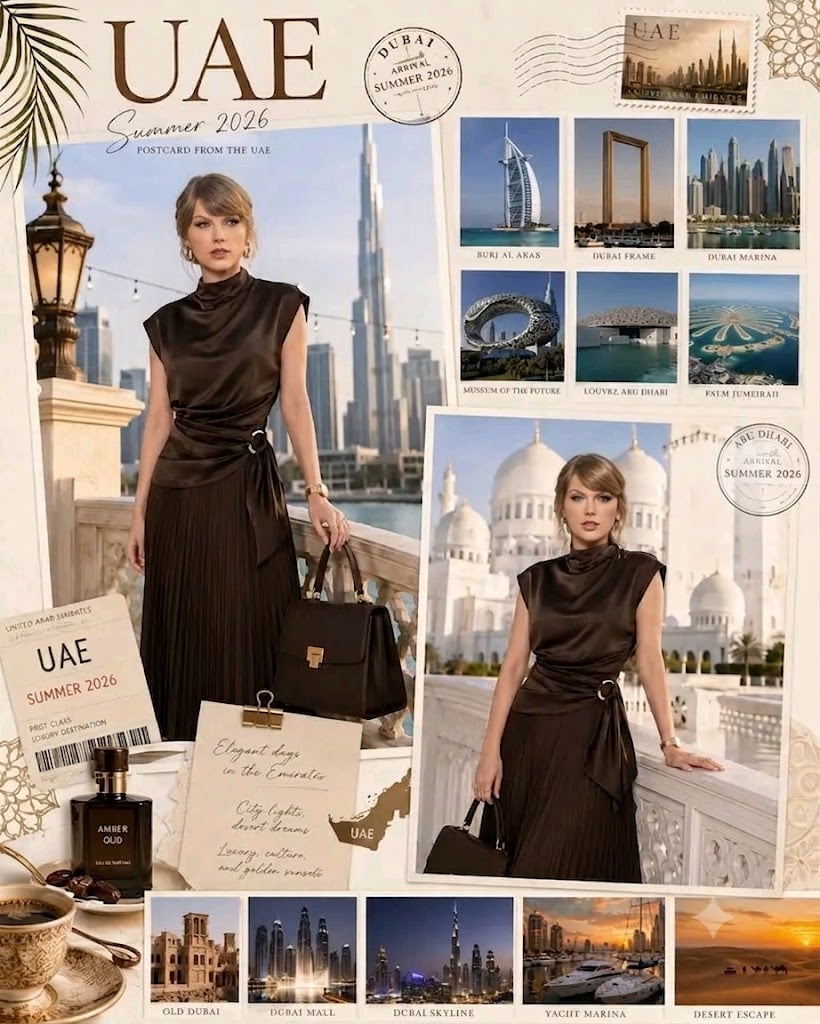
Create an ultra-detailed luxury travel scrapbook collage titled “UAE Summer 2026 – Postcard from the UAE,” designed in an elegant editorial magazine style with a warm palette of cream, beige, ivory, gold, camel, and rich chocolate brown. The centerpiece features two large overlapping Polaroid-style photographs of a glamorous blonde female celebrity wearing a sleeveless high-neck chocolate-brown satin dress with a silver ring waist detail, a matching structured leather handbag, and a gold wristwatch. In the first full-length portrait, she stands on a balcony with a classic stone balustrade overlooking the Dubai skyline, with the Burj Khalifa rising prominently in the background under bright daylight. In the second three-quarter portrait, she leans against a white marble balustrade with the magnificent white domes and minarets of the Sheikh Zayed Grand Mosque in Abu Dhabi behind her beneath a soft golden sky. Surrounding the portraits is a curated collection of travel photography arranged as a sophisticated mood board, including Burj Al Arab, Dubai Frame, Dubai Marina, Museum of the Future, Louvre Abu Dhabi, Palm Jumeirah, Old Dubai heritage architecture, Dubai Mall at night, the illuminated Dubai skyline, a luxury yacht marina at sunset, and golden desert dunes with camels. Add refined travel ephemera such as vintage passport stamps reading “Dubai Arrival – Summer 2026” and “Abu Dhabi Arrival – Summer 2026,” a faux postage stamp featuring the Dubai skyline, a premium first-class boarding pass labeled “United Arab Emirates – UAE Summer 2026,” and a textured parchment note clipped with a gold binder clip containing elegant handwritten text: “Elegant days in the Emirates. City lights, desert dreams. Luxury, culture, and golden sunsets.” Include a small gold silhouette map of the UAE beside the note. Enhance the composition with luxury lifestyle accents such as an amber oud perfume bottle, a dish of dates, and an elegant porcelain coffee cup on a saucer. The background should feature subtle Islamic geometric patterns embossed in gold, delicate palm leaf shadows, layered paper textures, soft sunlight, premium editorial typography, realistic shadows, high-end fashion magazine aesthetics, luxury travel campaign quality, photorealistic details, cinematic lighting, and an upscale scrapbook layout with impeccable composition.

Visual concept

Visual concept

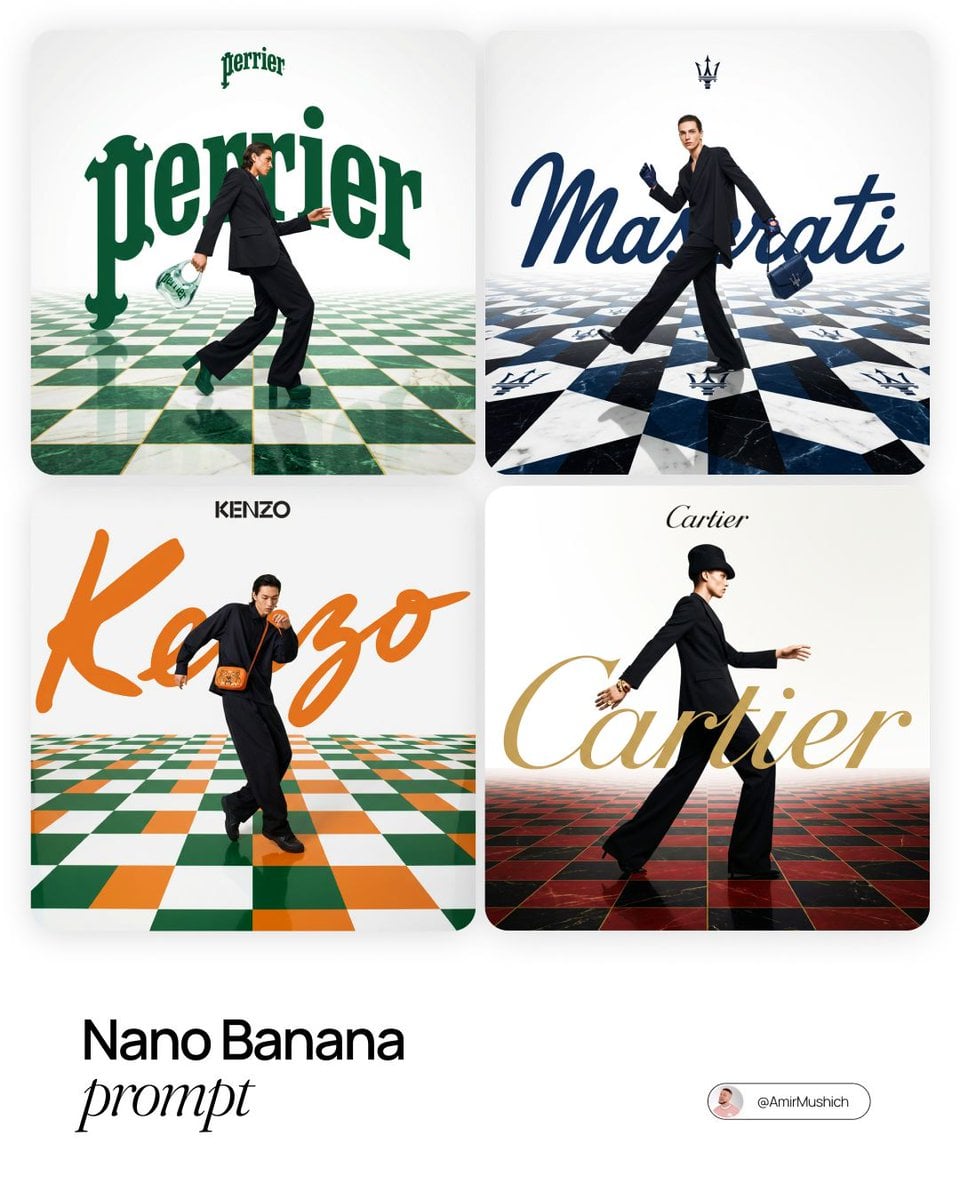
[BRAND NAME]. Act as a Fashion Photographer and Graphic Designer specializing in luxury brand campaign visuals with integrated typography and surreal spatial design. PHASE 1: SPATIAL CONCEPT Create a high-fashion editorial image where architecture and graphic design merge into a theatrical stage. The foundation is a bold geometric floor pattern that extends into forced perspective, creating infinite depth and visual drama. This is not a neutral backdrop – the floor is a protagonist that amplifies brand identity through pattern, color, and spatial illusion. PHASE 2: CHECKERBOARD ARCHITECTURE - Surface: Checkerboard/geometric tile pattern rendered in brand-relevant colors - Perspective: Aggressive forced perspective starting from bottom foreground and receding toward horizon (vanishing point at upper third of frame) - Pattern Logic: Autonomously determine pattern based on [BRAND NAME]: - Color Palette: Incorporate 2-3 signature colors of [BRAND NAME] into floor pattern while maintaining readability - Texture: Photorealistic rendering with subtle reflections and shadows for depth PHASE 3: MODEL & STYLING - Subject: One fashion model (gender-fluid casting) captured mid-motion – dynamic pose suggesting walking, running, or dancing - Outfit: Elevated monochrome look (black, white, or brand-neutral tone) to let floor pattern and typography dominate. Include 1-2 key accessories in [BRAND NAME]'s signature color as hero product focal points - Pose Energy: 70% movement, 30% control – fashion-forward but grounded (avoid floating/unnatural levitation) - Placement: Model positioned in lower-mid frame, interacting spatially with both floor perspective and typography layer - Camera Angle: Low-to-mid angle (waist-to-full body shot) to emphasize floor perspective drama PHASE 4: TYPOGRAPHY INTEGRATION - Brand Script: Oversized handwritten/script version of [BRAND NAME] rendered as flat graphic element behind or around the model - Scale: Typography should be 40-60% of frame width – bold and unmissable but not crushing the model - Color: Signature brand color (autonomously selected), solid fill with clean edges - Interaction: Typography appears to "sit" in the space – model may partially overlap letters, creating layering hierarchy - Logo Lockup: Clean, small brand logo centered in upper portion of frame (10-15% of width) in black or brand color - Treatment: Pure vector aesthetic – no gradients, no shadows, no dimensional effects. Flat color only. PHASE 5: COLOR ORCHESTRATION (AUTONOMOUS) Autonomously research and apply [BRAND NAME]'s iconic color system: - Primary: Identify 1-2 hero brand colors (e.g., Gucci → forest green + red, Tiffany → robin egg blue) - Application: Use primary colors in floor pattern AND typography for visual cohesion - Balance: 60% white/neutral space, 30% brand color saturation, 10% black for anchoring - Accent: Hero product (bag, shoes, accessory) should echo brand color for strategic eye-pull PHASE 6: LIGHTING & ATMOSPHERE - Lighting Setup: High-key fashion lighting with soft shadows – think editorial studio quality - Key Light: 45° front-left to sculpt model, creating gentle shadows on checkerboard - Fill: Ambient fill to prevent harsh contrast while maintaining drama - Floor Treatment: Subtle specular highlights on floor tiles for luxury sheen (not glossy/mirror-like) - Background: Pure white or subtle gradient to white at horizon line – maintains clean editorial feel PHASE 7: TECHNICAL EXECUTION - Mood: Playful luxury – sophisticated but not stiff, energetic but refined - Composition Rule: Dynamic diagonal lines (floor perspective) + vertical anchor (model) + horizontal balance (typography) - Depth Layers: Background (white) → Typography (mid-ground) → Model (foreground) → Floor pattern (spanning all depths) - Post-Production: Magazine-cover polish with color grading that enhances brand palette TECHNICAL SPECS: - Camera Simulation: Phase One XF IQ4 150MP, 80mm lens, f/5.6 for controlled depth - Aspect Ratio: 4:5 (Instagram editorial) or 3:4 (print campaign) - Resolution: 8K output, print-ready sharpness - Color Space: sRGB with vibrant saturation for digital, slight desaturation for luxury print feel - Style Reference: Gucci campaigns by Glen Luchford, Prada visuals, Highsnobiety x luxury collabs, Vogue Italia editorials - Rendering: Photorealistic model and floor, graphic-design-quality typography (hybrid aesthetic)

Visual concept

Visual concept

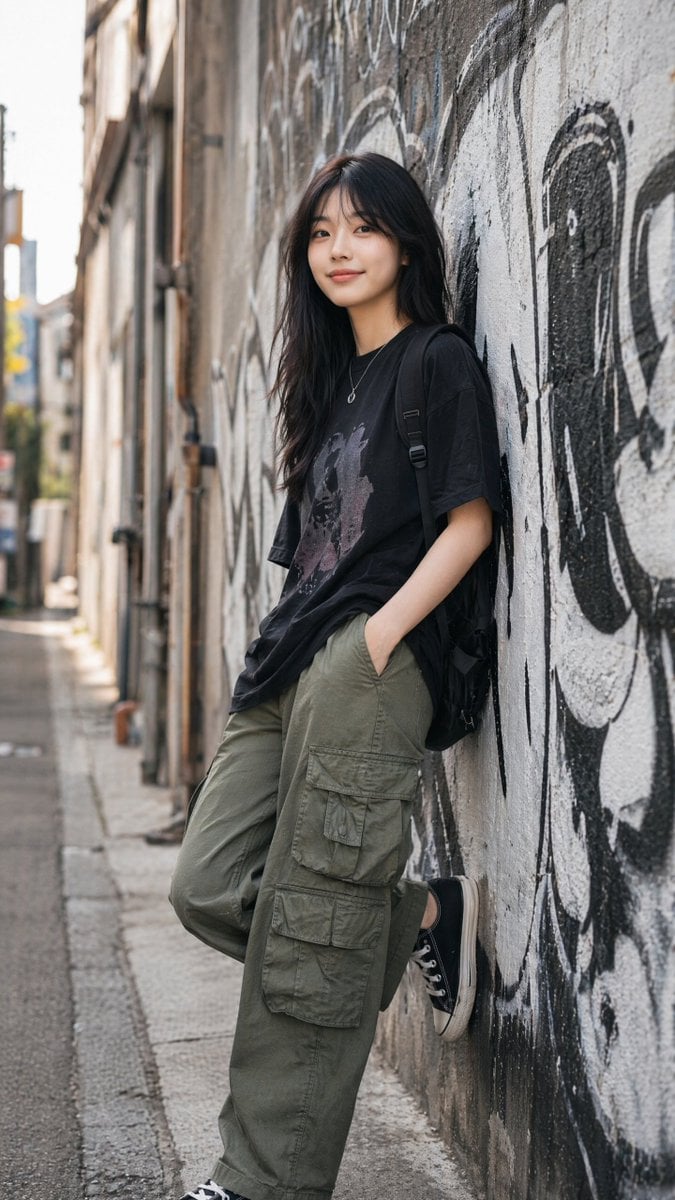
Use the uploaded image as the primary composition and camera reference. Match the framing, pose, body proportions, camera height, perspective, lighting direction, and overall mood as closely as possible while creating a completely new original image. An ultra-realistic lifestyle fashion portrait of a beautiful young East Asian woman casually leaning against a large graffiti-covered concrete wall in a narrow urban street. She wears an oversized black graphic t-shirt, loose olive green cargo pants with multiple pockets, classic black canvas sneakers with white rubber soles, a black backpack over both shoulders, and a delicate silver necklace. She stands with one leg straight while the other foot rests naturally against the wall, one hand inside her cargo pocket, the other relaxed. Long natural black hair flowing softly over her shoulders, minimal makeup, flawless skin, calm confident expression, looking directly at the camera. Background features large white and black graffiti artwork covering the wall, softly blurred city alley with shallow depth of field. Natural late afternoon sunlight, soft shadows, cinematic street photography, premium fashion editorial, authentic urban lifestyle, clean composition, photorealistic, highly detailed skin texture, realistic fabric folds, premium color grading, subtle film look, 85mm lens, f/1.8, full-frame camera, HDR, 8K, ultra sharp focus on the subject. Negative Prompt: low quality, blurry, oversaturated, cartoon, anime, CGI, 3D render, illustration, painting, plastic skin, extra fingers, deformed hands, duplicate body parts, bad anatomy, watermark, logo, text, signature, noise, motion blur.

Visual concept

Visual concept

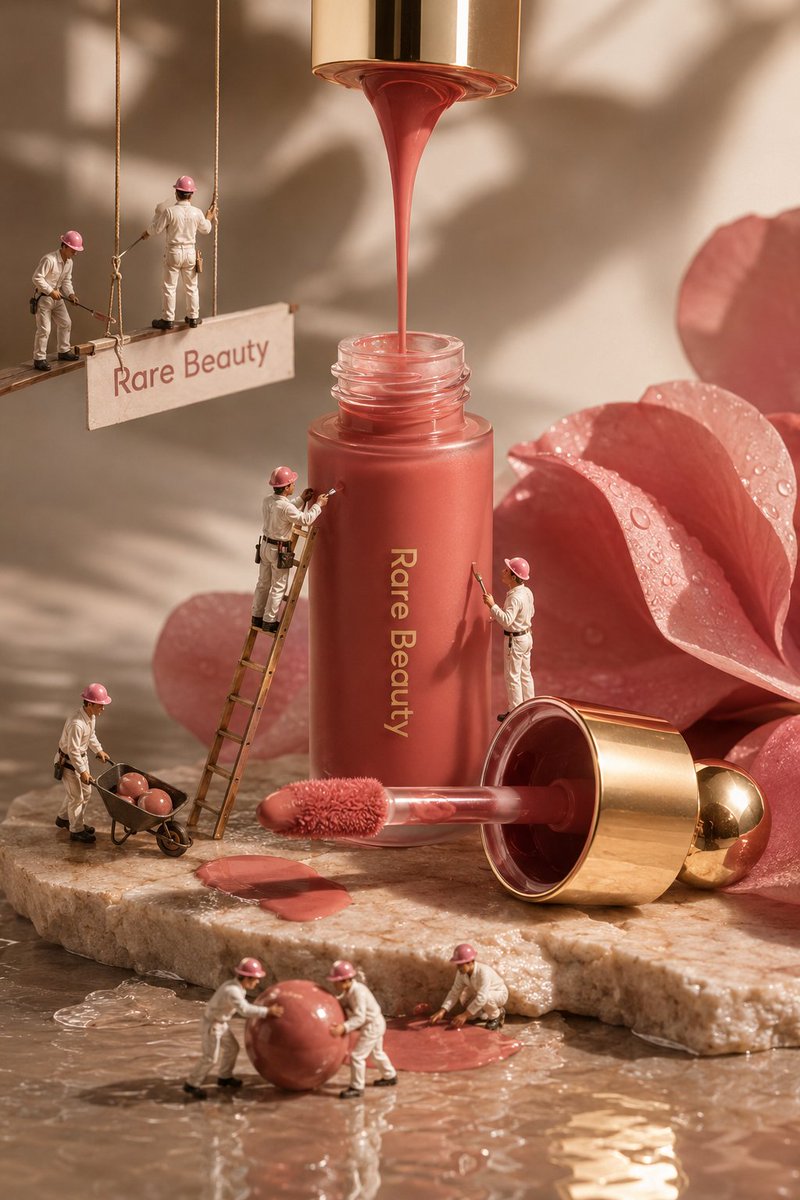
Create an ultra-realistic, high-end luxury beauty advertisement inspired by premium editorial cosmetics photography. The composition features a close-up macro portrait of a woman’s face filling the background, with natural warm skin tones, realistic pores, subtle freckles, delicate skin texture, glossy hydrated lips, and soft golden studio lighting. Keep the facial appearance elegant, natural, refined, and photorealistic, with a sophisticated beauty-campaign aesthetic. In the foreground, place premium liquid makeup products inspired by a modern luxury cosmetic brand. Include a tall frosted glass liquid blush bottle standing upright and another matching blush container lying horizontally on the surface. The packaging should have a soft muted rosy-pink/coral liquid visible through the frosted glass, clean minimalist typography, and a luxurious metallic gold cap. Place the applicator wand beside the bottle, with a soft fluffy doe-foot applicator carrying a small amount of rosy blush product. Add a creative miniature-world concept: several tiny professional beauty workers dressed in clean white work uniforms, black utility belts, black shoes, and pink protective helmets are climbing thin ropes around the cosmetic products. Some miniature workers should appear carefully painting or applying blush to the giant skin surface with tiny rollers and cosmetic tools, while another worker climbs toward the product bottle, creating the illusion that the cosmetic product is being professionally crafted and applied at a massive scale. The miniature figures should have realistic proportions, detailed clothing, believable poses, tiny equipment, realistic shadows, and physically accurate interaction with the environment. Arrange the products on a smooth warm beige/pink studio surface with subtle reflections and soft shadows. Use a carefully controlled luxury commercial lighting setup: warm diffused key light, gentle rim lighting, soft highlights on the glass and metallic gold cap, realistic reflections, cinematic depth of field, and subtle atmospheric glow. The background should remain minimal, elegant, warm, and uncluttered so the cosmetics and miniature workers remain the main focus. Use a premium beauty campaign composition with a slightly low product angle, macro photography aesthetics, shallow depth of field, realistic bokeh, extremely detailed glass textures, realistic liquid translucency, natural skin texture, accurate material reflections, and professional color grading. Make every element look physically present in the same scene rather than digitally pasted together. Overall mood: luxurious, feminine, creative, playful, premium, sophisticated, and visually striking. The final image should resemble a high-budget international cosmetic advertising campaign combined with imaginative miniature photography. Ultra-photorealistic, 8K detail, cinematic commercial photography, macro lens, realistic skin pores, realistic freckles, highly detailed miniature humans, physically accurate shadows, natural reflections, premium product styling, warm soft lighting, crisp foreground details, subtle depth of field, realistic materials, professional beauty photography, editorial advertising quality, no cartoon appearance, no illustration, no distorted hands, no duplicated people, no malformed faces, no floating objects, no unrealistic anatomy.

Visual concept

Visual concept

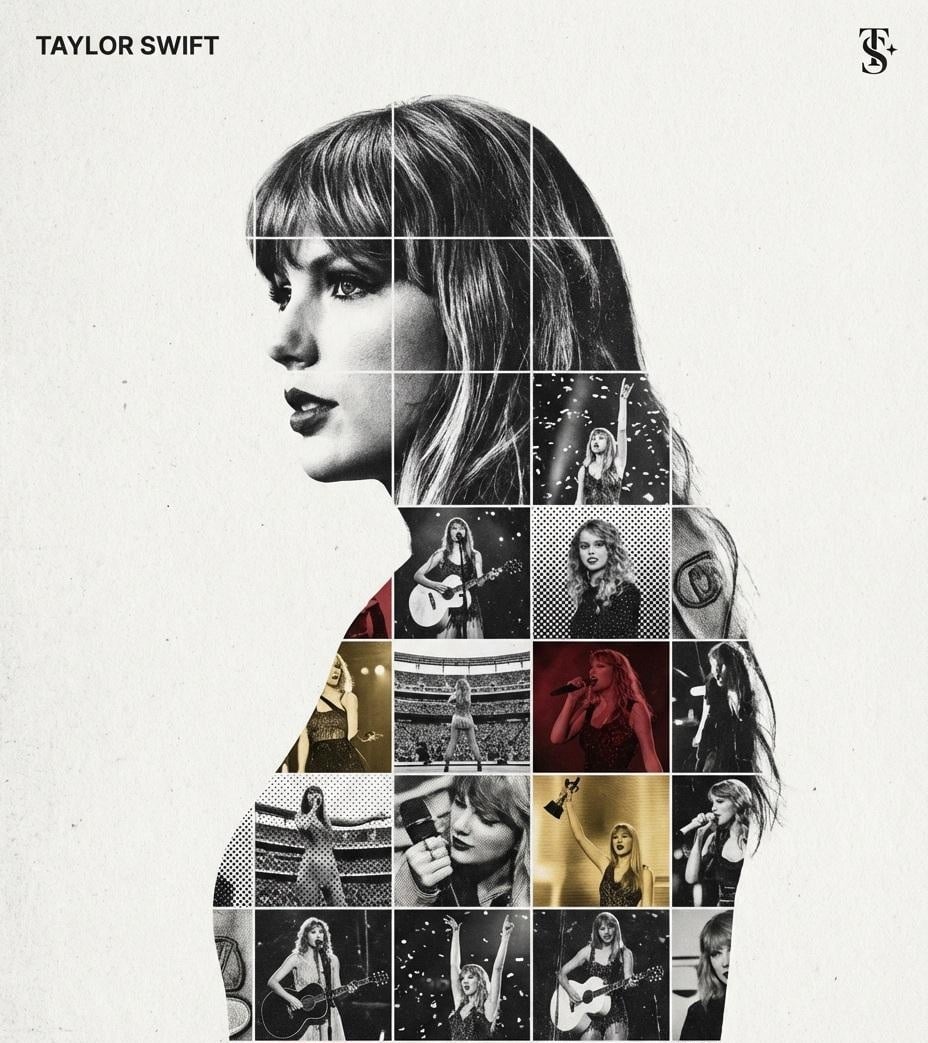
Create a refined, gallery-quality tribute poster built around a central portrait silhouette filled with a textured photo mosaic. The design should feel tactile, layered, and premium not like flat digital collage work. Central Structure : The Vessel The central focus must be a large-scale, high-contrast black and white portrait silhouette of [Persons name]. This silhouette acts as the container for the internal visual narrative. It must be centered perfectly on the canvas. The Grid Fill and Mixed Media Textures The interior of the silhouette should be populated by a dense photo mosaic grid made from action shots throughout the person’s career. Critical Texture Direction Do not paste flat photos. Each grid cell should have artistic treatment to create a tactile, collage-like aesthetic. Incorporate a mix of the following textures selectively across different cells: Halftone dots (comic-book style raster patterns) Fabric or embroidery textures suggesting jersey material or stitched patches Film grain or heavy noise on high-contrast action shots The result should feel handcrafted and layered rather than digitally assembled. Color Strategy Base palette: monochrome black and white. Introduce selective color overlays only on specific grid cells. The accent colors should relate to the relevant team, brand, or national flag. Use color sparingly to create visual rhythm and emphasis. Typography and Branding – Strict Micro-Scaling Top Left (The name) Write “[person name]” using the font Inter Semibold. Kerning: tight negative kerning , Size: small and discreet. The name must occupy a maximum of 20% of the total canvas width. Do not make it large or dominant. Top Right (The symbol) Place the primary logo (Team, Brand, or Flag). Size: very small. It must occupy a maximum of 10% of the total canvas width. Composition and Background Background Use off-white or light grey. Include a visible high-quality paper or subtle concrete texture. Avoid flat digital white. Alignment Center the silhouette precisely. Maintain generous negative space around the figure to preserve elegance and balance.

Visual concept

Visual concept

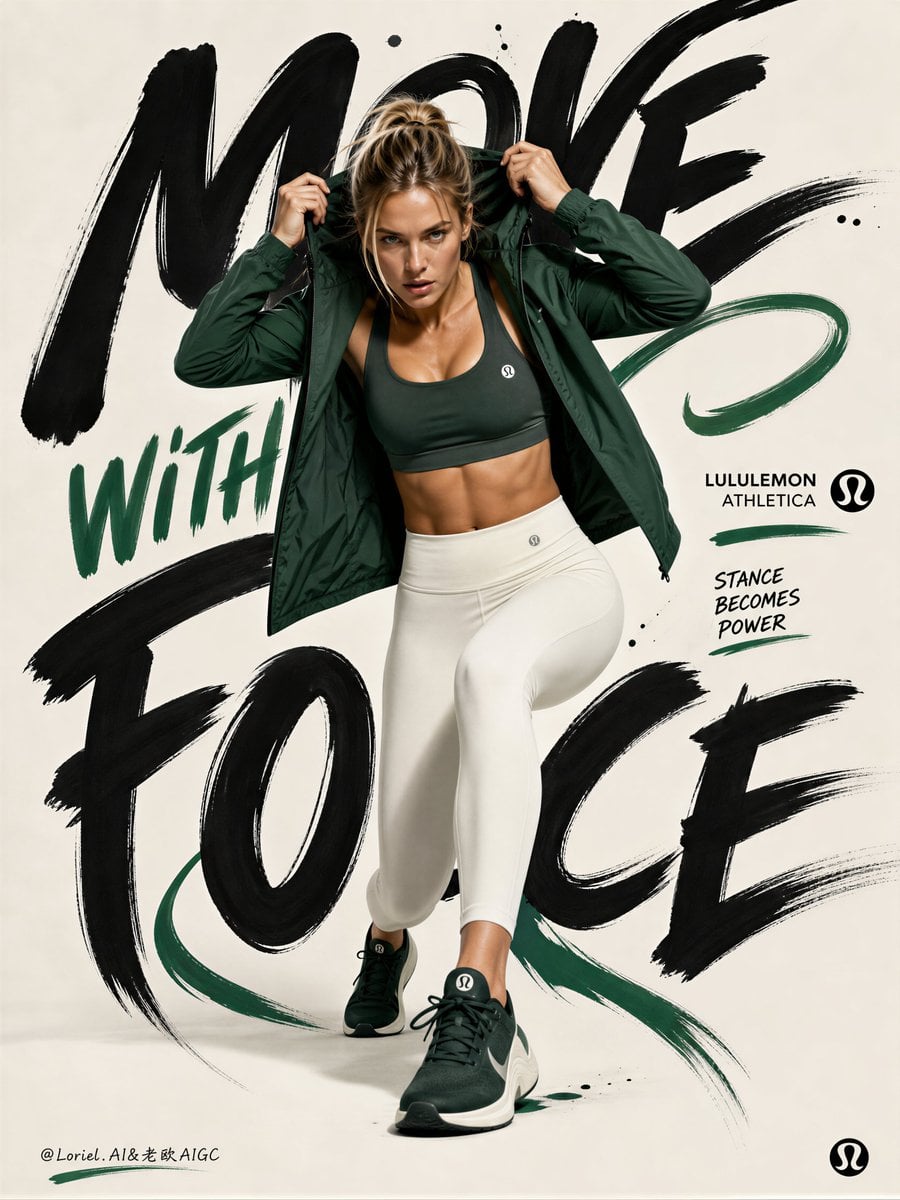
Create the fifth poster in a unified campaign series for Lululemon Athletica, preserving the same bold fashion-sport poster DNA while shifting the visual system into a cleaner minimalist composition with strong hand-drawn typography interaction. The image must feel hyper-real, striking, modern, avant-garde, and premium, with one athletic female figure dominating the composition against an ultra-clean minimal background. The key visual energy must come from the interaction between the body pose and the large hand-drawn graffiti lettering wrapped around the figure. Use a vertical poster layout with a mostly minimal clean background, like a premium studio cyclorama or soft matte paper backdrop. The background should feel spacious, controlled, and modern, with very little environmental clutter. Use a palette built around ivory white, soft warm off-white, matte black, deep emerald green, and subtle dark graphite accents. Optional tiny touches of muted coral or brushed silver may appear in very small controlled details, but emerald green must be the main new accent color. Hero figure: Show one healthy Western female fitness model with a sculpted athletic body, realistic anatomy, and a powerful editorial presence. Her pose should be inspired by a forward-pressing street-fashion athletic stance: one leg stepping or driving forward, one leg anchoring behind, torso leaning slightly toward camera, shoulders active, head engaged, and both hands near the hood, hair, collar, or upper head area as if she is locking into focus before movement. The pose must feel assertive, energetic, and stylish, with strong body tension and believable balance. No distorted anatomy, no awkward limbs, no exaggerated proportions. Wardrobe and product: Show authentic Lululemon Athletica activewear as the hero product, rendered with extreme realism and premium fabric fidelity. Use a sleek, fashion-forward training look such as: a cropped performance top or sports bra, a lightweight technical jacket or overshirt, high-waisted leggings or sculpted performance bottoms, and premium athletic sneakers. The outfit should feature the new color system: deep emerald green, ivory white, soft black, and graphite gray. The garments must feel unmistakably premium and technical, with clean seam construction, realistic stretch tension, elegant folds, premium matte texture, and strong product visibility. Typography interaction: Create oversized hand-drawn graffiti-style lettering and expressive brush-script forms that wrap around and behind the model, interacting closely with her silhouette. The letters should feel hand-painted, imperfect in an art-directed way, and integrated into the figure’s presence. Some letter strokes may frame the shoulders, curve around the torso, tuck behind the legs, or echo the line of the arms and step. The text should feel like a visual force field around the body, not a separate headline pasted on top. Keep the lettering mostly black or dark charcoal, with selected emerald green emphasis in a few strokes, fills, underlines, or graphic hits. Background behavior: Keep the environment minimal and bright, with perhaps only subtle paper texture, soft studio shadow grounding, faint painterly smudges, or very restrained brush residue. Do not clutter the composition with full graffiti walls or heavy street textures. This poster should feel cleaner, more distilled, and more fashion-forward than the previous ones. Motion and graphic accents: Add only a few restrained visual accents such as brush flicks, ink tails, paint commas, or small abstract marks around the figure and typography. These accents should reinforce motion and editorial rhythm without overwhelming the minimalist composition. Lighting: Use refined premium studio lighting with clean sculptural highlights across the face, shoulders, jacket, waist, legs, and shoes. The body and clothing must feel dimensional and sharp, while the background remains soft and controlled. The lighting should emphasize realism, product quality, and the power of the pose. Typography content: Use English branding only. Possible text directions: “LULULEMON” “ATHLETICA” “MOVE WITH FORCE” “FORM LEADS MOTION” “STANCE BECOMES POWER” Typography should feel artistic, hand-drawn, premium, and highly integrated into the composition. Include only a minimal official-style Lululemon logo if needed. Mood: clean, assertive, athletic, avant-garde, premium, minimalist, editorial, forward-moving, sharp, fashion-led, graphic, modern. Rendering style: hyper-real Lululemon activewear campaign poster, athletic Western female model, minimal studio background, hand-drawn graffiti typography interacting with the figure, emerald green and ivory palette, premium sportswear realism, avant-garde fashion-sport editorial, 8k, world-class campaign quality. Negative prompt: yellow-dominant palette, blue-dominant palette, cluttered graffiti wall, messy background, distorted anatomy, broken limbs, bad hands, extra fingers, twisted joints, weak stance, influencer look, generic activewear, low-detail fabric, cartoon lettering, cheap fitness ad, blurry shoes, bad typography, dirty shadows, black blotches, unrealistic pose
Kurz erklärt

Wie ist dieses Modell einzuordnen?

Referenzbilder müssen JPEG, PNG oder WebP sein, höchstens 10 MB groß und an jeder Kante mindestens 240 Pixel messen. Die aktuelle Seite bietet 1K/2K, acht Seitenverhältnisse für Textgenerierung sowie Wasserzeichen und Seed.

Worin ist es stark?
Funktionen — Wan 2.7 Image unterstützt Text-zu-Bild und Bildbearbeitung mit bis zu neun Referenzbildern.
Für wen eignet es sich?
Wan 2.7 Image — Prüfe Komposition, Text, Details und den Einfluss der Referenzen vor einer externen Nutzung manuell.
Warum auf Kyeo AI verwenden?
Punkteverbrauch — Fest 5 Credits pro Bild; jede Anfrage liefert ein Bild. 4K, mehrere Ausgaben, Galeriemodus, Denkmodus, Farbpaletten und Box-Steuerung sind auf dieser Seite nicht verfügbar.

Wichtige Parameter

Damit kannst du schnell einschätzen, ob dieses Modell zu deinem Anwendungsszenario passt.

Modellkategorie
KI-Bildmodell
Anbieter
Alibaba
Modellfamilie
Wan
Punkteverbrauch
Fest 5 Credits pro Bild; jede Anfrage liefert ein Bild.
Upload-Limit
9 · JPEG / PNG / WebP · 10 MB · 240 × 240 px
Auflösung
1K / 2K

Andere Bezeichnungen

Dasselbe Modell kann in offizieller Dokumentation, Community-Diskussionen und API-Anbindungen unterschiedlich heißen. Hier sind die Bezeichnungen zusammengeführt.

Wan2.7 Image
wan2.7-image
Wan 2.7 Bild

Häufige Nutzerfragen

Diese praktischen Fragen betreffen Aufgabe, Eingabebedingungen und Ergebnisanforderungen, die du vor der Auswahl prüfen solltest.

Wan 2.7 Image verwenden
Wie viele Punkte kostet Wan 2.7 Image pro Anfrage?
Welche Bildformate unterstützt Wan 2.7 Image?
Wan 2.7 Image Text-zu-Bild-Seitenverhältnisse
Wan 2.7 Image Bildbearbeitung
Wan 2.7 Image 1K 2K
Wan 2.7 Image: Seitenverhältnis wählen
Wan 2.7 Image: Wasserzeichen wählen
Wie viele Bilder lassen sich bei Wan 2.7 Image hochladen?
Wan 2.7 Image: Größenlimit pro Bild
Wan 2.7 Image Standard oder Pro wählen

Entscheidungshilfe

Noch unsicher bei der Modellwahl? Prüfe zunächst diese Entscheidungskriterien.

1
Wan 2.7 Image · Für den Vergleich von Wan Standard und Pro wählen

Wan 2.7 Image · Für den Vergleich von Wan Standard und Pro wählen — Prüfe Komposition, Text, Details und den Einfluss der Referenzen vor einer externen Nutzung manuell.

2
Wan 2.7 Image · Bei einer sichtbaren 4K-Auswahl zuerst andere Modelle vergleichen

Wan 2.7 Image · Bei einer sichtbaren 4K-Auswahl zuerst andere Modelle vergleichen — 4K, mehrere Ausgaben, Galeriemodus, Denkmodus, Farbpaletten und Box-Steuerung sind auf dieser Seite nicht verfügbar.

3
Wan 2.7 Image · Mit einer einzelnen Variable minimal validieren

Wan 2.7 Image · Mit einer einzelnen Variable minimal validieren — Die aktuelle Seite bietet 1K/2K, acht Seitenverhältnisse für Textgenerierung sowie Wasserzeichen und Seed.

Häufig gesuchte Vergleiche

Vergleiche gängige Alternativen für dieselbe Aufgabe, um Unterschiede bei Eingaben, Steuerung und Kosten zu erkennen.

Unterschied zwischen Wan 2.7 Image und Wan 2.7 Image Pro
Wan 2.7 Image vs Wan 2.7 Image Pro
Unterschied zwischen Wan 2.7 Image und Qwen Image
Wan 2.7 Image vs Qwen Image
Unterschied zwischen Wan 2.7 Image und Nano Banana Pro
Wan 2.7 Image vs Nano Banana Pro

Modellvergleich

Du bist bei der Wahl unsicher? Die Tabelle zeigt die wichtigsten Unterschiede zwischen diesem Modell und Alternativen auf einen Blick.

Wan 2.7 Image / Aktueller Anfrageweg
Wan 2.7 Image
Wan 2.7 Image / Aktueller Anfrageweg — Wan 2.7 Image unterstützt Text-zu-Bild und Bildbearbeitung mit bis zu neun Referenzbildern.
Wan 2.7 Image Pro
Gleiche Eingabewege und feste Einzelausgabe
Qwen Image
Text-zu-Bild oder Eingabe eines einzelnen Bildes
Wan 2.7 Image / Seitensichtbare Steuerungen
Wan 2.7 Image
Wan 2.7 Image / Seitensichtbare Steuerungen — Die aktuelle Seite bietet 1K/2K, acht Seitenverhältnisse für Textgenerierung sowie Wasserzeichen und Seed.
Wan 2.7 Image Pro
Dieselben 4 Steuerungen und Seitenverhältnisoptionen
Nano Banana Pro
1K/2K/4K, Seitenverhältnis und Ausgabeformat
Wan 2.7 Image / Bei einer sichtbaren 4K-Auswahl zuerst andere Modelle vergleichen
Wan 2.7 Image
Wan 2.7 Image / Bei einer sichtbaren 4K-Auswahl zuerst andere Modelle vergleichen — 4K, mehrere Ausgaben, Galeriemodus, Denkmodus, Farbpaletten und Box-Steuerung sind auf dieser Seite nicht verfügbar.
Wan 2.7 Image Pro
Ebenfalls ohne Stapelbilder und erweiterte Parameter
Nano Banana Pro
Bis zu 8 Eingabebilder, Ausgabeformat auf der Seite verfügbar
Wan 2.7 Image / Punkte pro Anfrage
Wan 2.7 Image
Wan 2.7 Image / Punkte pro Anfrage — 5
Wan 2.7 Image Pro
12
Nano Banana Pro
1K/2K 8; 4K 14
Wan 2.7 Image / Prüfschwerpunkte
Wan 2.7 Image
Wan 2.7 Image / Prüfschwerpunkte — Prüfe Komposition, Text, Details und den Einfluss der Referenzen vor einer externen Nutzung manuell.
Wan 2.7 Image Pro
Ergebnisse mit denselben Eingaben und 7 Punkten Preisunterschied vergleichen
Qwen Image
Prompt-Umsetzung, Text und Ausgabeformat

Erfahrungen aus der Praxis

Praktische Hinweise auf Grundlage öffentlicher Quellen, aktueller Website-Grenzen und repräsentativer Aufgaben.

Für den Vergleich von Wan Standard und Pro wählen / Wan 2.7 Image

Für den Vergleich von Wan Standard und Pro wählen / Wan 2.7 Image — 4K, mehrere Ausgaben, Galeriemodus, Denkmodus, Farbpaletten und Box-Steuerung sind auf dieser Seite nicht verfügbar.

Bei einer sichtbaren 4K-Auswahl zuerst andere Modelle vergleichen / Wan 2.7 Image

Bei einer sichtbaren 4K-Auswahl zuerst andere Modelle vergleichen / Wan 2.7 Image — Prüfe Komposition, Text, Details und den Einfluss der Referenzen vor einer externen Nutzung manuell.

Funktionen im Detail

Für den Vergleich von Wan Standard und Pro wählen

Für den Vergleich von Wan Standard und Pro wählen — Wan 2.7 Image unterstützt Text-zu-Bild und Bildbearbeitung mit bis zu neun Referenzbildern.

Bei einer sichtbaren 4K-Auswahl zuerst andere Modelle vergleichen

Bei einer sichtbaren 4K-Auswahl zuerst andere Modelle vergleichen — Die aktuelle Seite bietet 1K/2K, acht Seitenverhältnisse für Textgenerierung sowie Wasserzeichen und Seed.

Mit einer einzelnen Variable minimal validieren

Mit einer einzelnen Variable minimal validieren — 4K, mehrere Ausgaben, Galeriemodus, Denkmodus, Farbpaletten und Box-Steuerung sind auf dieser Seite nicht verfügbar.

Geeignete Aufgaben

Versionsvergleich bei Text-zu-Bild

Versionsvergleich bei Text-zu-Bild — Prüfe Komposition, Text, Details und den Einfluss der Referenzen vor einer externen Nutzung manuell.

Anweisungsbearbeitung eines einzelnen Bildes

Anweisungsbearbeitung eines einzelnen Bildes — Prüfe Komposition, Text, Details und den Einfluss der Referenzen vor einer externen Nutzung manuell.

Bearbeitung mit mehreren Referenzbildern

Bearbeitung mit mehreren Referenzbildern — Prüfe Komposition, Text, Details und den Einfluss der Referenzen vor einer externen Nutzung manuell.

Prompt-Tipps

Beim Versionsvergleich alle Eingaben gleich halten

Beim Versionsvergleich alle Eingaben gleich halten — Die aktuelle Seite bietet 1K/2K, acht Seitenverhältnisse für Textgenerierung sowie Wasserzeichen und Seed.

Bei mehreren Bildern ihre Rollen festlegen

Bei mehreren Bildern ihre Rollen festlegen — Referenzbilder müssen JPEG, PNG oder WebP sein, höchstens 10 MB groß und an jeder Kante mindestens 240 Pixel messen.

Auflösung, Parameter und Ergebnis vor externer Nutzung prüfen

Auflösung, Parameter und Ergebnis vor externer Nutzung prüfen — Prüfe Komposition, Text, Details und den Einfluss der Referenzen vor einer externen Nutzung manuell.

Warum dieses Modell?

Punkteverbrauch — Fest 5 Credits pro Bild; jede Anfrage liefert ein Bild.
Funktionen / Wan 2.7 Image — Wan 2.7 Image unterstützt Text-zu-Bild und Bildbearbeitung mit bis zu neun Referenzbildern.
Funktionen / Bei einer sichtbaren 4K-Auswahl zuerst andere Modelle vergleichen — Die aktuelle Seite bietet 1K/2K, acht Seitenverhältnisse für Textgenerierung sowie Wasserzeichen und Seed.
Upload-Limit — Referenzbilder müssen JPEG, PNG oder WebP sein, höchstens 10 MB groß und an jeder Kante mindestens 240 Pixel messen.

Vor der Nutzung beachten

Wan 2.7 Image / Mit einer einzelnen Variable minimal validieren — 4K, mehrere Ausgaben, Galeriemodus, Denkmodus, Farbpaletten und Box-Steuerung sind auf dieser Seite nicht verfügbar.
Wan 2.7 Image / Bei mehreren Bildern ihre Rollen festlegen — Referenzbilder müssen JPEG, PNG oder WebP sein, höchstens 10 MB groß und an jeder Kante mindestens 240 Pixel messen.
Wan 2.7 Image / Auflösung, Parameter und Ergebnis vor externer Nutzung prüfen — Prüfe Komposition, Text, Details und den Einfluss der Referenzen vor einer externen Nutzung manuell.

Einstellbare Parameter

Damit kannst du schnell einschätzen, ob dieses Modell zu deinem Anwendungsszenario passt.

Seitenverhältnis
Optional
Parametertyp: select
Standardwert: 1:1
1:1
16:9
4:3
21:9
3:4
9:16
8:1
1:8
8 Optionen
Auflösung
Optional
Parametertyp: select
Standardwert: 2K
1K
2K
Wasserzeichen hinzufügen
Optional
Parametertyp: select
Standardwert: false
Deaktiviert
Aktiviert
Zufallsseed
Optional
Parametertyp: number
Bereich 0–2147483647

Punkteverbrauch

5 Credits / 1 Bild

Fest 5 Credits pro Bild; jede Anfrage liefert ein Bild.

Tipp zum Punktesparen

Bevor du Bilder oder Videos in Serie generierst, solltest du dieselben Ausgangsmedien in einem A/B-Test mit dem aktuellen Modell und ähnlichen Alternativen vergleichen. Starte die Serie erst, wenn das Ergebnis passt, um keine Punkte zu verschwenden.

Häufig gestellte Fragen

Ähnliche Modelle

Noch unentschieden? Vergleiche auch diese ähnlichen Modelle.

Wan 2.7 Image Pro

Wan 2.7 Image Pro / Funktionen — Wan 2.7 Image Pro unterstützt Text-zu-Bild und Bildbearbeitung mit bis zu neun Referenzbildern. Fest 12 Credits pro Bild; jede Anfrage liefert ein Bild.

KI-Bildmodell
12 Credits / 1 Bild

Qwen Image

Wähle bei der Bildgenerierung aus Text die Ausgabegröße und prüfe vor der Bildbearbeitung die Maße der Referenz.

KI-Bildmodell
Generierung: 4/MP; Bearbeitung: mindestens 4 Credits reserviert

Nano Banana Pro

Nano Banana Pro unterstützt auf Kyeo AI Text-zu-Bild und die Bearbeitung mit Referenzbildern; als Ausgabe stehen 1K, 2K und 4K zur Wahl. 1K und 2K kosten je 8 Punkte, 4K kostet 14 Punkte. Die Auflösung bezeichnet die Ausgabemaße und garantiert weder Qualität noch Genauigkeit oder Detailtreue.

KI-Modell für Bildgenerierung und -bearbeitung
8–14 Punkte / Generierung

Quellen

Die Seite beruht auf Anbieterinformationen, Beschreibungen der Modellfamilie und der Anbindungskonfiguration von Kyeo AI.

Hinweis zu den Quellen

Wan 2.7 Image unterstützt Text-zu-Bild und Bildbearbeitung mit bis zu 9 Referenzbildern. Fest 5 Credits pro Bild; jede Anfrage liefert ein Bild. Referenzbilder müssen JPEG, PNG oder WebP sein, höchstens 10 MB groß und an jeder Kante mindestens 240 Pixel messen. Die aktuelle Seite bietet 1K/2K, acht Seitenverhältnisse für Textgenerierung sowie Wasserzeichen und Seed. 4K, mehrere Ausgaben, Galeriemodus, Denkmodus, Farbpaletten und Box-Steuerung sind auf dieser Seite nicht verfügbar.

Zuletzt geprüft: 2026-08-26
Alibaba Cloud Model Studio: Wan 2.7 image generation and editing API reference
Offiziell
Originalquelle ansehen
Alibaba Cloud Model Studio: Image generation and editing
Offiziell
Originalquelle ansehen
Alibaba Cloud Model Studio: Text-to-image with Qwen and Wan
Offiziell
Originalquelle ansehen