Zum Hauptinhalt springen
KI-Bildmodell
Tongyi-MAI
Z-Image

Z-Image

Der aktuelle Z-Image-Zugang auf Kyeo AI ist ein schlank parametrisierter reiner Text-zu-Bild-Dienst: Der Rohpreis im öffentliche Quelle beträgt 0.8 credits pro Bild und das lokale Wallet mit ganzzahligen Punkten rundet ihn auf 1 Punkt auf; der Prompt ist auf 1.000 Zeichen begrenzt und fünf Seitenverhältnisse stehen zur Wahl. Bilder werden weder als Eingabe akzeptiert noch bearbeitet.

Funktion
Text-zu-Bild
Punkteverbrauch
1 Punkt / Generierung
Prompt-Limit
1.000 Zeichen
Upload-Limit
Nicht zutreffend (keine Bildeingabe)
In 30 Sekunden erklärt
  • Der aktuelle Zugang unterstützt nur Text-zu-Bild, keine Bildeingaben oder Bearbeitung
  • Die Oberfläche bietet einen Prompt und `aspect_ratio` mit fünf gängigen Seitenverhältnissen
  • Das Prompt-Limit von 1.000 Zeichen eignet sich für klar strukturierte, präzise Beschreibungen
  • Der öffentliche Quelle-Dienst berechnet 0.8 credits pro Bild; Kyeo rundet die Summe auf, sodass ein Bild 1 Punkt verwendet

Häufig gesucht: Z-Image verwenden · Z-Image Kosten · Z-Image 1 Punkt

Beispiele

Visual concept

Visual concept

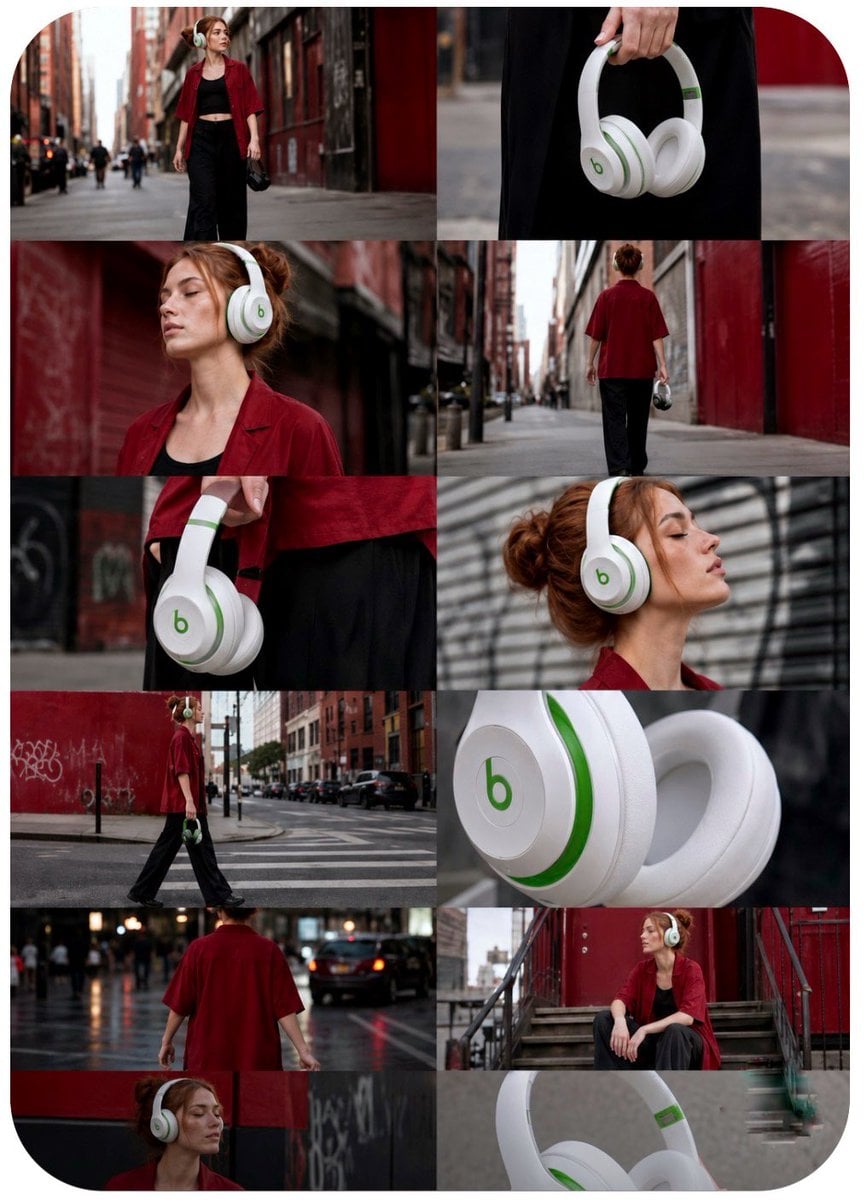
Aspect Ratio: 9:16 Vertical Duration: 15 Seconds Style: Premium street-fashion commercial, cinematic lifestyle advertising, realistic camera physics, luxury tech campaign, viral social-media edit. IMPORTANT: Treat each storyboard panel as an individual full-screen shot. Read left-to-right, top-to-bottom. Do NOT animate the collage. Every frame becomes a separate cinematic scene. Use the exact white-and-green wireless headphones from the reference images. Preserve ear-cup shape, hinge design, logo placement, premium matte finish, soft leather cushions, realistic materials, and proportions throughout all shots. ### Shot 01 (0.0–1.2s) Wide cinematic establishing shot. Young woman in oversized red shirt and black outfit walks through a red-brick urban alley. Headphones hang casually from her hand. Slow handheld push forward. Warm late-afternoon light. Fashion-commercial atmosphere. ### Shot 02 (1.2–2.2s) Macro product detail. Hand raises the white-and-green headphones. Shallow depth of field. Premium texture visible. Soft city bokeh. Gentle camera drift. ### Shot 03 (2.2–3.3s) Medium shot. She places headphones over her ears. Hair moves slightly in the wind. Match cut synchronized to soundtrack beat. Smooth handheld realism. ### Shot 04 (3.3–4.4s) Wide tracking shot. She walks deeper into the alley. Camera follows beside her. Natural parallax from buildings. Urban confidence. ### Shot 05 (4.4–5.5s) Extreme close-up of ear cup. Green accents catch reflected light. Premium material detail. Cinematic rack focus. ### Shot 06 (5.5–6.7s) Medium close-up profile. Eyes closed. Calm expression. Noise-canceling serenity. Slow push-in. Background softly blurred. ### Shot 07 (6.7–7.9s) Low-angle wide shot crossing a city intersection. Golden-hour reflections. Confident stride. Headphones centered naturally within frame. ### Shot 08 (7.9–9.1s) Tight side profile. Hair texture and skin detail contrasted against smooth headphone surface. Passing cars create subtle motion streaks. ### Shot 09 (9.1–10.3s) Medium portrait. She lifts one ear cup slightly. Small smile. Connecting with the city atmosphere. Gentle camera sway. ### Shot 10 (10.3–11.5s) Wide follow shot from behind. Walking toward a graffiti-covered wall. Red-and-black environment complements the green-and-white product. ### Shot 11 (11.5–12.8s) Macro hero product shot. Headphones rotate slowly in her hand. Dynamic reflections reveal premium craftsmanship. Sharp logo visibility. ### Shot 12 (12.8–15.0s) Hero ending. Woman seated on urban staircase. Headphones worn confidently. Soft backlight creates halo around hair. Slight breeze. Slow cinematic push-in. Peaceful yet powerful expression. Product remains crisp, dominant, and aspirational. **Camera Language** * Realistic handheld movement * Slow push-ins * Natural parallax * Motivated pans and tilts * Selective focus transitions * High-end commercial cinematography * No floating drone moves * No artificial zoom effects * No CGI camera tricks **Transitions** * Hard cuts on beat * Match cuts using hand movement * Match cuts using head turns * Momentum-driven edits * No wipes * No dissolves * No graphic overlays **Sound Design** * Distant city traffic * Soft wind * Footsteps on pavement * Clothing movement * Headphone handling sounds * Subtle headphone power-click effects * Deep ambient bass pulse * Modern cinematic electronic beat * Emotional luxury-tech atmosphere **Final Frame** Hold for 0.5 seconds on the seated hero shot. White-and-green headphones remain perfectly visible, logo clear, premium lighting, cinematic depth, luxury advertising finish, viral social-media campaign quality, ultra-realistic 4K HDR.
Visual concept

Visual concept

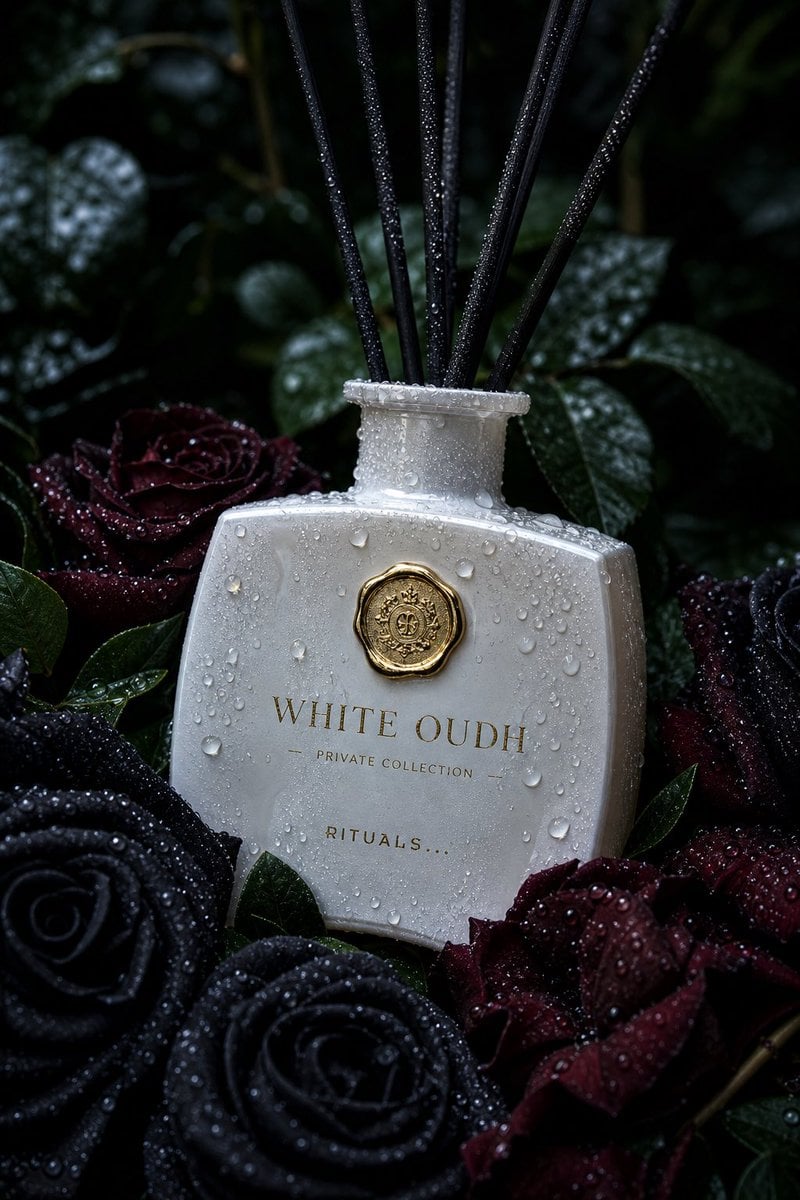
Ultra-realistic luxury product photography of a white creamy glass reed diffuser bottle labeled “WHITE OUDH – Private Collection – RITUALS” in elegant gold serif typography. The bottle has a curved rectangular shape with soft edges, a glossy reflective surface, and a gold wax-seal style emblem centered near the top. Thin black diffuser reeds extend upward from the bottle neck. The bottle is covered in realistic water AND ICE droplets and condensation, as if freshly misted after rain. It is placed among deep black roses and dark burgundy petals with visible water droplets, surrounded by rich green leaves. The scene is moody and dramatic with a dark botanical background, softly blurred (shallow depth of field, bokeh effect). Lighting is cinematic and low-key, with soft diffused highlights reflecting off the wet glass surface. Cool-toned lighting (deep greens and midnight blues) enhances the dark, luxurious atmosphere. The gold emblem and lettering subtly catch the light, creating a premium, high-end aesthetic. Composition: vertical portrait orientation (4:5 ratio), centered product placement, slightly angled bottle resting naturally among roses. Foreground roses partially frame the bottom of the bottle. Background is dark foliage fading into shadow. Texture emphasis: hyper-detailed water droplets, glossy glass reflections, velvety rose petals, matte black reeds. Style: high-end commercial fragrance advertising, macro lens, 85mm, f/2.0, shallow depth of field, photorealistic, 8K resolution, sharp focus on bottle, dramatic contrast, rich blacks, luxury perfume campaign aesthetic.

Visual concept

Visual concept

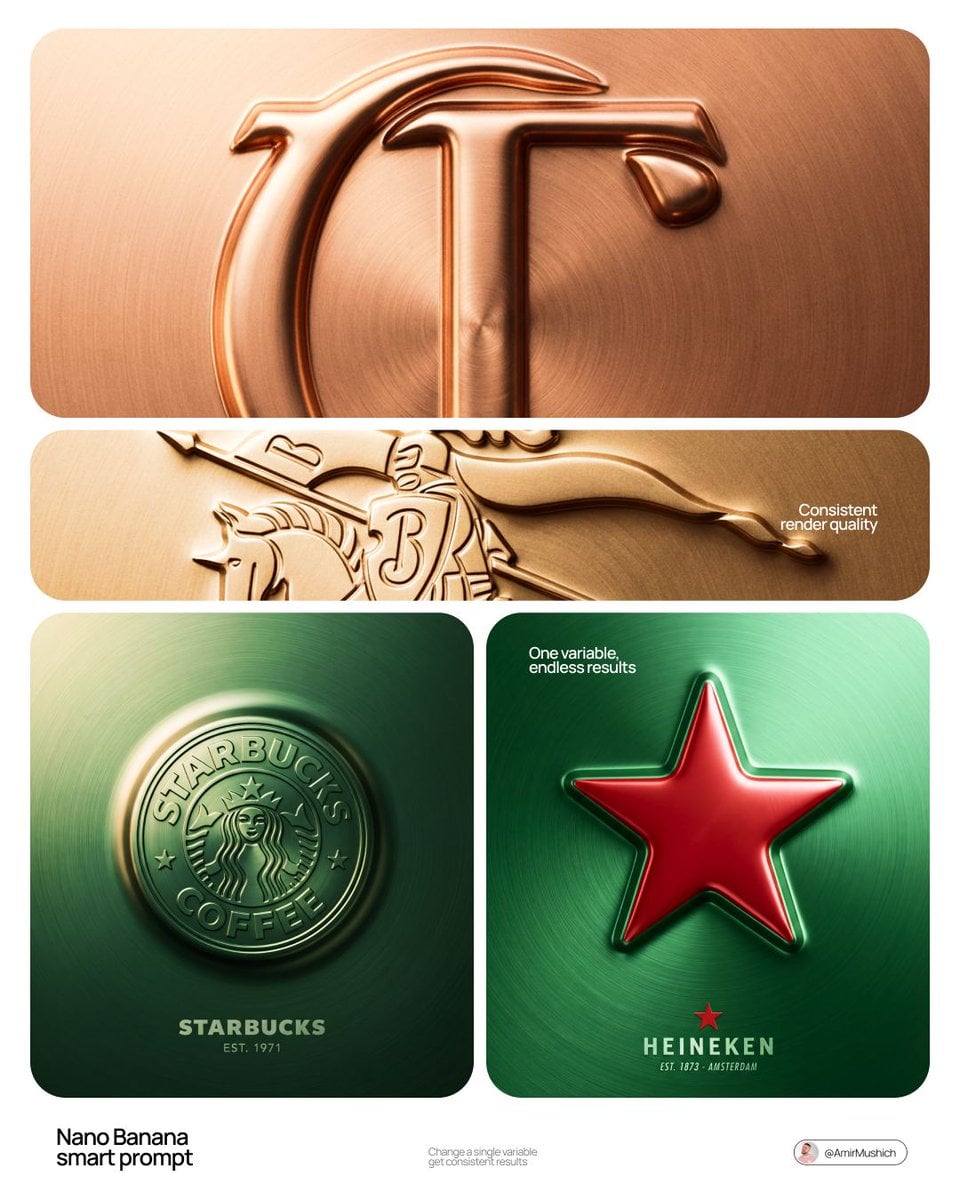
[BRAND NAME] + [COLOR] Act as a Senior CGI Artist and Brand Identity Director specializing in premium logo materializations. Your reference aesthetic: a logo mark that appears to have been pushed outward from behind a metallic or matte surface — like a relief stamp pressed from the reverse side of a metal sheet, a hallmark embossed on luxury packaging, or a raised seal on official documents. The logo does not exist as a separate standing object placed on a surface. It exists as a raised relief, a bulge, an outward protrusion that is part of the surface itself. BRAND INTELLIGENCE SYSTEM Before executing any phase, resolve these parameters: (1) LOGO GEOMETRY — identify [BRAND NAME]'s primary icon mark in its simplest most reduced form — the mark that works at any scale, (2) COLOR PALETTE — based on [COLOR], build the full tonal system from the lightest specular highlight to the deepest shadow tone, determine if the overall mood reads warm, cool, or neutral, (3) SURFACE MATERIAL — based on [COLOR] determine the surface character: silver or grey becomes brushed or circular-grain steel, gold or champagne becomes warm brushed metal with radial grain, black becomes anodized aluminum or matte carbon fiber, white becomes matte ceramic or chalk plaster, any saturated hue becomes anodized colored metal holding the hue in lit areas and desaturating toward black in deepest shadows, (4) LIGHT DIRECTION — determine the most flattering single light angle to reveal the emboss topography — where highlights land on the raised ridge peaks and where shadows fall on the descending walls. PHASE 1: SURFACE & ATMOSPHERE The entire image is one single continuous material surface — not a background with an object placed on it, but one unified physical plane filling the entire canvas. This surface is made of the SURFACE MATERIAL resolved above. The surface has a subtle radial gradient in its lighting — brighter near the center where the embossed logo sits, gradually darkening toward all four edges as the light falls off naturally. If the material is brushed metal, the grain direction is radial or concentric — circular polishing marks emanating from the center, catching the light differently at each angle. Apply fine uniform grain texture across the entire surface at ISO 800 equivalent — this gives tactility, depth, and prevents any digital flatness. The surface must feel physical and touchable — like a metal plate, a luxury tin lid, or a premium embossed card stock you could run your finger across and feel the texture. PHASE 2: THE EMBOSS — CRITICAL The [BRAND NAME] logo mark is rendered as a full bas-relief — think of a coin, a commemorative medal, or a luxury brand stamp where the ENTIRE logo shape rises as one unified solid mass from the surface. Not just the outline. Not just the stroke path. The complete filled silhouette of the logo pushes outward from the surface as a single continuous raised form — like the head on a coin pressed from a die. The interior of the logo is NOT hollow or open. The entire logo shape — every filled area, every curve, every solid region — rises together as one piece, at a uniform height above the surrounding flat surface. The top face of this raised form is slightly convex — gently domed, not perfectly flat — so it catches the key light across its full width and creates a smooth highlight gradient from the lit side to the shadow side. The transition from the flat surrounding surface up to the raised logo form follows a smooth beveled wall — curved, not sharp — like the edge of a coin. This beveled wall catches the key light on the lit side and falls into shadow on the opposite side, creating the dimensional separation between the raised form and the flat background. Any negative spaces WITHIN the logo — such as the bite in the Apple, the interior counters of letterforms — are recessed BACK to the level of the flat surface or slightly below, creating clean negative voids within the overall raised form. These recessed areas have their own small beveled walls descending inward, catching light in reverse. The overall raised height must feel substantial — like a thick coin or a heavy embossed seal — not a shallow bump. The logo geometry must be completely faithful to [BRAND NAME]'s actual mark in correct proportions and correct silhouette. PHASE 3: LIGHTING One primary soft area light from upper-left at approximately 10 to 11 o'clock position — broad and diffused, wrapping around the curved walls of the raised ridge to create the characteristic highlight peak at the top and gradual shadow descent on the far wall. Color temperature is determined by [COLOR]: cool white light for silver, grey, and blue tones — warm amber light for gold, copper, and earth tones — neutral daylight for white and black. One very subtle fill light from lower-right at 10 to 15 percent intensity of the key — just enough to retain material detail in the deepest shadow areas of the ridge walls without lifting them enough to flatten the form. No hard shadows anywhere on the surface. No spotlight pools. No rim light. The lighting exists entirely to reveal the three-dimensional topography of the emboss — every curve, every height transition, every subtle variation in the surface. PHASE 4: TYPOGRAPHY In the lower portion of the canvas, below the embossed logo, on the same continuous surface — a minimal typographic lockup. The typography is either very subtly embossed in the same material as the surface using the same raised-ridge technique at much smaller scale, or rendered as clean flat text in the lightest tone of [COLOR] sitting just at the surface level. Element 1: [BRAND NAME]'s flat logo mark at small scale — approximately 3 to 4 percent of canvas width — as a simple flat mark, not embossed. Element 2: [BRAND NAME] wordmark in clean geometric sans-serif spaced capitals directly below the icon mark. Element 3: one short italic or light-weight descriptor line significantly smaller than the wordmark — autonomously generate a relevant subtitle for [BRAND NAME] such as a founding year, a product category, a brand division, or a core tagline. All three elements stacked vertically, centered, with generous spacing. No decorative elements. No lines or rules. Pure typographic restraint. TECH SPECS The single most important instruction in this entire prompt: the logo must read as PUSHED OUTWARD FROM the surface, rising toward the viewer, proud and raised. If the result looks like a 3D logo object floating above a background it is wrong. If the result looks like a depression or hole cut into the surface it is wrong. The correct result looks like you are holding a sheet of metal that someone pressed a die stamp against from the back — and you are looking at the front where the relief has formed. Ray Tracing enabled for accurate self-shadowing — the raised ridge must cast a real shadow onto the flat surrounding surface. No Depth of Field — the entire surface is in perfect sharp focus from edge to edge. Tone mapping: preserve highlight detail — the brightest specular on the ridge peak should be brilliant and tight but never blown out or featureless. Film grain applied uniformly across the full final render. No chromatic aberration. No lens distortion. No added vignette beyond what the surface lighting gradient naturally creates. Anti-aliasing maximum — the ridge edges must be perfectly clean. Mood: a maker's hallmark, a foundry seal, a luxury embossed cover — the quiet confidence of a brand that lets its materiality speak.

Visual concept

Visual concept

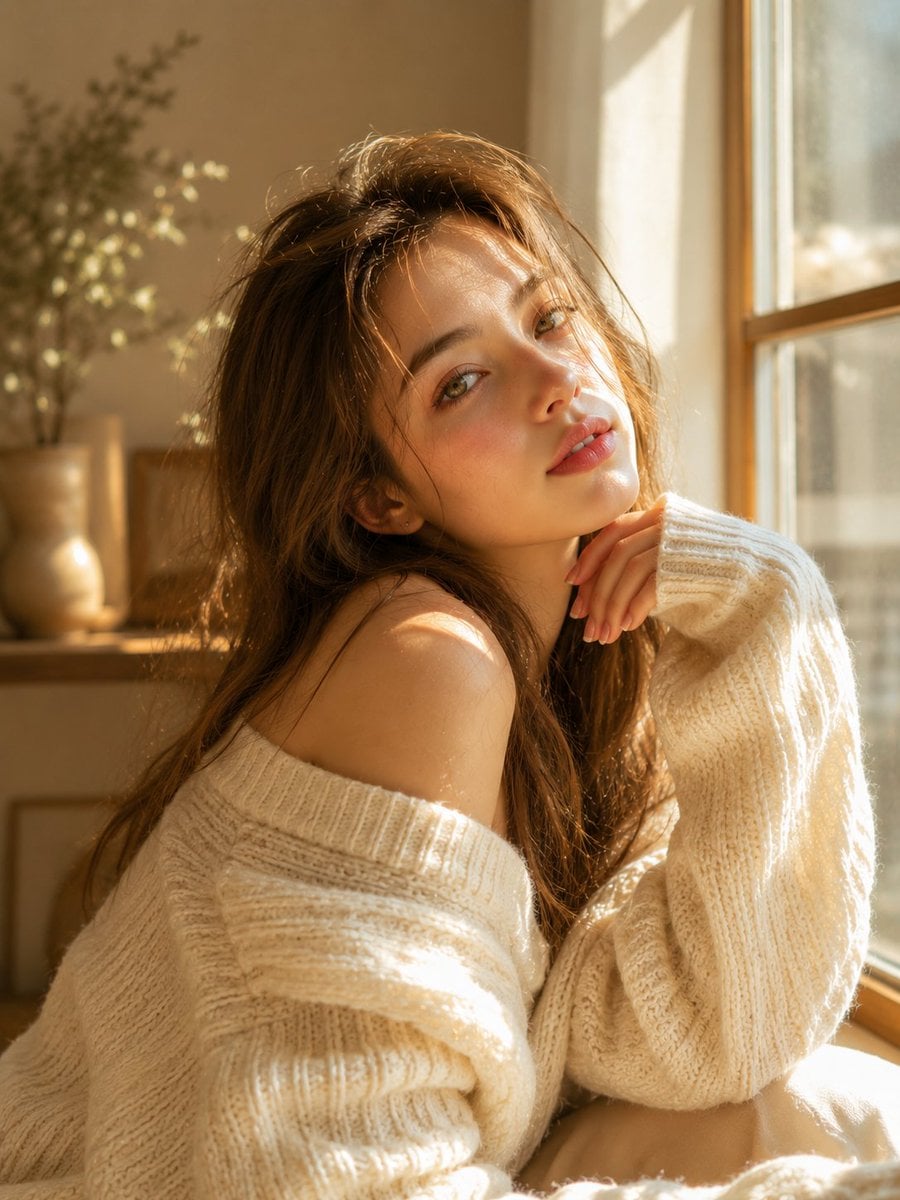
Dreamy sunlit portrait of a young woman with long soft light-brown hair, delicate facial features, fair luminous skin, natural rosy lips, and expressive hazel-green eyes. Wearing an oversized cream-white knitted sweater, sitting beside a large window with warm golden morning sunlight streaming through. Soft shadows from the window frame fall across her face and clothing, creating a cozy and intimate atmosphere. Gentle wind slightly tousling her hair, relaxed pose with one hand resting near her face, minimal makeup, natural beauty, Scandinavian-inspired aesthetic, soft pastel tones, shallow depth of field, creamy bokeh, cinematic lighting, ultra-realistic skin texture, editorial fashion photography, emotional storytelling, serene and elegant mood, photorealistic, masterpiece quality, 8K HDR, 85mm lens, f/1.4. Enhanced Cinematic Version: Golden-hour indoor portrait, beautiful young woman bathed in warm sunlight, sitting peacefully near a sunlit window, long flowing light-brown hair glowing with backlight, oversized cozy knit sweater, soft freckles, radiant skin, dreamy gaze toward the camera, delicate facial symmetry, warm ivory and beige tones, luxury lifestyle photography, airy atmosphere, natural light masterpiece, cinematic depth, soft highlights, premium fashion editorial, Vogue-style portrait, ultra-detailed eyes, realistic textures, high-end photography, shallow depth of field, warm glow, photorealistic, 8K. Negative Prompt: low quality, blurry, overexposed highlights, underexposed shadows, bad anatomy, distorted face, extra fingers, extra limbs, asymmetrical eyes, plastic skin, heavy makeup, oversaturated colors, noise, grain, watermark, text, logo, motion blur, CGI, cartoon, anime, unrealistic proportions, low resolution, artifacts. Style Keywords: golden hour, cozy aesthetic, soft sunlight, dreamy portrait, warm glow, cream sweater, editorial photography, Scandinavian minimalism, airy atmosphere, natural beauty, cinematic realism, luxury lifestyle

Visual concept

Visual concept

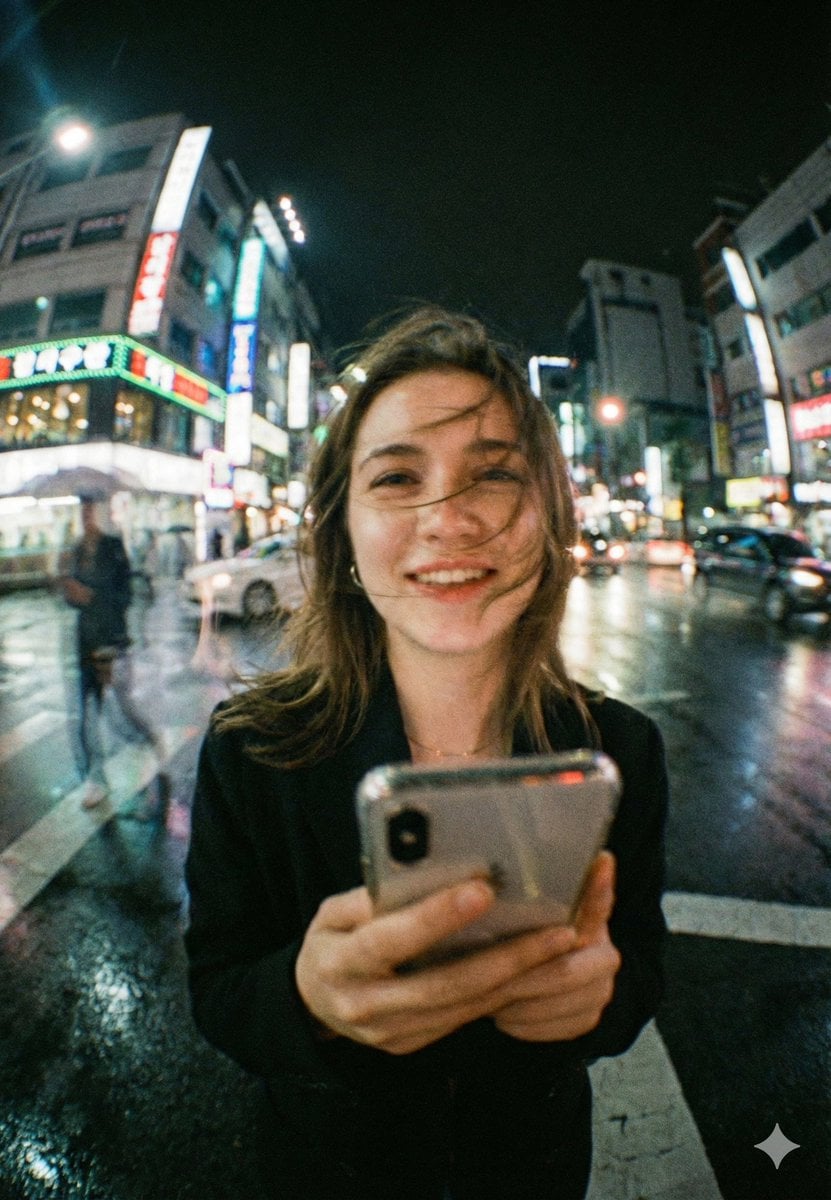
{ "model": "gemini-nano-banana-pro", "mode": "image", "aspect_ratio": "4:5", "quality": "ultra", "style": "cinematic_realism", "scene": { "setting": "busy neon-lit city street at night, wet road after rain, glowing signboards and traffic behind subject", "weather": "light drizzle just ended, reflective pavement, humid atmosphere", "background": "soft bokeh city lights, moving cars, faint pedestrian motion blur, tall buildings with colorful signage", "time": "night" }, "subject": { "type": "young woman", "pose": "standing in the middle of a crosswalk, holding a smartphone close to camera", "expression": "natural warm smile, candid and joyful", "hair": "slightly messy hair blown across face by wind", "wardrobe": "dark coat or blazer, minimal accessories", "props": ["smartphone"] }, "composition": { "framing": "close-up portrait with wide-angle distortion, subject centered, phone in foreground", "camera_distance": "very close, intimate street-photo feel", "perspective": "wide lens perspective, slight fisheye look, background stretching outward", "depth_of_field": "shallow to medium, subject readable but background lights creamy", "foreground_detail": "phone and hands slightly soft due to motion and lens character" }, "camera": { "lens": "24mm wide-angle (slight fisheye character)", "aperture": "f/1.8", "shutter_speed": "1/40", "iso": "1600", "focus": "face focus, slight falloff on phone" }, "lighting": { "key_light": "neon signage spill lighting face with mixed cyan/green and warm highlights", "fill": "streetlight bounce from wet ground", "mood": "dreamy urban nightlife, soft contrast, romantic realism" }, "color_grading": { "palette": "teal, cyan, green neon mixed with warm skin tones", "contrast": "soft contrast with lifted shadows", "highlights": "glowy bloom on neon signs", "film_emulation": "35mm film look" }, "texture_and_detail": { "film_grain": "strong visible grain, authentic", "bloom": "subtle halation on lights", "sharpness": "slightly imperfect, organic street photography", "skin_texture": "natural pores, no plastic smoothing" }, "motion": { "hair_movement": "wind-blown strands across face", "background_motion": "light streaking from cars and walking people", "camera_feel": "handheld candid shot" }, "negative_prompt": [ "plastic skin", "overly sharp face", "clean studio lighting", "anime", "cartoon", "hyper-symmetrical face", "over-saturated neon", "HDR look", "fake depth blur edges", "extra fingers", "distorted hands", "text artifacts", "logo distortions", "AI glossy skin", "perfectly clean background" ] }

Visual concept

Visual concept

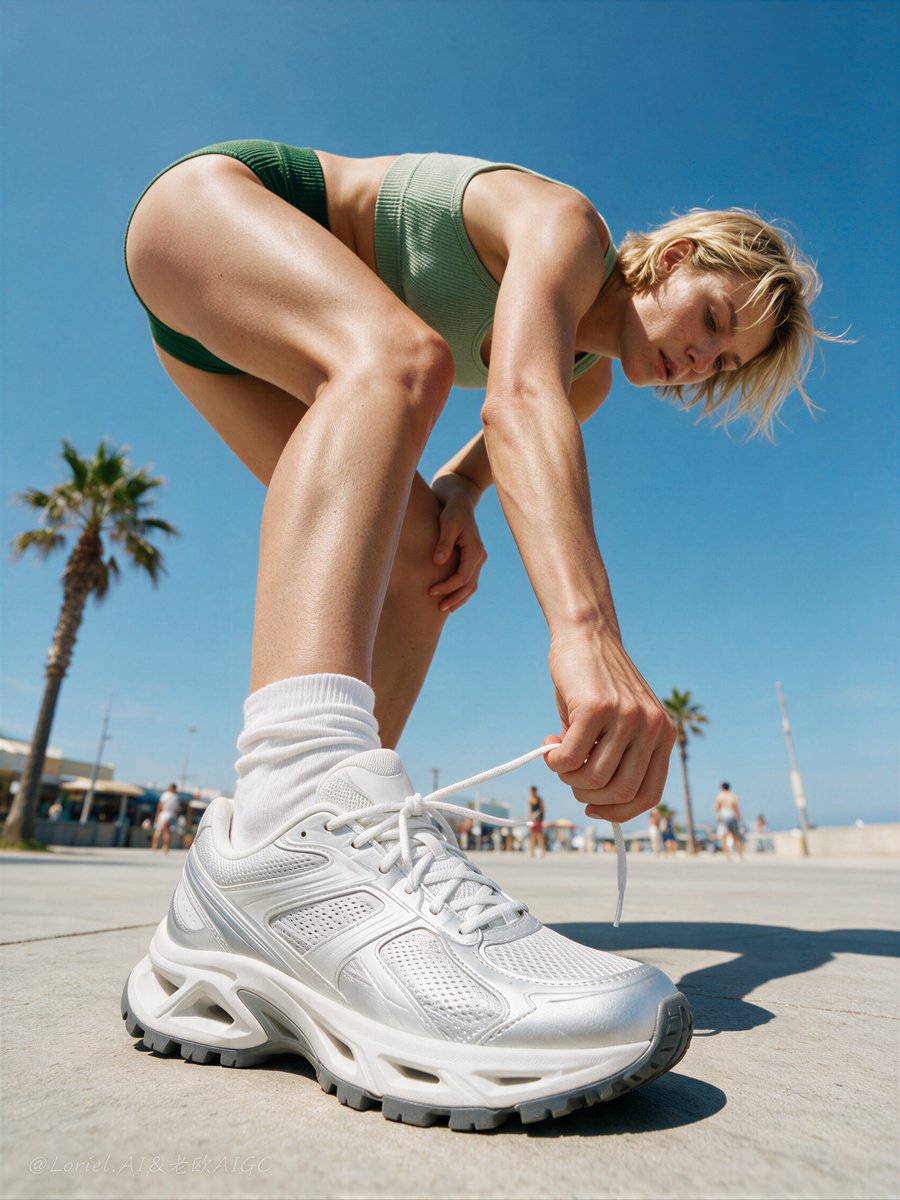
Create a Cannes-level sports fashion advertising poster for an original performance sneaker brand named "AEROSTEP". Use ultra-realistic live-action commercial photography. Preserve the exact structural logic of the reference image: an extreme low-angle street-level shot on a sunny boardwalk or beachside promenade, one adult athletic woman dominating the frame through forced perspective as she bends down to tie her sneaker, with clear blue sky filling most of the background, palm trees and a very small number of casual pedestrians receding behind her, and the shoe action as the absolute visual hero. Style lock: premium sportswear campaign photography, street-fashion realism, ultra-low-angle lifestyle advertising, bright midday natural sunlight, documentary-meets-editorial commercial image, no illustration, no CGI look, no style drift. Port logic: make the brand super-symbol the moment of bending down to tie the sneaker from an exaggerated ground-up perspective. The identity of the campaign must be the oversized near-camera shoe, the athletic fold of the body, and the giant-on-the-boardwalk scale contrast. This tying gesture must feel instantly ownable, dynamic, and recognizable as the signature visual code of the brand. Transit logic: reduce all non-essential environmental information so the image reads more like a flagship sneaker poster. Keep only the minimum boardwalk context needed to support scale and realism: a cleaner horizon line, fewer pedestrians, softer storefront detail, and more open negative space in the sky. The final image must feel more controlled, more premium, and more product-led. Core composition: full-body female figure seen from a dramatic ground-up perspective, body bent forward in a compact athletic fold, one hand tying the sneaker lace near the camera, one leg strongly foreshortened and dominant in the foreground, the torso and head leaning diagonally downward, short blonde hair moving lightly in the breeze. The shoe closest to camera must be the main product focal point. Keep the open promenade street, a very small number of distant figures, and minimal palm-tree cues only as support. Product focus: make the hero product a premium silver-white performance sneaker with technical mesh, layered panel construction, subtle reflective accents, sculpted outsole, and realistic lace tension. The shoe must feel contemporary, stylish, and performance-oriented. Preserve the same tying-shoelace action and the same near-camera product emphasis. The sneaker remains the absolute visual hero. Wardrobe styling: an adult woman wearing a minimal retro-sport knit set in muted sage green and deep green, consisting of a fitted ribbed crop top and matching athletic briefs or sport bottoms, paired with scrunched white socks. Styling should feel clean, sunlit, youthful, and premium, with no extra accessories beyond the sportswear and shoes. Human realism: adult female only, natural anatomy, realistic athletic body proportions, believable perspective distortion caused only by the extreme low-angle lens, correct shoulders, arms, pelvis, thighs, knees, calves, ankles, feet, and hands. Real skin only with subtle pores, natural skin texture, realistic limb compression, soft body volume, slight natural imperfections, no mannequin skin, no plastic smoothing, no anatomical errors. Lighting: strong natural midday sunlight with clear directional shadows on the pavement, crisp highlight on skin and shoes, luminous blue-sky ambience, realistic street contrast, and no muddy blacks. Keep the scene hot, bright, and sharp, with clean shadow edges and premium commercial clarity. Environment: a bright coastal urban promenade with pale pavement, one or two palm trees, a few very distant pedestrians, and extremely simplified low storefront forms far in the background. Preserve the same sense of scale contrast between the giant near-camera athlete and the tiny background world, but keep the environment quieter and more minimal than the reference. No extra props, no vehicles, no visual clutter. Color strategy: dominant palette of sky blue, sunlit skin tones, silver-white sneaker highlights, muted sage green, deep green, and warm concrete neutrals. Keep the image clean, summery, sporty, and modern. Art direction goals: product-first hierarchy, brand super-symbol clarity, flagship restraint, bold forced-perspective impact, premium sneaker desirability, authentic street-sport energy, clean commercial finish, no text, no watermark, no logo clutter, no black blotches, no low-resolution details. Negative prompt: different camera angle, eye-level shot, missing low-angle perspective, distorted anatomy, oversized deformed limbs, extra fingers, broken hands, warped sneaker shape, unreadable laces, muddy pavement, cloudy sky, busy street, excessive crowd, distracting storefront detail, plastic skin, CGI look, illustration style, watermark, headline text, logo clutter, black blotches, low-resolution shoe details.

Kurz erklärt

Wie ist dieses Modell einzuordnen?

Wenn du direkt aus Text ein neues Bild erstellen möchtest, bietet Z-Image einen klaren Einstieg mit gut kalkulierbaren Kosten. Für die Bearbeitung bestehender Bilder, mehrere Referenzbilder oder Auflösungsstufen solltest du die entsprechenden Alternativen vergleichen.

Worin ist es stark?
Z-Image ist auf Kyeo als schlanke reine Text-zu-Bild-Option positioniert. Die aktuelle Oberfläche bietet keine Bildeingaben, Bearbeitungsfunktionen, Referenzbilder oder Qualitätsstufen. Ob das Modell zu einer Aufgabe passt, richtet sich nach den benötigten Eingaben und Steuerelementen; das Ergebnis sollte nicht vorab als Entwurf oder fertige Ausgabe eingestuft werden.
Für wen eignet es sich?
Geeignet, um aus Text Cover, Social-Media-Motive, Plakatkonzepte und Stilrichtungen zu erstellen. Auch Einzelpersonen und Teams können zu festen Kosten verschiedene Prompts ausprobieren.
Warum auf Kyeo AI verwenden?
Kyeo begrenzt den aktuellen Zugang klar auf Prompt und `aspect_ratio`: maximal 1.000 Zeichen, fünf Seitenverhältnisse und 1 Punkt je Generierung. So lassen sich Eingabegrenzen und Kosten vor der Generierung direkt prüfen.

Wichtige Parameter

Damit kannst du schnell einschätzen, ob dieses Modell zu deinem Anwendungsszenario passt.

Modellkategorie
KI-Bildmodell
Anbieter
Tongyi-MAI
Modellfamilie
Z-Image
Anbindung
Aktuelle Plattformanbindung
Plattform-Modellkennung
z-image
Laufzeit
Asynchroner Auftrag
Prompt-Limit
1.000 Zeichen
Upload-Limit
Nicht zutreffend (keine Bildeingabe)

Andere Bezeichnungen

Dasselbe Modell kann in offizieller Dokumentation, Community-Diskussionen und API-Anbindungen unterschiedlich heißen. Hier sind die Bezeichnungen zusammengeführt.

z-image
Z Image
ZImage

Häufige Nutzerfragen

Diese praktischen Fragen betreffen Aufgabe, Eingabebedingungen und Ergebnisanforderungen, die du vor der Auswahl prüfen solltest.

Z-Image verwenden
Z-Image Kosten
Z-Image 1 Punkt
Z-Image Prompt-Limit
Unterstützt Z-Image Bild-zu-Bild?
Welche Seitenverhältnisse stehen bei Z-Image zur Wahl?
Für welche Aufgaben eignet sich Z-Image?
Z-Image im Vergleich zu Nano Banana
Z-Image im Vergleich zu GPT Image 1.5
Kann Z-Image hochgeladene Bilder bearbeiten?

Entscheidungshilfe

Noch unsicher bei der Modellwahl? Prüfe zunächst diese Entscheidungskriterien.

1
Wenn du nur aus Text ein neues Bild erstellen möchtest

Benötigt die Aufgabe weder ein vorhandenes Bild noch Referenzbilder, Bearbeitung oder Qualitätsstufen, bietet Z-Image wenige Eingaben und feste Kosten je Generierung – die Auswahl ist entsprechend unkompliziert.

2
Wenn Bearbeitung oder Referenzbilder erforderlich sind

Musst du ein vorhandenes Bild verändern, ein Motiv aus einer Referenz erhalten oder eine Auflösungs- beziehungsweise Qualitätsstufe wählen, vergleiche zuerst Nano Banana, GPT Image 1.5 oder Flux 2 Flex.

3
Zuerst mit einem eindeutigen Prompt testen

Lege zunächst das gewünschte Seitenverhältnis fest und generiere dann mit einem Prompt, der Motiv, Szene, Komposition und Stil beschreibt. Passe ihn anhand des tatsächlichen Ergebnisses an. Ein Modellwechsel ist erst nötig, wenn du Steuerelemente brauchst, die dieser Zugang nicht bietet.

Häufig gesuchte Vergleiche

Vergleiche gängige Alternativen für dieselbe Aufgabe, um Unterschiede bei Eingaben, Steuerung und Kosten zu erkennen.

Wie unterscheiden sich Z-Image und Nano Banana bei Bildeingaben und Preis?
Z-Image oder Nano Banana für reines Text-zu-Bild?
Wie unterscheiden sich Z-Image und GPT Image 1.5 bei der Bildbearbeitung?
Wann sollte man statt Z-Image GPT Image 1.5 verwenden?
Wie unterscheiden sich Z-Image und Flux 2 Flex bei Auflösung und Preis?
Für welche Aufgaben braucht man Flux 2 Flex statt Z-Image?

Modellvergleich

Du bist bei der Wahl unsicher? Die Tabelle zeigt die wichtigsten Unterschiede zwischen diesem Modell und Alternativen auf einen Blick.

Aktuelle Positionierung auf Kyeo AI
Z-Image
Kostengünstiges reines Text-zu-Bild
Nano Banana
Unterstützt Text-zu-Bild und Bildbearbeitung
GPT Image 1.5
Unterstützt Text-zu-Bild, Bildbearbeitung und Qualitätsstufen
Workflow-Grenze
Z-Image
Reines Text-zu-Bild
Nano Banana
Text-zu-Bild + Bildbearbeitung
Flux 2 Flex
Text-zu-Bild + Bildbearbeitung
Prompt-Limit
Z-Image
1.000 Zeichen
Nano Banana
5.000 Zeichen
GPT Image 1.5
Keine Zeichenobergrenze veröffentlicht
Aktuelle Preisbasis
Z-Image
Fest 1 Punkt / Generierung
Nano Banana
Fest 3 Punkte / Generierung
Flux 2 Flex
14–24 Punkte / Generierung
Besser geeignet für
Z-Image
Neue Bilder werden nur aus Text erstellt
GPT Image 1.5
Bildbearbeitung oder Qualitätsstufen erforderlich
Nano Banana
Bilderstellung oder -bearbeitung im selben Ablauf erforderlich

Erfahrungen aus der Praxis

Praktische Hinweise auf Grundlage öffentlicher Quellen, aktueller Website-Grenzen und repräsentativer Aufgaben.

Wenige Parameter bedeuten nicht automatisch geringe Ausgabequalität

Kyeo bietet derzeit nur Prompt und Seitenverhältnis. Das beschreibt eine schlanke Interaktion, erlaubt aber nicht den Schluss, dass die Bilder nur als Entwurf taugen. Ob ein Ergebnis verwendbar ist, muss anhand des konkreten Prompts und des erzeugten Bildes beurteilt werden.

Preis und Workflow getrennt bewerten

Der Festpreis von 1 Punkt senkt die Kosten eines einzelnen Versuchs, ersetzt aber keine Prüfung der benötigten Funktionen. Kläre zuerst, ob reines Text-zu-Bild genügt, und entscheide anhand der Ergebnisse, ob du weiter iterierst oder ein Modell mit Bearbeitung, Referenzbildern oder Qualitätsstufen verwendest.

Funktionen im Detail

Reiner Text-zu-Bild-Zugang

Akzeptiert ausschließlich einen Text-Prompt und keine Referenzbilder. Der Zugang eignet sich, um neue Bilder von Grund auf zu erstellen, nicht für lokale Änderungen an vorhandenem Material.

Fünf Seitenverhältnisse

Zur Wahl stehen 1:1, 4:3, 3:4, 16:9 und 9:16 für quadratische, horizontale und vertikale Kompositionen. Separate Pixelmaße oder Qualitätsstufen bietet die Oberfläche nicht.

Klare Prompt- und Abrechnungsgrenzen

Der Prompt darf höchstens 1.000 Zeichen lang sein, jede Generierung kostet fest 1 Punkt. Derzeit gibt es keine zusätzlichen Preisstufen nach Seitenverhältnis, Qualität oder Auflösung.

Geeignete Aufgaben

Konzeptskizzen

Prüfe per Text schnell, ob Motiv, Szene, Komposition und Stil deinen Vorstellungen entsprechen, und passe den Prompt anhand des tatsächlichen Ergebnisses an.

Cover und Social-Media-Motive

Erstelle in Formaten wie 1:1, 16:9 oder 9:16 Artikelbilder, Video-Cover und Social-Media-Motive. Ob sie direkt verwendbar sind, hängt von der tatsächlichen Ausgabe ab.

Prompt- und Kompositionsvarianten

Die festen Kosten je Generierung und wenigen Parameter eignen sich, um Themen, Kompositionen oder Stilbeschreibungen schrittweise zu vergleichen. Eine Steuerung für Stapelgenerierung bietet die aktuelle Seite nicht.

Prompt-Tipps

Den Prompt nach Wichtigkeit strukturieren

Beschreibe innerhalb der 1.000 Zeichen zuerst Motiv, Szene, Komposition, Licht und Stil. Stelle zentrale Anforderungen an den Anfang und vermeide widersprüchliche Zusätze.

Das Ausgabeformat vorab festlegen

Wähle passend zum Einsatzort ein quadratisches, horizontales oder vertikales Format. Die aktuelle Oberfläche bietet nach der Generierung weder Outpainting noch eine Neukomposition; lege das Seitenverhältnis deshalb vor dem Absenden fest.

Bildtext genau angeben und prüfen

Soll Text im Bild erscheinen, gib Wortlaut, Sprache, Position und Stil eindeutig an.

Warum dieses Modell?

Der Festpreis von 1 Punkt je Generierung macht die Kosten vorab sichtbar.
Für die schlanke Eingabe genügen Prompt und Seitenverhältnis.
Fünf Formate decken gängige quadratische, horizontale und vertikale Kompositionen ab.
Mit bis zu 1.000 Zeichen lässt sich eine klare Szenenbeschreibung strukturieren.

Vor der Nutzung beachten

Der aktuelle Zugang unterstützt nur Text-zu-Bild, akzeptiert keine Referenzbilder und kann vorhandene Bilder nicht bearbeiten.
Das Prompt-Limit beträgt 1.000 Zeichen; lange oder sehr komplexe Anforderungen müssen gekürzt werden.
Die Oberfläche bietet keine Detailsteuerung für Auflösung, Qualität, Zufalls-Seed oder negativen Prompt.
Bildtext, Details und Motivkonsistenz müssen weiterhin manuell geprüft werden. Der niedrige Preis ersetzt keine Abnahme.

Einstellbare Parameter

Damit kannst du schnell einschätzen, ob dieses Modell zu deinem Anwendungsszenario passt.

Seitenverhältnis
Optional
Parametertyp: Auswahlliste
Standardwert: 1:1
1:1
4:3
3:4
16:9
9:16

Punkteverbrauch

öffentliche Quelle 0.8/Bild; lokal 1 Punkt

Der aktuelle Rohpreis des vorgelagerten Dienstes beträgt 0.8 credits pro Bild. Kyeo bewahrt diesen Dezimalwert und wendet `Math.ceil` auf die Anfragesumme an, sodass Vorautorisierung und Abrechnung eines Bildes 1 Punkt verwenden.

Tipp zum Punktesparen

Bevor du Bilder oder Videos in Serie generierst, solltest du dieselben Ausgangsmedien in einem A/B-Test mit dem aktuellen Modell und ähnlichen Alternativen vergleichen. Starte die Serie erst, wenn das Ergebnis passt, um keine Punkte zu verschwenden.

Häufig gestellte Fragen

Ähnliche Modelle

Noch unentschieden? Vergleiche auch diese ähnlichen Modelle.

Nano Banana

Nano Banana (Gemini 2.5 Flash Image) bietet auf Kyeo AI sowohl Text-zu-Bild als auch Bildbearbeitung per natürlicher Sprache. Ohne Upload wird `Nano Banana`, mit Upload `Nano Banana` aufgerufen. Beide Pfade kosten je 3 Punkte; das Prompt-Limit beträgt 5.000 Zeichen.

KI-Modell für Bildgenerierung und -bearbeitung
3 Punkte / Generierung

GPT Image 1.5

GPT Image 1.5 unterstützt auf Kyeo Text-zu-Bild und Bild-zu-Bild mit 3 Seitenverhältnissen sowie den Qualitätsstufen medium/high. Bild-zu-Bild verarbeitet bis zu 16 Referenzbilder im Format JPG, PNG oder WebP mit höchstens 10 MB je Bild. medium kostet 4 Punkte, high 22 Punkte. GPT Image 1.5 ist ein von OpenAI als veraltet markiertes Bildmodell der vorherigen Generation. Kyeo stellt seinen Generierungs- und Bearbeitungszugang weiterhin bereit; daraus folgt nicht, dass OpenAI es weiterhin als aktuelle Standardwahl führt.

KI-Bildmodell
4–22 Punkte / Generierung

Flux 2 Flex

Flux 2 Flex bietet auf Kyeo Text-zu-Bild und einen Bearbeitungseinstieg für bis zu 8 Bilder. Ohne Upload wird Flux 2 Flex verwendet, nach einem Upload erfolgt der Wechsel zu Flux 2 Flex. Aktuell stehen 7 feste Seitenverhältnisse und 1K/2K für 14 beziehungsweise 24 Punkte pro Anfrage zur Wahl.

KI-Bildmodell
14–24 Punkte / Anfrage

Quellen

Die Seite beruht auf Anbieterinformationen, Beschreibungen der Modellfamilie und der Anbindungskonfiguration von Kyeo AI.

Hinweis zu den Quellen

Z-Image auf Kyeo AI: Text-zu-Bild, 1.000 Zeichen, fünf Seitenverhältnisse, 0.8 credits pro Bild im öffentliche Quelle und lokal auf 1 Punkt aufgerundet. Der aktuelle Rohpreis des vorgelagerten Dienstes beträgt 0.8 credits pro Bild. Kyeo bewahrt diesen Dezimalwert und wendet `Math.ceil` auf die Anfragesumme an, sodass Vorautorisierung und Abrechnung eines Bildes 1 Punkt verwenden.

Zuletzt geprüft: 2026-08-04
Tongyi-MAI / Z-Image GitHub
Offiziell
Originalquelle ansehen
Z-Image Technical Report (arXiv)
Offiziell
Originalquelle ansehen