
Modèle IA de génération et d’édition d’images
Google
Nano Banana
Nano Banana
Sur Kyeo AI, Nano Banana (Gemini 2.5 Flash Image) permet de générer des images à partir de texte et de les modifier en langage naturel. Sans image importée, Kyeo appelle `Nano Banana` ; avec un import, il utilise `Nano Banana`. Les deux chemins coûtent 3 crédits par tâche et acceptent un prompt de 5 000 caractères au maximum.
Fonctions
Texte vers image, image vers image
Crédits
3 crédits / génération
Limite du prompt
5 000 caractères
Limite d’import
Jusqu’à 10 images
L’essentiel en 30 secondes
- Sans image importée, Kyeo appelle `Nano Banana` ; avec un import, il utilise `Nano Banana`
- La génération à partir de texte et l’édition coûtent actuellement 3 crédits fixes par tâche
- Prompt de 5 000 caractères au maximum, sorties PNG/JPEG et 11 formats
- L’interface d’édition accepte jusqu’à 10 images, mais Google recommande de ne pas dépasser 3 entrées avec ce modèle
Recherches populaires: comment utiliser Nano Banana sur Kyeo AI · combien de crédits consomme Nano Banana sur Kyeo AI · comment générer une nouvelle image avec Nano Banana sans import
Exemples
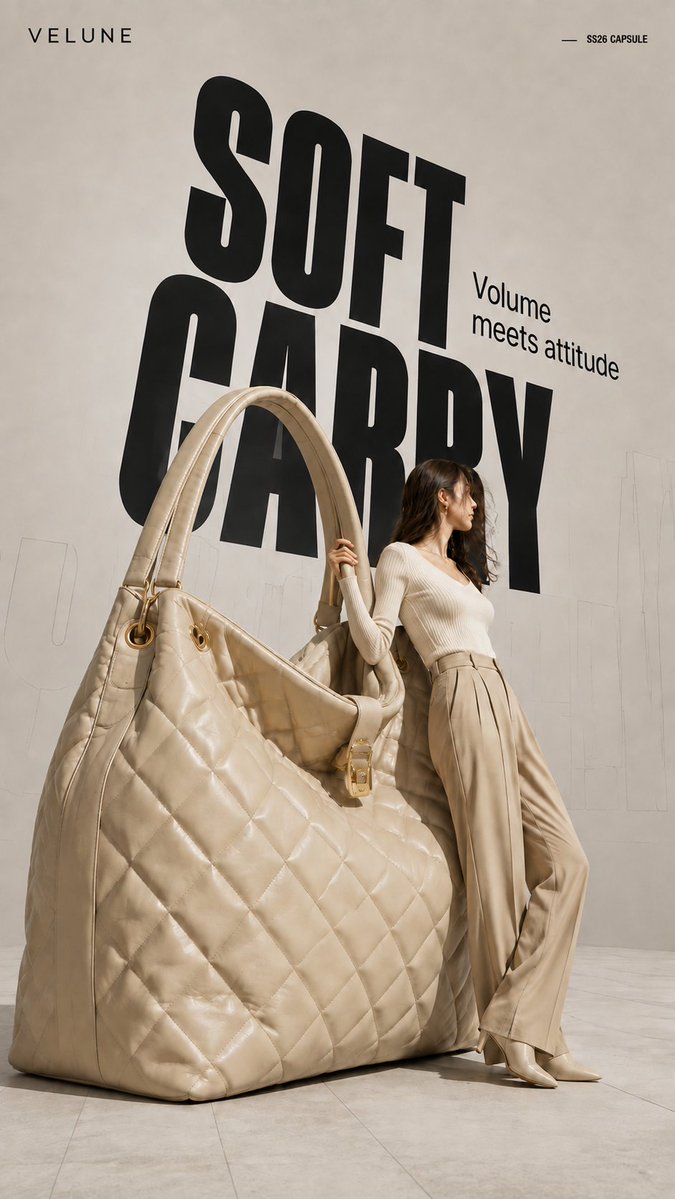
Visual concept
Brand name: [Brand Name] Main title: [Main Title] Subtitle: [Subtitle] Collection label: [Collection Label] Product type: [Product Type] Product material and key details: [Product Material And Key Details] Main color palette: [Main Color Palette] Model styling: [Model Styling] Model interaction: [Model Interaction] Create a 9:16 high-fashion editorial poster featuring an oversized [Product Type] transformed into a giant wearable object installation. Show most of the product clearly and keep its complete silhouette recognizable. Preserve premium product craftsmanship, including realistic material texture, stitching, polished edges, metal hardware, structural joints, reflections, surface finishing, and other details specific to the product. It should look like a real luxury product enlarged to architectural scale, not a rough prop or simplified 3D object. Use an asymmetrical composition: place the oversized product on one side and a realistic full-body adult female model on the other. The model should physically interact with the object by leaning against it, holding it, pushing it, or using it for balance. The pose should show believable weight, contact, and body tension rather than a standard fashion pose. Use a clean neutral studio background with subtle perspective lines, architectural outlines, and soft directional light. Add a large black condensed headline behind the subjects, with partial overlap from the model and product. Place faint oversized outline typography or low-opacity perspective text farther in the background to create depth.
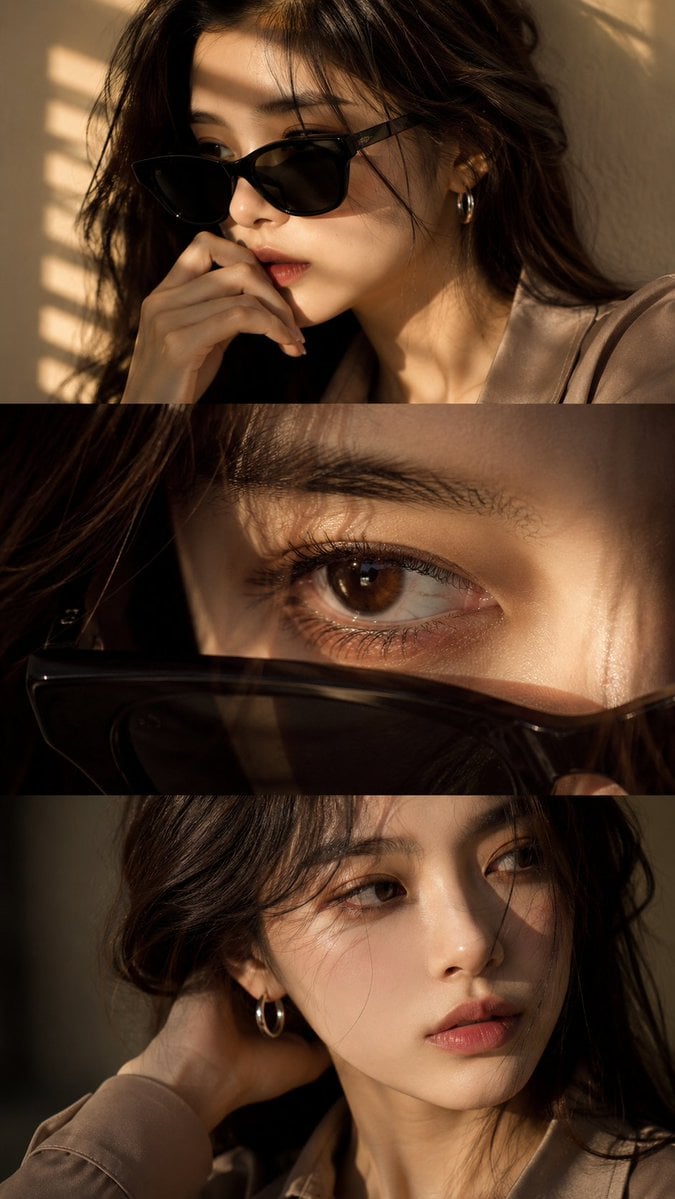
Visual concept
Use the uploaded face reference as a strict identity guide and preserve exact facial features, proportions, skin tone, eye shape, nose, lips, jawline, and overall recognizable identity with very high accuracy. Create an ultra-realistic cinematic high-end fashion editorial vertical triptych portrait in 9:16 format divided into three horizontal panels featuring a young Asian woman with elegant feminine beauty, soft natural styling, luxury aesthetic, silver hoop earring, minimal jewelry, and softly voluminous dark ash-brown wavy hair. Panel 1: medium close-up three-quarter portrait wearing black sunglasses, hand near lips, calm introspective expression, warm golden sunlight through window blinds casting striped shadows, cinematic mood. Panel 2: extreme macro close-up of one eye with sunglasses lowered in foreground, highly detailed iris, lashes, moist reflections, cinematic depth, emotional intimate feel. Panel 3: close-up without sunglasses, head turned toward light, hand behind neck, relaxed lips, soft distant gaze, subtle emotional tension. Outfit: smoky taupe or muted beige tailored silk-viscose blouse, minimal elegant luxury fashion styling, realistic fabric texture. Lighting: warm golden cinematic sunlight, soft indoor blinds shadows, luxury editorial lighting, soft contrast, glowing skin highlights. Camera: DSLR ultra-realism, 85mm lens, f/1.4 shallow depth of field, sharp facial detail, natural skin texture, 8K quality. Color grading: warm golden tones, soft amber highlights, cinematic contrast, filmic glow, luxury finish. Negative: no anime, no CGI, no plastic skin, no over-smoothing, no face change, no distortion, no watermark, no text, no logo.
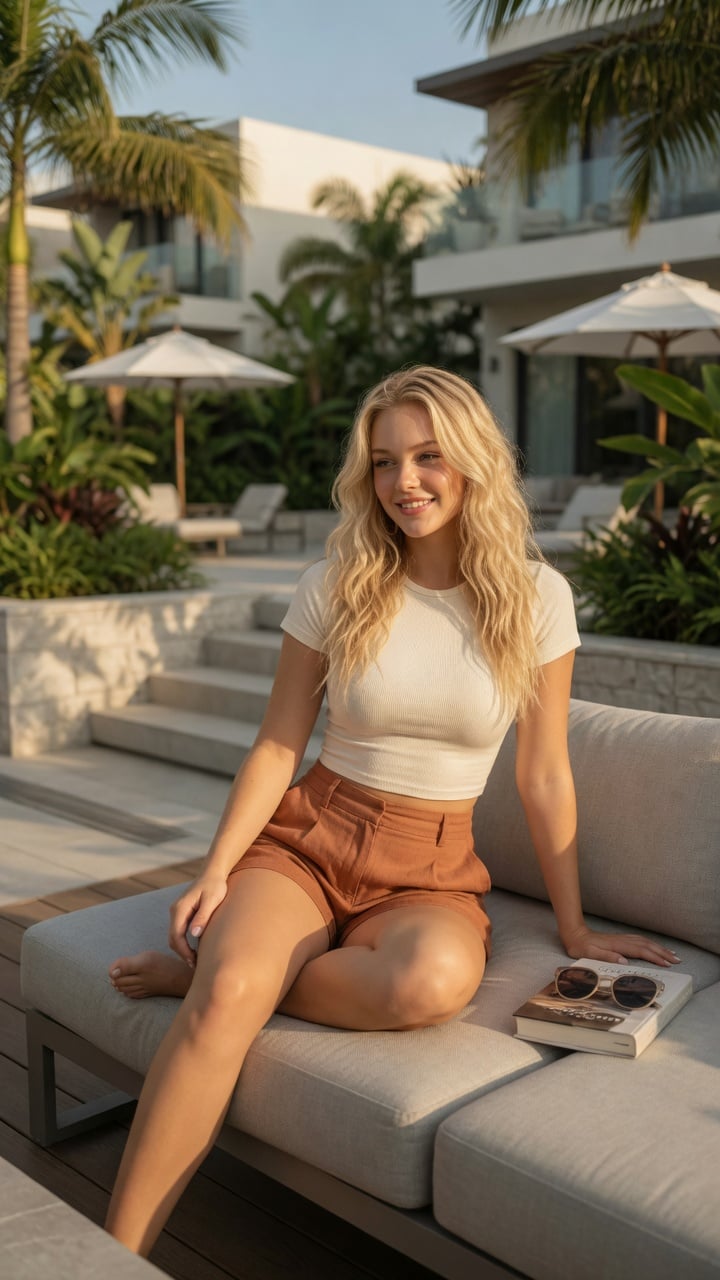
Visual concept
Ultra-realistic lifestyle fashion editorial photograph of a confident young woman relaxing on a contemporary outdoor terrace at an upscale residential complex. She has shoulder-length Blonde colored wavy hair, natural glowing makeup, and a relaxed smile while looking toward the horizon. She is wearing a fitted cream-colored ribbed crop top paired with high-waisted linen shorts in a warm terracotta color.She sits casually on a light gray modular outdoor sofa with one leg folded and the other resting naturally, one hand supporting her body and the other resting on her knee. A hardcover novel and a pair of sunglasses lie beside her, suggesting a peaceful afternoon of reading.The environment features minimalist architecture, lush tropical landscaping, stone planters, modern wooden decking, neutral outdoor furniture, and soft white umbrellas. Bright golden afternoon sunlight creates warm highlights and gentle shadows through nearby palm leaves. The atmosphere is calm, luxurious, and summery.Captured from a slightly low three-quarter angle using an 85mm lens with shallow depth of field. Natural skin texture, realistic anatomy, premium fabric details, cinematic color grading, HDR, soft bokeh, photorealistic, magazine-quality fashion photography, ultra-detailed, 8K. Negative Prompt:low quality, blurry, watermark, logo, text artifacts, bad anatomy, extra limbs, extra fingers, duplicate person, distorted hands, unrealistic proportions, oversaturated, underexposed, overexposed, motion blur, cartoon, anime, illustration, CGI, plastic skin
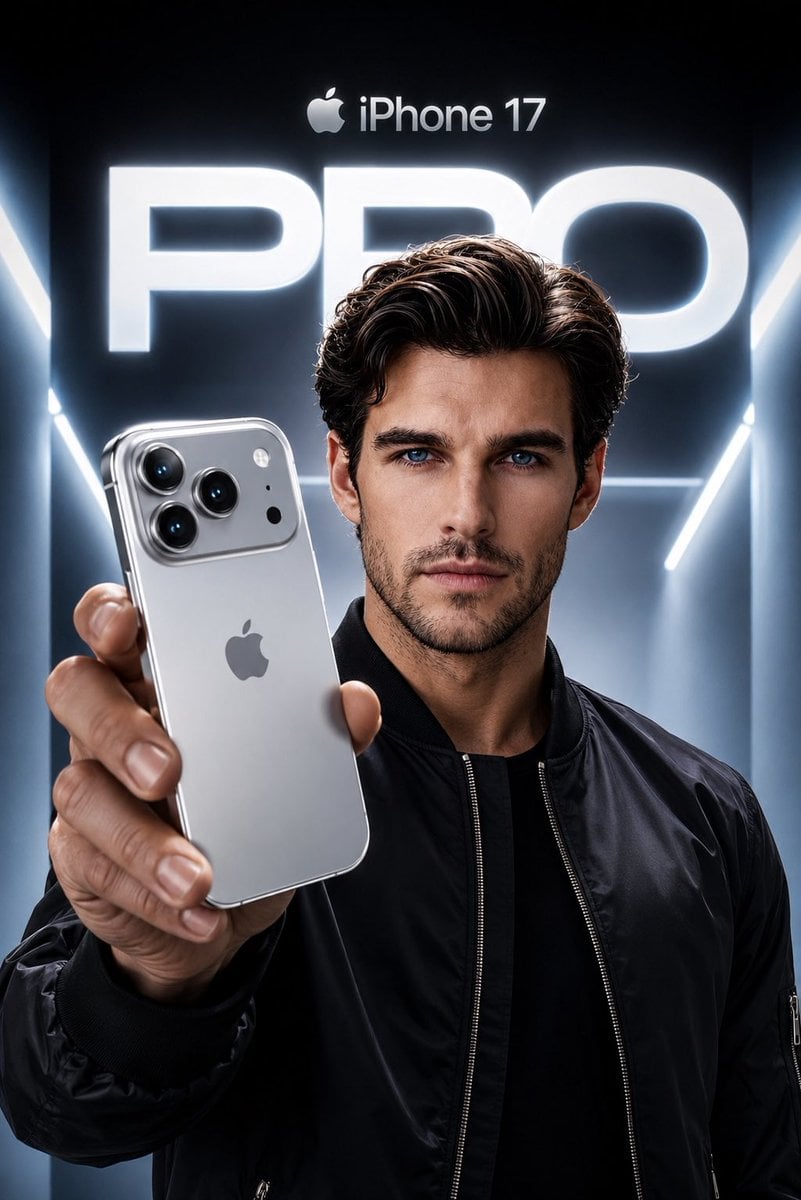
Visual concept
Create an ultra-premium Apple-style product campaign using the uploaded image as the exact facial reference. Preserve my identity with maximum accuracy, including my face shape, hairstyle, beard, eyebrows, skin tone, eye proportions, lips, jawline, and every unique facial feature. Do not alter my age or recognizable appearance. I am wearing a sleek black premium bomber jacket with a minimal futuristic aesthetic. I am confidently holding a Silver iPhone 17 Pro toward the camera in a dramatic low-angle perspective, with the phone dominating the foreground while my face remains perfectly sharp and cinematic. The iPhone features a luxurious brushed titanium silver finish with polished edges, realistic reflections, premium camera lenses, and authentic Apple design language. The background is a futuristic Apple keynote-inspired environment with glowing white and cool blue volumetric lighting, clean architectural lines, and a massive illuminated “PRO” typography behind me. At the top, place a subtle Apple logo with “iPhone 17” in Apple’s minimalist style. Use high-end commercial lighting, realistic skin texture, natural hand proportions, sharp focus, premium depth of field, soft rim lighting, and flawless reflections on the phone. The composition should feel like an official Apple flagship advertisement, ultra-realistic, hyper-detailed, 8K, HDR, IMAX quality, magazine cover worthy, with a cool silver and blue color palette, luxury aesthetic, and perfect cinematic color grading.
Visual concept
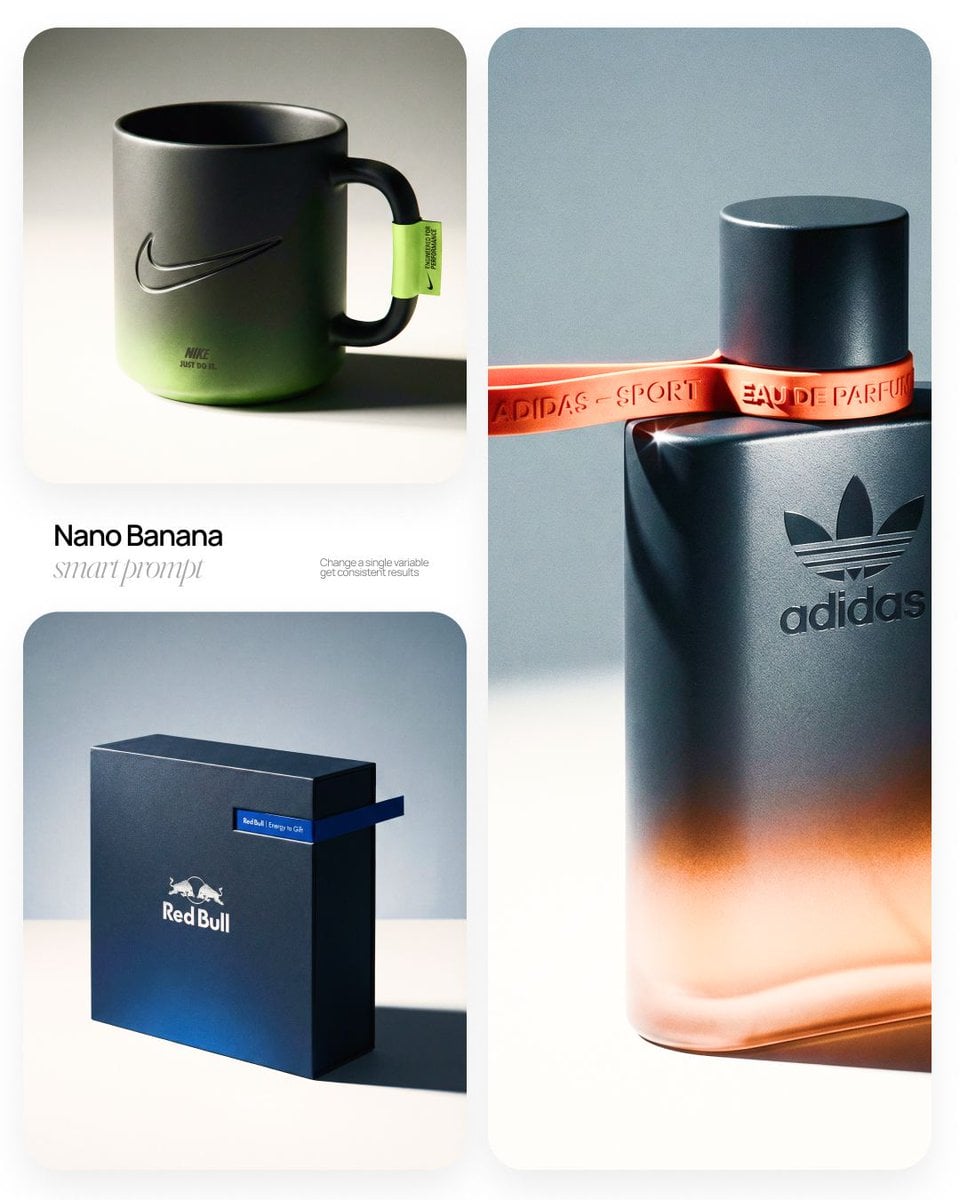
[BRAND NAME] | [OBJECT] Act as a High-End Commercial Product Photographer and Creative Director shooting a luxury editorial campaign (Hypebeast / Highsnobiety /Wallpaper* level). PHASE 1: BRAND INTELLIGENCE The hero subject is a [OBJECT] branded for [BRAND NAME]. Autonomously determine [BRAND NAME]'s full visual identity: signature color palette, typographic DNA, logo mark geometry, material language, and cultural positioning. Apply this identity to the [OBJECT] with precision — do not invent a generic brand, decode the real visual codes. PHASE 2: OBJECT SURFACE & MATERIAL DNA Regardless of the shape of [OBJECT], apply this material system: Base tone: deep neutral — matte dark graphite, warm charcoal, or matte black. Fine-grain surface micro-texture visible under raking light — powder-coat, matte paper, or brushed material feel. Subtle gradient bloom: the base color dissolves in the lower portion of the object's surface into the brand's most iconic accent color — a soft luminous haze from within the material, not a printed graphic. Logo application: embossed, debossed, or metallic foil relief — catching specular light at edges only. Precise. Restrained. Typography: brand-accurate typeface, small tracking, positioned with editorial intentionality. PHASE 3: THE ACCENT BREAKOUT ELEMENT This is the signature design move — adapt it to the natural geometry of [OBJECT]: Identify the most logical "interruption zone" on [OBJECT] — a seam, edge, band, collar, rim, strap, or wrap point. At this zone, apply a narrow saturated accent element in the brand's most iconic hue — vivid, slightly matte. This element must visually "break out" of the object's boundary — extending, protruding, or wrapping beyond the expected edge, creating a deliberate 3D tension between the object and the detail.The accent element carries a micro-typographic brand detail — tagline, model name, or descriptor — small, precise, tracked. PHASE 4: STAGING & COMPOSITION Studio cyclorama. Surface tone: off-white to warm light gray. Background field: cool neutral mid-gray, darker in upper zone. [OBJECT] positioned at 3/4 angle — front face and one secondary surface simultaneously visible. Rule of thirds: object occupies right 60% of frame. Left field: generous negative space — intentional, not empty. Single hard-edged directional shadow cast to the right and slightly downward — crisp penumbra, no diffusion. PHASE 5: LIGHTING Single dominant key light: large softbox, camera-left, elevated at 40°. Specular highlight traces the top-left edge of [OBJECT] — revealing material grain. Shadow side: no fill. Darkness earns depth. Subtle ambient bounce from cyclorama floor — lifts shadow by 15%, no more. Accent element receives micro-specular glint along its dominant edge. Mood: Rembrandt chiaroscuro logic applied to product photography. No lens flare. No atmospheric effects. PHASE 6: TECH SPECS Lens: 85mm equivalent, f/4.5. Depth of field: object fully sharp, background softened. Chromatic aberration: subtle, at extreme frame edges only — optical realism signal. Film grain overlay: 15% opacity — anti-CGI-plastic treatment. Render: Octane / Ray Tracing quality —subsurface scattering where material demands it, global illumination, physically accurate shadow falloff. Aspect ratio: autonomously determine optimal ratio for this [OBJECT] format.
En une phrase
Que vaut ce modèle ?
Cet accès à prix fixe réunit génération et édition, sans niveau tarifaire lié à la résolution. La documentation actuelle de l’API Gemini classe toujours `gemini-2.5-flash-image` comme modèle stable ; seul l’ancien identifiant d’aperçu `gemini-2.5-flash-image-preview` est obsolète. Kyeo utilise les identifiants Nano Banana de l’interface source publique actuelle : les capacités réelles restent celles des paramètres de cette page et des résultats observés.
- Ses points forts
- Kyeo regroupe la génération et l’édition Nano Banana sur une même page, mais appelle un identifiant de modèle source publique actuelle différent selon qu’une image est importée ou non. Son principal trait distinctif est le tarif fixe de 3 crédits, et non une résolution supérieure ou une recherche augmentée.
- À qui s’adresse-t-il ?
- Convient à la génération à partir de texte, à l’ajout, à la suppression ou au remplacement d’éléments, aux changements de style, ainsi qu’aux essais de composition avec peu de références dont le rôle est clair. La conservation stable d’une personne, d’un produit ou d’un élément de marque doit être confirmée par des tests.
- Pourquoi l’utiliser sur Kyeo AI ?
- La page affiche clairement la limite de 5 000 caractères, les sorties PNG/JPEG, les 11 formats et le maximum de 10 images pour l’interface d’édition, puis choisit automatiquement le chemin de génération ou d’édition.
Paramètres essentiels
Évaluez rapidement si ce modèle convient à votre activité.
Catégorie
Modèle IA de génération et d’édition d’images
Éditeur
Google
Famille
Nano Banana
Accès
Disponible actuellement sur Kyeo AI
Fonctions
Nano Banana — Tâche asynchrone
Mode d’exécution
Tâche asynchrone
Limite du prompt
5 000 caractères
Limite d’import
Jusqu’à 10 images
Autres noms
Un même modèle peut porter des noms différents dans la documentation officielle, les discussions de la communauté et les interfaces d’intégration. Ils sont regroupés ici.
Nano Banana — comment comparer les éditions de Nano Banana et GPT Image 1.5
Gemini 2.5 Flash Image
Google Nano Banana
Questions fréquentes des utilisateurs
Ces questions pratiques portent sur la tâche, les entrées et le résultat à confirmer avant de choisir.
comment utiliser Nano Banana sur Kyeo AI
combien de crédits consomme Nano Banana sur Kyeo AI
comment générer une nouvelle image avec Nano Banana sans import
comment modifier une image importée avec Nano Banana
la génération et l’édition Nano Banana ont-elles le même prix
combien d’images accepte au maximum l’interface d’édition Nano Banana
quand Nano Banana Pro convient-il mieux que la version à prix fixe
comment comparer les éditions de Nano Banana et GPT Image 1.5
que vérifier après avoir modifié une image produit avec Nano Banana
Nano Banana est-il Gemini 2.5 Flash Image
Guide de choix
Pour choisir entre plusieurs modèles, commencez par ces critères essentiels.
1
Pour générer ou modifier à coût fixe
Si la tâche n’exige ni choix entre 1K, 2K et 4K ni recherche augmentée, commencez par une génération ou une édition ciblée à 3 crédits, puis décidez selon le résultat s’il faut poursuivre.
2
Pour une résolution précise ou des fonctions plus récentes
Si vous avez besoin d’une sortie explicite en 1K, 2K ou 4K, ou de recherche augmentée, comparez Nano Banana 2 et Pro, actuellement proposés sur Kyeo. Pour confronter les éditions de différents éditeurs, testez GPT Image 1.5 avec les mêmes ressources.
3
Commencer les essais avec 1 à 3 références
Pour une édition multi-image, commencez avec peu d’entrées et précisez le rôle de chacune. N’en ajoutez que si le besoin est réel et le résultat maîtrisé : la limite de 10 images ne signifie pas qu’en utiliser 10 améliore la stabilité.
Comparaisons souvent recherchées
Comparez des alternatives courantes sur une même tâche pour clarifier les différences d’entrées, de contrôle et de coût.
comment choisir entre Nano Banana à 3 crédits fixes et Pro facturé selon la résolution
faut-il passer à Pro lorsque Nano Banana ne propose pas de 4K
quelles tâches conviennent mieux à Nano Banana 2
choisir Nano Banana ou Nano Banana 2 pour la recherche augmentée
comment tester les outils d’édition d’images de Google et d’OpenAI
comment comparer les limites d’entrée de Nano Banana et GPT Image 1.5
Tableau comparatif
Vous hésitez encore ? Ce tableau met en évidence les principales différences entre ce modèle et ses alternatives.
Positionnement actuel sur Kyeo
Nano Banana
Accès à prix fixe pour la génération et l’édition d’images
Nano Banana Pro
Tarification selon la résolution, avec une option 4K
GPT Image 1.5
Option OpenAI de génération et d’édition d’images
Structure du workflow
Nano Banana
La même page bascule entre génération et édition selon la présence d’images
Nano Banana Pro
Un même accès au modèle accepte du texte ou des images
GPT Image 1.5
La même page choisit le chemin correspondant au type d’entrée
Tarif actuel sur Kyeo
Nano Banana
3 crédits par génération ou édition
Nano Banana Pro
8 crédits en 1K/2K ; 14 en 4K
Nano Banana 2
5 crédits en 1K, 8 en 2K et 12 en 4K
Nombre d’images pour l’édition
Nano Banana
Jusqu’à 10 via l’interface source publique actuelle ; Google recommande de ne pas dépasser 3 entrées
Nano Banana Pro
Jusqu’à 8 images en entrée actuellement
GPT Image 1.5
Jusqu’à 16 images de référence actuellement
Besoins les mieux adaptés
Nano Banana
Génération et édition ciblée à prix fixe, sans niveau de résolution
Nano Banana Pro
Besoin d’un niveau de sortie explicite en 1K, 2K ou 4K
Nano Banana 2
Besoin de davantage de résolutions ou de recherche augmentée
Retour d’usage
Des conseils pratiques fondés sur les sources publiques, les limites actuelles du site et des tâches représentatives.
Une limite d’interface n’est pas une quantité recommandée
L’interface d’édition source publique actuelle accepte jusqu’à 10 images, ce qui permet de joindre davantage de ressources. Le guide Google de Gemini 2.5 Flash Image recommande toutefois de ne pas dépasser 3 entrées pour obtenir de meilleurs résultats. En pratique, privilégiez le plus petit ensemble d’entrées réellement utile.
Il faut distinguer le modèle stable de l’ancien identifiant d’aperçu
Google classe actuellement `gemini-2.5-flash-image` comme modèle stable et indique seulement `gemini-2.5-flash-image-preview` comme obsolète. L’identifiant de l’interface source publique actuelle utilisé par Kyeo est différent et ne permet pas de déduire une correspondance exacte de version.
Fonctions en détail
Chemin texte vers image
Sans image importée, Kyeo utilise `Nano Banana` pour générer une image à partir du prompt. Le format de sortie et le format d’image sont réglables ; chaque tâche coûte 3 crédits fixes.
Chemin d’édition en langage naturel
Après l’import d’une image, Kyeo passe à `Nano Banana`. Le texte peut indiquer ce qu’il faut conserver, supprimer, remplacer ou ajuster, mais le respect de ces consignes doit être vérifié image par image.
Limites de format, de proportions et d’entrée
Les sorties PNG/JPEG et 11 formats sont actuellement pris en charge. Vous pouvez envoyer jusqu’à 10 images de référence, mais Google recommande de ne pas dépasser 3 images en entrée pour obtenir de meilleurs résultats avec ce modèle.
Usages adaptés
Créer une nouvelle image à partir de texte
Générez une première version en décrivant le sujet, la scène, la composition et le style, puis choisissez le format pour obtenir une image horizontale, verticale ou carrée.
Apporter des modifications ciblées à une image
Essayez d’ajouter ou de supprimer des éléments, de remplacer l’arrière-plan, d’ajuster les couleurs ou de changer de style. Pour l’apparence d’un produit, l’identité d’une personne ou les règles de marque, vérifiez manuellement les détails qui ne devaient pas changer.
Composer avec quelques images de référence
Fournissez des références distinctes pour le sujet, la matière ou la scène, puis indiquez leur rôle dans le prompt. Commencez par 1 à 3 images afin de ne pas confondre la limite de l’interface avec une quantité recommandée.
Conseils de prompt
Commencer par le sujet et l’action souhaitée
Indiquez en une phrase ce qu’il faut générer ou modifier, puis ajoutez les éléments à conserver, à remplacer et à éviter. Une action concrète est généralement plus facile à contrôler qu’une suite de termes de style abstraits.
Attribuer un rôle à chaque référence
Précisez quelle image fournit le sujet, la matière, la pose ou l’arrière-plan, et commencez si possible avec 1 à 3 références. Plus les entrées sont nombreuses, plus il faut vérifier si des éléments ont été mélangés ou omis.
Choisir le format et le type de fichier avant l’envoi
Sélectionnez d’abord un format adapté à l’emplacement final, comme 1:1, 16:9 ou 9:16, puis choisissez PNG ou JPEG. Après la génération, contrôlez le texte, les mains, les contours, les caractéristiques du sujet et les zones qui ne devaient pas changer.
Pourquoi le choisir ?
Génération à partir de texte et édition d’images sur une même page.
Tarif fixe de 3 crédits par tâche sur les deux chemins, pour un coût facile à prévoir.
Prompt de 5 000 caractères au maximum et 11 formats disponibles.
L’interface d’édition accepte plusieurs images, ce qui permet d’essayer des références aux rôles distincts.
À savoir avant de l’utiliser
Google classe actuellement `gemini-2.5-flash-image` comme modèle stable, mais Kyeo utilise un identifiant de l’interface source publique actuelle qui ne permet pas d’affirmer une correspondance exacte de version.
Le formulaire actuel ne propose aucun niveau de résolution 1K, 2K ou 4K, ni recherche augmentée.
L’interface source publique actuelle accepte jusqu’à 10 images pour l’édition, mais Google recommande de ne pas dépasser 3 entrées pour obtenir de meilleurs résultats avec ce modèle.
Le texte dans l’image, les caractéristiques d’une personne ou d’un produit, la cohérence et les risques liés aux droits d’auteur exigent tous un contrôle humain ; la page ne garantit pas le résultat.
Paramètres réglables
Évaluez rapidement si ce modèle convient à votre activité.
Format de sortie
Facultatif
Type de paramètre: Liste déroulante
Par défaut : png
PNG
JPEG
Format
Facultatif
Type de paramètre: Liste déroulante
Par défaut : 1:1
1:1
9:16
16:9
3:4
4:3
3:2
11 options au total
Coût en crédits
3 crédits / génération
Sur Kyeo AI, chaque tâche de génération à partir de texte ou d’édition d’image coûte actuellement 3 crédits fixes.
Conseil pour économiser des crédits
Avant de générer une série d’images ou de vidéos, effectuez un test A/B avec les mêmes médias sur ce modèle et des modèles similaires. Lancez la série après avoir validé le résultat pour éviter de gaspiller des crédits.
Questions fréquentes
Modèles similaires
Vous hésitez encore ? Comparez aussi ces modèles similaires.
Nano Banana Pro
Sur Kyeo AI, Nano Banana Pro prend en charge la génération à partir de texte et l’édition par images de référence, avec des sorties en 1K, 2K ou 4K. Le 1K et le 2K coûtent 8 crédits par génération, contre 14 pour le 4K. La résolution indique une taille de sortie, sans garantir la qualité, l’exactitude ni le niveau de détail.
Modèle IA de génération et d’édition d’images
8 à 14 crédits / génération
Nano Banana 2
Kyeo AI propose la génération à partir de texte et l’édition guidée par des références avec Nano Banana 2. Vous pouvez importer jusqu’à 10 images, choisir parmi 15 formats et produire en 1K, 2K ou 4K. Les tarifs actuels sont respectivement de 5, 8 et 12 crédits, le prompt est limité à 20 000 caractères et le formulaire actuel ne propose pas de recherche web.
Modèle IA de génération et d’édition d’images
5 à 12 crédits / génération
GPT Image 1.5
Sur Kyeo, GPT Image 1.5 prend en charge la génération à partir de texte et l’édition d’images, avec 3 formats et les niveaux de qualité medium/high. Le chemin image vers image accepte jusqu’à 16 références JPG, PNG ou WebP, limitées à 10 Mo chacune. Le niveau medium coûte 4 crédits et le niveau high 22 crédits. GPT Image 1.5 est un modèle d’image de génération précédente qu’OpenAI a abandonné. Kyeo conserve ses accès de génération et d’édition, sans que cela signifie qu’OpenAI le recommande encore par défaut.
Modèle d’image par IA
4 à 22 crédits / génération
Sources
Le contenu de cette page est établi à partir des informations de l’éditeur, de la documentation sur la famille du modèle et de la configuration d’intégration de Kyeo AI.
Note sur les sources
Découvrez Nano Banana sur Kyeo AI : génération et édition d’images à 3 crédits fixes, prompt de 5 000 caractères et jusqu’à 10 images en édition. Sur Kyeo AI, chaque tâche de génération à partir de texte ou d’édition d’image coûte actuellement 3 crédits fixes.
Dernière mise à jour: 2026-07-20
Google AI for Developers : Nano Banana
Officiel
Google AI for Developers : génération d’images avec Gemini
Officiel