AI 이미지 생성 및 편집 모델
Google
Nano Banana
Nano Banana
Kyeo AI의 Nano Banana(Gemini 2.5 Flash Image)는 텍스트 이미지 생성과 자연어 이미지 편집을 모두 제공합니다. 이미지를 업로드하지 않으면 `Nano Banana`, 업로드하면 `Nano Banana`를 호출합니다. 두 경로 모두 생성당 3포인트이고 프롬프트는 최대 5,000자입니다.
기능 유형
텍스트 이미지 생성, 이미지 편집
포인트 사용량
생성당 3포인트
프롬프트 한도
5,000자
업로드 한도
이미지 최대 10장
30초 요약
- 이미지를 업로드하지 않으면 `Nano Banana`, 업로드하면 `Nano Banana` 호출
- 텍스트 이미지 생성과 편집 모두 현재 생성당 3포인트 고정
- 프롬프트 최대 5,000자, PNG / JPEG와 화면 비율 11개 선택
- 편집 인터페이스는 이미지 최대 10장을 받지만 Google은 더 나은 결과를 위해 입력 3장 이하 권장
인기 검색어: Kyeo AI에서 Nano Banana 사용하는 방법 · Kyeo AI Nano Banana 생성당 포인트 · Nano Banana 이미지 없이 새 이미지 생성 방법
예시
Visual concept
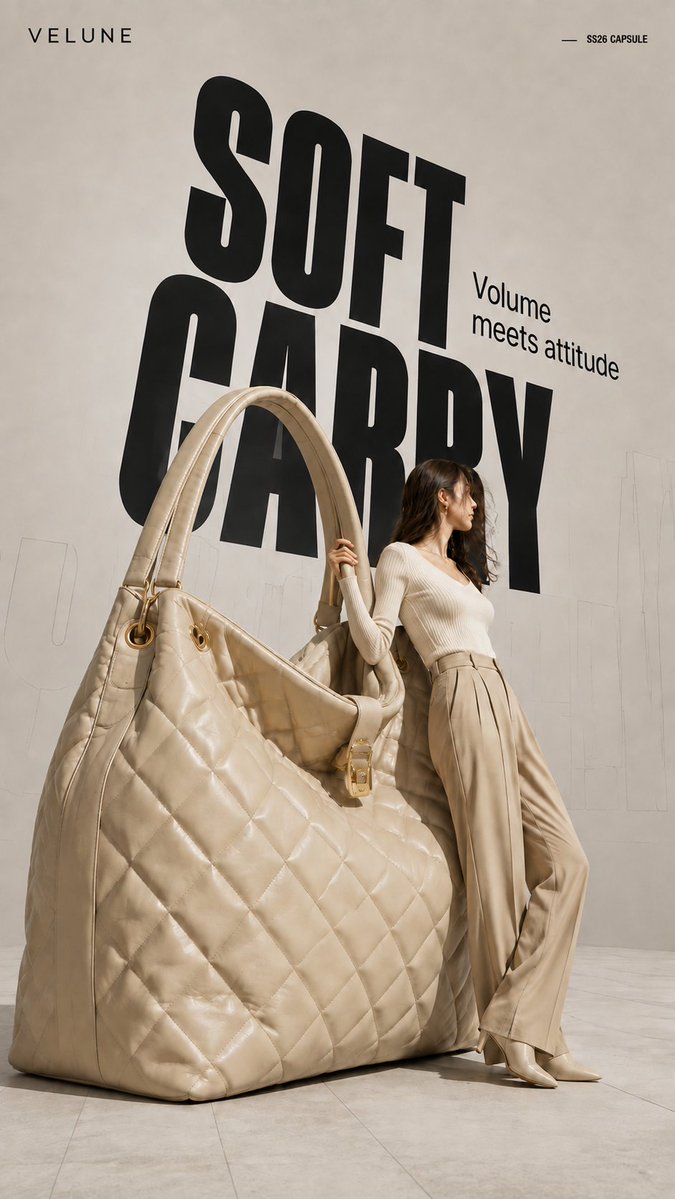
Brand name: [Brand Name] Main title: [Main Title] Subtitle: [Subtitle] Collection label: [Collection Label] Product type: [Product Type] Product material and key details: [Product Material And Key Details] Main color palette: [Main Color Palette] Model styling: [Model Styling] Model interaction: [Model Interaction] Create a 9:16 high-fashion editorial poster featuring an oversized [Product Type] transformed into a giant wearable object installation. Show most of the product clearly and keep its complete silhouette recognizable. Preserve premium product craftsmanship, including realistic material texture, stitching, polished edges, metal hardware, structural joints, reflections, surface finishing, and other details specific to the product. It should look like a real luxury product enlarged to architectural scale, not a rough prop or simplified 3D object. Use an asymmetrical composition: place the oversized product on one side and a realistic full-body adult female model on the other. The model should physically interact with the object by leaning against it, holding it, pushing it, or using it for balance. The pose should show believable weight, contact, and body tension rather than a standard fashion pose. Use a clean neutral studio background with subtle perspective lines, architectural outlines, and soft directional light. Add a large black condensed headline behind the subjects, with partial overlap from the model and product. Place faint oversized outline typography or low-opacity perspective text farther in the background to create depth.
Visual concept
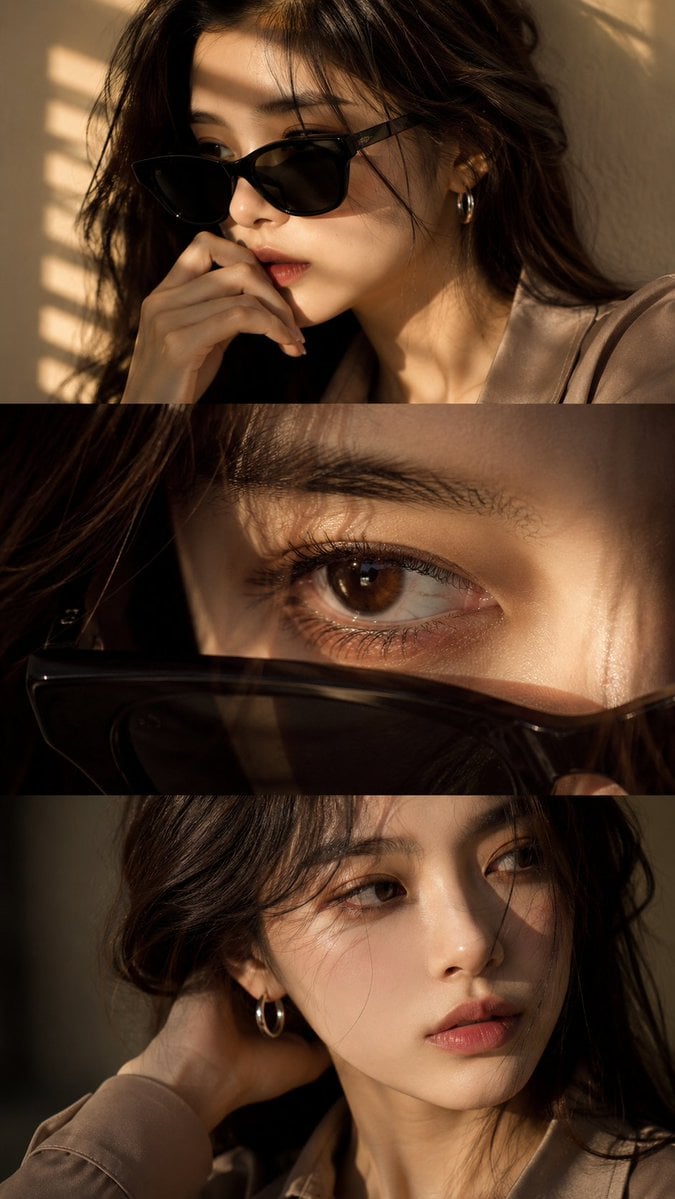
Use the uploaded face reference as a strict identity guide and preserve exact facial features, proportions, skin tone, eye shape, nose, lips, jawline, and overall recognizable identity with very high accuracy. Create an ultra-realistic cinematic high-end fashion editorial vertical triptych portrait in 9:16 format divided into three horizontal panels featuring a young Asian woman with elegant feminine beauty, soft natural styling, luxury aesthetic, silver hoop earring, minimal jewelry, and softly voluminous dark ash-brown wavy hair. Panel 1: medium close-up three-quarter portrait wearing black sunglasses, hand near lips, calm introspective expression, warm golden sunlight through window blinds casting striped shadows, cinematic mood. Panel 2: extreme macro close-up of one eye with sunglasses lowered in foreground, highly detailed iris, lashes, moist reflections, cinematic depth, emotional intimate feel. Panel 3: close-up without sunglasses, head turned toward light, hand behind neck, relaxed lips, soft distant gaze, subtle emotional tension. Outfit: smoky taupe or muted beige tailored silk-viscose blouse, minimal elegant luxury fashion styling, realistic fabric texture. Lighting: warm golden cinematic sunlight, soft indoor blinds shadows, luxury editorial lighting, soft contrast, glowing skin highlights. Camera: DSLR ultra-realism, 85mm lens, f/1.4 shallow depth of field, sharp facial detail, natural skin texture, 8K quality. Color grading: warm golden tones, soft amber highlights, cinematic contrast, filmic glow, luxury finish. Negative: no anime, no CGI, no plastic skin, no over-smoothing, no face change, no distortion, no watermark, no text, no logo.
Visual concept
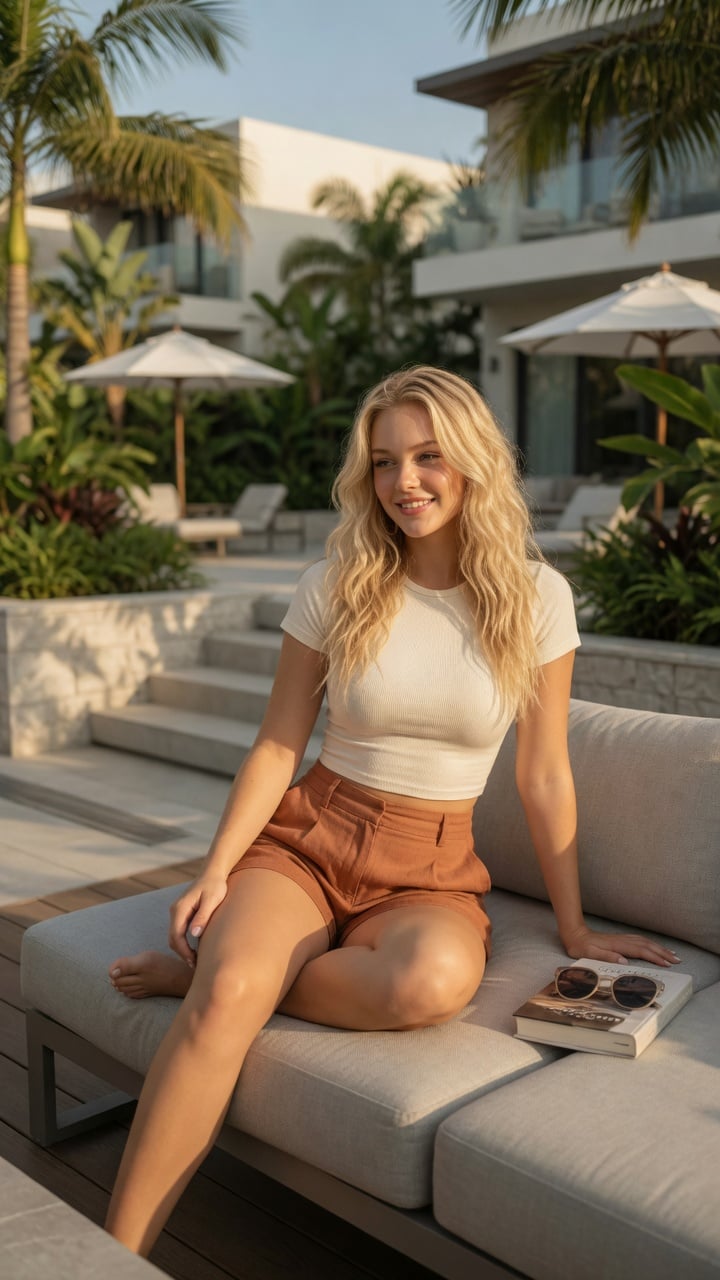
Ultra-realistic lifestyle fashion editorial photograph of a confident young woman relaxing on a contemporary outdoor terrace at an upscale residential complex. She has shoulder-length Blonde colored wavy hair, natural glowing makeup, and a relaxed smile while looking toward the horizon. She is wearing a fitted cream-colored ribbed crop top paired with high-waisted linen shorts in a warm terracotta color.She sits casually on a light gray modular outdoor sofa with one leg folded and the other resting naturally, one hand supporting her body and the other resting on her knee. A hardcover novel and a pair of sunglasses lie beside her, suggesting a peaceful afternoon of reading.The environment features minimalist architecture, lush tropical landscaping, stone planters, modern wooden decking, neutral outdoor furniture, and soft white umbrellas. Bright golden afternoon sunlight creates warm highlights and gentle shadows through nearby palm leaves. The atmosphere is calm, luxurious, and summery.Captured from a slightly low three-quarter angle using an 85mm lens with shallow depth of field. Natural skin texture, realistic anatomy, premium fabric details, cinematic color grading, HDR, soft bokeh, photorealistic, magazine-quality fashion photography, ultra-detailed, 8K. Negative Prompt:low quality, blurry, watermark, logo, text artifacts, bad anatomy, extra limbs, extra fingers, duplicate person, distorted hands, unrealistic proportions, oversaturated, underexposed, overexposed, motion blur, cartoon, anime, illustration, CGI, plastic skin
Visual concept
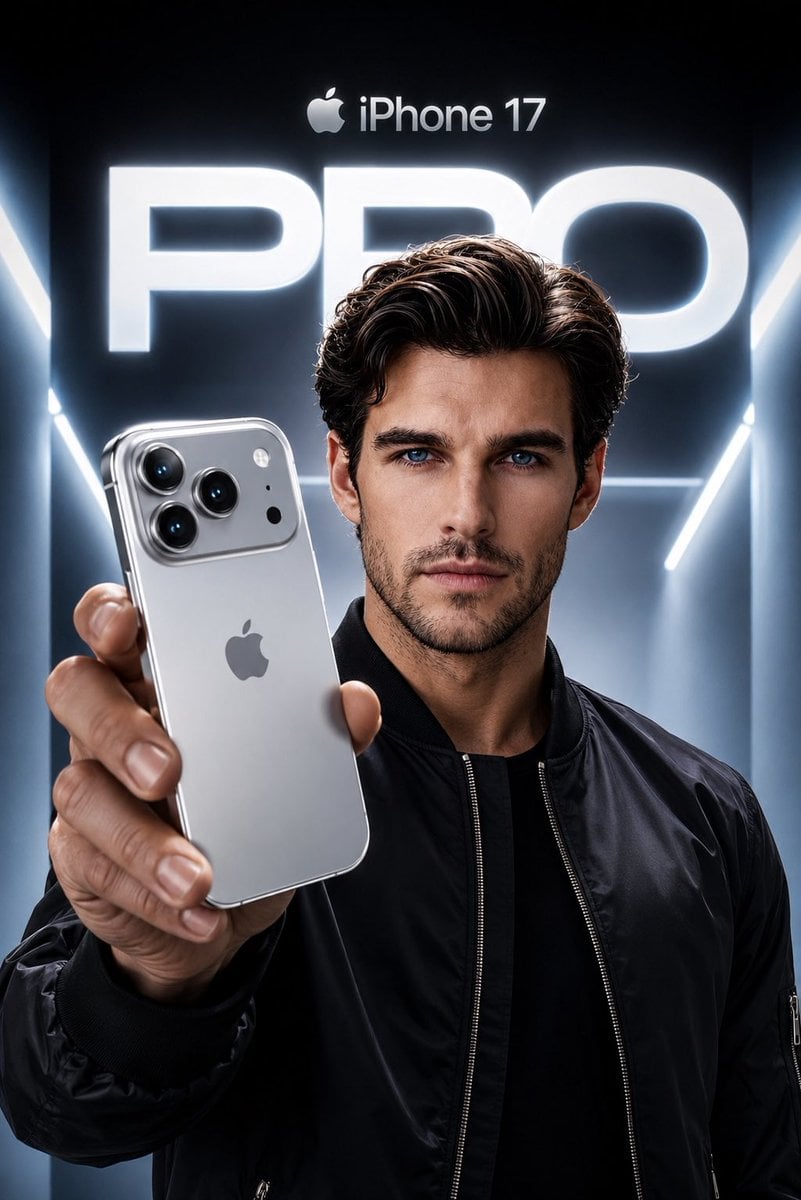
Create an ultra-premium Apple-style product campaign using the uploaded image as the exact facial reference. Preserve my identity with maximum accuracy, including my face shape, hairstyle, beard, eyebrows, skin tone, eye proportions, lips, jawline, and every unique facial feature. Do not alter my age or recognizable appearance. I am wearing a sleek black premium bomber jacket with a minimal futuristic aesthetic. I am confidently holding a Silver iPhone 17 Pro toward the camera in a dramatic low-angle perspective, with the phone dominating the foreground while my face remains perfectly sharp and cinematic. The iPhone features a luxurious brushed titanium silver finish with polished edges, realistic reflections, premium camera lenses, and authentic Apple design language. The background is a futuristic Apple keynote-inspired environment with glowing white and cool blue volumetric lighting, clean architectural lines, and a massive illuminated “PRO” typography behind me. At the top, place a subtle Apple logo with “iPhone 17” in Apple’s minimalist style. Use high-end commercial lighting, realistic skin texture, natural hand proportions, sharp focus, premium depth of field, soft rim lighting, and flawless reflections on the phone. The composition should feel like an official Apple flagship advertisement, ultra-realistic, hyper-detailed, 8K, HDR, IMAX quality, magazine cover worthy, with a cool silver and blue color palette, luxury aesthetic, and perfect cinematic color grading.
Visual concept
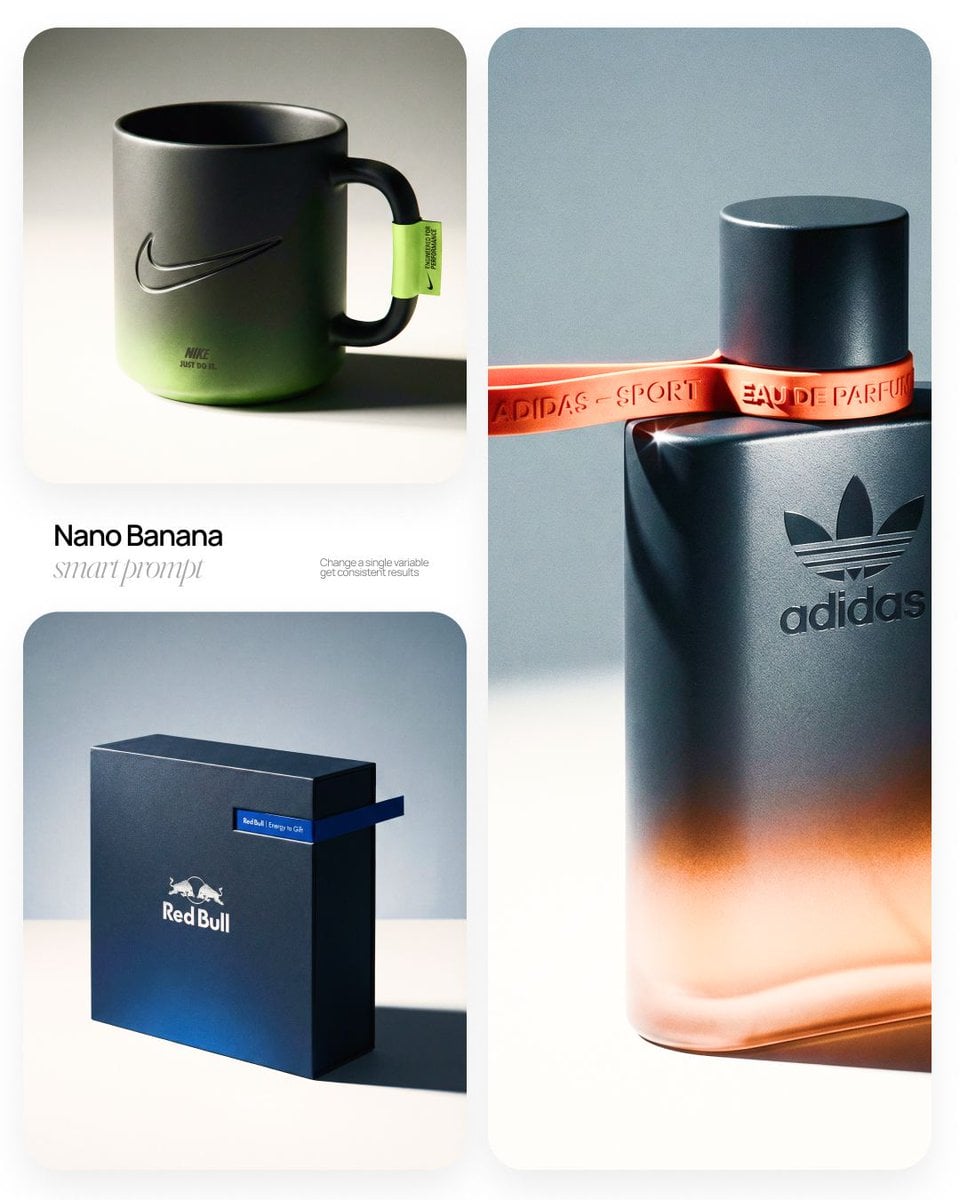
[BRAND NAME] | [OBJECT] Act as a High-End Commercial Product Photographer and Creative Director shooting a luxury editorial campaign (Hypebeast / Highsnobiety /Wallpaper* level). PHASE 1: BRAND INTELLIGENCE The hero subject is a [OBJECT] branded for [BRAND NAME]. Autonomously determine [BRAND NAME]'s full visual identity: signature color palette, typographic DNA, logo mark geometry, material language, and cultural positioning. Apply this identity to the [OBJECT] with precision — do not invent a generic brand, decode the real visual codes. PHASE 2: OBJECT SURFACE & MATERIAL DNA Regardless of the shape of [OBJECT], apply this material system: Base tone: deep neutral — matte dark graphite, warm charcoal, or matte black. Fine-grain surface micro-texture visible under raking light — powder-coat, matte paper, or brushed material feel. Subtle gradient bloom: the base color dissolves in the lower portion of the object's surface into the brand's most iconic accent color — a soft luminous haze from within the material, not a printed graphic. Logo application: embossed, debossed, or metallic foil relief — catching specular light at edges only. Precise. Restrained. Typography: brand-accurate typeface, small tracking, positioned with editorial intentionality. PHASE 3: THE ACCENT BREAKOUT ELEMENT This is the signature design move — adapt it to the natural geometry of [OBJECT]: Identify the most logical "interruption zone" on [OBJECT] — a seam, edge, band, collar, rim, strap, or wrap point. At this zone, apply a narrow saturated accent element in the brand's most iconic hue — vivid, slightly matte. This element must visually "break out" of the object's boundary — extending, protruding, or wrapping beyond the expected edge, creating a deliberate 3D tension between the object and the detail.The accent element carries a micro-typographic brand detail — tagline, model name, or descriptor — small, precise, tracked. PHASE 4: STAGING & COMPOSITION Studio cyclorama. Surface tone: off-white to warm light gray. Background field: cool neutral mid-gray, darker in upper zone. [OBJECT] positioned at 3/4 angle — front face and one secondary surface simultaneously visible. Rule of thirds: object occupies right 60% of frame. Left field: generous negative space — intentional, not empty. Single hard-edged directional shadow cast to the right and slightly downward — crisp penumbra, no diffusion. PHASE 5: LIGHTING Single dominant key light: large softbox, camera-left, elevated at 40°. Specular highlight traces the top-left edge of [OBJECT] — revealing material grain. Shadow side: no fill. Darkness earns depth. Subtle ambient bounce from cyclorama floor — lifts shadow by 15%, no more. Accent element receives micro-specular glint along its dominant edge. Mood: Rembrandt chiaroscuro logic applied to product photography. No lens flare. No atmospheric effects. PHASE 6: TECH SPECS Lens: 85mm equivalent, f/4.5. Depth of field: object fully sharp, background softened. Chromatic aberration: subtle, at extreme frame edges only — optical realism signal. Film grain overlay: 15% opacity — anti-CGI-plastic treatment. Render: Octane / Ray Tracing quality —subsurface scattering where material demands it, global illumination, physically accurate shadow falloff. Aspect ratio: autonomously determine optimal ratio for this [OBJECT] format.
한 줄 요약
이 모델은 어떤가요?
해상도별 가격 등급이 없는 고정 가격 생성 및 편집 모델입니다. 현재 Google은 Gemini API 문서에서 `gemini-2.5-flash-image`를 이전 버전 모델로 표시합니다. Kyeo는 이 경로와 호환 별칭 `gemini-2.5-flash-image-preview`를 계속 제공하므로 버전 상태를 이해한 뒤 실제 결과를 기준으로 선택해야 합니다.
- 잘하는 작업
- Kyeo는 Nano Banana의 텍스트 이미지 생성과 편집을 같은 페이지에 제공하지만 작업을 제출할 때는 이미지 업로드 여부에 따라 서로 다른 현재 공개 자료 인터페이스 모델 ID를 호출합니다. 핵심 차이는 고해상도나 검색 보조가 아니라 3포인트 고정 가격입니다.
- 추천 사용자
- 텍스트로 이미지를 만들고 기존 이미지에 요소를 추가·삭제·교체하거나 스타일을 조정하며 역할이 명확한 소수의 참조 이미지로 합성을 시도하는 데 적합합니다. 인물, 상품이나 브랜드 요소를 안정적으로 유지할 수 있는지는 실제 결과로 판단해야 합니다.
- Kyeo AI에서 사용하는 이유
- 현재 페이지는 프롬프트 5,000자, PNG / JPEG 출력, 화면 비율 11개와 편집 이미지 최대 10장의 범위를 명확히 표시하며 생성과 편집 사이에서 해당 경로를 자동으로 선택합니다.
주요 매개변수
모델이 비즈니스 작업에 적합한지 빠르게 판단할 수 있습니다.
모델 유형
AI 이미지 생성 및 편집 모델
제공사
Google
모델 제품군
Nano Banana
연동 방식
현재 사이트 연동
기능 유형
Nano Banana — 비동기 작업
실행 방식
비동기 작업
프롬프트 한도
5,000자
업로드 한도
이미지 최대 10장
다른 이름
같은 모델도 공식 문서, 커뮤니티, API 연동 계층에서 다른 이름으로 불릴 수 있어 한곳에 정리했습니다.
Nano Banana — Nano Banana와 GPT Image 1.5 편집 결과 비교
Gemini 2.5 Flash Image
Google Nano Banana
자주 묻는 질문
작업, 입력 조건, 결과 요구를 기준으로 모델 선택 전에 확인할 실용적인 질문을 정리했습니다.
Kyeo AI에서 Nano Banana 사용하는 방법
Kyeo AI Nano Banana 생성당 포인트
Nano Banana 이미지 없이 새 이미지 생성 방법
Nano Banana 이미지 업로드 후 편집 방법
Nano Banana 텍스트 생성과 편집 가격
Nano Banana 편집 이미지 최대 개수
Nano Banana Pro가 고정 가격 모델보다 적합한 경우
Nano Banana와 GPT Image 1.5 편집 결과 비교
Nano Banana 상품 이미지 편집 검수 항목
Nano Banana는 Gemini 2.5 Flash Image인가요
선택 가이드
어떤 모델을 사용할지 고민된다면 다음 주요 판단 기준부터 확인하세요.
1
고정 비용의 생성이나 편집이 필요할 때
작업에 1K, 2K 또는 4K 등급 선택이나 검색 보조가 필요 없다면 먼저 3포인트로 텍스트 이미지 생성 또는 지정 편집을 한 번 실행하고 결과를 바탕으로 계속할지 결정하세요.
2
해상도나 더 새로운 기능이 필요할 때
명확한 1K, 2K, 4K 출력 등급이나 검색 보조가 필요하면 현재 Kyeo가 제공하는 Nano Banana 2와 Pro를 비교하세요. 서로 다른 제공사의 편집 결과를 비교하려면 같은 소재로 GPT Image 1.5를 평가할 수 있습니다.
3
참조 이미지 1~3장으로 먼저 검증하세요
여러 이미지를 편집할 때는 적은 입력으로 시작하고 각 이미지의 역할을 명확히 쓰세요. 실제로 필요하고 결과를 통제할 수 있을 때만 이미지를 늘리세요. 인터페이스가 10장을 허용한다고 10장을 함께 쓰면 더 안정적인 것은 아닙니다.
자주 검색하는 비교
같은 작업에서 자주 선택하는 후보를 비교해 입력, 제어, 비용 차이를 확인하세요.
3포인트 고정 Nano Banana와 해상도별 요금 Pro 중 무엇을 선택해야 하나요
Nano Banana에 4K 등급이 없으면 Pro를 사용해야 하나요
어떤 작업에 Nano Banana 2가 더 적합한가요
검색 보조가 필요하면 Nano Banana와 Nano Banana 2 중 무엇을 선택해야 하나요
Google과 OpenAI 이미지 편집 모델을 어떻게 평가해야 하나요
Nano Banana와 GPT Image 1.5의 입력 한도는 어떻게 다른가요
모델 비교표
어떤 모델을 선택할지 고민된다면 현재 모델과 대안의 핵심 차이를 표에서 한눈에 확인하세요.
현재 Kyeo 위치
Nano Banana
고정 가격 텍스트 이미지 생성 및 편집 모델
Nano Banana Pro
해상도별 요금과 4K 선택 제공
GPT Image 1.5
OpenAI 이미지 생성 및 편집 모델
작업 흐름 구조
Nano Banana
같은 페이지에서 이미지 업로드 여부에 따라 생성 / 편집 경로 전환
Nano Banana Pro
같은 모델에서 텍스트 또는 이미지 입력을 받음
GPT Image 1.5
같은 페이지에서 입력 유형에 따라 해당 경로 전환
현재 Kyeo 가격
Nano Banana
텍스트 이미지 생성과 편집 모두 생성당 3포인트
Nano Banana Pro
1K / 2K 8포인트, 4K 14포인트
Nano Banana 2
1K 5포인트, 2K 8포인트, 4K 12포인트
편집 이미지 수량
Nano Banana
현재 공개 자료 인터페이스 최대 10장, Google은 더 나은 결과를 위해 3장 이하 권장
Nano Banana Pro
현재 입력 이미지 최대 8장
GPT Image 1.5
현재 참조 이미지 최대 16장
더 적합한 요구
Nano Banana
해상도 등급이 없는 고정 가격 생성과 지정 편집
Nano Banana Pro
명확한 1K, 2K 또는 4K 출력 등급 필요
Nano Banana 2
더 많은 해상도 선택이나 검색 보조 필요
실제 사용 관점
공개 자료, 현재 사이트 범위, 대표 작업을 바탕으로 한 실용적인 안내입니다.
인터페이스 한도는 권장 입력 수량이 아닙니다
현재 공개 자료 편집 인터페이스가 이미지 최대 10장을 허용하므로 요청에 더 많은 소재를 담을 수 있습니다. 그러나 Google의 Gemini 2.5 Flash Image 안내는 더 나은 결과를 위해 입력 3장 이하를 권장합니다. 실제로는 더 작은 유효 입력 세트를 우선 사용하세요.
이전 버전 상태가 현재 사용 불가를 뜻하지는 않습니다
`gemini-2.5-flash-image`와 호환 별칭 `gemini-2.5-flash-image-preview`의 버전 상태는 모델 선택 요소로 삼아야 하며, 한 번의 출력 품질을 미리 판단하는 근거로 사용해서는 안 됩니다.
기능 상세 정보
텍스트 이미지 생성 경로
이미지를 업로드하지 않으면 Kyeo는 `Nano Banana`를 사용해 텍스트 프롬프트로 이미지를 생성합니다. 현재 출력 형식과 화면 비율을 설정할 수 있고 생성당 3포인트가 고정으로 부과됩니다.
자연어 이미지 편집 경로
이미지를 업로드하면 Kyeo는 `Nano Banana`를 사용합니다. 유지, 삭제, 교체하거나 조정할 내용을 텍스트로 설명할 수 있지만 지시를 얼마나 따랐는지는 이미지별로 확인해야 합니다.
형식, 비율과 입력 범위
현재 PNG / JPEG 출력과 화면 비율 11개를 지원합니다. 참고 이미지는 최대 10장까지 제출할 수 있지만 Google은 더 나은 결과를 위해 이 모델에 입력 이미지 3장 이하를 권장합니다.
추천 활용 사례
텍스트로 새 이미지 생성
주체, 장면, 구도와 스타일 설명으로 초안을 만들고 화면 비율로 가로형, 세로형이나 정사각형 방향을 제어하는 데 적합합니다.
기존 이미지 지정 수정
요소 추가·삭제, 배경 교체, 색상 조정이나 스타일 변경을 시도할 수 있습니다. 상품 외관, 인물 정체성이나 브랜드 규정이 관련된다면 변경을 요청하지 않은 세부 요소를 사람이 확인해야 합니다.
소수의 참조 이미지 합성
주체, 재질과 장면의 참조 이미지를 각각 제공하고 프롬프트로 용도를 지정할 수 있습니다. 1~3장으로 먼저 검증하고 인터페이스 한도를 권장 수량으로 오해하지 마세요.
프롬프트 팁
주체와 목표 동작을 먼저 쓰세요
무엇을 생성하거나 수정할지 한 문장으로 설명한 뒤 반드시 유지, 교체하고 피해야 할 내용을 추가하세요. 실행 가능한 동작 설명은 추상적인 스타일 단어의 나열보다 검수하기 쉽습니다.
참조 이미지마다 용도를 표시하세요
어떤 이미지가 주체, 재질, 자세나 배경을 제공하는지 명확히 하고 가능하면 1~3장으로 시작하세요. 입력이 많을수록 요소가 섞이거나 누락되었는지 더 꼼꼼히 확인해야 합니다.
제출 전에 비율과 형식을 정하세요
최종 지면에 맞춰 1:1, 16:9, 9:16 등의 비율을 선택하고 PNG 또는 JPEG를 결정하세요. 출력 후 글자, 손, 가장자리, 주체 특징과 수정을 요청하지 않은 영역을 확인하세요.
선택할 이유
같은 페이지에서 텍스트 이미지 생성과 편집을 모두 제공합니다.
두 경로 모두 생성당 3포인트로 고정되어 비용을 예상하기 쉽습니다.
프롬프트 최대 5,000자와 화면 비율 11개를 제공합니다.
편집 인터페이스가 여러 이미지를 받아 역할을 나눈 참조 입력을 시도하기 좋습니다.
사용 전 확인 사항
현재 Google은 `gemini-2.5-flash-image`를 이전 버전 모델로 표시하므로 장기 작업 흐름에는 더 새로운 모델도 평가해야 합니다.
현재 양식에는 1K, 2K 또는 4K 해상도 등급이 없으며 검색 보조도 제공하지 않습니다.
현재 공개 자료 인터페이스는 편집 이미지 최대 10장을 허용하지만 Google은 더 나은 결과를 위해 이 모델에 입력 이미지 3장 이하를 권장합니다.
이미지 속 글자, 인물이나 상품 특징, 일관성과 저작권 위험을 모두 사람이 검토해야 하며 페이지는 결과를 보장하지 않습니다.
조정 가능한 매개변수
모델이 비즈니스 작업에 적합한지 빠르게 판단할 수 있습니다.
출력 형식
선택 사항
매개변수 유형: 드롭다운 선택
기본값: png
PNG
JPEG
화면 비율
선택 사항
매개변수 유형: 드롭다운 선택
기본값: 1:1
1:1
9:16
16:9
3:4
4:3
3:2
총 11개 선택 항목
포인트 사용량
생성당 3포인트
현재 Kyeo AI에서 텍스트 이미지 생성이나 편집 작업을 한 번 실행하면 모두 3포인트가 고정으로 부과됩니다.
포인트 절약 팁
이미지나 동영상을 일괄 생성하기 전에 같은 소재로 현재 모델과 유사 후보를 A/B 테스트해 보세요. 결과를 확인한 뒤 일괄 생성하면 포인트 낭비를 줄일 수 있습니다.
자주 묻는 질문
유사 모델 추천
아직 결정하지 못했다면 유사 후보 모델도 함께 비교해 보세요.
Nano Banana Pro
Kyeo AI의 Nano Banana Pro는 텍스트 이미지 생성과 참조 이미지 편집을 지원하며 1K, 2K 또는 4K 출력을 선택할 수 있습니다. 생성당 1K와 2K는 8포인트, 4K는 14포인트입니다. 해상도는 출력 크기 등급이며 품질, 정확도나 세부 요소를 보장하지 않습니다.
Nano Banana 2
Kyeo AI에서는 Nano Banana 2로 텍스트 이미지 생성과 참조 이미지 편집을 할 수 있습니다. 참조 이미지는 최대 10장, 화면 비율은 15개, 출력은 1K/2K/4K 중에서 선택할 수 있습니다. 현재 가격은 각각 5, 8, 12포인트이며 프롬프트 한도는 20,000자이고, 현재 생성 양식에는 웹 검색 옵션이 없습니다.
GPT Image 1.5
GPT Image 1.5는 Kyeo에서 텍스트 이미지 생성과 이미지 편집을 지원하며, 가로세로비 3종과 medium/high 품질을 선택할 수 있습니다. 이미지 편집에는 JPG, PNG 또는 WebP 참고 이미지를 최대 16장까지 사용할 수 있고, 각 파일은 10MB 이하여야 합니다. medium은 4포인트, high는 22포인트입니다. GPT Image 1.5는 OpenAI가 사용 중단으로 표시한 이전 세대 이미지 모델입니다. Kyeo는 생성과 편집 진입점을 계속 제공하지만, 그렇다고 OpenAI가 이 모델을 현행 우선 선택으로 분류한다는 뜻은 아닙니다.
정보 출처
페이지 내용은 개발사 자료, 모델 제품군 설명, Kyeo AI 플랫폼 연동 설정을 바탕으로 정리했습니다.