圖片範本
查看、複製、套用免費;生成扣點數
精選
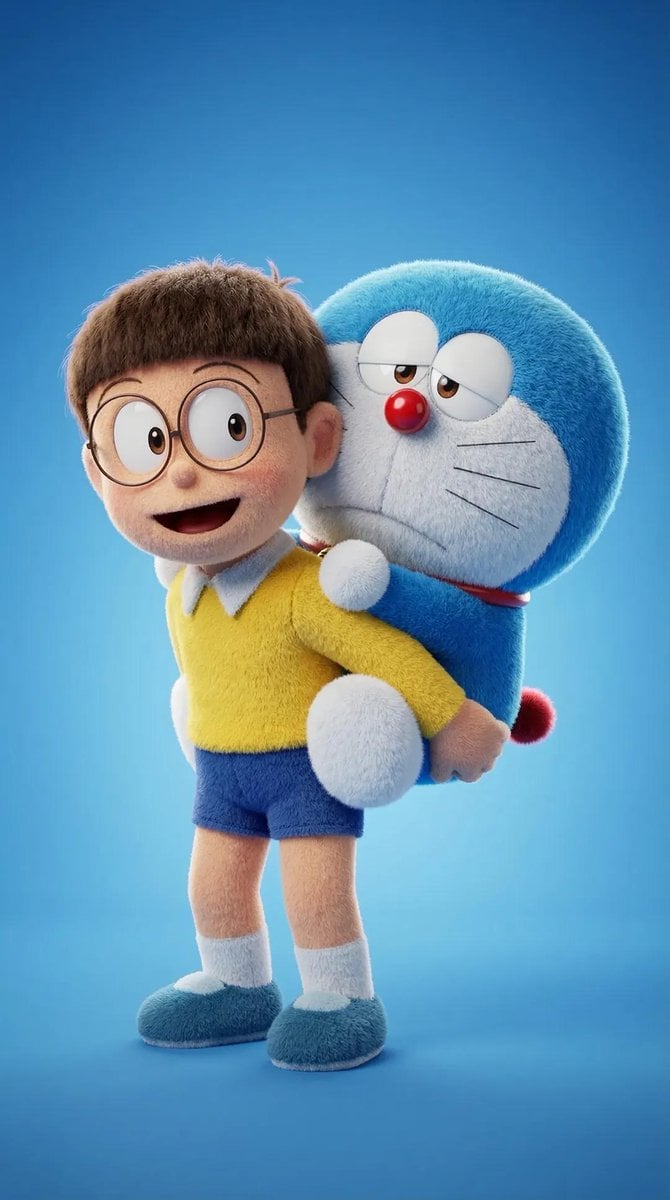
[Doraemon's] 3D 絨毛卡通範本
先查看推薦模型、適用情境與使用步驟,再決定如何直接套用。
官方範本2 次瀏覽
3D 與插畫
視覺實驗
3D 算圖
動漫風
角色
超現實
夢幻
等距視角
範本類型
圖片範本
使用權限
查看、複製、套用免費;生成扣點數
建立時間
2026/06/15
評分
目前沒有評分
範本總覽
這類範本更適合先保留畫面結構,再替換主體、風格或商業訴求。優先使用 Flux 2 Pro 起步,再依結果切換至同類型的備選模型。
推薦模型
如果你不確定先用哪個模型,可以先從作者推薦的幾個起點開始。
Flux 2 Pro
Nano Banana 2
提示詞內容
先查看推薦模型、適用情境與使用步驟,再決定如何直接套用。
生成一個 ultra-detailed 3D plush cartoon character,靈感來自 classic animated TV style。角色位於 center frame,full body visible,整體如同 soft toy:realistic fluffy fur texture、smooth rounded shapes、vibrant saturated colors、big expressive eyes 與 cute proportions。 使用以下 character image 作為角色設定參考:[Doraemon's]。指定動作為:[Nobita carries Doraemon on his back]。 以 high-resolution Pixar-style 3D rendering 進行算繪,搭配 soft studio lighting、subtle rim light、clean blue-tone gradient background、cinematic lighting、depth of field、highly detailed fur strands、soft shadows under feet、glossy nose 與 toy-like material。 最後輸出 ultra sharp 8K render,並採用 centered composition、minimal background、character facing camera、symmetrical pose 與 adorable expression。
使用建議
依照這個順序上手,通常比直接複製 prompt 更容易得到可用結果。
1
先選推薦模型
如果你沒有既定偏好,先從 Flux 2 Pro 開始通常更穩。
2
保留結構,替換關鍵資訊
優先保留構圖、光線、材質與風格結構,再替換主體、品牌資訊與使用情境。
3
至少進行 2 到 3 次比較
圖片範本最有價值的地方是加速嘗試,所以不要只跑一張就做決定。
範本資訊
協助你快速判斷這個範本是否適合目前的任務。
範本類型
圖片範本
使用權限
查看、複製、套用免費;生成扣點數
建立時間
2026/06/15
評分
目前沒有評分
適用情境
這個範本更適合下列幾類任務。
海報與封面
適合活動圖片、社群封面、宣傳海報與視覺 KV。
商品與品牌圖片
適合電商主圖、品牌視覺與商品延伸。
角色與風格探索
適合製作人物、插畫、情境與風格方向樣本。
推薦模型
如果你不確定先用哪個模型,可以先從作者推薦的幾個起點開始。
相關範本
一起比較同類型範本,通常更容易找到最適合你的 prompt 方向。

評分與評價
目前沒有評分
請先登入