الانتقال إلى المحتوى الرئيسي
نموذج صور بالذكاء الاصطناعي
OpenAI
GPT Image

GPT Image 1.5

يدعم GPT Image 1.5 في Kyeo النص إلى صورة والصورة إلى صورة، مع اختيار ثلاث نسب أبعاد ومستويي الجودة medium/high. يستخدم مسار الصورة إلى صورة حتى 16 صورة مرجعية بصيغة JPG أوPNG أوWebP، لا تتجاوز الواحدة 10 MB؛ وتكلف medium أربع نقاط وhigh اثنتين وعشرين نقطة. GPT Image 1.5 نموذج صور من الجيل السابق أهملته OpenAI. يحتفظ Kyeo بمدخلي التوليد والتحرير، لكن ذلك لا يعني أن OpenAI لا تزال تعده خيارها الحالي المفضل.

تصنيف القدرة
نص إلى صورة وصورة إلى صورة
استهلاك النقاط
4-22 نقطة / عملية
حد نص الطلب
لم يُعلن حد المحارف
حد الرفع
حتى 16 صورة، 10 MB لكل منها
تعرّف عليه في 30 ثانية
  • GPT Image 1.5 / تصنيف القدرة — يدعم GPT Image 1.5 في Kyeo النص إلى صورة والصورة إلى صورة، مع اختيار ثلاث نسب أبعاد ومستويي الجودة medium/high. يستخدم مسار الصورة إلى صورة حتى 16 صورة مرجعية بصيغة JPG أوPNG أوWebP، لا تتجاوز الواحدة 10 MB؛ وتكلف medium أربع نقاط وhigh اثنتين وعشرين نقطة.
  • GPT Image 1.5 / نسبة العرض إلى الارتفاع — لا يتيح Kyeo سوى `aspect_ratio` و`quality`، وهو ليس كامل نطاق معلمات واجهة OpenAI المباشرة
  • GPT Image 1.5 / حد الرفع — حتى 16 صورة، 10 MB لكل منها
  • GPT Image 1.5 / استهلاك النقاط — تكلف medium وhigh حاليًا 4 و22 نقطة على التوالي؛ ولا يمثل تغير المستوى ضمانًا لجودة النتيجة

عمليات البحث الشائعة: كيفية استخدام GPT Image 1.5 في Kyeo · متطلبات رفع الصور إلى مسار الصورة إلى صورة في GPT Image 1.5 · معلمات النص إلى صورة في GPT Image 1.5

أمثلة

Visual concept

Visual concept

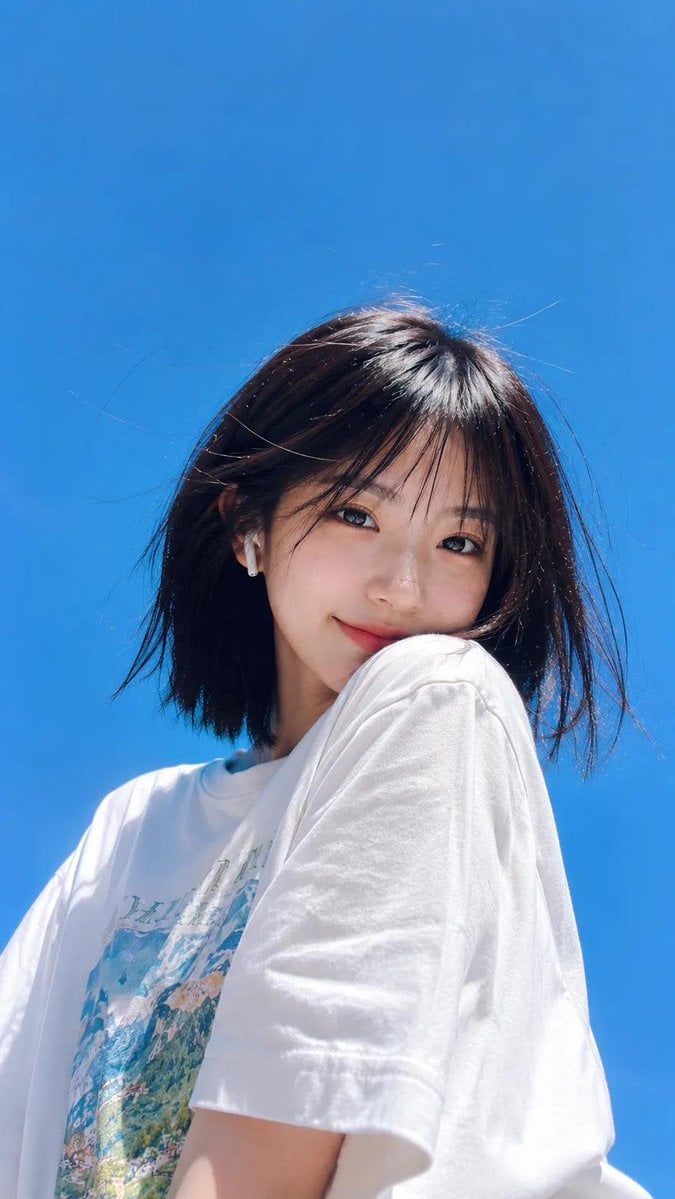
Ultra-realistic lifestyle portrait of a cheerful young woman with fair porcelain skin, medium-length straight black hair with wispy curtain bangs gently blown by the wind, bright genuine smile, almond-shaped dark brown eyes, and natural soft makeup. She wears an oversized white graphic T-shirt with colorful landscape prints, a delicate silver necklace with a small green butterfly pendant, and a white wireless earbud. She casually holds a transparent cup of iced orange juice with a brown straw and a cute smiling face logo. Captured from a dramatic low-angle wide-angle perspective against a clear blue sky, illuminated by bright natural midday sunlight with soft shadows and vibrant colors. Fresh, youthful, carefree summer atmosphere, candid lifestyle photography, minimalist composition, natural skin texture, realistic hair strands, HDR, cinematic color grading, DSLR quality, sharp focus, ultra-photorealistic, editorial style, masterpiece, 8K.

Visual concept

Visual concept

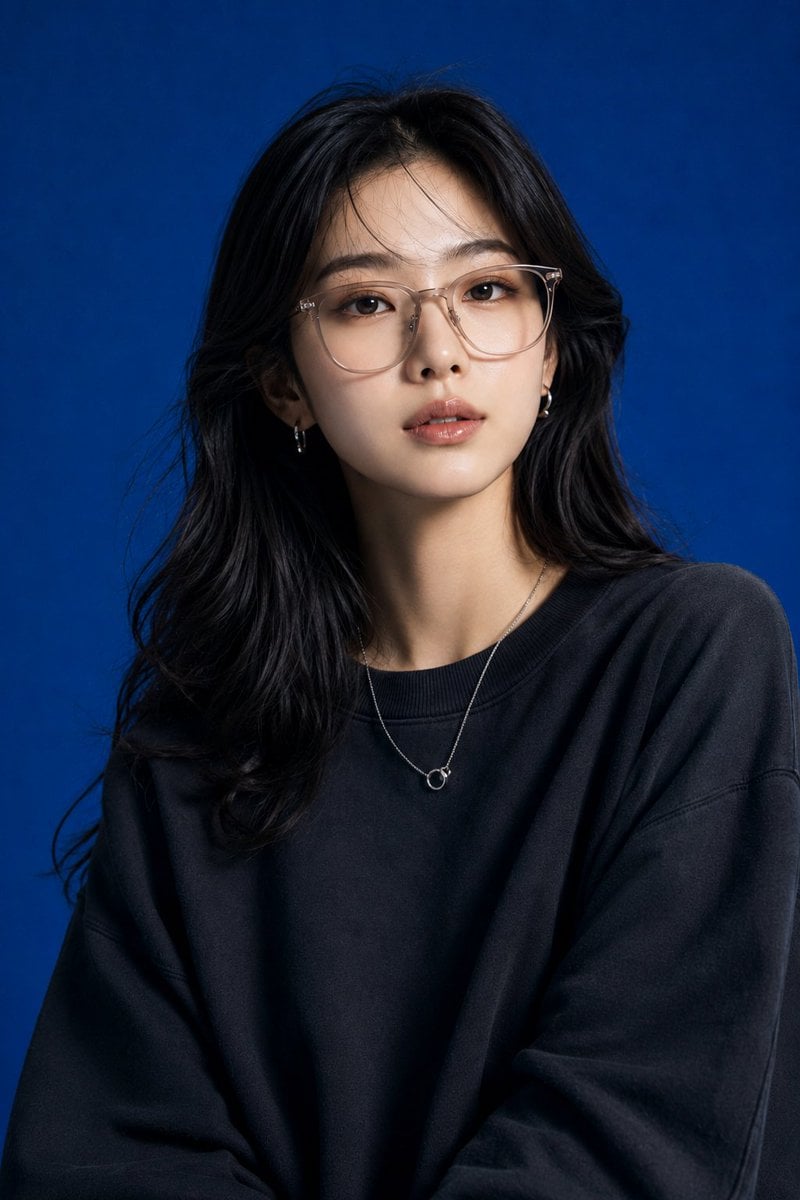
Create image Create a high-end studio fashion portrait inspired by the uploaded blue-background reference photograph. Recreate the original composition with matching framing, focal length feel, camera position, subject scale, perspective, and overall visual balance while maintaining a realistic photographic appearance. Replace the reference model with a beautiful young Japanese/Korean woman. Preserve authentic East Asian facial features, natural proportions, realistic skin texture, eye shape, facial structure, and cultural authenticity. Avoid exaggerated beauty filters, unrealistic facial modifications, or doll-like features. Maintain a natural, believable fashion-model appearance. Match the original body language closely: upper torso visible, shoulders relaxed, chin slightly elevated, eyes directed upward beyond the camera, conveying quiet confidence, sophistication, and contemplation. Maintain the same sense of presence and spatial positioning within the frame. Retain the rich cobalt-blue studio backdrop and the refined editorial atmosphere. Reproduce the original lighting setup with soft directional illumination, subtle facial highlights, realistic reflections on eyewear and jewelry, and smooth shadow transitions around the jawline, neck, and clothing folds. Preserve depth, dimensionality, and professional studio realism. Appearance: Young Japanese/Korean woman in her early-to-mid 20s Clear luminous skin with natural texture Soft almond-shaped eyes Elegant facial structure Healthy natural makeup with subtle editorial refinement Glossy neutral lips Long dark hair styled in soft layers or gentle waves Sophisticated yet approachable expression Style the model in contemporary luxury street-fashion apparel. Use an oversized premium knit sweater, relaxed-fit sweatshirt, or fashion-forward minimalist streetwear silhouette with natural fabric draping. Layer with a delicate silver necklace, subtle rings, and lightly tinted translucent eyewear. Wardrobe should feel premium, modern, and suitable for a luxury fashion campaign. Keep the image tightly composed with the same portrait crop and subject placement. Ensure identical camera-to-subject distance and visual weight in the frame. The final result should feel indistinguishable from a genuine professional fashion photoshoot captured in this exact studio environment. Photorealistic editorial photography, luxury fashion campaign, premium Korean/Japanese streetwear styling, deep monochromatic blue backdrop, realistic skin texture, subtle film-grade contrast, detailed fabric rendering, natural lighting falloff, commercial advertising quality, shallow depth of field, magazine-cover aesthetics, fashion-editorial realism, luxury street-fashion branding. Negative Prompt: Do not alter the background color or studio environment. Do not change the framing, crop, perspective, subject distance, or lighting direction. Avoid anime styling, illustration effects, CGI appearance, excessive retouching, artificial skin smoothing, exaggerated facial features, unrealistic eye size, porcelain skin effect, text overlays, logos, watermarks, duplicate subjects, distorted anatomy, extra limbs, or unrealistic clothing physics.

Visual concept

Visual concept

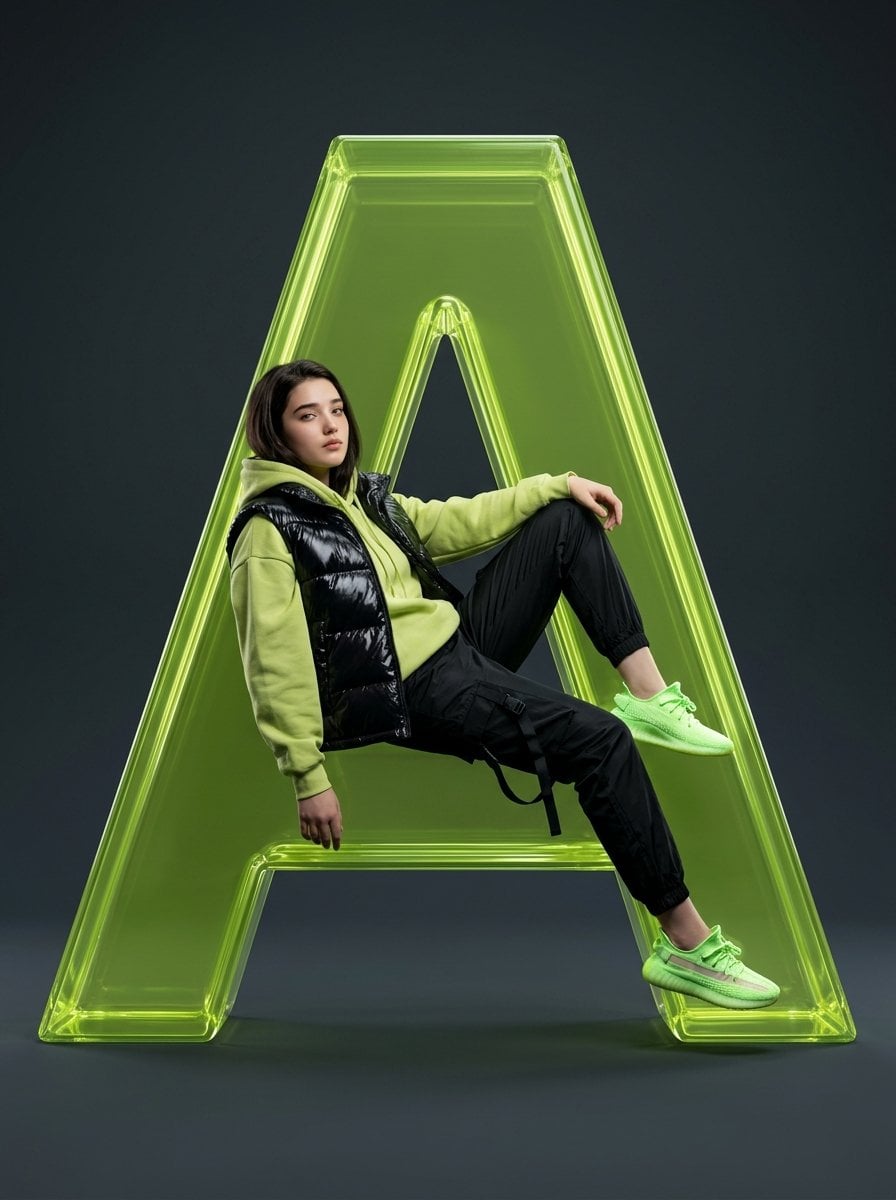
Full-body studio fashion portrait of a female subject with uploaded face as reference, lounging gracefully inside the hollow of a massive, 3D-rendered translucent lime-green glass letter “A” (representing Hania AI). She wears a glossy black puffer vest over a lime-green oversized hoodie, paired with sleek black techwear joggers featuring multiple utility straps, and neon green reflective sneakers. The background is a seamless, deep matte charcoal grey, making the glowing glass structure and vibrant outfit stand out vividly. Lighting is cinematic and directional, with sharp rim lighting outlining her silhouette and enhancing depth. Shot with an 85mm lens, ultra-sharp focus, commercial luxury aesthetic, 8k resolution, with highly photorealistic textures on nylon fabric and glass.

Visual concept

Visual concept

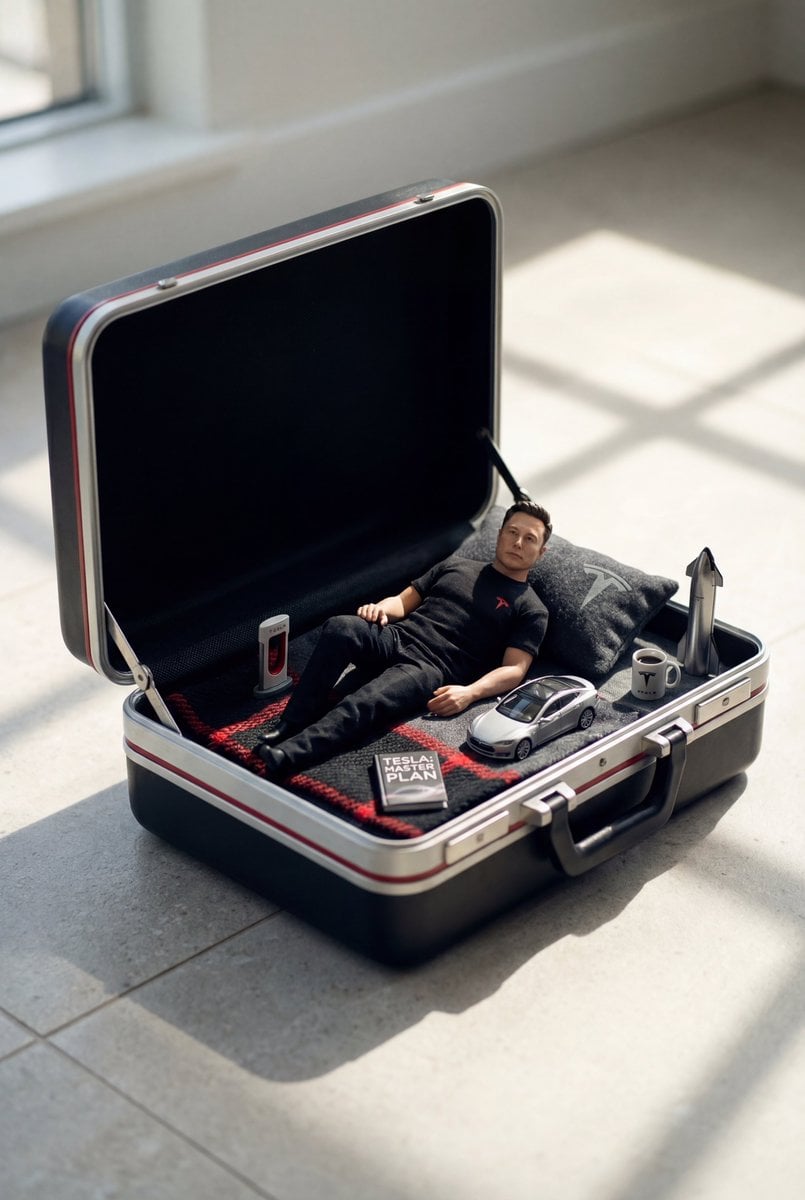
{ "prompt": "Create a hyper-realistic, ultra-detailed cinematic photo featuring a MINIATURE version of the person from the provided reference image (preserve facial likeness, skin tone, hairstyle, and overall identity). The tiny character is relaxing inside an OPEN vintage hard-shell suitcase that is used like a tiny bed. The suitcase sits on a clean stone/tile floor in a bright room with strong natural sunlight casting soft rectangular window shadows across the floor.\n\nONLY VARIABLES:\n1) Character: use the user reference photo for the person’s face and identity.\n2) Theme/Genre: {THEME}\n\nCOMPOSITION & SCALE:\n- The person must be clearly mini-sized (toy-scale) relative to the suitcase, with correct perspective and believable proportions.\n- The open suitcase interior is styled like a cozy miniature scene: pillow, textured blanket or towel, and themed tiny props.\n- Add realistic micro-details: fabric weave, zipper teeth, suitcase latches, scuffs, stitching, subtle dust, realistic contact shadows.\n\nTHEME STYLING (derive everything from {THEME}):\n- Choose a cohesive color palette and make the SUITCASE COLOR match the theme (e.g., beach = warm coral/sand; football = deep green/black or team-inspired; sporty = bold neon accents; cozy-casual = muted cream/tan; luxury = black/ivory/gold).\n- Dress the tiny character in an outfit that fits {THEME}.\n- Place 5–8 tiny theme props neatly inside the suitcase near the character (miniature scale, photoreal materials). Examples by theme:\n • Beach: tiny sunscreen bottle, mini sunglasses, seashells, flip-flops, mini straw hat, folded towel.\n • Football/Soccer: tiny soccer ball, mini jersey/scarf, cleats, shin guards, whistle, small tactic board.\n • Sporty/Fitness: tiny water bottle, mini dumbbell, resistance band, smartwatch, towel, energy bar.\n • Cozy/Casual: tiny book/magazine, mug, knitted throw, headphones, mini candle.\n(If {THEME} is different, invent equivalent props that strongly communicate that theme.)\n\nLIGHTING & CAMERA:\n- Bright natural sunlight, soft realistic shadows, subtle bounce light, HDR-like dynamic range.\n- Photographic realism: shallow depth of field (but keep face and key props sharp), 50–85mm lens look.\n- No text, no logos, no watermarks.\n\nFINAL LOOK:\n- Hyper-real, high detail, clean editorial product-photography vibe, believable miniature diorama realism, crisp textures and natural skin rendering.", "negative_prompt": "cartoon, CGI, illustration, anime, plastic-looking skin, uncanny face, distorted anatomy, extra fingers, deformed hands, duplicated limbs, wrong perspective, unrealistic scale, blurry, low-res, noisy, harsh artifacts, over-smoothed, bad shadows, floating objects, cluttered scene, messy background, text, watermark, logo, brand names, extra people, face not matching reference", "variables": { "THEME": "beach | football | sporty | cozy-casual | luxury | etc.", "USER_IMAGE": "reference photo uploaded by the user (required)" } }

Visual concept

Visual concept

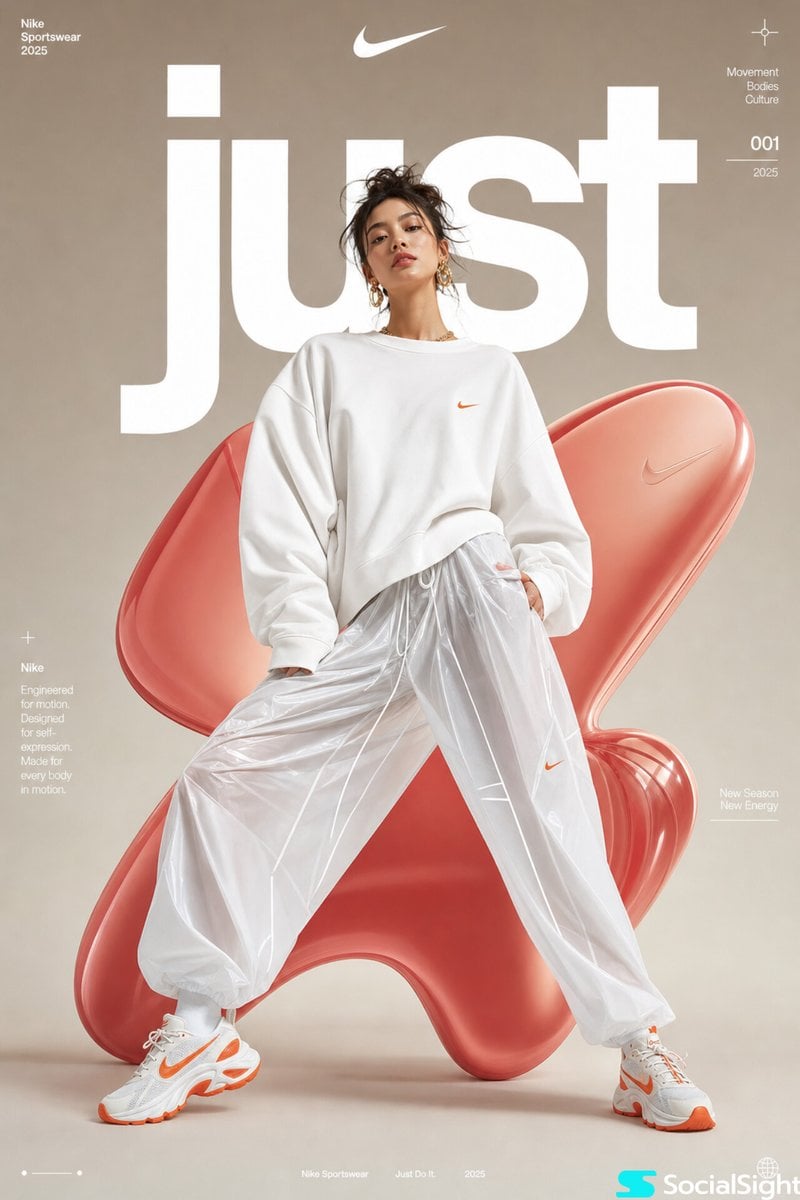
High-fashion futuristic sportswear editorial poster, full-body female model in dynamic wide-leg stance, oversized white minimalist sweatshirt with voluminous sleeves, glossy translucent parachute pants, chunky white-orange athletic sneakers, sleek messy updo hairstyle, gold statement earrings, soft natural makeup, confident editorial expression, studio fashion photography, centered composition, smooth neutral beige gradient background with large abstract glossy red-pink organic 3D inflatable blob shapes behind model, bold oversized white typography “just” partially behind subject, premium athletic brand campaign aesthetic, ultra-clean lighting, soft diffused studio shadows, luxury streetwear advertisement, contemporary magazine cover design, minimalist layout, subtle futuristic graphic microtext, highly polished commercial fashion retouching, sharp focus, cinematic soft contrast, photorealistic, high detail, 8k

Visual concept

Visual concept

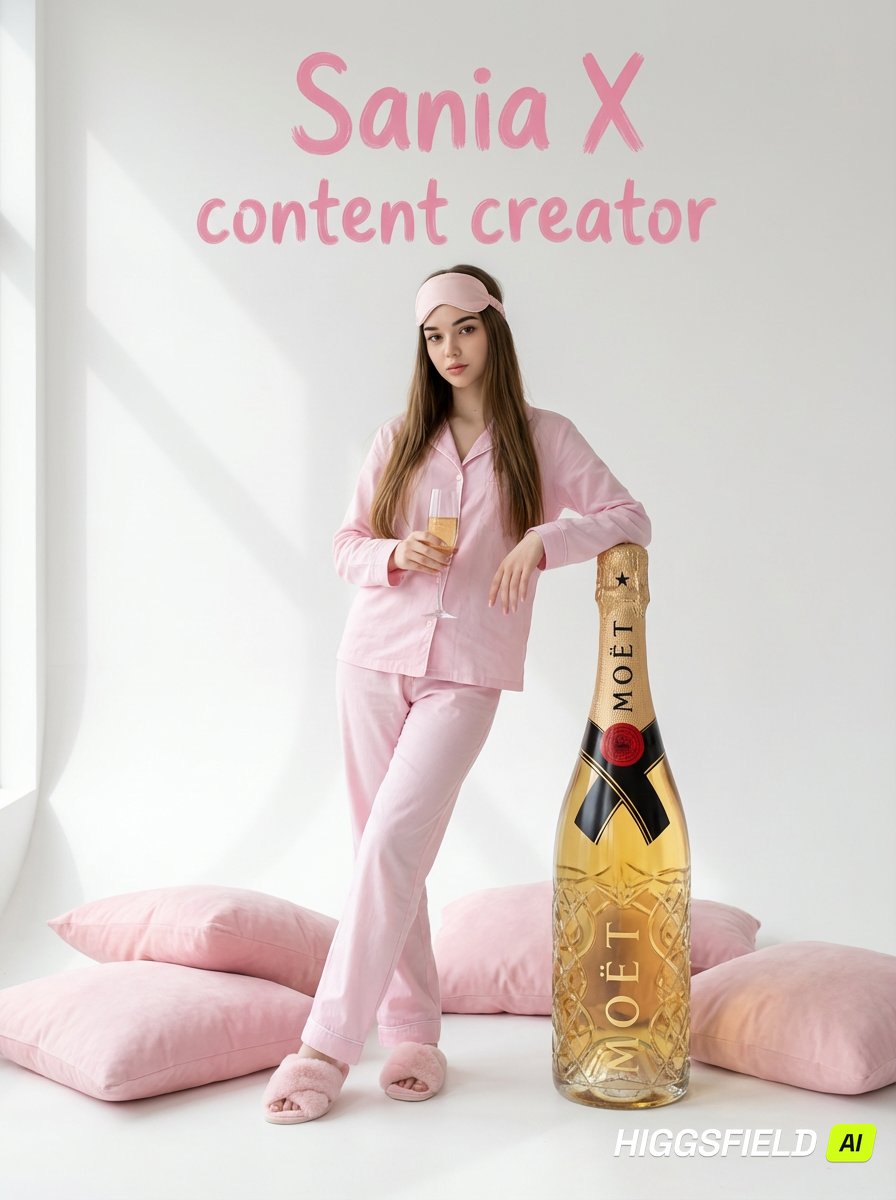
{ "type": "image_generation_prompt", "style": "ultra-realistic professional photography, VOGUE magazine editorial", "resolution": "8K", "camera": { "mode": "portrait", "framing": "close-up portrait with visible upper body", "angle": "straight-on", "focus": "woman in sharp focus", "lens_look": "professional portrait lens", "depth_of_field": "shallow, natural" }, "identity_preservation": { "use_reference_image": true, "alter_face": false, "strict_identity_lock": true, "notes": "Do not change or distort facial features, proportions, expression, or skin texture. Preserve the woman’s face exactly as in the reference image." }, "subject": { "gender": "female", "appearance": { "hair": { "style": "very long, straight, thick hair falling forward", "color": "unchanged from reference" }, "eyes": "beautiful, expressive", "expression": "light, natural smile", "skin": "highly detailed, natural texture, no plastic look" }, "wardrobe": { "outfit": "pastel pink cotton pajama set", "top": "classic button-up pajama shirt", "bottom": "loose-fit pajama pants", "footwear": "soft pastel pink furry slippers", "headwear": "pink sleep mask worn as a headband" }, "pose": { "position": "standing on the floor", "interaction": [ "leaning against a tall decorative glass champagne bottle", "holding a champagne glass in one hand" ], "gaze": "looking directly into the camera" } }, "environment": { "background": { "color": "clean white", "details": "soft shadow cast from a panoramic window" }, "props": { "champagne_bottle": { "brand_style": "Moët-style decorative prop", "description": "tall transparent glass bottle with golden liquid, visually identical to a real champagne bottle but decorative" }, "pillows": { "placement": "on the floor around the woman", "colors": "multiple shades of pink", "size": "large, soft cushions" } } }, "lighting": { "type": "natural soft daylight", "direction": "from panoramic window", "effects": [ "face and body evenly lit", "soft realistic shadows", "no artificial highlights" ] }, "text_overlay": { "content": "Sania X content creator", "language": "English", "style": { "color": "pink paint-like lettering", "look": "hand-painted, clear and accurate", "emphasis": "strong focus on letters and spacing" }, "position": "above the woman", "constraints": [ "no other text", "no watermarks" ] }, "aesthetic": { "mood": "soft, elegant, festive, editorial", "palette": [ "pastel pink", "white", "soft gold" ] }, "quality_constraints": { "prohibitions": [ "do not alter facial expression", "do not redraw or replace facial features", "do not over-blur or plasticize skin or hair", "do not change hairstyle or color", "no artificial filter look", "no hand or finger distortions", "no extra or merged fingers", "no incorrect body proportions", "no duplicate subjects", "no watermarks or unwanted text", "no unnatural anatomy or noise" ] }, "output_goal": "Create an ultra-realistic 8K Vogue-style editorial portrait of a woman in pastel pink pajamas, standing in a clean white studio environment with champagne-themed props, preserving her exact facial identity, featuring the text 'Sania X content creator' above her in pink paint lettering." }
خلاصة في جملة

كيف يبدو هذا النموذج؟

عند اختيار GPT Image 1.5، تحقّق أولًا مما إذا كنت تحتاج إلى التوافق مع نتائج 1.5 الحالية أو إلى إعادة اختبار مطالبات قديمة. تضع Kyeo مساري تحويل النص إلى صورة والتحرير من صورة في الصفحة نفسها، وتعرض نسب الأبعاد ونقطتي medium وhigh وحدّ الصور المرجعية؛ وبما أن OpenAI صنّفت 1.5 نموذجًا سابقًا مهملًا، ينبغي أيضًا مقارنة المهام الجديدة مع GPT Image 2 والنماذج الحالية باستخدام المدخل نفسه.

ما الذي يتقنه؟
GPT Image 1.5 نموذج صور من الجيل السابق أهملته OpenAI. يحتفظ Kyeo بمدخلي التوليد والتحرير، لكن ذلك لا يعني أن OpenAI لا تزال تعده خيارها الحالي المفضل.
لمن يناسب؟
يناسب الحاجة إلى توافق نتائج 1.5 القائمة أو إعادة اختبار نصوص طلب قديمة أو تعديل صور موجودة بصورة موجهة أو تجارب بمراجع متعددة.
لماذا تستخدمه في Kyeo AI؟
GPT Image 1.5 / طريقة التكامل — عند اختيار GPT Image 1.5، تحقّق أولًا مما إذا كنت تحتاج إلى التوافق مع نتائج 1.5 الحالية أو إلى إعادة اختبار مطالبات قديمة. تضع Kyeo مساري تحويل النص إلى صورة والتحرير من صورة في الصفحة نفسها، وتعرض نسب الأبعاد ونقطتي medium وhigh وحدّ الصور المرجعية؛ وبما أن OpenAI صنّفت 1.5 نموذجًا سابقًا مهملًا، ينبغي أيضًا مقارنة المهام الجديدة مع GPT Image 2 والنماذج الحالية باستخدام المدخل نفسه.

المعلمات الأساسية

يساعدك على تقييم مدى ملاءمة النموذج لسيناريو عملك بسرعة.

فئة النموذج
نموذج صور بالذكاء الاصطناعي
الشركة
OpenAI
عائلة النموذج
GPT Image
طريقة التكامل
التكامل الحالي داخل المنصة
طريقة التشغيل
مهمة غير متزامنة
حد نص الطلب
لم يُعلن حد المحارف
حد الرفع
حتى 16 صورة، 10 MB لكل منها

أسماء أخرى

قد يحمل النموذج نفسه أسماء مختلفة في الوثائق الرسمية ونقاشات المجتمع وطبقة تكامل API؛ نجمعها هنا بصورة موحدة.

gpt-image-1.5
gpt-image-1.5-2025-12-16

أسئلة المستخدمين الشائعة

تركز هذه الأسئلة العملية على المهمة وشروط الإدخال والنتيجة التي ينبغي تأكيدها قبل الاختيار.

كيفية استخدام GPT Image 1.5 في Kyeo
متطلبات رفع الصور إلى مسار الصورة إلى صورة في GPT Image 1.5
معلمات النص إلى صورة في GPT Image 1.5
كيفية الاختيار بين medium وhigh في GPT Image 1.5
نقاط GPT Image 1.5 في Kyeo
عدد الصور المرجعية وحجمها في GPT Image 1.5
مقارنة GPT Image 1.5 و4o Image
مقارنة GPT Image 1.5 وNano Banana Pro
هل أُهمل GPT Image 1.5
متى يُحتفظ بـ GPT Image 1.5 بدل الانتقال إلى نموذج صور أحدث

دليل الاختيار

هل ما زلت مترددًا في اختيار النموذج؟ ابدأ بهذه النقاط الأساسية.

1
اختبره أولًا عند وجود سير عمل 1.5 قائم

أما المشاريع الجديدة فينبغي أن تقارن أيضًا GPT Image 2 الحالي من OpenAI، لتجنب اعتماد نموذج مهمل نقطة بداية افتراضية.

2
GPT Image: ملائم للتعديلات الدقيقة

لا يوفر 4o Image في Kyeo حاليًا إلا نصًا إلى صورة قليل النقاط؛ بينما تختلف حدود النسب والدقة والصور المرجعية في Nano Banana Pro. اختبر النص والمواد نفسها، ثم اختر بحسب معدل نجاح المهمة والزمن والنقاط.

3
أقصر مسار للتحقق

تأكد أولًا من فهم التحرير والمناطق المحفوظة واتجاه التعديل، ثم اختبر المهمة نفسها على `high` لمعرفة ما إذا كان تحسن النتيجة يستحق فرق 18 نقطة.

المقارنات الشائعة في البحث

قارن البدائل الشائعة في المهمة نفسها لتوضيح الفروق في المدخلات والتحكم والتكلفة.

الفرق بين GPT Image 1.5 و4o Image
GPT Image 1.5 مقابل 4o Image
الفرق بين GPT Image 1.5 وNano Banana Pro
GPT Image 1.5 مقابل Nano Banana Pro
الفرق بين GPT Image 1.5 وFlux 2 Pro
GPT Image 1.5 مقابل Flux 2 Pro

جدول مقارنة النماذج

هل تتردد بين الخيارات؟ يوضح هذا الجدول أهم الفروق بين النموذج الحالي وبدائله بنظرة واحدة.

حالة النموذج وقدرته داخل المنصة
GPT Image 1.5
نموذج سابق أهملته OpenAI؛ ولا يزال Kyeo يوفر النص إلى صورة والصورة إلى صورة
4o Image
لا يوفر Kyeo حاليًا إلا النص إلى صورة بسعر ثابت قدره 3 نقاط
Nano Banana Pro
يدعم التوليد والتحرير ويوفر نسب أبعاد وخيارات دقة أكثر
حد الصور المرجعية
GPT Image 1.5
حتى 16 صورة JPEG أوPNG أوWebP، لا تتجاوز الواحدة 10 MB
4o Image
لا تقبل صفحة Kyeo الحالية صورًا مرجعية
Nano Banana Pro
حتى 8 صور مرجعية، ويظل الاتساق بحاجة إلى اختبار
معلمات Kyeo الاختيارية
GPT Image 1.5
ثلاث نسب أبعاد ومستويان لـquality هما medium / high
4o Image
ثلاثة خيارات لـsize
Nano Banana Pro
11 نسبة أبعاد مع خيارات للدقة
نقاط Kyeo الحالية
GPT Image 1.5
4 نقاط لـmedium / و22 لـhigh
4o Image
3 نقاط ثابتة / عملية
Nano Banana Pro
8 / 8 / 14 نقطة لـ1K / 2K / 4K على التوالي
أساس الاختيار
GPT Image 1.5
التوافق مع سير عمل 1.5 قائم أو مقارنة الجيل السابق
4o Image
خيار للمقارنة عند الحاجة إلى نص إلى صورة بنقاط قليلة
Nano Banana Pro
خيار للمقارنة عند الحاجة إلى مسار Google أو نسب أكثر

تجربة الاستخدام الفعلية

إرشادات عملية تستند إلى مصادر عامة وحدود الموقع الحالية ومهام تمثل الاحتياجات الشائعة.

تغيرت حالة النموذج الرسمية

GPT Image 1.5 / تغيرت حالة النموذج الرسمية — تصنف OpenAI حاليًا GPT Image 1.5 جيلًا سابقًا ومهملًا، وتعرض GPT Image 2 بوصفه نموذج الصور الحالي. يجب بيان ذلك عند تقديم 1.5، ولا يجوز الاستمرار في وصفه بأنه خيار OpenAI الأساسي.

قدرات OpenAI المباشرة لا تعادل قدرات صفحة Kyeo

GPT Image 1.5 / قدرات OpenAI المباشرة لا تعادل قدرات صفحة Kyeo — لا يتيح Kyeo إلا ثلاث نسب أبعاد ومستويين لـquality، ولا يتيح كل معلمات الصور في الواجهة المباشرة.

تفاصيل القدرات

هل يدعم GPT Image 1.5 النص إلى صورة والصورة إلى صورة؟ / GPT Image 1.5

هل يدعم GPT Image 1.5 النص إلى صورة والصورة إلى صورة؟ / GPT Image 1.5 — يدعم GPT Image 1.5 في Kyeo النص إلى صورة والصورة إلى صورة، مع اختيار ثلاث نسب أبعاد ومستويي الجودة medium/high. يستخدم مسار الصورة إلى صورة حتى 16 صورة مرجعية بصيغة JPG أوPNG أوWebP، لا تتجاوز الواحدة 10 MB؛ وتكلف medium أربع نقاط وhigh اثنتين وعشرين نقطة.

حدود واضحة لعدد الصور المرجعية وصيغها

حدود واضحة لعدد الصور المرجعية وصيغها — حتى 16 صورة، 10 MB لكل منها

تغيّر quality مستوى النقاط أيضًا

تغيّر quality مستوى النقاط أيضًا — يوفر النص إلى صورة والصورة إلى صورة `medium / high` معًا: يحتسب Kyeo 4 / 22 نقطة على التوالي. وquality معلمة للطلب وأساس للفوترة، لا وعدًا بالدقة أو قابلية التسليم.

الاستخدامات المناسبة

GPT Image: إبداع يومي

أنشئ صور منشورات اجتماعية أو تصورات أو مسودات منتجات من المتطلبات النصية، وافحص الكتابة والتخطيط وتفاصيل العلامة التجارية قبل الاستخدام.

تعديلات موجهة على صور موجودة

يمكن اختبار استبدال عنصر أو تعديل الخلفية أو تغيير الألوان أو إعادة تنظيم المشهد؛ وتظل دقة الكتابة والمناطق المحفوظة والتكوين بحاجة إلى فحص بشري في كل صورة.

تجارب بمراجع متعددة

يمكن تقديم مراجع مختلفة للموضوع والخامة والألوان والمشهد، لكن ينبغي البدء بأقل عدد ضروري والتحقق من فهم النموذج لوظيفة كل صورة.

نصائح الموجّه

اكتب تعليمات التحرير بترتيب «حافظ / استبدل / أضف»

اسرد أولًا العناصر التي يجب الحفاظ عليها، ثم ما يجب استبداله وإضافته مع بيان الموضع والعلاقة؛ وافحص بعد التوليد أي تغييرات غير مصرح بها.

وضح وظيفة كل صورة في المراجع المتعددة

اذكر بحسب ترتيب الرفع أي صورة توفر الموضوع أو الملابس أو الخلفية أو الخامة، لتقليل خلط المصادر.

ثبّت المدخلات عند مقارنة medium وhigh

اختبر المستويين بنص الطلب والمراجع نفسيهما، وسجّل التفاصيل والكتابة والتكوين ومعدل الفشل. لا تنتقل إلى المستوى الأعلى إلا إذا كان العائد المختبر يبرر فرق 18 نقطة.

أسباب اختياره

طريقة التشغيل / GPT Image 1.5 — يدعم GPT Image 1.5 في Kyeo النص إلى صورة والصورة إلى صورة، مع اختيار ثلاث نسب أبعاد ومستويي الجودة medium/high. يستخدم مسار الصورة إلى صورة حتى 16 صورة مرجعية بصيغة JPG أوPNG أوWebP، لا تتجاوز الواحدة 10 MB؛ وتكلف medium أربع نقاط وhigh اثنتين وعشرين نقطة.
حد الرفع — حتى 16 صورة، 10 MB لكل منها
استهلاك النقاط — نقاط medium وhigh واضحة، مما يسهل مقارنة التكلفة بالمدخل نفسه.
طريقة التكامل / GPT Image 1.5 — يناسب اختبارات الانحدار والمقارنة عند ترحيل سير عمل 1.5 قائم.

ما يجب معرفته قبل الاستخدام

طريقة التشغيل / GPT Image 1.5 — صنفت OpenAI ‏GPT Image 1.5 نموذجًا مهملًا من الجيل السابق، وينبغي تقييم النماذج الحالية مع المهام الجديدة.
GPT Image 1.5 / نسبة العرض إلى الارتفاع — لا يتيح Kyeo إلا ثلاث نسب أبعاد ومستويين لـquality، ولا يتيح كل معلمات الصور في الواجهة المباشرة.
استهلاك النقاط — تكلفة high أعلى بوضوح، فلا يناسب بدء التجارب الدفعيّة به.
طريقة التكامل / GPT Image 1.5 — قد يظل GPT Image ينتج كتابة غير واضحة أو اتساقًا ضعيفًا بين العمليات أو انحرافات في التخطيط؛ ولا يلغي high هذه القيود.

المعلمات القابلة للضبط

يساعدك على تقييم مدى ملاءمة النموذج لسيناريو عملك بسرعة.

نسبة العرض إلى الارتفاع
اختياري
نوع المعلمة: select
القيمة الافتراضية: 1:1
1:1
2:3
3:2
الجودة
اختياري
نوع المعلمة: select
القيمة الافتراضية: medium
medium (قياسي)
high (جودة عالية)

استهلاك النقاط

4-22 نقطة / عملية

يكلف مستوى `medium` في Kyeo AI أربع نقاط لكل عملية، ويكلف `high` اثنتين وعشرين نقطة.

نصيحة لتوفير النقاط

قبل توليد الصور أو الفيديو على دفعات، يُنصح بإجراء اختبار A/B بالمواد نفسها بين النموذج الحالي وبدائله من النوع نفسه، ثم بدء التوليد على دفعات بعد تأكيد النتيجة لتجنب هدر النقاط.

الأسئلة الشائعة

نماذج مشابهة موصى بها

لم تقرر بعد؟ قارن أيضًا بهذه البدائل المشابهة.

4o Image

4o Image / تصنيف القدرة — لا تقدم الصفحة الحالية سوى النسب `1:1 / 3:2 / 2:3`، بسعر ثابت قدره 3 نقاط لكل عملية، ولا تقبل صورة مرجعية.

نموذج صور بالذكاء الاصطناعي
3 نقاط / عملية

Nano Banana Pro

يدعم Nano Banana Pro في Kyeo AI توليد الصور من النص وتحرير الصور المرجعية، مع اختيار إخراج 1K أو2K أو4K. تبلغ تكلفة 1K و2K ثماني نقاط لكل عملية، و4K أربع عشرة نقطة؛ وتمثل الدقة مستوى حجم الإخراج، لا ضمانًا للجودة أو الدقة أو التفاصيل.

نموذج لتوليد الصور وتحريرها بالذكاء الاصطناعي
8–14 نقطة / عملية

Flux 2 Pro

Flux 2 Pro / تصنيف القدرة — Flux 2 Pro — تُحتسب تكلفة النص إلى صورة وتحرير الصور بحسب الدقة: خمس نقاط لـ1K وسبع نقاط لـ2K. 3–5,000 محرف; 8 صور.

نموذج صور بالذكاء الاصطناعي
5-7 نقاط / عملية

مصادر المعلومات

أُعد محتوى الصفحة استنادًا إلى مواد الشركة المطوّرة ووصف عائلة النموذج وإعداد التكامل في منصة Kyeo AI.

ملاحظة المصدر

يدعم GPT Image 1.5 في Kyeo النص إلى صورة والصورة إلى صورة، مع اختيار ثلاث نسب أبعاد ومستويي الجودة medium/high. يستخدم مسار الصورة إلى صورة حتى 16 صورة مرجعية بصيغة JPG أوPNG أوWebP، لا تتجاوز الواحدة 10 MB؛ وتكلف medium أربع نقاط وhigh اثنتين وعشرين نقطة.

آخر تحديث: 2026-07-20
OpenAI: صفحة نموذج GPT Image 1.5
رسمي
عرض المصدر الأصلي
OpenAI: دليل توليد الصور
رسمي
عرض المصدر الأصلي
OpenAI: تسعير API
رسمي
عرض المصدر الأصلي