الانتقال إلى المحتوى الرئيسي
نموذج صور بالذكاء الاصطناعي
xAI
Grok Imagine

Grok Imagine

يوفر Grok Imagine في Kyeo AI النص إلى صورة وتحرير صورة واحدة: يستدعي وضع النص إلى صورة عند عدم الرفع، وينتقل إلى وضع تحرير صورة واحدة بعد رفع صورة واحدة. يتيح النص إلى صورة الاختيار بين الوضع القياسي بأربع نقاط ووضع أولوية الجودة بخمس نقاط؛ أما صورة إلى صورة فبسعر ثابت قدره أربع نقاط ولا يعرض هذا المفتاح.

تصنيف القدرة
نص إلى صورة وصورة إلى صورة
استهلاك النقاط
4-5 نقاط / عملية
حد نص الطلب
5,000 محرف
حد الرفع
صورة واحدة
تعرّف عليه في 30 ثانية
  • وضع نص إلى صورة بلا رفع، وانتقال تلقائي إلى تحرير صورة واحدة عند رفعها
  • فوترة `enable_pro=false/true` في النص إلى صورة عند 4/5 نقاط، وصورة إلى صورة عند 4 نقاط ثابتة
  • يقبل التحرير صورة JPG أوPNG أوWebP واحدة بحد حالي قدره 10 MB
  • فحص المحتوى: الافتراضي: متوقف.

عمليات البحث الشائعة: كيفية توليد صورة بـ Grok Imagine في Kyeo · كيف يعمل Grok Imagine عند إدخال نص طلب فقط · أي وضع Grok Imagine يُستدعى بعد رفع صورة واحدة

أمثلة

Visual concept

Visual concept

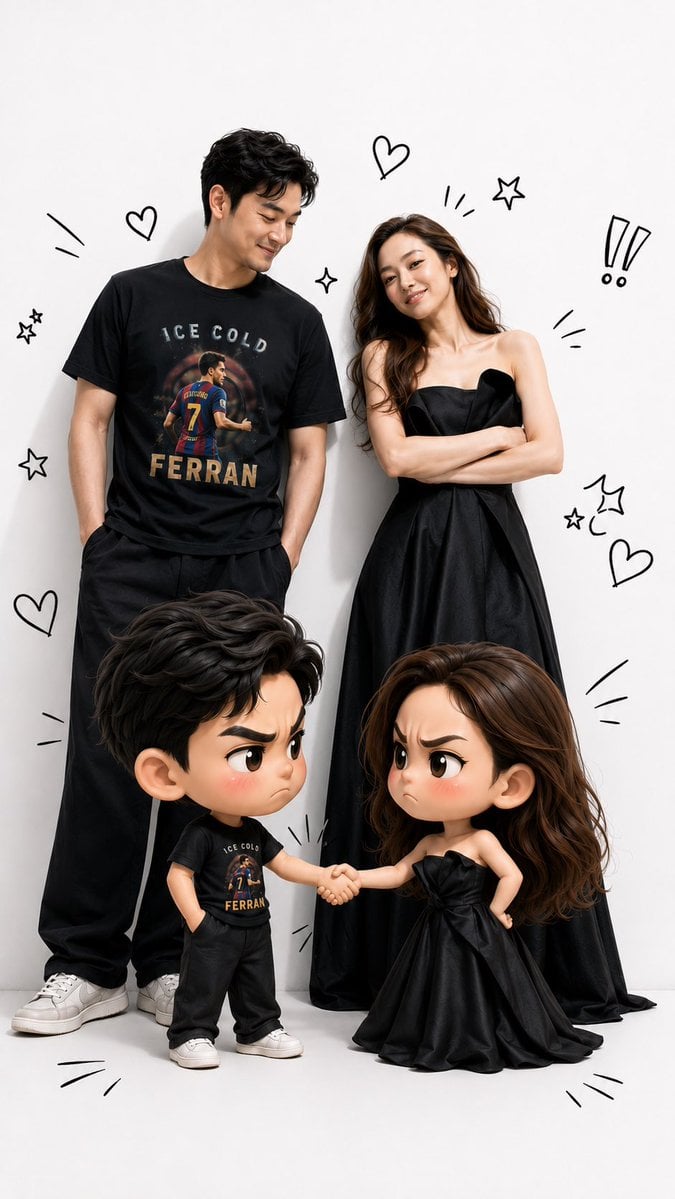
Use the uploaded face photo as the primary facial reference and the uploaded T-shirt photo as the primary clothing reference. Preserve the person’s facial identity exactly, including face shape, skin tone, hairstyle, natural expression, and all distinctive facial features. Also preserve the T-shirt design exactly as shown in the reference, without changing its color, pattern, logo, print, or any other details. Create a hyper-realistic illustration inspired by the attached reference image. A grown man stands on the left and a grown woman stands on the right. In front of them are adorable 3D chibi versions of each character. The two chibi characters are shaking hands while making funny “arguing” expressions—furrowed eyebrows, pouting faces, and slightly blushing cheeks—yet they remain cute, playful, and entertaining. The adult versions smile warmly as they watch the amusing interaction between their chibi counterparts. The adult faces must match the uploaded face references exactly, and the clothing—especially the man’s T-shirt—must be identical to the uploaded reference, preserving every design detail faithfully. Use a premium visual style that seamlessly blends photorealistic humans with high-quality 3D chibi characters. The chibi characters should have oversized heads, large expressive eyes, small bodies, and an irresistibly cute appearance. Add black hand-drawn doodles around the characters, such as hearts, exclamation marks, expressive lines, stars, motion effects, and other decorative sketch elements, similar to those in the reference image. Use soft studio lighting, a clean white studio background, vibrant colors, ultra-sharp details, soft shadows, cinematic lighting, sharp focus, premium-quality rendering, ultra-realistic textures, ultra-detailed finishing, and true 8K quality. The composition should be full-body, symmetrical, and in a vertical 9:16 aspect ratio, making it ideal for TikTok, Instagram Reels, and YouTube Shorts. Ensure the final result maintains an extremely accurate resemblance to the original face references and keeps the T-shirt design perfectly identical to the reference, without adding any accessories or altering any attributes that are not present in the original photos.
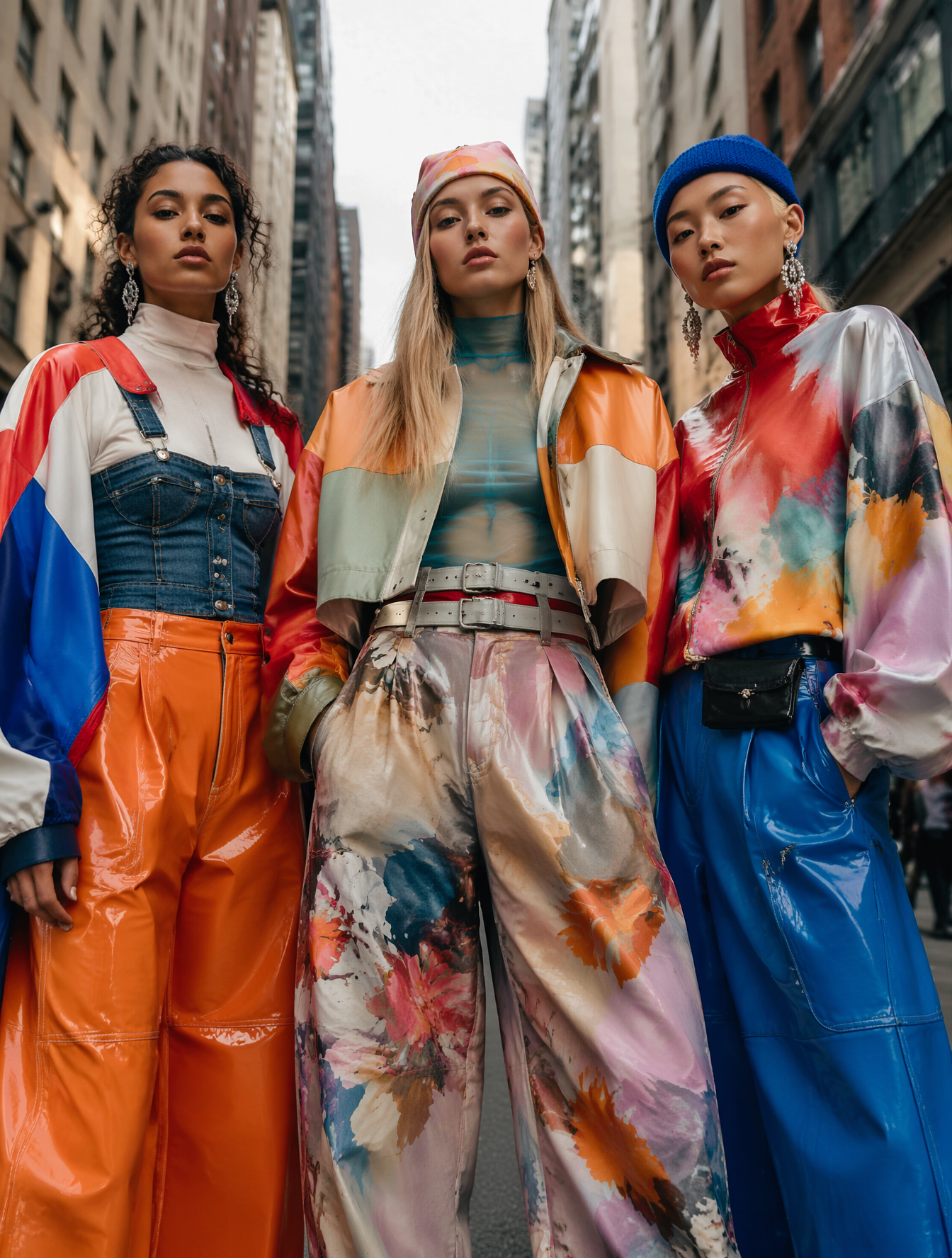
Fashion portrait

Fashion portrait

Visual concept

Visual concept

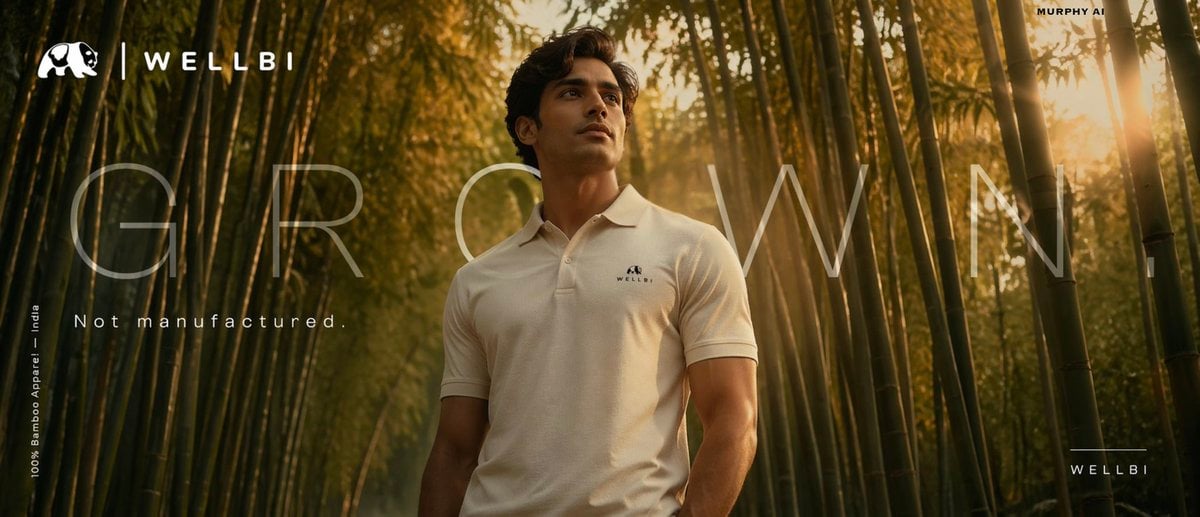
Cinematic product poster for WELLBI, India's premium bamboo apparel brand. SCENE: A lone young Indian man emerges from a dense, luminous bamboo forest at golden hour. Wears a perfectly draped, ultra-clean ivory WELLBI bamboo polo. Bamboo stalks alive with warm amber and jade light filtering through canopy. VISUAL STORYTELLING: The bamboo forest IS the fabric — seamless living metaphor. Thin golden light rays land on the polo, suggesting softness and breathability. COMPOSITION: Low angle, subject centre-frame, bamboo framing both sides like a natural arch. Horizon at lower third. Cinematic 2.39:1 anamorphic crop. — TYPOGRAPHY SYSTEM — Hero line: "GROWN." — single word, massive scale, Helvetica Neue Ultra Light, all caps, extreme letter-spacing +600, ghost white at 15% opacity overlaid across the ENTIRE poster width — architectural, not decorative. Sub-line: "Not manufactured." — set in sharp Aktiv Grotesk Regular, sentence case, 18pt, tracking +80, positioned directly below hero word. White. Full opacity. Feels like a whisper after a shout. Brand name: "WELLBI" — bottom right corner. Neutral Grotesk Medium, all caps, tracking +300, 11pt. Separated by a 0.5pt hairline rule above it, 40px wide. Restrained. Premium. Legal/descriptor: "100% Bamboo Apparel — India" — micro text, 7pt, tracking +150, bottom left. Rotated 90° vertical. Acts as a structural edge element, not an afterthought. COLOUR PALETTE: Deep jungle green, warm amber, ivory white, earth brown. LIGHTING: ARRI Alexa Mini LF — golden hour rim, diffused fill, subtle lens flare grazing the polo fabric. MOOD: Grounded luxury. Like a Loro Piana campaign shot in Assam. CAMERA: 85mm f/1.4, shallow DOF, anamorphic lens flare. Editorial brand poster for WELLBI sustainable Indian fashion. SCENE: Extreme close-up of a weathered artisan's hands spinning bamboo thread. Blurred WELLBI tee draped elegantly in background. Warm-lit rural Indian workshop — clay walls, raw natural light. VISUAL STORYTELLING: Rough hands against silk-smooth bamboo fabric. Heritage craftsmanship. The contrast IS the message. COMPOSITION: Split tonal — dark warm left (hands, workshop), light cream right (garment). Hands at cross-point. Leica 50mm documentary realism. — TYPOGRAPHY SYSTEM — Hero line: "ONE LAKH HANDS." — Canela Display Thin, mixed case, enormous scale, set across 80% of poster width. The word "HANDS" drops to second line, indented right — staggered layout creates visual rhythm like musical notation. Counter-line: Below "HANDS", flush right: "One fabric." — same Canela Thin but 28pt, italic. The tonal shift from all-caps to italic sentence case creates emotional contrast — like going from statement to confession. Brand stamp: "WELLBI" centred bottom — pressed as if letterpress embossed. Freight Display Pro Bold, tracked tight at -20. Earthen cream on warm brown. Feels physical. Tactile. Descriptor line: "Handcrafted bamboo apparel since 2021 — India" — 9pt, Suisse Int'l Light, tracking +200, full width, very bottom edge. Reads like a footnote on a heritage certificate. COLOUR: Terracotta, aged ivory, saffron gold, deep walnut. LIGHTING: Soft natural window light, warm practical lamp. Documentary-editorial quality. MOOD: Deeply human. D&AD craft award energy. CAMERA: Leica 50mm Summilux, skin texture visible, documentary realism with fashion editorial polish.

Visual concept

Visual concept

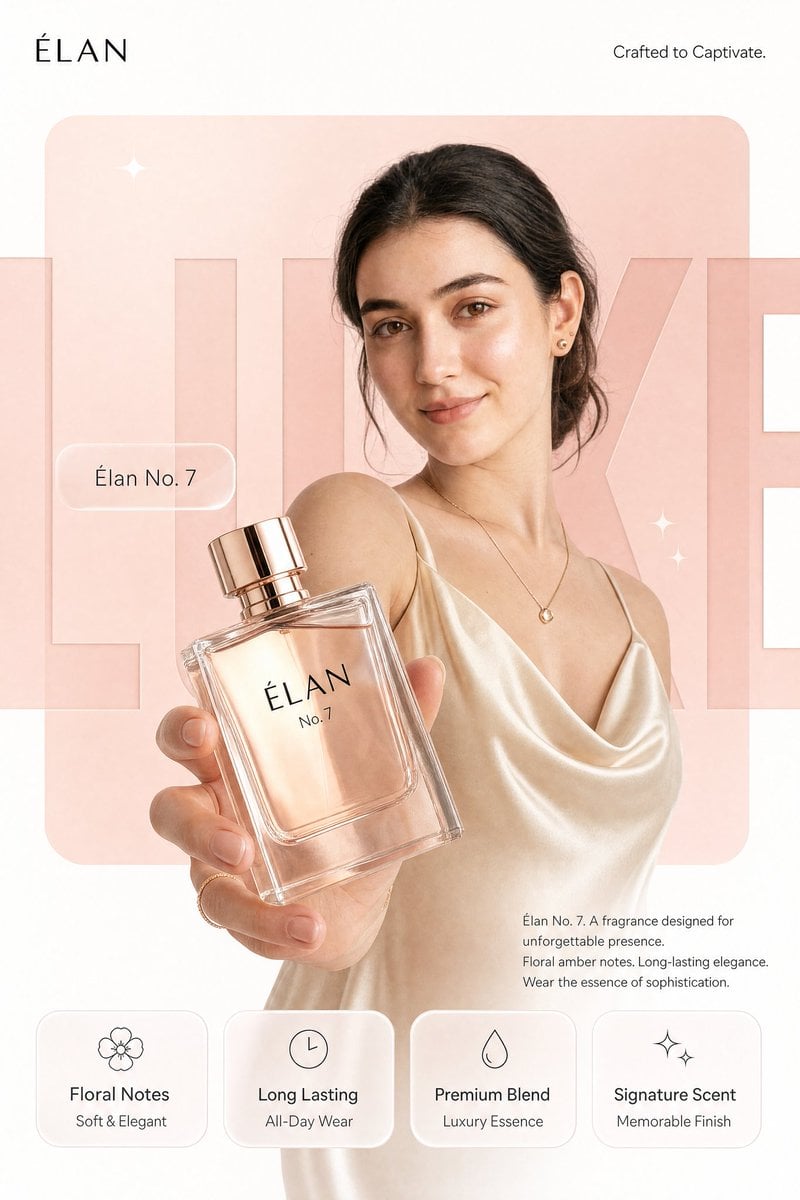
REFERENCE IMAGE INSTRUCTION: Use the uploaded product photo as the exact source of truth for the product's appearance, color, finish, branding, and form factor. Do not invent or alter any product detail. Reproduce it with photorealistic precision. --- Create a photorealistic premium [PRODUCT CATEGORY] campaign poster in a 4:5 vertical aspect ratio. Design it as a clean global OOH, digital, and social campaign layout with strict grid alignment, premium white space, and precise typography. The campaign idea is "[CAMPAIGN TAGLINE]," but do not render that phrase as visible text. Use a strict 12-column poster grid with 6% outer margins. Keep all text aligned to this grid. The image has four layers: background shape, giant background typography, subject/product photography, and clean graphic text overlays. BACKGROUND: Pure matte white canvas. Place one large rounded-rectangle block behind the subject, occupying roughly 70% of the poster height and 76% of the width, centered slightly above the middle. The block uses a controlled [PRIMARY BRAND COLOR] gradient, glowing gently from top-left to bottom-right. Behind the subject and product, place giant cropped typography reading "[BACKGROUND HERO WORD]" in ultra-bold geometric sans-serif letters. The word is a background layer only: huge, partially cropped by the frame edges, wide letter spacing, darker [PRIMARY BRAND COLOR] than the rectangle, subtle embossed depth, soft shadow, and low enough contrast that it does not fight the product. SUBJECT AND PRODUCT: [DESCRIBE MODEL OR SUBJECT — e.g., "a female model with a clean editorial look, neutral confident expression, natural slightly wind-touched hair, muted off-white outfit, and [ACCENT COLOR] jacket"]. Shoot from a slightly low hero angle. Body angled for depth, face turned toward the viewer with direct eye contact. One hand extends toward the camera holding the product from the uploaded reference image. The product is the dominant foreground object, slightly tilted to reveal [KEY PRODUCT DETAIL — e.g., "the triple camera system, brushed titanium edges, and centered brand logo"]. Keep the product sharp with realistic surface reflections, material texture, faint micro-details, and soft bloom around premium features. Keep the model's face readable behind it. LIGHTING: Soft studio key light from front-left, warm rim light from the right, and subtle [PRIMARY BRAND COLOR] bounce from the background block. Skin remains natural and non-airbrushed with realistic catchlights. Product edges have clean [MATERIAL FINISH — e.g., "metallic / matte / glossy"] highlights. Shadows are soft and controlled. TYPOGRAPHY OVERLAY: All text must be flat, crisp, perfectly aligned graphic typography — not painted onto the scene. Render exactly these text elements once, with no extra text: Top left, small black logo: [BRAND LOGO NAME/MARK] Top right, thin sans-serif: "[BRAND SUB-TAGLINE — e.g., 'Built for Apple Intelligence.']" Mid left, glassmorphism pill: "[PRODUCT NAME — e.g., 'iPhone 17 Pro']" Large background type: "[BACKGROUND HERO WORD]" Bottom right body copy, small clean sans-serif: "[PRODUCT NAME]. [POWER STATEMENT — one sentence.] [FEATURE 1]. [FEATURE 2]. [CLOSING LINE — e.g., 'Designed for what's next.']" BOTTOM FEATURE STRIP: Place four equal-width glass-white rounded cards along the bottom, aligned to the grid, same height, same spacing, same baseline alignment. Each card has one minimal line icon above the heading. Render exactly: Card 1: "[FEATURE HEADING 1]" / "[FEATURE SUBLINE 1]" Card 2: "[FEATURE HEADING 2]" / "[FEATURE SUBLINE 2]" Card 3: "[FEATURE HEADING 3]" / "[FEATURE SUBLINE 3]" Card 4: "[FEATURE HEADING 4]" / "[FEATURE SUBLINE 4]" GRAPHIC DETAILS: Two or three small sparkle icons only, subtle grain, soft glassmorphism, controlled [PRIMARY BRAND COLOR]-white-[ACCENT COLOR] palette, no neon, no oversaturation.

Visual transformation

Visual transformation

Visual concept

Visual concept

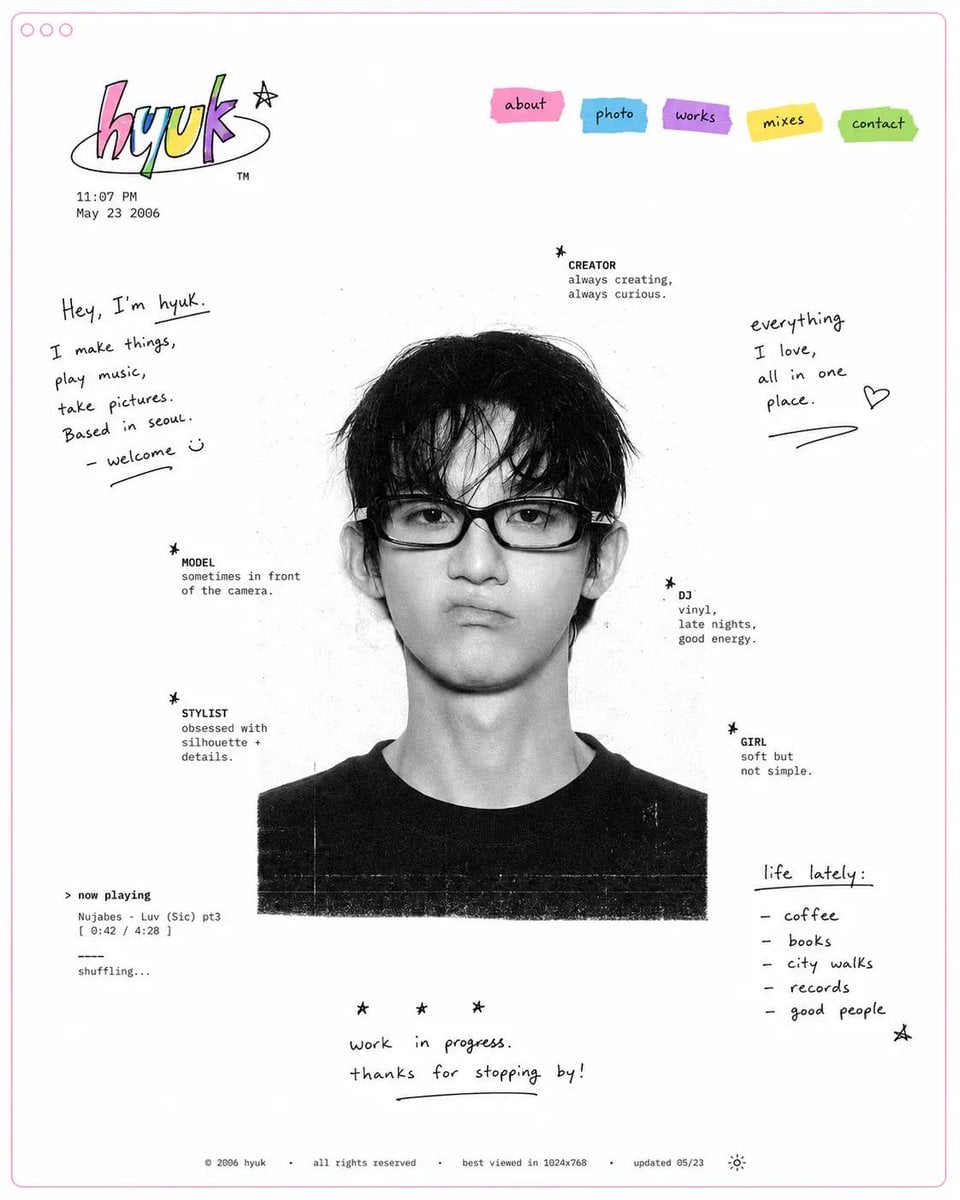
Design a minimal early-internet personal profile webpage / digital portfolio landing page on a large white canvas with generous negative space and a thin pastel pink browser-style frame. In the center, place a black-and-white editorial portrait of [SUBJECT], featuring soft film grain, subtle scanner texture, and low-contrast photographic tones. Surround the portrait with scattered profile metadata labels and small star-bullet elements arranged asymmetrically, resembling a playful personal résumé. Include descriptors such as: ✦ creator ✦ model ✦ stylist ✦ DJ ✦ girl ✦ photographer ✦ collector ✦ dreamer In the top-left corner, create a colorful hand-drawn logo or personal brand mark. Beneath it, add a tiny timestamp and date in a small system font, mimicking an old personal homepage. In the top-right corner, place irregular sticker-like navigation tabs in bright accent colors (pink, cyan, purple, yellow, and green). Use simple labels such as: HOME ABOUT WORK DIARY LINKS Scatter handwritten marker-style notes, introductions, personal thoughts, and lifestyle captions throughout the empty space. Examples: "currently making things online" "welcome to my homepage" "music, fashion, internet" "updated today" "living between projects" Maintain an anti-grid editorial layout with intentionally imperfect spacing and playful placement. Mix tiny system fonts, handwritten script, and casual notebook-style annotations. Keep the portrait entirely monochrome while reserving color only for the logo, navigation stickers, and a few small graphic accents.

خلاصة في جملة

كيف يبدو هذا النموذج؟

تجمع هذه الصفحة الاستخدام الفعلي لـGrok Imagine في Kyeo: يمكنك توليد صورة من نص أو رفع صورة واحدة تملك حق استخدامها وتحريرها. يتيح النص إلى صورة خمس نسب ثابتة ووضعَي معالجة؛ ويستخدم صورة إلى صورة حد نص الطلب نفسه، لكنه يخفي النسبة و`enable_pro`. راجع حدود الإدخال والفوترة قبل الاختيار، ولا تعتبر تسويق المنتج الخارجي قدرة متاحة تلقائيًا في التكامل الحالي.

ما الذي يتقنه؟
لا يقبل مدخل التحرير سوى صورة مرجعية واحدة، لذلك يختلف نمط الإدخال فيه عن النماذج التي تدعم عدة مراجع.
لمن يناسب؟
يلائم توليد الصور من النص، كما يلائم طلب تعديلات واضحة حول صورة قائمة، مثل تغيير المشهد أو التكوين أو الألوان أو المعالجة البصرية. يجب فحص كل نتيجة، فلا يكفي اسم الوضع لتوقع الجودة.
لماذا تستخدمه في Kyeo AI؟
يعرض Kyeo قبل الإرسال النسب المتاحة ووضع المعالجة وحد نص الطلب وحد الرفع والنقاط، وينتقل تلقائيًا إلى وضع التحرير عند رفع صورة.

المعلمات الأساسية

يساعدك على تقييم مدى ملاءمة النموذج لسيناريو عملك بسرعة.

فئة النموذج
نموذج صور بالذكاء الاصطناعي
الشركة
xAI
عائلة النموذج
Grok Imagine
طريقة التكامل
التكامل الحالي داخل المنصة
طريقة التشغيل
مهمة غير متزامنة
حد نص الطلب
5,000 محرف
حد الرفع
صورة واحدة

أسماء أخرى

قد يحمل النموذج نفسه أسماء مختلفة في الوثائق الرسمية ونقاشات المجتمع وطبقة تكامل API؛ نجمعها هنا بصورة موحدة.

Grok Imagine text to image
Grok Imagine image editing

أسئلة المستخدمين الشائعة

تركز هذه الأسئلة العملية على المهمة وشروط الإدخال والنتيجة التي ينبغي تأكيدها قبل الاختيار.

كيفية توليد صورة بـ Grok Imagine في Kyeo
كيف يعمل Grok Imagine عند إدخال نص طلب فقط
أي وضع Grok Imagine يُستدعى بعد رفع صورة واحدة
ما الفرق بين تشغيل `enable_pro` وإيقافه
كم نقطة يستهلك النص إلى صورة وصورة إلى صورة في Grok Imagine
كم صورة يمكن رفعها لتحرير Grok Imagine
هل أختار Grok Imagine أمGPT Image 2
هل أختار Grok Imagine أمNano Banana 2
ما حدود تحرير صورة واحدة في Grok Imagine
ما صيغ الصور التي يمكن رفعها إلى Grok Imagine

دليل الاختيار

هل ما زلت مترددًا في اختيار النموذج؟ ابدأ بهذه النقاط الأساسية.

1
حدد نسبة الصورة أولًا عند التوليد من نص

حدد نسبة الصورة أولًا عند التوليد من نص — استخدم النص إلى صورة بلا رفع. اختر `1:1 / 2:3 / 3:2 / 16:9 / 9:16` بحسب الاستخدام، ثم اشرح الموضوع والمشهد والتكوين وما يجب تجنبه.

2
ارفع صورة واحدة مصرحًا بها للتحرير

ارفع صورة واحدة مصرحًا بها للتحرير — ينتقل Kyeo بعد الرفع إلى صورة إلى صورة ويخفي النسبة و`enable_pro` الخاصين بالتوليد. لا تقبل الواجهة حاليًا سوى صورة JPG أوPNG أوWebP واحدة لا تتجاوز 10 MB.

3
عامل وضعَي المعالجة كخيارين للمقارنة

عامل وضعَي المعالجة كخيارين للمقارنة — يعيد صورتين مقابل 4 أرصدة لكل طلب قياسي لتحويل النص إلى صورة. يعيد 4 صور مقابل 5 أرصدة لكل طلب جودة لتحويل النص إلى صورة.

المقارنات الشائعة في البحث

قارن البدائل الشائعة في المهمة نفسها لتوضيح الفروق في المدخلات والتحكم والتكلفة.

ما الفرق في حدود الإدخال بين Grok Imagine وGPT Image 2؟
Grok Imagine مقابل GPT Image 2: ما الفرق في المعلمات والسعر؟
ما الفرق في عناصر التحكم بين Grok Imagine وNano Banana 2؟
Grok Imagine مقابل Nano Banana 2: ما الفرق في الصور المرجعية والنقاط؟
ما الفرق في حد الصور المرجعية بين Grok Imagine وFlux 2 Flex؟
Grok Imagine مقابل Flux 2 Flex: ما الفرق في التحكم بالدقة؟

جدول مقارنة النماذج

هل تتردد بين الخيارات؟ يوضح هذا الجدول أهم الفروق بين النموذج الحالي وبدائله بنظرة واحدة.

الإدخال والوضع
Grok Imagine
نص إلى صورة بلا رفع؛ وتحرير صورة واحدة عند رفع صورة
GPT Image 2
التوليد بلا صور وتحرير حتى 16 صورة مرجعية في الصفحة نفسها
Nano Banana 2
التوليد بلا صور وحتى 14 مرجعًا عند الرفع
حد الصور المرجعية
Grok Imagine
صورة واحدة كحد أقصى في صفحة Kyeo
GPT Image 2
حتى 16 صورة في صفحة Kyeo
Flux 2 Flex
حتى 8 صور في صفحة Kyeo
فوترة Kyeo الحالية
Grok Imagine
النص إلى صورة 4/5 نقاط؛ وصورة إلى صورة 4 نقاط ثابتة
GPT Image 2
3/5/8 نقاط لدقة 1K/2K/4K
Nano Banana 2
5/8/12 نقطة لدقة 1K/2K/4K
عناصر التحكم الظاهرة للنص إلى صورة
Grok Imagine
خمس نسب ثابتة ووضع المعالجة `enable_pro`
GPT Image 2
نسبة الأبعاد ودقة 1K/2K/4K
Flux 2 Flex
نسبة الأبعاد ودقة 1K/2K
عناصر التحكم في وضع التحرير
Grok Imagine
فحص المحتوى: الافتراضي: متوقف. صورة واحدة.
GPT Image 2
الإبقاء على اختياري النسبة والدقة
Nano Banana 2
الإبقاء على اختيارات النسبة والدقة والصيغة وتعزيز البحث

تجربة الاستخدام الفعلية

إرشادات عملية تستند إلى مصادر عامة وحدود الموقع الحالية ومهام تمثل الاحتياجات الشائعة.

ما عناصر التحكم التي تستحق الفحص قبل الضغط على التشغيل؟

قبل تشغيله، الفحوصات الرئيسية هي شكل الإطار وجودة إدخال المرجع. هذه عادة هي الأجزاء التي تحدد ما إذا كانت النتيجة الأولى قريبة بما يكفي لمواصلة التكرار هنا نحو مرئيات مفاهيمية جريئة واتجاه فني تجريبي من دون جعل الإعداد أثقل من اللازم.

حد ملفات واضح لتحرير صورة واحدة / Grok Imagine

حد ملفات واضح لتحرير صورة واحدة / Grok Imagine — يقبل التحرير صورة JPG أوPNG أوWebP واحدة بحد حالي قدره 10 MB

تفاصيل القدرات

اختيار الوضع تلقائيًا بحسب رفع الصورة

اختيار الوضع تلقائيًا بحسب رفع الصورة — يُرسل الطلب إلى وضع النص إلى صورة بلا صورة، وينتقل إلى وضع تحرير صورة واحدة عند رفع صورة واحدة. يشترك الوضعان في الصفحة نفسها، لكنهما يختلفان في عناصر التحكم والسعر.

وضعا معالجة للنص إلى صورة

وضعا معالجة للنص إلى صورة — يعيد صورتين مقابل 4 أرصدة لكل طلب قياسي لتحويل النص إلى صورة. يعيد 4 صور مقابل 5 أرصدة لكل طلب جودة لتحويل النص إلى صورة.

حد ملفات واضح لتحرير صورة واحدة

حد ملفات واضح لتحرير صورة واحدة — يسمح Kyeo حاليًا بصورة JPG أوPNG أوWebP واحدة لا تتجاوز 10 MB. يكلف التحرير أربع نقاط ثابتة، ولا تعرض الواجهة نسبة الأبعاد أو اختيار وضع المعالجة.

الاستخدامات المناسبة

إنشاء صورة بنسبة محددة من النص

اختر نسبة ثابتة لتسليم مربع أو عمودي أو أفقي، ثم صف الموضوع والبيئة والعدسة والإضاءة وعلاقات التخطيط.

تعديل صورة قائمة

ارفع صورة واحدة تملك إذن استخدامها، وحدد العناصر التي يجب الحفاظ عليها وما ينبغي استبداله أو إضافته أو حذفه أو تعديله.

مقارنة أولوية السرعة بأولوية الجودة

اختبر الوضعين بنص الطلب نفسه، واختر وفق زمن التوليد والنقاط والنتيجة الفعلية؛ ولا تمثل عينة واحدة ضمانًا لاتساق النتائج اللاحقة.

نصائح الموجّه

رتب الوصف حسب الأهمية

اكتب الموضوع والحركة أولًا، ثم المشهد والتكوين والإضاءة والألوان والوسيط. وإذا كان ظهور نص ضروريًا، فتحقق من الإملاء وشكل الحروف والتخطيط ولا تفترض أن النموذج سيعيده بدقة.

افصل في تعليمات التحرير بين ما يبقى وما يتغير

اذكر بوضوح الموضوعات أو البنية أو النصوص التي يجب الحفاظ عليها، والمناطق المطلوب استبدالها أو إعادة رسمها. قد تبعد التعليمات المتعارضة النتيجة عن المتوقع، لذلك راجعها يدويًا بعد الإرسال.

اختر نسبة التسليم قبل وصف التكوين

يتيح النص إلى صورة `1:1 / 2:3 / 3:2 / 16:9 / 9:16`. حدد الاستخدام النهائي أولًا ثم صف موضع الموضوع والفراغ؛ ولا يظهر هذا الاختيار بعد رفع صورة.

أسباب اختياره

تبديل تلقائي بين وضع التوليد والتحرير في الصفحة نفسها بحسب رفع صورة.
سعر النص إلى صورة وخمس نسب ووضعا المعالجة ظاهرة قبل الإرسال.
يدعم تحرير صورة واحدة بصيغ JPG وPNG وWebP مع حد 10 MB واضح.
يمكن تأكيد تكلفة النص إلى صورة وصورة إلى صورة قبل التشغيل.

ما يجب معرفته قبل الاستخدام

لا يقبل صورة إلى صورة حاليًا سوى صورة واحدة، ولا يدعم عدة مراجع.
يختفي كل من النسبة و`enable_pro` بعد الرفع، ويُرسل وضع التحرير بأربع نقاط ثابتة.
لا يغني مفتاح فحص المحتوى عن المراجعة البشرية لحقوق النشر والخصوصية والسلامة.
عادة ما تزيد تقلبات إعادة العمل كلما كان الأسلوب أقوى.

المعلمات القابلة للضبط

يساعدك على تقييم مدى ملاءمة النموذج لسيناريو عملك بسرعة.

نسبة العرض إلى الارتفاع
اختياري
نوع المعلمة: select
القيمة الافتراضية: 1:1
1:1
2:3
3:2
16:9
9:16
فحص المحتوى
اختياري
نوع المعلمة: مفتاح تبديل
الافتراضي: متوقف
متوقف
مفعّل
وضع التوليد
اختياري
نوع المعلمة: select
القيمة الافتراضية: false
قياسي
جودة

استهلاك النقاط

4-5 نقاط / عملية

يكلف النص إلى صورة 4 نقاط عند إيقاف `enable_pro` و5 نقاط عند تشغيله؛ ويكلف صورة إلى صورة 4 نقاط ثابتة.

نصيحة لتوفير النقاط

قبل توليد الصور أو الفيديو على دفعات، يُنصح بإجراء اختبار A/B بالمواد نفسها بين النموذج الحالي وبدائله من النوع نفسه، ثم بدء التوليد على دفعات بعد تأكيد النتيجة لتجنب هدر النقاط.

الأسئلة الشائعة

نماذج مشابهة موصى بها

لم تقرر بعد؟ قارن أيضًا بهذه البدائل المشابهة.

GPT Image 2

GPT Image 2 / تصنيف القدرة — يدعم GPT Image 2 في Kyeo AI توليد الصور من النص وتحرير الصور المرجعية. ويحتسب Kyeo التكلفة حسب دقة الإخراج: 3 نقاط لـ1K، و5 نقاط لـ2K، و8 نقاط لـ4K.

نموذج لتوليد الصور وتحريرها بالذكاء الاصطناعي
3–8 نقاط/عملية

Nano Banana 2

يقدّم Kyeo AI توليد الصور من النص والتحرير بالصور المرجعية باستخدام Nano Banana 2. يمكنك رفع ما يصل إلى 10 صور مرجعية، والاختيار بين 15 نسبة أبعاد، وإخراج النتيجة بدقة 1K/2K/4K. الأسعار الحالية 5 و8 و12 نقطة على التوالي، وحد نص الطلب 20,000 محرف، ولا يتضمن نموذج التوليد الحالي خيار البحث على الويب.

نموذج لتوليد الصور وتحريرها بالذكاء الاصطناعي
5–12 نقطة / عملية

Flux 2 Flex

يوفر Flux 2 Flex في Kyeo النص إلى صورة وتحريرًا لما يصل إلى ثماني صور. يستخدم Flux 2 Flex بلا رفع، وينتقل إلى Flux 2 Flex بعد الرفع؛ وتتاح حاليًا سبع نسب ثابتة ودقة 1K/2K مقابل 14 أو24 نقطة للعملية.

نموذج صور بالذكاء الاصطناعي
14–24 نقطة / عملية

مصادر المعلومات

أُعد محتوى الصفحة استنادًا إلى مواد الشركة المطوّرة ووصف عائلة النموذج وإعداد التكامل في منصة Kyeo AI.

ملاحظة المصدر

يدعم Grok Imagine في Kyeo النص إلى صورة وتحرير صورة واحدة. يتيح النص إلى صورة الوضع القياسي أو وضع أولوية الجودة مقابل 4 أو5 نقاط على التوالي؛ وبعد رفع صورة واحدة ينتقل إلى صورة إلى صورة بسعر ثابت قدره 4 نقاط.

آخر تحديث: 2026-08-26
xAI Docs: Grok Imagine Image
رسمي
عرض المصدر الأصلي
xAI News: Grok Imagine Quality Mode
رسمي
عرض المصدر الأصلي