الانتقال إلى المحتوى الرئيسي
نموذج صور بالذكاء الاصطناعي
xAI
Grok Imagine Image

Grok Imagine Image 2.0

يجمع Grok Imagine Image 2.0 في واجهة واحدة داخل الموقع بين التوليد من النص والتحرير القياسي لما يصل إلى 5 صور مرجعية. يتيح تحويل النص إلى صورة 5 نسب ثابتة، بينما يضيف التحرير خيار auto؛ ويُحجز حاليًا 4 أرصدة لكل صورة في كلا الوضعين.

سير العمل
تحويل النص إلى صورة وتحرير الصور
الصور المرجعية
ما يصل إلى 5 صور
نسبة الأبعاد
5 نسب + تلقائي
الأرصدة
4 لكل صورة
تعرّف عليه في 30 ثانية
  • يستخدم كل من تحويل النص إلى صورة والتحرير القياسي للصور مدخل طلب مستقلًا
  • يدعم تحرير الصور 1–5 صور مرجعية بتنسيق JPEG أو PNG أو WebP
  • يدعم تحويل النص إلى صورة 5 نسب ثابتة، ويضيف تحرير الصور خيار auto
  • يبلغ السعر الحالي لكل من الوضعين المتاحين 4 أرصدة لكل صورة

عمليات البحث الشائعة: كيفية استخدام Grok Imagine Image 2.0 · كم تبلغ تكلفة Grok Image 2.0 · كم صورة مرجعية يدعم Grok Image 2.0

أمثلة

Visual concept

Visual concept

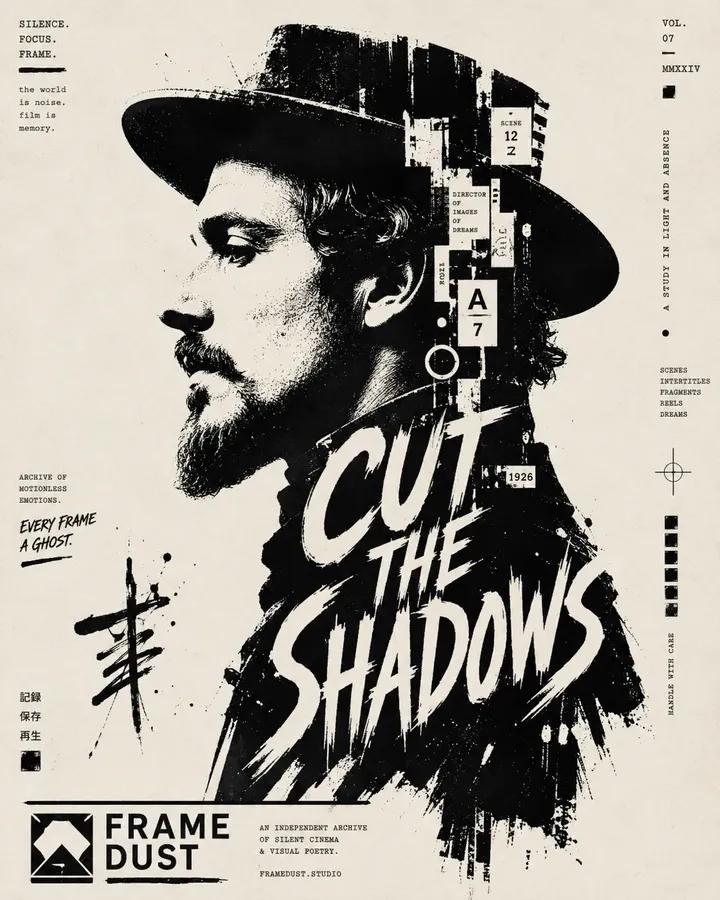
High-contrast black and white typographic portrait poster of [Human], shown in side profile with [Feature]. Build the portrait with bold black silhouette blocks, sharp negative space, rough ink edges, fragmented stencil shapes, tiny editorial microtext, vertical typographic accents and expressive hand-drawn calligraphic marks. Integrate one large readable text block saying “[Text]” in 2 to 4 stacked lines, placed only inside the neck and body area, using oversized scribbled lettering that feels fused into the silhouette. Include a graphic design logo reading “[Logo]” near the footer. Minimal off-white paper background, asymmetrical layout, cropped vertical composition, experimental editorial poster design, raw ink print texture, aspect ratio 4:5.

Visual concept

Visual concept

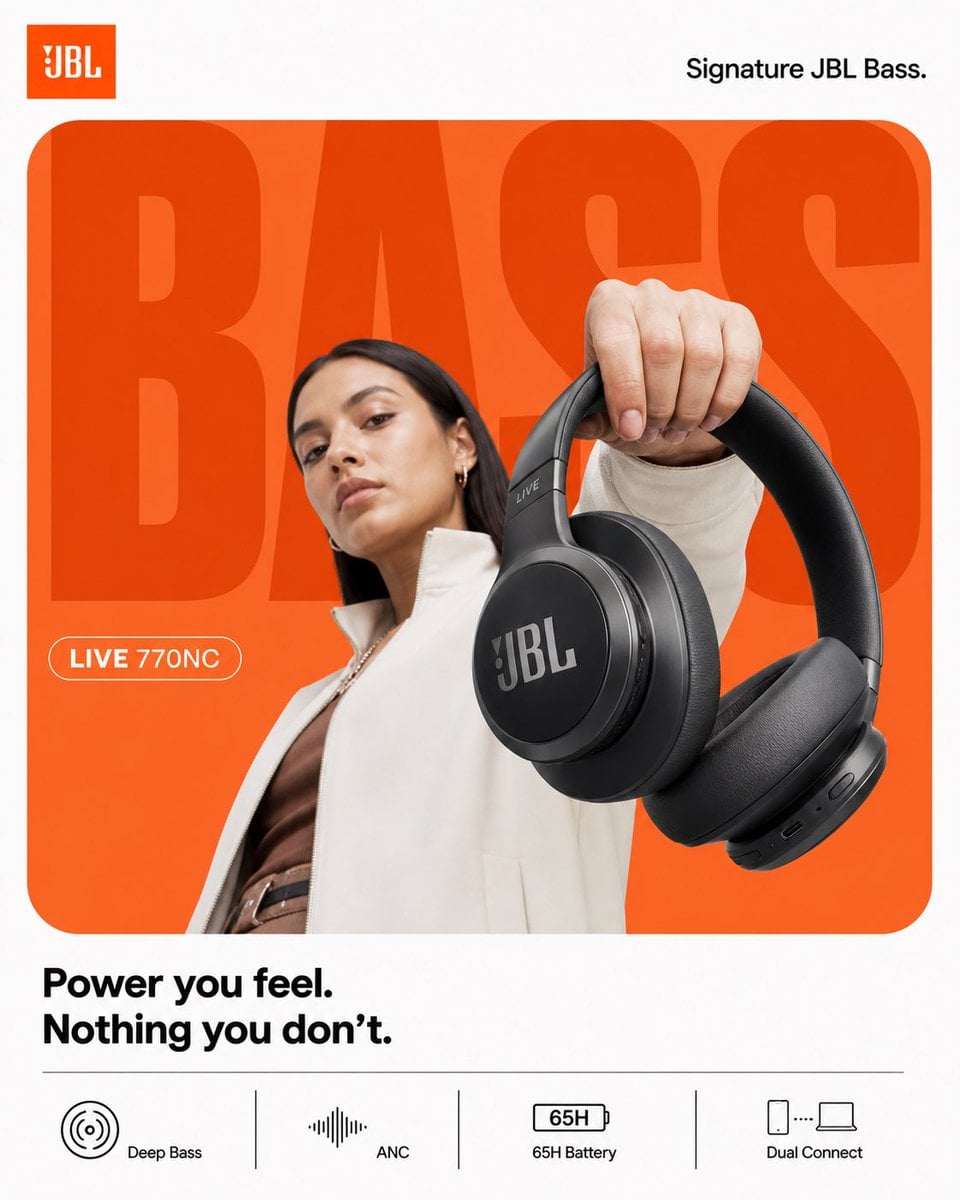
ACT AS: Apple × Nike hybrid product designer (graphic-first, not cinematic) PROJECT TITLE: “BASS, WITHOUT TRYING.” FORMAT: 4:5 vertical, ultra-clean, product-first poster STYLE DNA: Flat minimalism × bold typography × strong color blocking × hyper-clean product 🧠 CORE INTENT: Effortless impact. Not loud visually. But strong. 🎬 LAYOUT (THIS IS KEY): BACKGROUND: Pure white canvas COLOR BLOCK: Rounded rectangle (dominant) → JBL orange → flat gradient (very subtle, not glowing) GIANT TYPE: “BASS” - ultra-bold sans-serif - tight kerning - fills frame - partially cropped - sits BEHIND subject color: slightly darker orange than block NO effects. 👤 SUBJECT: - female model (editorial, calm) - neutral face (no hype) - slight low angle POSE: - holding headphones toward camera - minimal body twist OUTFIT: - muted tones (off-white / brown) 🎧 PRODUCT: JBL headphones POSITION: - extreme foreground (forced perspective) - very clean - slightly tilted DETAIL: - sharp edges - no over-texture - no scratches - product = hero ✨ LIGHTING: - flat studio light - soft shadow only - no rim light drama 🎨 COLOR: - orange + white - minimal palette - no saturation spikes ✍️ TYPOGRAPHY: TOP LEFT: JBL logo TOP RIGHT: “Signature JBL Bass.” MID LEFT (pill): “LIVE 770NC” BOTTOM: “Power you feel. Nothing you don’t.” 📊 FEATURES (CLEAN STRIP): simple icons, no glass: - Deep Bass - ANC - 65H Battery - Dual Connect 📐 RULE: Everything must feel: flat controlled intentional NO cinematic energy Boat 4:5 vertical premium headphone campaign poster, ultra-clean high-energy composition, boAt Nirvana 751 ANC STYLE: Nike-level graphic clarity × JBL energy control × Indian Gen-Z identity BACKGROUND: pure white canvas MAIN BLOCK: large rounded rectangle, deep navy to electric blue gradient, smooth and premium, no texture TYPOGRAPHY: giant bold “LOUD” text, ultra-bold sans-serif, tight kerning, slightly condensed, cropped edges, flat color, subtle duplication offset SUBJECT: young Indian Gen-Z model, confident expression, direct eye contact, slight smirk, relaxed stance, minimal movement, wearing street casual outfit (neutral tones with blue accents) PRODUCT: boAt Nirvana 751 ANC headphones, clean matte black, strong logo visibility, extreme foreground perspective, slight tilt, crisp edges, controlled reflections SECONDARY PRODUCT: worn naturally by subject LIGHTING: soft frontal key light, electric blue rim light, subtle red accent highlight, medium contrast shadows SOUND VISUAL: minimal waveform arcs in electric blue, clean, subtle glow, no particles or chaos TYPOGRAPHY DETAILS: top left: boAt logo top right: “Signature boAt Bass.” mid left pill: “NIRVANA 751 ANC” bottom right text: “Play louder. Own your sound.” FEATURE STRIP: flat clean grid with icons: - Beast Mode Bass - Active Noise Cancellation - 65H Playtime - ASAP Charge CAMERA: 50mm lens, slight low angle, sharp focus, high clarity, no cinematic blur RENDER: clean, premium, high contrast but controlled, no noise, no over-effects

Visual concept

Visual concept

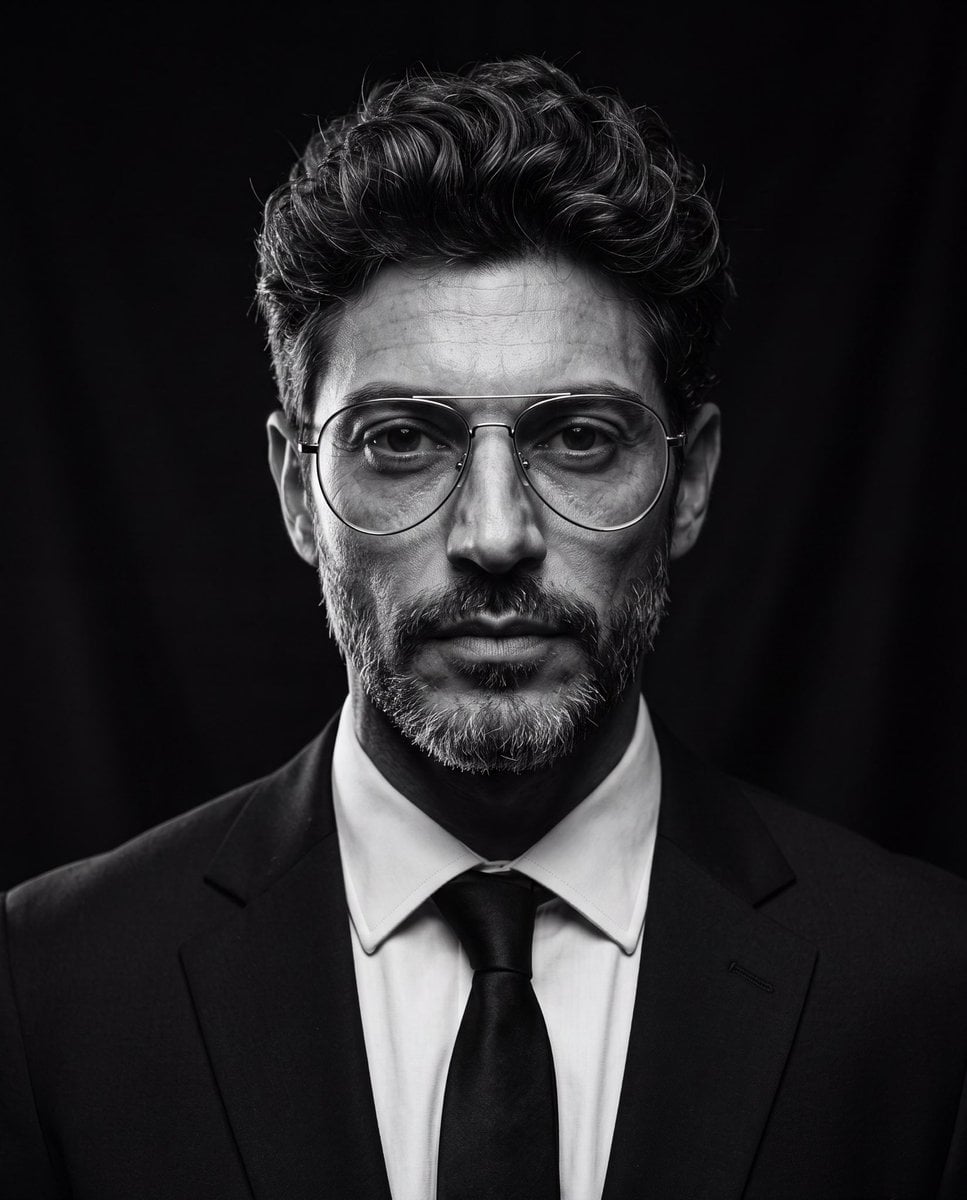
Create an ultra-realistic cinematic studio portrait of the person in the reference image. Preserve the person’s facial features and identity while styling them in a luxury editorial fashion. Give them a modern textured quiff hairstyle with medium-length hair, voluminous top, natural lift, slightly messy brushed-back texture, subtle side taper, clean sides, and realistic individual hair strands. Add thin silver metal aviator eyeglasses with large rounded lenses, minimalist frame, clear lenses, elegant luxury design, perfectly fitted to the face. Dress them in a tailored black suit, crisp white dress shirt, and black tie. Pose them looking directly into the camera with a calm, confident, serious expression. Use dramatic low-key studio lighting with a single large octabox positioned 45° above the subject, classic Rembrandt lighting, deep cinematic shadows, subtle rim light around the hair and shoulders, black seamless background, high contrast black-and-white grading, rich tonal range, crisp eyes with natural catchlights, highly detailed skin texture, realistic pores, subtle facial hair detail, shallow depth of field, Leica SL2 with APO-Summicron 90mm lens, f/2.2, ISO 100, HDR, editorial fashion photography, timeless Hollywood portrait, museum-quality, photorealistic, ultra-sharp, 8K resolution, masterpiece. Negative Prompt cartoon, anime, illustration, CGI, plastic skin, beauty filter, overprocessed skin, blurry, low quality, low resolution, distorted face, asymmetrical eyes, duplicate face, extra glasses, oversized glasses, thick frames, text, watermark, logo, cropped head, poor lighting, noisy image, unrealistic hair, exaggerated hairstyle, overexposed, underexposed

Visual concept

Visual concept

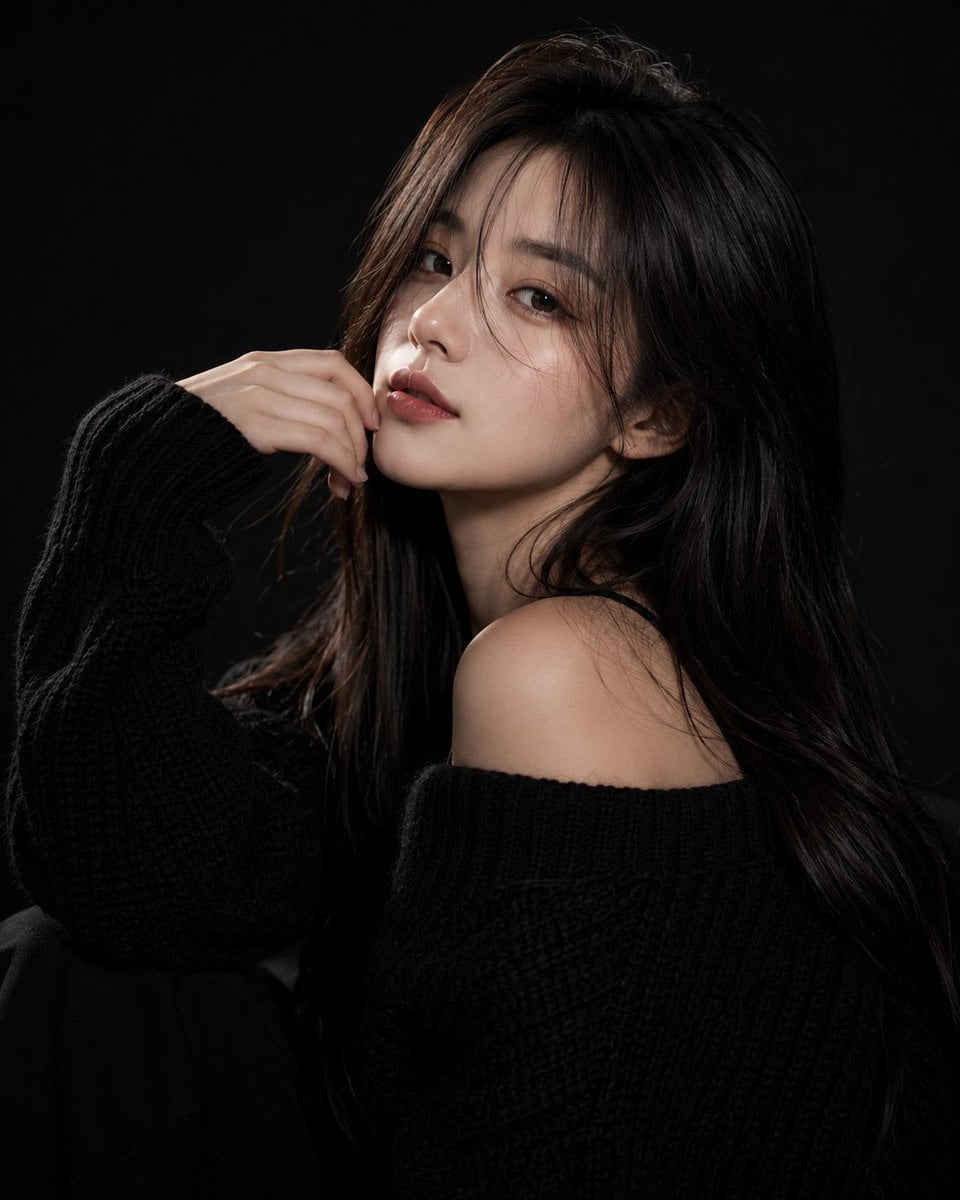
Ultra-realistic fashion beauty portrait of a stylish young woman with long silky dark-brown hair and soft curtain bangs, wearing an oversized chunky black knit sweater. She poses elegantly against a deep black studio background, partially covering one eye with her hand while gazing confidently into the camera. Soft fair skin, natural matte makeup, warm blush, defined brows, subtle eyeliner, and rich velvet-red lips. Calm, mysterious, high-fashion expression with a modern editorial aesthetic. Professional studio lighting creates dramatic contrast between light and shadow, emphasizing facial structure, hair texture, and the cozy knit fabric. Minimalist composition, luxury fashion campaign mood, sophisticated monochrome styling, clean black-on-black palette with subtle skin-tone highlights. Sharp focus on the visible eye, premium beauty photography, elegant and timeless atmosphere. Shot on a full-frame camera, 85mm lens, f/1.8, shallow depth of field, ultra-detailed skin texture, soft directional key light, cinematic contrast, high-end magazine editorial, luxury fashion advertisement, photorealistic, HDR, 8K resolution, masterpiece quality. Negative Prompt: blurry, low resolution, low quality, bad anatomy, extra fingers, deformed hands, duplicate limbs, asymmetrical eyes, distorted face, cartoon, anime, CGI, painting, plastic skin, excessive retouching, overexposed highlights, underexposed shadows, noise, grain, watermark, logo, text, cluttered background, motion blur, unrealistic proportions, oversaturated colors.

Visual concept

Visual concept

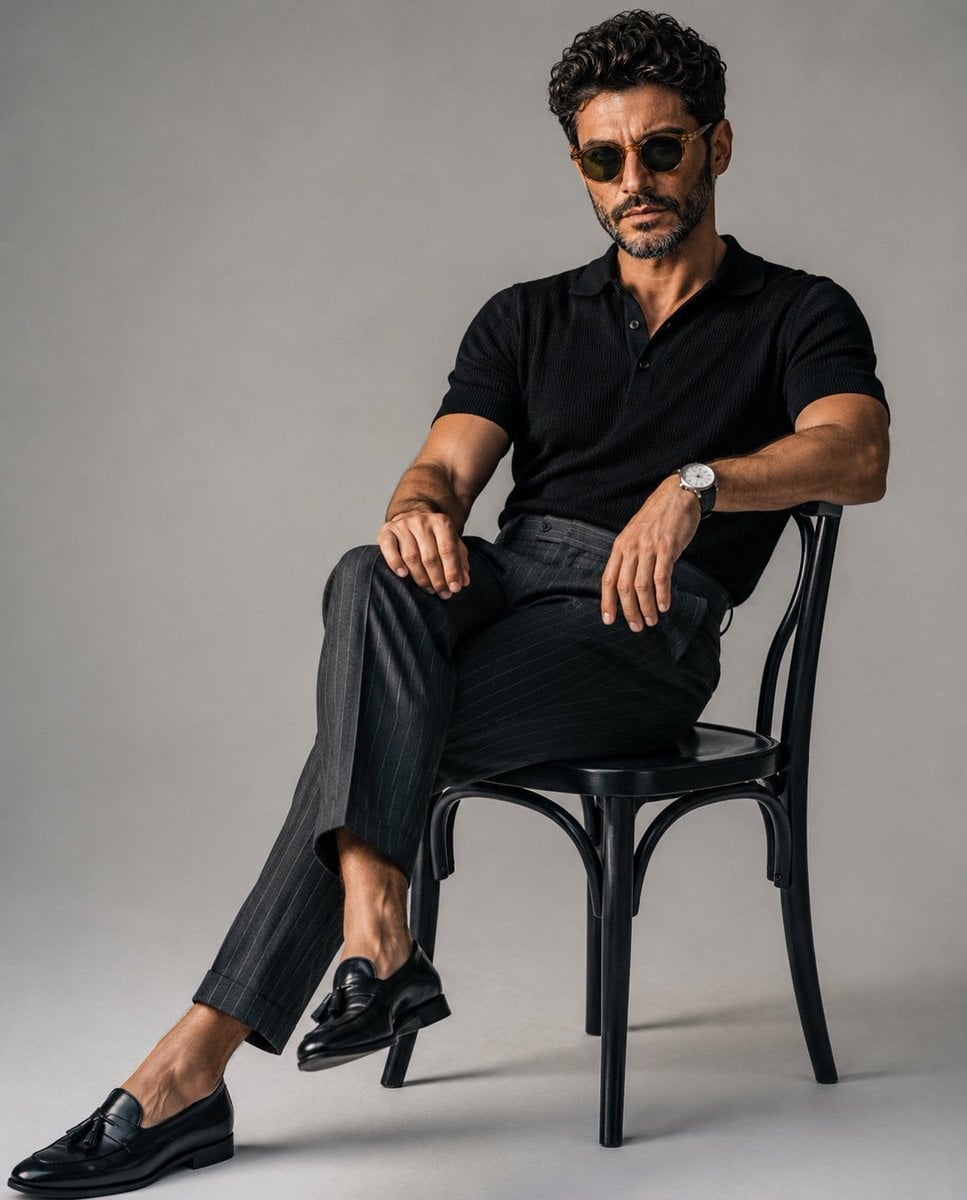
A luxury editorial fashion portrait of a stylish young man sitting casually on a classic black wooden chair in a minimalist photography studio with a seamless light gray backdrop. He wears a fitted black knit polo shirt tucked into tailored high-waisted charcoal gray pinstripe trousers, paired with polished black leather tassel loafers and a minimalist silver wristwatch. One leg is extended while the other is crossed naturally, with one arm resting on his knee and the other relaxed on the chair, maintaining direct eye contact with a calm, confident expression. Slightly messy textured hair, clean masculine features, relaxed yet elegant posture. Soft diffused studio lighting from a large octabox creates gentle shadows, realistic skin tones, and subtle depth. Minimalist composition with negative space, quiet luxury aesthetic, old-money fashion, premium menswear editorial, ultra-realistic, photorealistic, Vogue magazine style, Hasselblad medium format look, 85mm lens, f/4, crisp details, cinematic color grading, high dynamic range, 8K. Negative Prompt: low quality, blurry, cartoon, anime, CGI, unrealistic anatomy, extra fingers, duplicate limbs, distorted face, bad proportions, oversaturated colors, harsh lighting, watermark, logo, text, cluttered background, noise, artifacts, motion blur, low resolution, overexposed, underexposed, wrinkled clothing, awkward pose.

Visual concept

Visual concept

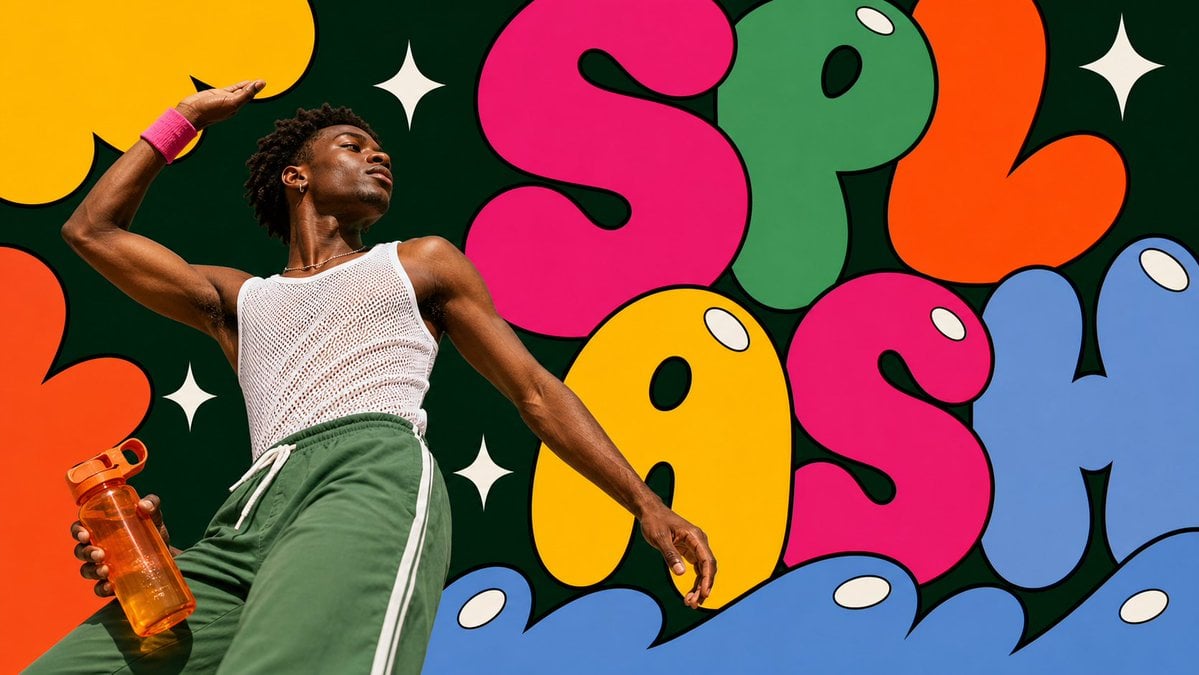
Create an image in pop-bubble-letter-photo-poster-style. Aspect ratio: 9:16. Scene: [SUBJECT] [SUBJECT_ACTION], interacting with or carrying [PRODUCT_OR_PROP], in [LOCATION]. Style the subject with [WARDROBE_STYLE]. Use real photographic portrait detail for the subject: low-angle editorial framing, bright direct sunlight or clean studio light, crisp skin and fabric texture, saturated wardrobe, calm confident expression. Layout: center the subject on the vertical axis and surround them with [BACKGROUND_ELEMENTS]. Build the poster from oversized flat bubble-letter forms spelling or suggesting "[MAIN_TEXT]". Crop the letters hard against the frame edges. Layer some letter shapes behind the subject and some in the foreground over the lower frame while keeping the face and main gesture unobstructed. Graphic language: thick black outlines, smooth flat fills, hot pink, candy yellow, leaf green, tangerine orange, tomato red, powder blue, deep evergreen negative space, cream-white oval shine highlights, and [ACCENT_SYMBOL]. Keep the bubbles bold, rounded, inflated, vector-like, and pop-art. Text: use "[MAIN_TEXT]" as the large bubble-letter graphic word. Add "[SECONDARY_TEXT]" only as tiny editorial caption text if needed. Do not include watermarks, usernames, creator IDs, QR codes, platform logos, or app marks. --- VARIABLES --- [ACCENT_SYMBOL] — four-point sparkle, oval highlight, curved underline, star separator, or small rounded sticker shape [BACKGROUND_ELEMENTS] — dark green negative-space panel, oversized cropped bubble letters, white sparkle marks, oval shine highlights, candy-colored abstract shapes [LOCATION] — painted wall, studio set, public plaza, gallery exterior, market stall, campus courtyard, subway entrance, or clean event backdrop [MAIN_TEXT] — short bubble-letter word or graphic headline such as WOW, POP, OPEN, BLOOM, WAVE, or PLAY [PRODUCT_OR_PROP] — camera, headphones, drink bottle, book, bouquet, transit card, compact mirror, sunglasses, or featured product [SECONDARY_TEXT] — tiny editorial caption, campaign note, date line, or short supporting phrase [SUBJECT] — main person, model, performer, maker, athlete, student, traveler, or product ambassador [SUBJECT_ACTION] — standing still, leaning back, looking upward, closing eyes in sunlight, holding a prop, stepping forward, or posing calmly [WARDROBE_STYLE] — bold striped knit, saturated trousers, color-block streetwear, mod fashion layers, clean editorial styling, or retro pop styling --- NEGATIVE PROMPT --- watermark, username, creator ID, QR code, platform logo, app interface marks, copied reference person, copied outfit, copied exact text, long paragraphs, crowded small text, 3D balloon letters, chrome typography, glossy plastic render, clay mascot, muted pastel-only palette, thin-line doodles, busy street background, horror, dystopian, grunge, cyberpunk, luxury minimalist editorial
خلاصة في جملة

كيف يبدو هذا النموذج؟

عند عدم رفع صورة يُنفَّذ تحويل النص إلى صورة، وعند رفع 1–5 صور اجتازت التحقق من التوقيع يُنفَّذ التحرير القياسي للصور. لا يقبل الموقع كصور مرجعية إلا الملفات التي يكون نوعها الفعلي JPEG أو PNG أو WebP، وبحد أقصى 10 MB لكل صورة. لا تتوفر أدلة سعر مستقلة لخريطة المقاطع أو تحرير المقاطع، ولذلك لا يظهران حاليًا ضمن الأوضاع القابلة للاستدعاء.

ما الذي يتقنه؟
موجّه لمهام الصور التي تتطلب توليد صورة واحدة بسرعة، أو الحفاظ على اتجاه عدة مواد مرجعية، أو مواصلة تكوين الصورة الأصلية بنسبة تلقائية.
لمن يناسب؟
يناسب صور المنتجات ذات الأجواء البصرية، ومراجع الشخصيات أو الخامات، ومقاسات منصات التواصل، واستبدال الخلفيات، واستكشاف الأساليب، والمسودات البصرية المقيّدة بعدة صور.
لماذا تستخدمه في Kyeo AI؟
يميّز Kyeo بين تحويل النص إلى صورة والتحرير القياسي للصور قبل خصم الأرصدة، ويتحقق من النوع الفعلي والبيانات الوصفية الموقعة لكل صورة، ثم ينشئ المهمة وفق السعر المثبت لكل من المسارين المتاحين.

المعلمات الأساسية

يساعدك على تقييم مدى ملاءمة النموذج لسيناريو عملك بسرعة.

فئة النموذج
نموذج صور بالذكاء الاصطناعي
الشركة المطوّرة
xAI
عائلة النموذج
Grok Imagine Image
حد النص التوجيهي
8,000 حرف داخل الموقع
تنسيقات الصور المرجعية
JPEG / PNG / WebP
تسوية المهمة
حسب الاستهلاك الفعلي أو تُحال إلى المراجعة المحاسبية

أسماء أخرى

قد يحمل النموذج نفسه أسماء مختلفة في الوثائق الرسمية ونقاشات المجتمع وطبقة تكامل API؛ نجمعها هنا بصورة موحدة.

Grok Image 2
Grok Imagine Image 2
صور Grok 2.0
نموذج صور Grok Imagine

أسئلة المستخدمين الشائعة

تركز هذه الأسئلة العملية على المهمة وشروط الإدخال والنتيجة التي ينبغي تأكيدها قبل الاختيار.

كيفية استخدام Grok Imagine Image 2.0
كم تبلغ تكلفة Grok Image 2.0
كم صورة مرجعية يدعم Grok Image 2.0
ما نسب الأبعاد التي يدعمها Grok Image 2.0
ما الفرق بين تحويل النص إلى صورة وتحرير الصور في Grok Image 2.0
متى تتوفر النسبة التلقائية في Grok Image 2.0

دليل الاختيار

هل ما زلت مترددًا في اختيار النموذج؟ ابدأ بهذه النقاط الأساسية.

1
استخدم تحويل النص إلى صورة لبناء المشهد من الصفر

إذا لم يكن هناك عنصر أو خامة أو تخطيط يجب الحفاظ عليه، فلا ترفع أي صورة واختر 1:1 أو 2:3 أو 3:2 أو 16:9 أو 9:16.

2
استخدم تحرير الصور للحفاظ على الحقائق البصرية

عندما تحتاج إلى الرجوع إلى منتج أو شخص أو خامة أو تكوين، ارفع 1–5 صور وحدد في النص التوجيهي القيد الذي تمثله كل صورة.

3
لا تستخدم هذه الصفحة حاليًا إذا كنت تحتاج إلى التحكم بالمقاطع

المتاح الآن هو التحرير القياسي للصور فقط؛ وتظل خريطة المقاطع وتحرير المقاطع غير قابلين للاستدعاء لتجنب خصم الأرصدة خطأً قبل اكتمال توثيق السعر.

المقارنات الشائعة في البحث

قارن البدائل الشائعة في المهمة نفسها لتوضيح الفروق في المدخلات والتحكم والتكلفة.

ما الفرق بين Grok Imagine Image 2.0 وGPT Image 2 من حيث السعر وطريقة الإدخال؟
ما الفرق بين Grok Imagine Image 2.0 وQwen Image 3.0 في عدد الصور المرجعية؟
كيف أختار بين Grok Imagine Image 2.0 وNano Banana 2 Lite؟

جدول مقارنة النماذج

هل تتردد بين الخيارات؟ يوضح هذا الجدول أهم الفروق بين النموذج الحالي وبدائله بنظرة واحدة.

الأرصدة داخل الموقع
Grok Imagine Image 2.0
4 أرصدة لكل صورة
GPT Image 2
تسعير متدرج وفق صفحة النموذج الحالية
Nano Banana 2 Lite
3 أرصدة ثابتة
الصور المرجعية
Grok Imagine Image 2.0
1–5 صور، بحد 10 MB لكل صورة
Qwen Image 3.0
1–3 صور، بحد 10 MB لكل صورة
Nano Banana 2 Lite
ما يصل إلى 10 صور، بحد 30 MB لكل صورة
نسبة العرض إلى الارتفاع
Grok Imagine Image 2.0
5 نسب ثابتة؛ ويتوفر auto عند التحرير
GPT Image 2
راجع عقد المقاسات الحالي في صفحة النموذج
Qwen Image 3.0
8 مقاسات للوحة

تجربة الاستخدام الفعلية

إرشادات عملية تستند إلى مصادر عامة وحدود الموقع الحالية ومهام تمثل الاحتياجات الشائعة.

السعر موحّد بين الوضعين

يبلغ السعر الحالي لكل من تحويل النص إلى صورة والتحرير القياسي 4 أرصدة لكل صورة، لذا ينبغي اختيار الوضع وفق الحاجة إلى المواد المرجعية، لا بتخمين المسار ذي السعر الأقل.

دعم الصور المتعددة لا يغني عن إدارة المواد المرجعية

يمكن توزيع أدوار العنصر والخامة واللون والتكوين على ما يصل إلى 5 صور مرجعية، لكن المواد المتعارضة ستظل تقلل استقرار النتائج.

تفاصيل القدرات

توليد الصور بوضعين

يبدّل بصرامة بين تحويل النص إلى صورة والتحرير القياسي للصور حسب وجود صور مرجعية مرفوعة.

تحرير يعتمد على صور مرجعية متعددة

يمكن إرسال 1–5 صور مرجعية موقعة في المهمة الواحدة لوصف العنصر أو الخامة أو الأسلوب أو العلاقات المكانية.

التحكم في نسبة اللوحة

يوفر تحويل النص إلى صورة 5 نسب ثابتة، ويتيح تحرير الصور أيضًا خيار auto لاستخدام نسبة أنسب مستمدة من الصورة الأصلية.

الاستخدامات المناسبة

صور منتجات ذات أجواء بصرية

استخدم صورة المنتج المرجعية لتثبيت الشكل والخامة، ثم عدّل الخلفية والإضاءة وموضع العنصر عبر النص التوجيهي.

مراجع الشخصيات والملابس

خصص صورًا منفصلة لمظهر الشخصية وتفاصيل الملابس واتجاه الألوان، ما يقلل التعارض بين الحقائق المتعلقة بالشخصية.

مسودات بصرية لعدة مقاسات

استخدم النسب الأفقية أو الرأسية أو المربعة لإعداد اتجاهات مختلفة للأغلفة ومنشورات الخلاصة وصفحات القصص.

نصائح الموجّه

ابدأ بالحقائق التي يجب الحفاظ عليها

عند تحرير الصور، وضّح أولًا حدود العنصر وخامته ولونه وتكوينه التي يجب الحفاظ عليها، ثم صف الخلفية أو الأسلوب المراد تغييره.

حدّد دور كل صورة

اذكر بوضوح أي صورة تحدد العنصر وأيها تحدد الخامة أو الإضاءة، وتجنب جعل جميع الصور المرجعية تتحكم في كل تفاصيل المشهد في الوقت نفسه.

اختر النسبة وفق موضع التسليم

حدّد أولًا ما إذا كان التسليم أفقيًا أو رأسيًا أو مربعًا عند التحويل من النص؛ ولا تختر auto في تحرير الصور إلا عندما تريد الحفاظ على تكوين المصدر.

أسباب اختياره

يعتمد تحويل النص إلى صورة والتحرير القياسي للصور سعرًا واضحًا وموحّدًا للصورة الواحدة.
يمكن استخدام ما يصل إلى 5 صور مرجعية في المرة الواحدة.
يدعم وضع التحرير خيار auto، كما تغطي النسب الثابتة المقاسات الأفقية والرأسية الشائعة.
يُتحقق من النوع الفعلي للصورة وبياناتها الوصفية الموقعة قبل خصم الأرصدة.

ما يجب معرفته قبل الاستخدام

يبلغ حد النص التوجيهي داخل الموقع 8,000 حرف، وهو حد أمان واضح للمنتج.
يتطلب تحرير الصور ما بين 1 و5 صور، وألا تتجاوز كل صورة 10 MB.
لا يتوفر auto إلا لتحرير الصور؛ ويُرفض تحويل النص إلى صورة بهذا الخيار قبل خصم الأرصدة.
لا يمكن استدعاء خريطة المقاطع أو تحرير المقاطع حاليًا؛ وقد تظل المهمة غير المتزامنة عرضة للفشل أو الإحالة إلى المراجعة المحاسبية.

المعلمات القابلة للضبط

يساعدك على تقييم مدى ملاءمة النموذج لسيناريو عملك بسرعة.

نسبة العرض إلى الارتفاع
اختياري
نوع المعلمة: قائمة منسدلة
الافتراضي: 1:1
1:1
2:3
3:2
16:9
9:16
auto (لتحرير الصور فقط)
5 خيارات لتحويل النص إلى صورة؛ و6 خيارات لتحرير الصور

استهلاك النقاط

4 أرصدة لكل صورة

تبلغ تكلفة تحويل النص إلى صورة والتحرير القياسي للصور حاليًا 4 أرصدة لكل صورة ناتجة، ويُحجز 4 أرصدة مسبقًا قبل إنشاء المهمة داخل الموقع. بعد اكتمال المهمة تُقرأ الكلفة الفعلية؛ وإذا كانت صالحة ولا تتجاوز المبلغ المحجوز يُرَدّ الفرق وتكتمل التسوية. أما إذا كانت مفقودة أو غير صالحة أو أكبر من المحجوز فتنتقل العملية إلى المراجعة المحاسبية من دون خصم خفي.

نصيحة لتوفير النقاط

قبل توليد الصور أو الفيديو على دفعات، يُنصح بإجراء اختبار A/B بالمواد نفسها بين النموذج الحالي وبدائله من النوع نفسه، ثم بدء التوليد على دفعات بعد تأكيد النتيجة لتجنب هدر النقاط.

الأسئلة الشائعة

نماذج مشابهة موصى بها

لم تقرر بعد؟ قارن أيضًا بهذه البدائل المشابهة.

GPT Image 2

GPT Image 2 / تصنيف القدرة — يدعم GPT Image 2 في Kyeo AI توليد الصور من النص وتحرير الصور المرجعية. ويحتسب Kyeo التكلفة حسب دقة الإخراج: 3 نقاط لـ1K، و5 نقاط لـ2K، و8 نقاط لـ4K.

نموذج لتوليد الصور وتحريرها بالذكاء الاصطناعي
3–8 نقاط/عملية

Qwen Image 3.0

يغطي Qwen Image 3.0 التوليد النصي الخالص وتوليد الصور باستخدام ما يصل إلى 3 مراجع، مع دقتي 1K/2K و8 مقاسات للوحة وإخراج PNG/JPEG وتوسيع نص الطلب والنص السلبي وseed. ويتراوح التفويض المسبق داخل الموقع بين 5 و7 نقاط.

نموذج صور بالذكاء الاصطناعي
5–7 نقاط

Nano Banana 2 Lite

Nano Banana 2 Lite مدخل صور بإعدادات مختصرة: يمكن التوليد بالنص وحده أو رفع ما يصل إلى 10 صور مرجعية، ولا يحتاج المستخدم في الواجهة إلا إلى اختيار نسبة الصورة، بسعر ثابت قدره 3 نقاط للطلب. ولا يعرض زرًا للدقة حتى لا تتحول تسمية في جدول السعر إلى قدرة غير موجودة في الواجهة.

نموذج صور بالذكاء الاصطناعي
3 نقاط ثابتة

مصادر المعلومات

أُعد محتوى الصفحة استنادًا إلى مواد الشركة المطوّرة ووصف عائلة النموذج وإعداد التكامل في منصة Kyeo AI.

ملاحظة المصدر

رُوجعت هذه الصفحة وفق عقد طلبات الصور الحالي داخل الموقع، وحدود الرفع الموقّع، وأدلة الأسعار المتاحة بعد تسجيل الدخول؛ وتتطابق المعلمات المنشورة مع القائمة البيضاء للطلبات الفعلية.

آخر تحديث: 2026-08-24
بيانات الواجهة الحالية لـGrok Image 2
التكامل

تُستخدم للتحقق من أوضاع الإدخال وعناصر التحكم الظاهرة وحدود الوسائط وإتاحة النسخة المتصلة بالموقع حاليًا. الخيارات الفعلية هي المعروضة في الصفحة ومساحة العمل.

عقد Kyeo الحالي للرفع والفوترة والتسوية
التكامل

يُستخدم للتحقق من النوع الفعلي للملف، وحد الحجم داخل الموقع، والحجز المسبق بعدد صحيح من الأرصدة، وتسوية الاستهلاك الفعلي بعد اكتمال المهمة.