본문으로 건너뛰기
AI 이미지 모델
Topaz Labs
Topaz

Topaz Image Upscaler

Topaz Image Upscaler / 기능 — Topaz Image Upscaler는 Kyeo에서 이미지 한 장과 확대 배율을 받고 프롬프트를 읽지 않으며 주제나 구도를 수정하지 않습니다. 1, 2, 4는 가로세로 확대 배율이지 1K, 2K, 4K 해상도가 아닙니다. 출력 가로세로는 원본 각 치수에 선택한 배율을 곱해 계산합니다.

기능
1×~4× 단일 이미지 확대
크레딧 소모
40 사전 승인, 실사용 차액 환불
프롬프트 한도
사용하지 않음
업로드 제한
1장, 최대 10MB
30초 요약
  • Topaz Image Upscaler / 기능 — 이미지 한 장과 확대 배율 하나만 필요합니다.
  • Topaz Image Upscaler / 확대 배율 — 1×, 2×, 4×의 입력 의미를 명확히 하고 증명되지 않은 목표 해상도 가격 매핑과 분리합니다.
  • Topaz Image Upscaler / 업로드 제한 — JPG/PNG/WebP 1장, 최대 10MB. 출력 이미지의 긴 변은 8192픽셀을 초과할 수 없습니다.
  • Topaz Image Upscaler / 크레딧 소모 — 보수적 사전 승인 40, 성공 후 실사용 차액 환불

인기 검색어: Kyeo에서 Topaz Image Upscaler 사용하는 방법 · Topaz Image Upscaler 회당 크레딧 · Topaz Image Upscaler 지원 이미지 형식

예시

Visual concept

Visual concept

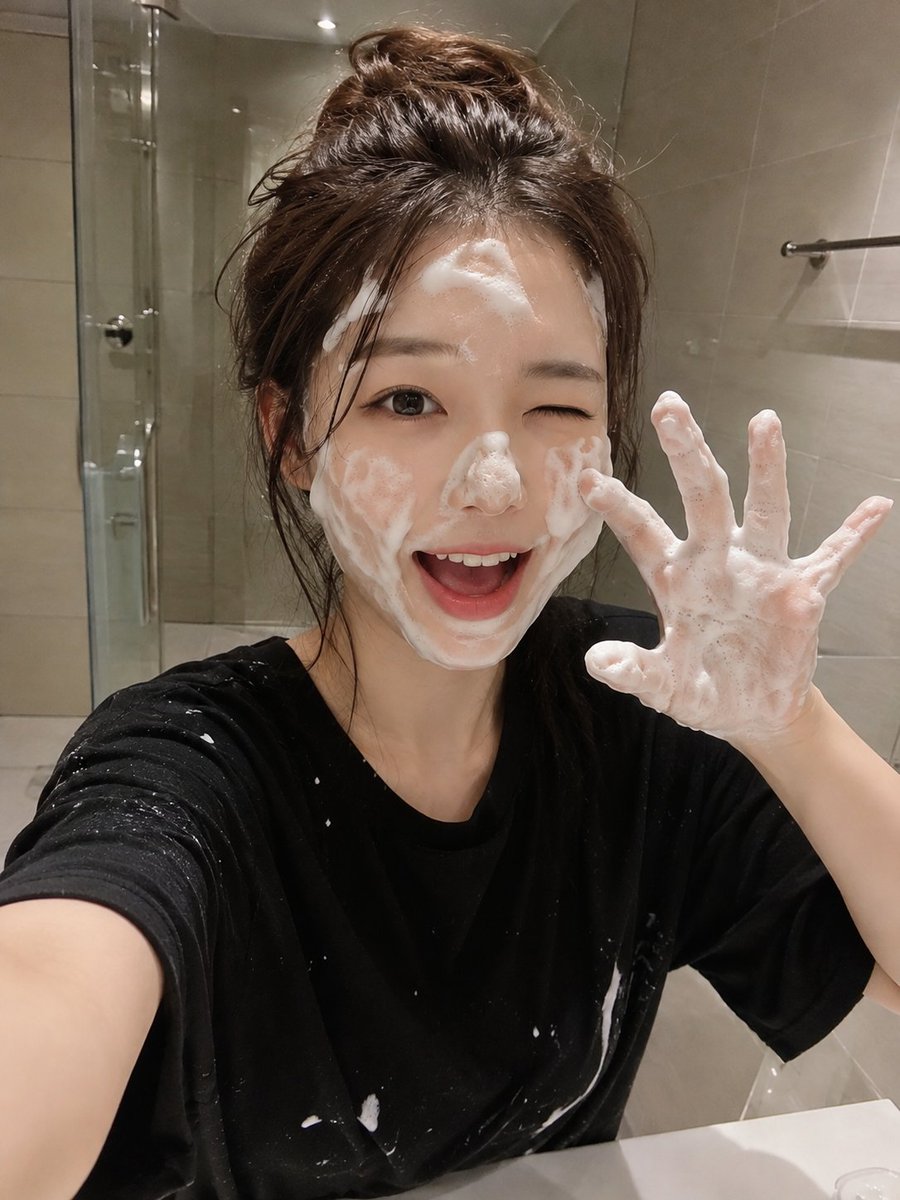
{ "prompt": "A RAW ultra-realistic smartphone photo of a cute young Japanese woman in a modern bathroom during her skincare routine. She has fair porcelain skin, large expressive dark brown eyes, naturally soft pink lips, and long chestnut-brown hair that is slightly damp and tousled. She is playfully winking with one eye while smiling with her mouth open, both hands raised in a cute claw pose completely covered in rich white facial cleansing foam. Thick soap bubbles are spread naturally across her forehead, cheeks, nose, chin, hairline, and fingers. She wears a loose oversized black T-shirt with a few soap splashes on it. The background features a clean minimalist bathroom with beige ceramic wall tiles, a frameless glass shower door, a chrome towel bar, and a white sink. The image is captured as a casual selfie using a modern smartphone held at arm's length, creating an authentic everyday social media aesthetic. Warm indoor bathroom lighting, realistic skin pores, subtle smartphone HDR, natural shadows, tiny sensor noise, automatic white balance, slight handheld framing, 26mm smartphone lens, realistic exposure, no studio lighting, no beauty filters, no AI-generated appearance, ultra-photorealistic, indistinguishable from a real iPhone photo, RAW mobile camera quality, 8K.", "negative_prompt": "anime, illustration, painting, CGI, 3D render, plastic skin, overprocessed face, heavy beauty filter, blurry, low resolution, watermark, logo, text, extra fingers, deformed hands, bad anatomy, duplicate limbs, oversaturated colors, unrealistic lighting, artifacts", "width": 768, "height": 1024, "steps": 30, "cfg_scale": 7, "sampler": "DPM++ 2M Karras", "seed": -1 }
Visual concept

Visual concept

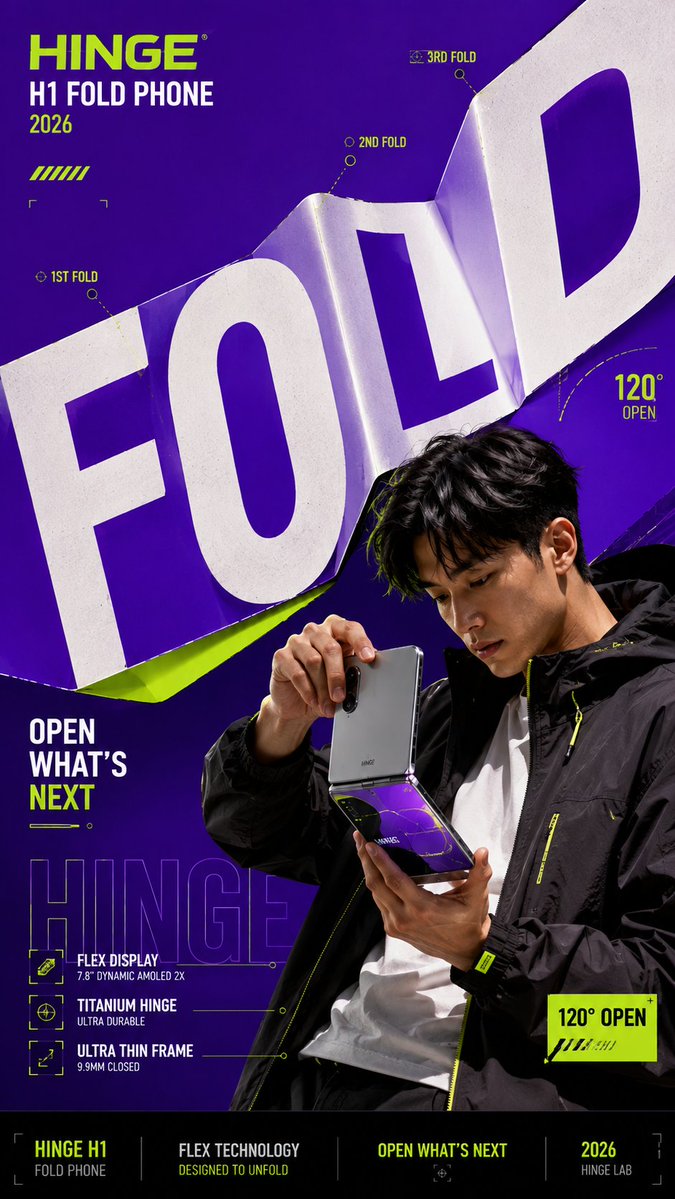
Create a bold editorial campaign poster where oversized typography behaves like a physical material instead of remaining flat and static. Brand: [Brand Name] Product / Campaign: [Product Or Campaign] Main Word: [Short Word] Subject: [Person Or Product] Material Behavior: [Material Behavior] Main Color: [Color] Accent Color: [Color] Campaign Details: [Slogan Or Specs] Aspect Ratio: [Aspect Ratio] Use realistic commercial photography, oversized typography, strong high-contrast colors, and contemporary editorial design. Make the main word extremely large, filling roughly 50–75% of the composition. Let the typography physically react according to the selected material behavior: FOLD: create clean creases and folded planes that follow the product or subject’s structural direction. PEEL: build several clean color layers and let the top layer lift away to reveal what is underneath. SPLIT: divide the typography into several large strips and shift them in alternating directions while keeping the subject visually intact. REFLECT: turn the letterforms into flat mirrored surfaces that realistically reflect the subject, product, and surrounding colors. Create strong foreground–subject–background interaction so the person or product feels physically connected to the typography. Use one dominant color with black, white, and one contrasting accent color. Add only a few meaningful campaign details such as the brand name, product name, slogan, specifications, or small editorial labels. Keep people, products, materials, lighting, and reflections realistic and polished. The final image should feel like a finished campaign key visual — bold, colorful, layered, and conceptually clear. Avoid generic subject + big text layouts, random deformation, heavy 3D lettering, meaningless filler text, excessive UI graphics, clutter, and disconnected visual effects.

Visual concept

Visual concept

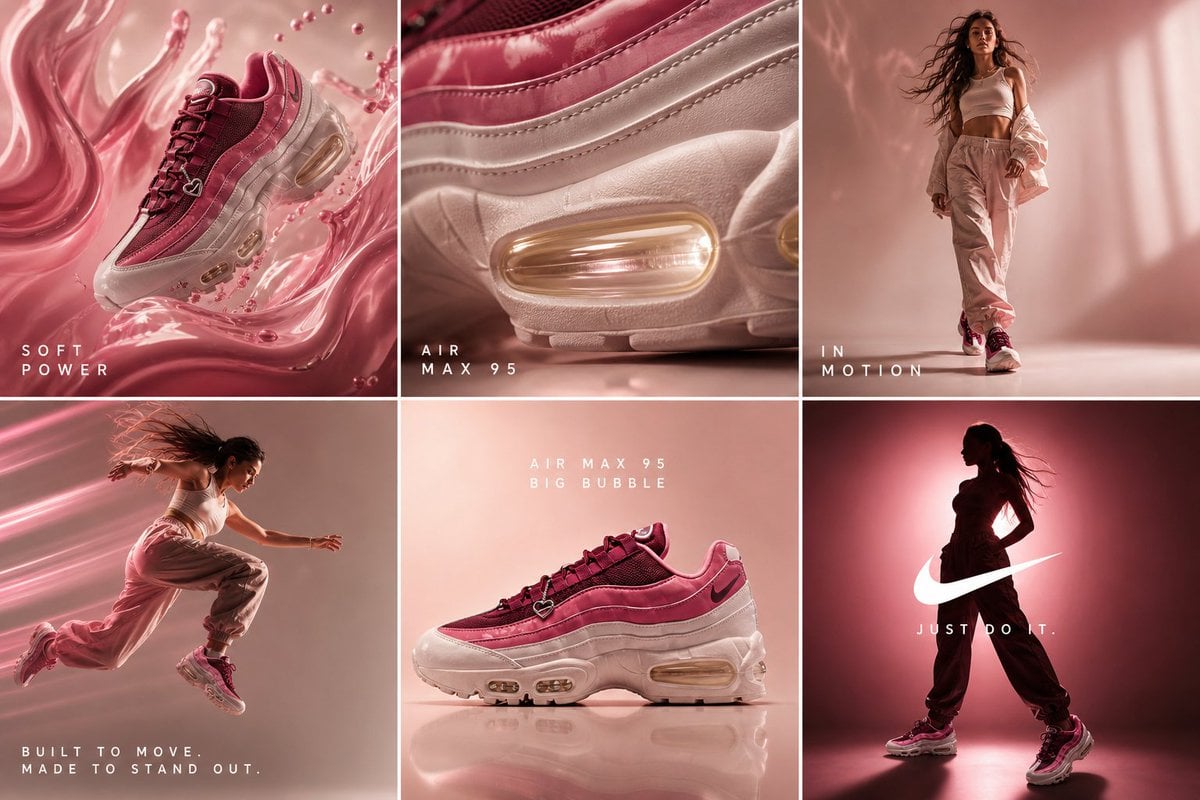
cinematic 6-frame grid (3x2), ultra-premium campaign for Nike Air Max 95 “Big Bubble” in deep berry pink + glossy rose tones STRICT consistency across all frames: same lighting setup, same color grading, same product color accuracy, same soft beige-pink gradient background, same luxury editorial tone lighting: soft diffused studio lighting + glossy specular highlights + subtle pink glow accents color palette: deep berry red, glossy pink, blush beige, warm ivory, soft gold reflections texture emphasis: matte mesh + glossy leather + translucent air bubble CAMPAIGN CONCEPT: “Soft Power in Motion” MOOD: feminine strength, confident, bold, effortless luxury, streetwear meets beauty campaign FRAME 1 — HOOK (surreal scroll stopper) Nike Air Max 95 floating mid-air, surrounded by flowing liquid pink silk + glossy fluid waves, subtle motion distortion, dreamy yet powerful composition FRAME 2 — TEXTURE (desire macro) extreme macro close-up of air bubble + layered material textures, translucent sole glowing with warm golden light, hyper-detailed reflections FRAME 3 — EMOTION (identity) confident female model wearing Nike Air Max 95, walking forward with attitude, soft wind in hair, minimal neutral outfit, strong posture, empowered presence FRAME 4 — MOVEMENT (performance) dynamic mid-air jump shot, motion blur trails, glowing air sole emphasizing bounce, high-speed capture feel, energy lines FRAME 5 — HERO PRODUCT (clean dominance) perfectly centered product shot, symmetrical composition, ultra-clean background, premium minimal aesthetic, sharp detail FRAME 6 — BRAND PAYOFF (iconic finish) cinematic silhouette of female figure wearing the sneakers, strong pink backlight glow, dramatic shadows, bold Nike energy, powerful stance STYLE: high fashion editorial + luxury product photography + cinematic sports campaign ultra-realistic, 4k, sharp focus, depth of field, premium finish, no distortion, no inconsistencies OPTIONAL TEXT OVERLAY (minimal, clean typography): “Soft Power” / “In Motion” / “Just Do It.”

Visual concept

Visual concept

Ultra-realistic portrait photography of a young woman with long wavy dark brown hair, wearing an oversized vintage brown leather jacket, standing outdoors in front of a rustic stone wall during golden hour. She covers most of her face with one hand placed vertically over her eyes and nose, creating a mysterious aesthetic. Fresh colorful flowers are attached to her hand and fingers: a deep purple flower centered on the hand, a bright red flower on one finger, and a soft pink flower near the wrist. A pale pink daisy-like flower is tucked behind her ear. Warm sunlight illuminates her hair and jacket from the side, creating rich highlights, soft shadows, and cinematic contrast. Natural skin texture, realistic hair strands, shallow depth of field, creamy background bokeh, moody editorial fashion style, candid composition, soft earthy tones, highly detailed, DSLR photography, 85mm lens, f/1.8, photorealistic, ultra sharp focus, 8K quality, natural outdoor lighting, luxury fashion magazine aesthetic, vertical portrait, centered composition. Negative Prompt: blurry, low quality, extra fingers, distorted hand, visible full face, overexposed lighting, cartoon, anime, CGI, unrealistic flowers, duplicate flowers, bad anatomy, plastic skin, watermark, text, logo, cropped hand, deformed eyes, oversaturated colors, noisy background, artificial lighting, motion blur.

Visual concept

Visual concept

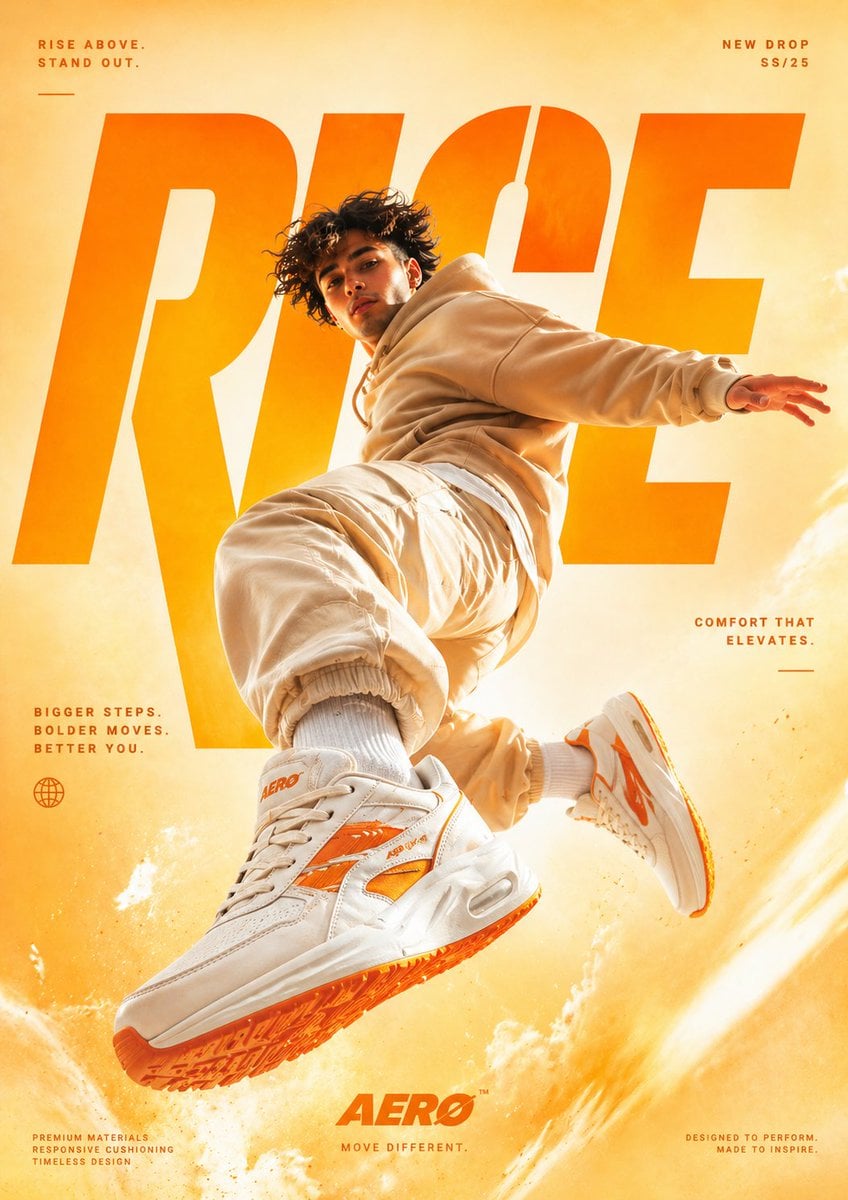
A cinematic, high-end sneaker advertisement poster featuring a young male model mid-air in a dynamic jumping pose, captured from a low-angle perspective to emphasize power and motion. The model is wearing a coordinated beige streetwear outfit (hoodie and joggers), with oversized chunky white sneakers that have bold orange accents on the sole and side stripes. The background is a smooth studio gradient in warm tones, blending light yellow and vibrant orange for an eye-catching, energetic feel. Dramatic soft studio lighting enhances the subject, with glowing highlights and subtle shadows that complement the outfit and colour palette. Behind the model, large bold typography is seamlessly integrated into the composition, reading “RISE” in oversized modern sans-serif font, partially obscured by the subject for depth. Additional small promotional text is placed around the layout in a clean editorial style, such as: “RISE ABOVE. STAND OUT.” “BIGGER STEPS. BOLDER MOVES. BETTER YOU.” “COMFORT THAT ELEVATES.” “PREMIUM MATERIALS. RESPONSIVE CUSHIONING. TIMELESS DESIGN.” At the bottom, a modern sneaker brand logo “AERO” appears with the tagline “MOVE DIFFERENT.” Add subtle motion effects like dust particles or energy trails beneath the jumping foot to enhance impact. Ultra-realistic detail, sharp focus, high contrast, commercial fashion photography style, magazine-quality composition, 4K resolution.

Visual concept

Visual concept

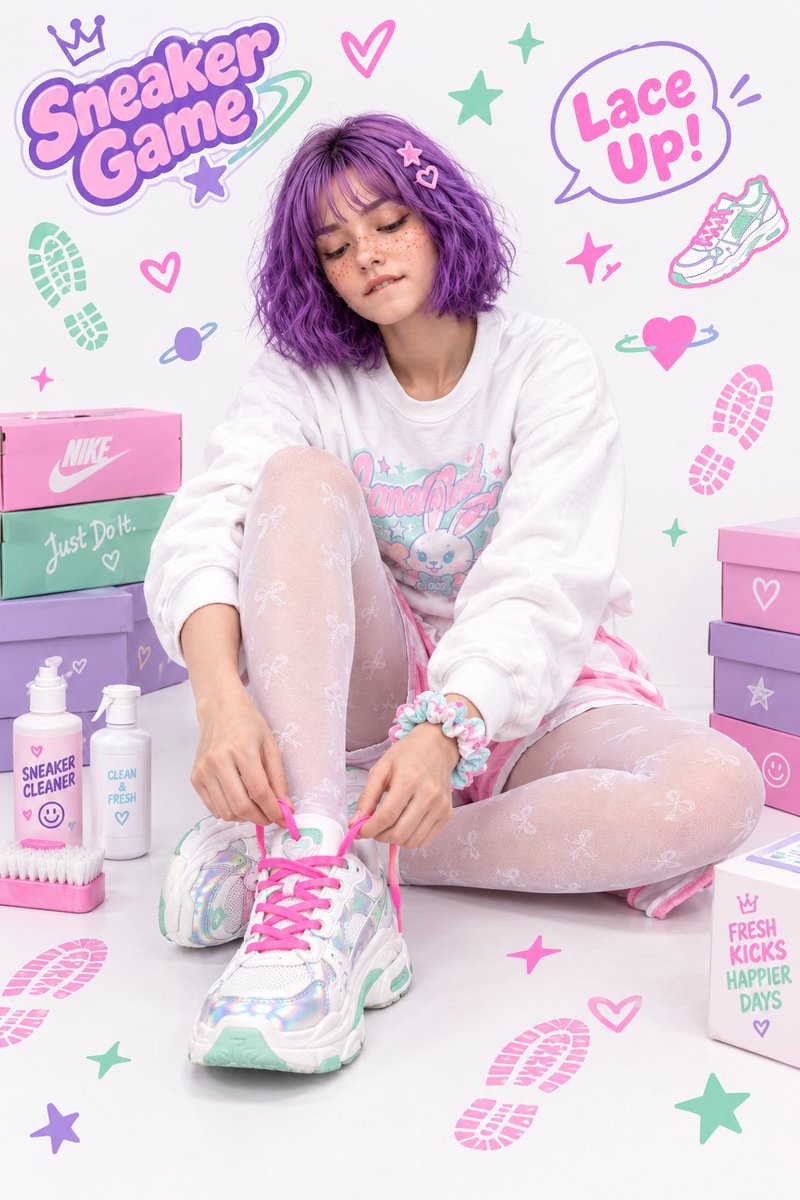
Create a high-quality full-body Y2K fashion editorial photograph of the same female character from the reference image. The character is sitting on a clean white studio floor in a relaxed, cute pose, leaning slightly forward while tying the bright neon-pink shoelaces of a chunky white sneaker. Her head is tilted slightly downward and she is looking at the shoe with a focused, gentle expression, subtly biting her lower lip in concentration. CHARACTER: - Young woman with short, wavy purple bob hair - Soft purple bangs framing the forehead - Cute pastel pink and purple hair clips - Natural fair skin with visible freckles across the cheeks and nose - Soft makeup, subtle eyeliner and natural pink lips - Keep the character's facial features, hairstyle, skin tone and overall identity consistent with the reference image OUTFIT: - Oversized white long-sleeved crew-neck sweatshirt - Cute colorful pastel Y2K graphic printed on the front - Matching white and pastel-pink shorts - Sheer white patterned tights with small cute bow motifs - Pastel ruffled scrunchie bracelet around the wrist - Chunky white sneakers with holographic/iridescent panels - Pastel mint-green accents on the sneakers - Bright vibrant neon-pink shoelaces POSE AND COMPOSITION: - Full-body composition - Sitting naturally on the floor - One leg bent upward and the other positioned comfortably to the side - Hands actively tying the pink shoelaces - One sneaker prominently visible in the foreground - Camera positioned slightly low and front-facing - Fashion editorial photography - Natural anatomy and realistic hands and fingers - Balanced composition with the character as the main focus BACKGROUND: Clean bright white studio background with a playful Y2K pop aesthetic. Surround the character with colorful decorative elements: - Pastel purple, pink, mint and lavender doodles - Hearts - Stars - Sparkles - Shoe-print graphics - Cute arrows - Planet/ring doodles - Floating sneaker illustrations - Pastel shoeboxes stacked around the scene - Cute sneaker-cleaning bottles and brushes - Small decorative text bubbles saying “Sneaker Game” and “Lace Up

한 줄 요약

이 모델은 어떤가요?

이 경로는 입력이 적은 단일 이미지 확대 방식입니다. JPG, PNG 또는 WebP를 업로드하고 1×, 2× 또는 4×를 선택한 뒤 출력 크기와 디테일을 확인하세요. 내용이 이미 확정되었고 주된 문제가 픽셀 크기 부족인 이미지에 적합합니다. 주제, 문자 영역이나 구도를 바꾸려면 먼저 편집 모델을 사용하세요.

잘하는 작업
Topaz Image Upscaler / 확대 배율 — Topaz Image Upscaler는 Kyeo에서 이미지 한 장과 확대 배율을 받고 프롬프트를 읽지 않으며 주제나 구도를 수정하지 않습니다. 1, 2, 4는 가로세로 확대 배율이지 1K, 2K, 4K 해상도가 아닙니다. 출력 가로세로는 원본 각 치수에 선택한 배율을 곱해 계산합니다.
추천 사용자
상품 이미지, 포스터, 소셜 미디어 커버, 오래된 사진 스캔과 그 밖에 크기가 작은 기존 소재를 확대하는 데 사용할 수 있습니다. 문자, 인물과 가는 질감은 항목별로 다시 확인하세요.
Kyeo AI에서 사용하는 이유
Topaz Image Upscaler / 크레딧 소모 — 보수적 사전 승인 40, 성공 후 실사용 차액 환불. 출력 이미지의 긴 변은 8192픽셀을 초과할 수 없습니다.

주요 매개변수

모델이 비즈니스 작업에 적합한지 빠르게 판단할 수 있습니다.

모델 유형
AI 이미지 모델
제공사
Topaz Labs
모델 제품군
Topaz
크레딧 소모
보수적 사전 승인 40, 성공 후 실사용 차액 환불
업로드 제한
JPG/PNG/WebP 1장, 최대 10MB
확대 배율
1× / 2× / 4× · ≤ 8192 px

다른 이름

같은 모델도 공식 문서, 커뮤니티, API 연동 계층에서 다른 이름으로 불릴 수 있어 한곳에 정리했습니다.

Topaz Image Upscaler
Topaz Image Upscale
Topaz Upscaler

자주 묻는 질문

작업, 입력 조건, 결과 요구를 기준으로 모델 선택 전에 확인할 실용적인 질문을 정리했습니다.

Kyeo에서 Topaz Image Upscaler 사용하는 방법
Topaz Image Upscaler 회당 크레딧
Topaz Image Upscaler 지원 이미지 형식
Topaz Image Upscaler 출력 크기 계산
원본에서 출력 크기를 계산하는 방법
Topaz Image Upscaler 최대 파일 크기
Topaz Image Upscaler로 흐린 이미지를 복원할 수 있나요
Topaz Image Upscaler와 Recraft 중 선택
Topaz가 모든 배율에 40크레딧을 사전 승인하는 이유
목표 크기에 맞는 이미지 확대 배율 선택

선택 가이드

어떤 모델을 사용할지 고민된다면 다음 주요 판단 기준부터 확인하세요.

1
내용은 맞지만 픽셀 크기가 부족할 때 사용

내용은 맞지만 픽셀 크기가 부족할 때 사용 — 주제, 구도와 문자를 수정할 필요가 없는지 먼저 확인한 뒤 목표 가로세로에 맞춰 배율을 선택하세요. 확대하면 픽셀 크기는 늘지만 모든 흐림, 압축 흔적이나 잘못된 내용이 고쳐지는 것은 아닙니다.

2
내용을 바꿔야 하면 먼저 편집 모델 선택

내용을 바꿔야 하면 먼저 편집 모델 선택 — 주제를 교체하거나 문자 영역을 조정하거나 구도를 다시 만들려면 먼저 Flux Kontext Pro 또는 GPT Image 1.5를 사용하세요. 고정 비용의 단일 이미지 강화를 비교하려면 Recraft Crisp Upscale도 확인할 수 있습니다.

3
크기를 계산한 뒤 소규모 테스트

크기를 계산한 뒤 소규모 테스트 — 원본 가로세로에 배율을 곱해 출력 치수를 계산하세요. 문자, 가장자리, 인물과 질감은 1× 또는 2×로 시험하고 4×는 비용이 더 높으며 가짜 디테일을 더 세심하게 확인해야 합니다.

자주 검색하는 비교

같은 작업에서 자주 선택하는 후보를 비교해 입력, 제어, 비용 차이를 확인하세요.

Topaz와 Recraft Crisp Upscale의 입력과 요금은 어떻게 다른가요?
Topaz와 Recraft 중 선택 배율을 제공하는 모델은 무엇인가요?
이미지 확대와 프롬프트 편집은 어떻게 구분해야 하나요?
Topaz와 GPT Image 1.5의 작업 범위는 어떻게 다른가요?
구도를 바꿀 때 Topaz를 먼저 쓰면 안 되는 이유는 무엇인가요?

모델 비교표

어떤 모델을 선택할지 고민된다면 현재 모델과 대안의 핵심 차이를 표에서 한눈에 확인하세요.

현재 사이트 포지셔닝
Topaz Image Upscaler
한 장의 이미지를 배율로 확대
Recraft Crisp Upscale
단일 이미지 선명화 작업
Flux Kontext Pro
텍스트로 이미지 내용 수정
현재 화면 제어 항목
Topaz Image Upscaler
1×~4× 단일 이미지 확대
Recraft Crisp Upscale
가벼운 선명화 작업에 가까움
GPT Image 1.5
텍스트 이미지/이미지 편집과 quality 경로
현재 요금 기준
Topaz Image Upscaler
모든 배율에 40 사전 승인, 성공 후 실사용 차액 환불
Recraft Crisp Upscale
회당 1크레딧
Flux Kontext Pro
회당 4크레딧
더 적합한 작업
Topaz Image Upscaler
구도를 바꾸지 않고 픽셀 크기만 늘리기
Recraft Crisp Upscale
회당 1크레딧 고정 단일 이미지 강화
GPT Image 1.5
주제, 문자 영역 또는 구도 수정

실제 사용 관점

공개 자료, 현재 사이트 범위, 대표 작업을 바탕으로 한 실용적인 안내입니다.

배율은 K 단위 출력 해상도가 아님

Topaz Image Upscaler / 배율은 K 단위 출력 해상도가 아님 — `upscale_factor=4`는 가로와 세로를 각각 4배로 늘린다는 뜻이며 고정 4K 출력을 의미하지 않습니다. 최종 픽셀 크기는 원본에 따라 달라지므로 페이지에서 1K/2K/4K를 배율 대신 사용할 수 없습니다.

높은 배율은 크기·비용·검수량을 함께 늘림

Topaz Image Upscaler / 높은 배율은 크기·비용·검수량을 함께 늘림 — 보수적 사전 승인 40, 성공 후 실사용 차액 환불. 출력 이미지의 긴 변은 8192픽셀을 초과할 수 없습니다.

기능 상세 정보

요청에는 이미지와 배율만 포함

요청에는 이미지와 배율만 포함 — 이미지 한 장과 확대 배율 하나만 필요합니다.

입력 형식과 크기에 모두 하드 제한

입력 형식과 크기에 모두 하드 제한 — JPG/PNG/WebP 1장, 최대 10MB. 출력 이미지의 긴 변은 8192픽셀을 초과할 수 없습니다.

배율과 가격 구간을 분리

배율과 가격 구간을 분리 — 1×, 2×, 4×의 입력 의미를 명확히 하고 증명되지 않은 목표 해상도 가격 매핑과 분리합니다. 보수적 사전 승인 40, 성공 후 실사용 차액 환불.

추천 활용 사례

작은 상품 이미지나 포스터 확대

내용이 확정되었고 픽셀 크기만 늘리면 될 때 목표 배치에 맞춰 배율을 계산하세요. 실행 후에도 상품 디테일, 문자와 브랜드 요소를 확인해야 합니다.

저해상도 오래된 이미지와 재출력 이미지 처리

오래된 사진 스캔, 스크린샷 또는 압축된 기존 소재를 시험할 수 있지만 심하게 사라진 디테일은 안정적으로 복원되지 않을 수 있고 새로운 인공 흔적이 생길 수도 있습니다.

커버·배너·인쇄용으로 더 큰 크기 준비

배치에 필요한 픽셀을 기준으로 배율을 고른 뒤 실제 출력으로 잘림, 가장자리와 문자를 확인하세요. 인쇄나 플랫폼 규격에 맞는지는 배율만으로 판단할 수 없습니다.

프롬프트 팁

원본을 먼저 확인하고 프롬프트는 작성하지 않기

Kyeo는 이 워크플로에 프롬프트를 보내지 않습니다. 원본 픽셀 크기, 압축 정도, 문자와 인물 디테일이 확대할 가치가 있는지 먼저 확인하세요.

목표 크기에서 배율을 역산

예를 들어 원본 너비가 1,000픽셀이면 2×는 약 2,000픽셀 너비를 뜻하며 2K 프리셋은 아닙니다. 필요한 최소 배율을 선택해 불필요한 확대를 피하세요. 현재 세 가지 모두 40을 사전 승인하고 성공 후 실사용 차액을 환불합니다.

출력을 항목별로 검수하고 확대를 보정 보장으로 생각하지 않기

전후 크기를 비교하고 가장자리, 반복 질감, 인물, 문자와 압축 인공 흔적을 확대해 확인하세요. 내용 오류는 먼저 편집 모델에서 수정한 뒤 확대 여부를 결정하세요.

선택할 이유

모델 제품군 / Topaz Image Upscaler — 이미지 한 장과 확대 배율 하나만 필요합니다.
확대 배율 — 1×, 2×, 4×의 입력 의미를 명확히 하고 증명되지 않은 목표 해상도 가격 매핑과 분리합니다.
업로드 제한 — 입력 형식, 파일 크기와 긴 변 제약을 명확히 확인할 수 있습니다.
프롬프트 한도 — 프롬프트를 받지 않아 의미 편집 모델과 입력 경계가 분명합니다.

사용 전 확인 사항

현재 프롬프트 기반 작업을 지원하지 않으며 문자로 이미지 내용을 바꾸지도 않습니다.
원본 이미지 한 장만 받으며 여러 참고 이미지를 조합할 수 없습니다.
1×, 2× 또는 4×를 선택할 때 원본 가로세로에 배율을 곱해 출력 치수를 확인하세요.
심하게 흐리거나 과도하게 압축되었거나 내용이 잘못된 이미지는 확대 후에도 사용할 수 없거나 가짜 디테일이 생길 수 있습니다.

조정 가능한 매개변수

모델이 비즈니스 작업에 적합한지 빠르게 판단할 수 있습니다.

확대 배율
선택 사항
매개변수 유형: select
기본값: 2×
1×
2×
4×

포인트 사용량

보수적 사전 승인 40, 성공 후 실사용 차액 환불

보수적 사전 승인 40, 성공 후 실사용 차액 환불. Topaz Image Upscaler는 Kyeo에서 이미지 한 장과 확대 배율을 받고 프롬프트를 읽지 않으며 주제나 구도를 수정하지 않습니다. 1, 2, 4는 가로세로 확대 배율이지 1K, 2K, 4K 해상도가 아닙니다. 출력 가로세로는 원본 각 치수에 선택한 배율을 곱해 계산합니다. JPG/PNG/WebP 1장, 최대 10MB. 출력 이미지의 긴 변은 8192픽셀을 초과할 수 없습니다.

포인트 절약 팁

이미지나 동영상을 일괄 생성하기 전에 같은 소재로 현재 모델과 유사 후보를 A/B 테스트해 보세요. 결과를 확인한 뒤 일괄 생성하면 포인트 낭비를 줄일 수 있습니다.

자주 묻는 질문

유사 모델 추천

아직 결정하지 못했다면 유사 후보 모델도 함께 비교해 보세요.

Recraft Crisp Upscale

Recraft Crisp Upscale은 Kyeo에서 단일 이미지의 선명도와 해상도를 높이는 동작입니다. JPG, PNG 또는 WebP 이미지 1장을 받고 최대 10MB이며 배율, 출력 형식이나 다른 파라미터는 제공하지 않고 매번 1크레딧을 청구합니다. 다운로드한 파일의 실제 크기, 선명도와 디테일 변화를 비교하세요.

AI 이미지 모델
1 크레딧 / 회

Flux Kontext Pro

Flux Kontext Pro는 Kyeo에서 순수 텍스트 생성과 단일 이미지 편집을 제공하며 매번 4크레딧이 고정됩니다. 텍스트 생성에는 화면 비율 6종을 선택할 수 있고, 이미지 1장을 업로드하면 편집 모드로 전환되어 Kyeo가 화면 비율 옵션을 숨기고 기본적으로 해당 파라미터를 보내지 않습니다. 페이지에서는 JPEG/PNG, 자동 번역, 프롬프트 강화, 안전 허용 범위와 워터마크 식별자도 제공합니다.

AI 이미지 모델
4 크레딧 / 회

GPT Image 1.5

GPT Image 1.5는 Kyeo에서 텍스트 이미지 생성과 이미지 편집을 지원하며, 가로세로비 3종과 medium/high 품질을 선택할 수 있습니다. 이미지 편집에는 JPG, PNG 또는 WebP 참고 이미지를 최대 16장까지 사용할 수 있고, 각 파일은 10MB 이하여야 합니다. medium은 4포인트, high는 22포인트입니다. GPT Image 1.5는 OpenAI가 사용 중단으로 표시한 이전 세대 이미지 모델입니다. Kyeo는 생성과 편집 진입점을 계속 제공하지만, 그렇다고 OpenAI가 이 모델을 현행 우선 선택으로 분류한다는 뜻은 아닙니다.

AI 이미지 모델
회당 4~22포인트

정보 출처

페이지 내용은 개발사 자료, 모델 제품군 설명, Kyeo AI 플랫폼 연동 설정을 바탕으로 정리했습니다.

출처 안내

Topaz Image Upscaler는 Kyeo에서 이미지 한 장과 확대 배율을 받고 프롬프트를 읽지 않으며 주제나 구도를 수정하지 않습니다. 1, 2, 4는 가로세로 확대 배율이지 1K, 2K, 4K 해상도가 아닙니다. 출력 가로세로는 원본 각 치수에 선택한 배율을 곱해 계산합니다. JPG/PNG/WebP 1장, 최대 10MB. 출력 이미지의 긴 변은 8192픽셀을 초과할 수 없습니다. 보수적 사전 승인 40, 성공 후 실사용 차액 환불.

마지막 업데이트: 2026-08-26
Topaz Gigapixel: Upscale
공식
원본 출처 보기
Topaz Gigapixel: Settings
공식
원본 출처 보기
Topaz Gigapixel
공식
원본 출처 보기