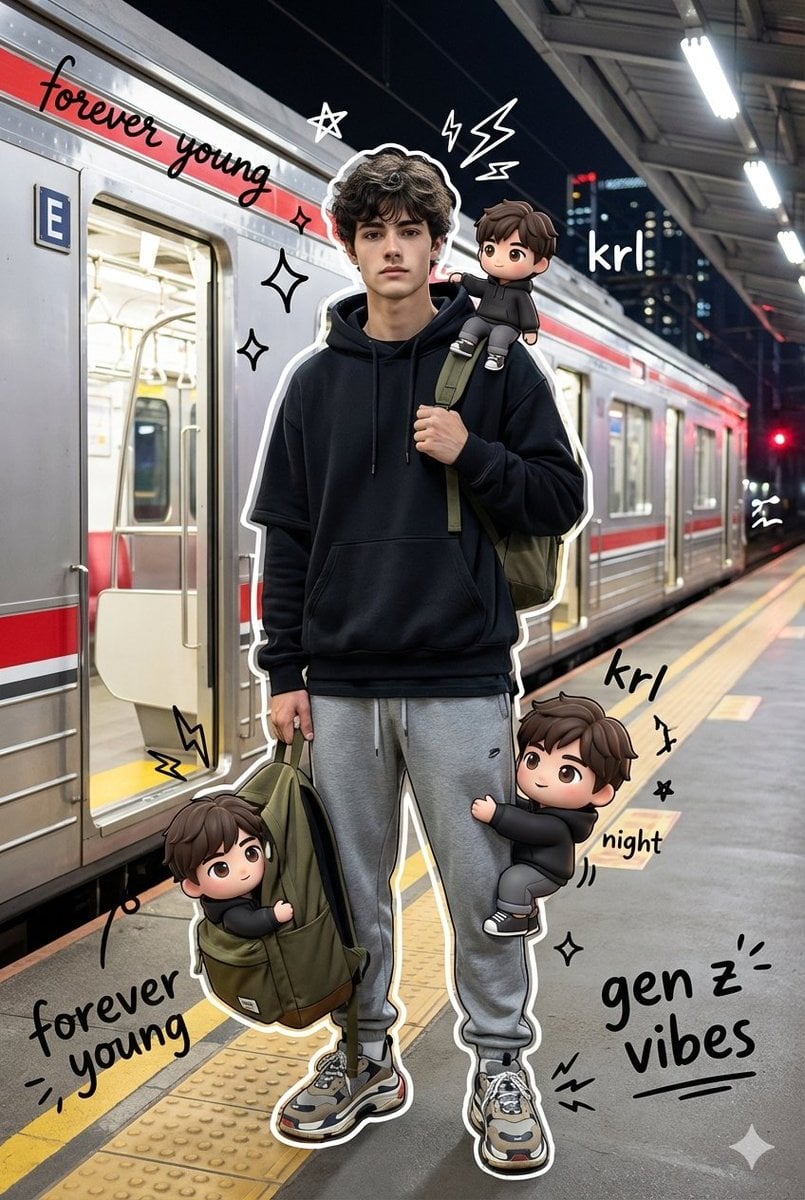
KRL 站台真人与 Chibi 分身混合媒介模板
先看推荐模型、适用场景和使用步骤,再决定如何直接套用。
这类模板更适合先保留画面结构,再替换主体、风格或商业诉求。优先用 Google Imagen4 起跑,再根据结果切换到同类型备选。
如果你不确定先用哪个模型,可以先从作者推荐的这几个起点开始。
提示词内容
先看推荐模型、适用场景和使用步骤,再决定如何直接套用。
生成 high quality mixed media portrait,使用 uploaded person photo 作为人物来源。trendy young man 夜晚站在 train station platform,pose coolly,一只手 holding the strap of an olive backpack。穿 oversized layered black hoodie、gray sweatpants、chunky sneakers 的 stylish streetwear outfit。背景是 realistic KRL Jabodetabek Commuter Line train side view,保留 signature red striping,train doors wide open,受 bright cinematic station lighting 和 city night ambiance 照亮。真实主体周围出现 several cute 3D style chibi versions of himself,same outfit and same face;一个 sitting on his shoulder,一个 climbing his leg,另一个 peeking out from the backpack。叠加 vibrant hand drawn doodle effects:white drawn outlines around the subject、playful scribbles、stars、sparkles、electric sparks,以及 floating white and black handwritten slogans:“forever young”、“krl”、“night”、“gen z vibes”。最终让写实摄影和 colorful flat cartoon illustrations 自然融合,同时 keeping the face and body shape unchanged。
使用建议
按这个顺序上手,通常比直接复制 prompt 更容易拿到可用结果。
如果你没有既定偏好,先从 Google Imagen4 开始通常更稳。
优先保留构图、光线、材质和风格结构,再替换主体、品牌信息和使用场景。
图片模板最有价值的地方是加速试错,所以别只跑一张就做决定。
模板信息
帮助你快速判断这个模板是否适合当前任务。
适合场景
这个模板更适合以下几类任务。
海报与封面
商品与品牌图
角色与风格探索
推荐模型
如果你不确定先用哪个模型,可以先从作者推荐的这几个起点开始。
相关模板
同类型模板一起对比,通常更容易找到更适合你的 prompt 方向。
评分与评价
请先登录