الانتقال إلى المحتوى الرئيسي
نموذج لتوليد الصور وتحريرها بالذكاء الاصطناعي
OpenAI
GPT Image

GPT Image 2.5 Sunburst

GPT Image 2.5 Sunburst / تصنيف القدرة — يدعم GPT Image 2.5 Sunburst في Kyeo AI توليد الصور من النص وتحرير الصور المرجعية. ويحتسب Kyeo التكلفة حسب دقة الإخراج: 3 نقاط لـ1K، و10 نقاط لـ2K، و16 نقاط لـ4K.

تصنيف القدرة
نص إلى صورة وصورة إلى صورة
استهلاك النقاط
3–16 نقاط/عملية
حد نص الطلب
20,000 محرف
حد الرفع
حتى 16 صورة
تعرّف عليه في 30 ثانية
  • GPT Image 2.5 Sunburst / تصنيف القدرة — تدعم صفحة Kyeo نفسها التوليد من نص خالص وطلبات التحرير بما يصل إلى 16 صورة مرجعية
  • GPT Image 2.5 Sunburst / الدقة / استهلاك النقاط — يُسعّر التوليد والتحرير حسب الدقة: 3/10/16 نقاط لـ1K/2K/4K
  • GPT Image 2.5 Sunburst / حد الرفع — يقبل Kyeo صور JPEG وPNG وWebP المرجعية، ويقيد كل صورة حاليًا بـ10 MB
  • تدعم النسب 27:16 و16:27 و9:8 و8:9 دقة 1K فقط؛ أما النسب الأخرى فتدعم 1K و2K و4K.

عمليات البحث الشائعة: كيفية استخدام GPT Image 2.5 Sunburst في Kyeo AI · كم نقطة تستهلك دقات 1K و2K و4K في GPT Image 2.5 Sunburst · كيفية تحرير صورة مرجعية بـ GPT Image 2.5 Sunburst

أمثلة

Visual concept

Visual concept

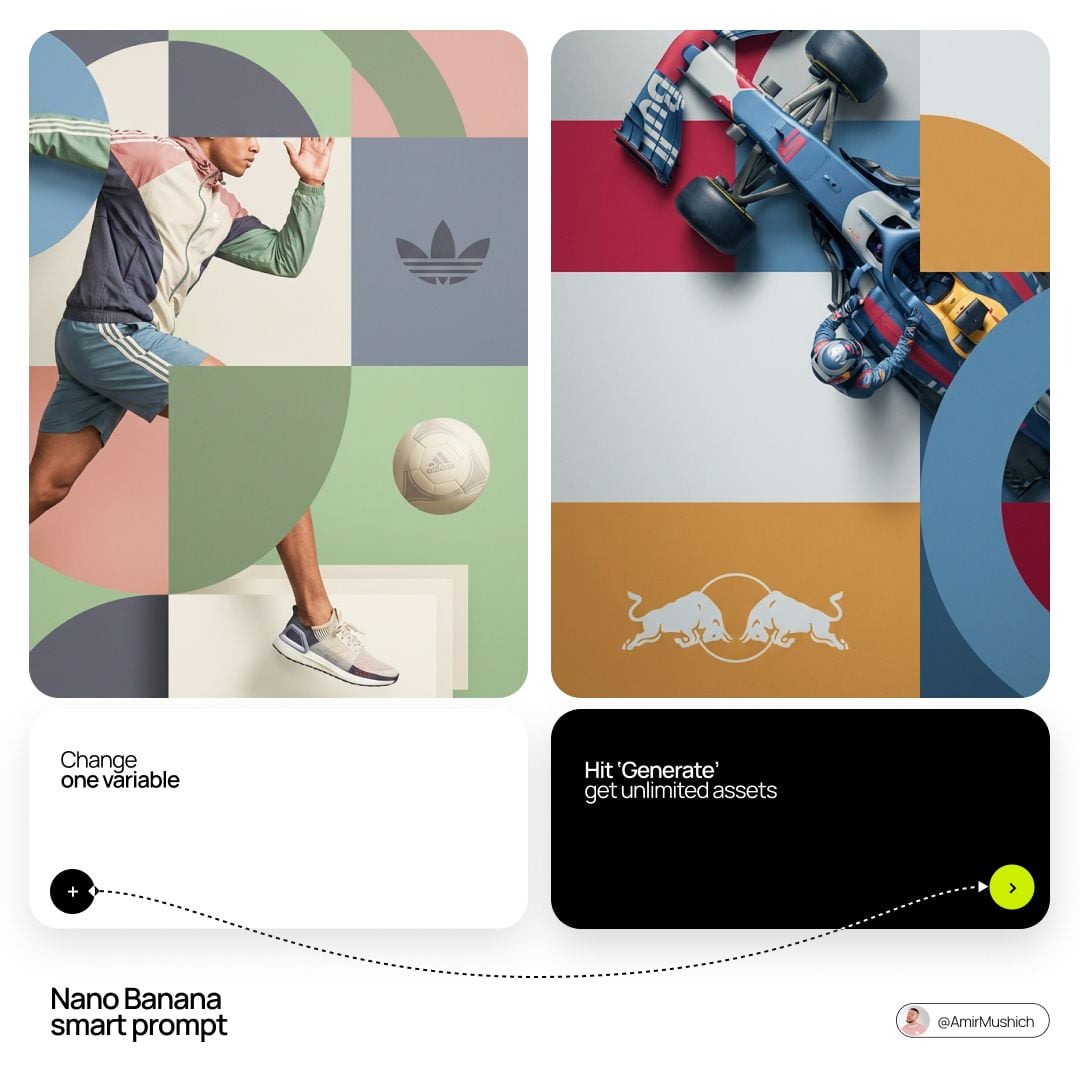
[BRAND NAME]. Act as a World-Class Editorial Designer. PHASE 1: DYNAMIC SUBJECT LOGIC. - Subject Selection: Autonomously analyze [BRAND NAME]. - Layering (The Sandwich Effect): Interweave the subject with background shapes. Some parts of the car/person must be hidden behind geometric blocks, while other parts (wheels, limbs, props) must overlap them to create 3D depth. PHASE 2: GRID & GEOMETRY. - Layout: A clean 2x2 grid composition. - Overlays: Superimpose large, bold geometric arcs and circles over the grid. - Visual Balance: Place one iconic product prop (e.g., a floating key fob for cars or a ball for sports) in a separate quadrant to balance the subject. PHASE 3: SOPHISTICATED MUTED PALETTE. - Color Direction: DO NOT use aggressive neon or oversaturated colors. - Palette: Identify the core colors of [BRAND NAME] and shift them to a "Sophisticated Muted" spectrum. - Tones: Use desaturated, earthy, or "dusty" versions of the brand colors (e.g., instead of hot pink, use dusty rose; instead of bright mint, use sage green; instead of royal blue, use slate blue). - Finish: Matte, flat color blocks with zero gradients. PHASE 4: PHOTOGRAPHY & LIGHTING. - Subject Style: High-end commercial studio photography. - Lighting: Soft, diffused studio lighting with gentle highlights. No harsh shadows. - Integration: The subject must feel physically embedded into the graphic grid. PHASE 5: MINIMALIST BRANDING. - Logo: Place a clean, single-color [BRAND NAME] logo in the center of one background block. No taglines, just the iconic symbol.
Visual concept

Visual concept

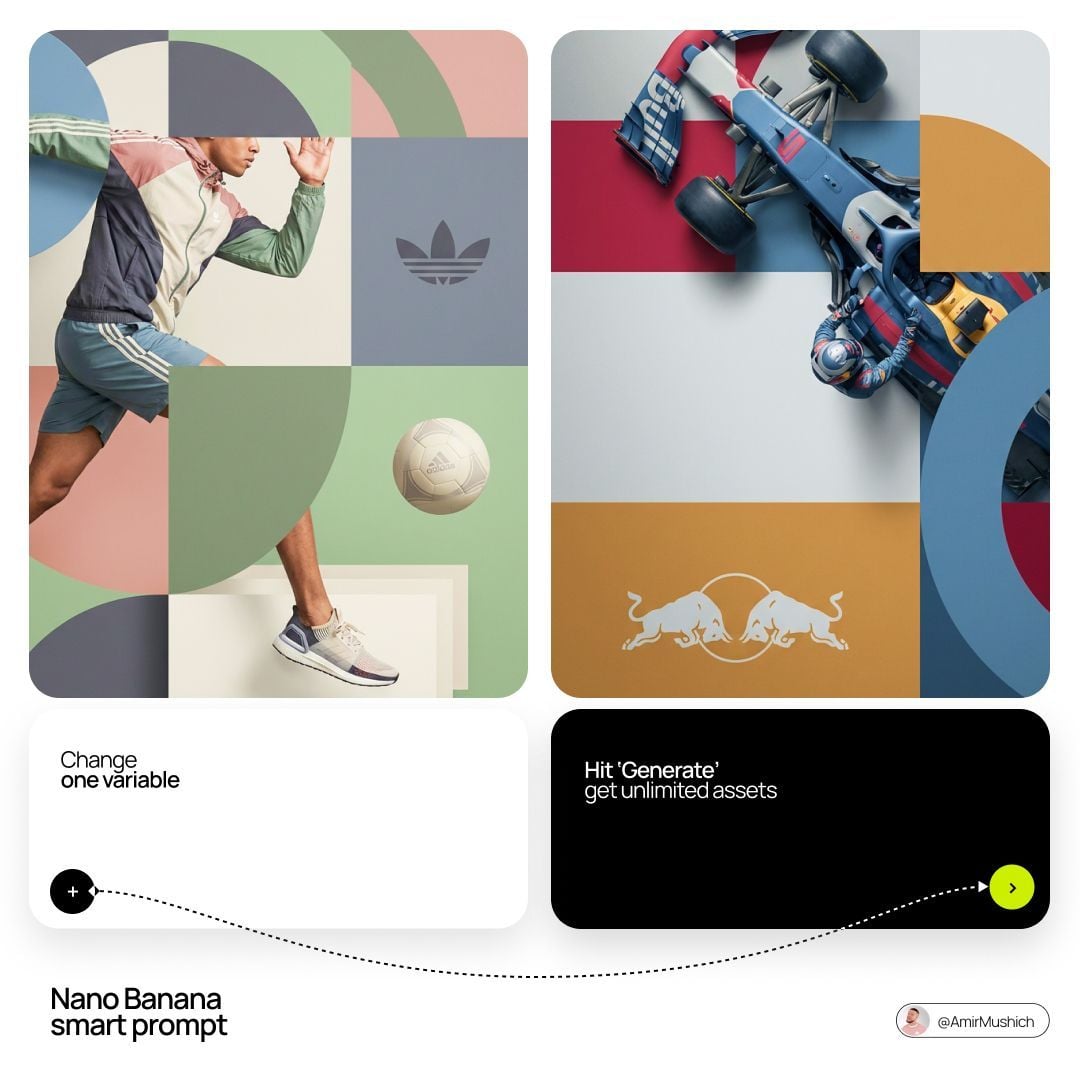
[BRAND NAME]. Act as a World-Class Editorial Designer. PHASE 1: DYNAMIC SUBJECT LOGIC. - Subject Selection: Autonomously analyze [BRAND NAME]. - Layering (The Sandwich Effect): Interweave the subject with background shapes. Some parts of the car/person must be hidden behind geometric blocks, while other parts (wheels, limbs, props) must overlap them to create 3D depth. PHASE 2: GRID & GEOMETRY. - Layout: A clean 2x2 grid composition. - Overlays: Superimpose large, bold geometric arcs and circles over the grid. - Visual Balance: Place one iconic product prop (e.g., a floating key fob for cars or a ball for sports) in a separate quadrant to balance the subject. PHASE 3: SOPHISTICATED MUTED PALETTE. - Color Direction: DO NOT use aggressive neon or oversaturated colors. - Palette: Identify the core colors of [BRAND NAME] and shift them to a "Sophisticated Muted" spectrum. - Tones: Use desaturated, earthy, or "dusty" versions of the brand colors (e.g., instead of hot pink, use dusty rose; instead of bright mint, use sage green; instead of royal blue, use slate blue). - Finish: Matte, flat color blocks with zero gradients. PHASE 4: PHOTOGRAPHY & LIGHTING. - Subject Style: High-end commercial studio photography. - Lighting: Soft, diffused studio lighting with gentle highlights. No harsh shadows. - Integration: The subject must feel physically embedded into the graphic grid. PHASE 5: MINIMALIST BRANDING. - Logo: Place a clean, single-color [BRAND NAME] logo in the center of one background block. No taglines, just the iconic symbol.
Visual concept

Visual concept

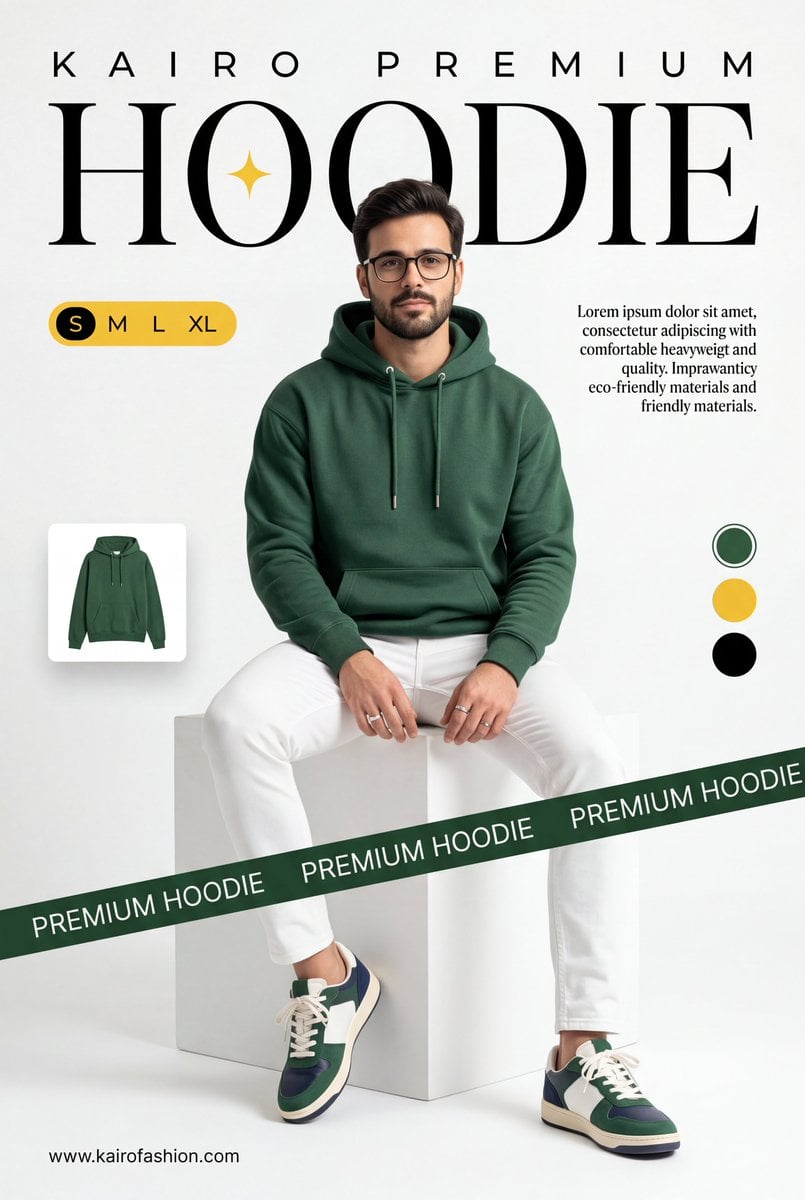
A professional commercial fashion advertisement featuring [a young male model] in the uploaded image, sitting on a minimalist white matte cube. He has a neutral, confident expression and is looking directly at the camera. Attire & Styling: Hoodie: A high-quality, [heavyweight forest green (British Racing Green) hoodie]. It features a relaxed fit, a spacious kangaroo pocket, and metal-tipped drawstrings. Bottoms: Clean, slim-fit white trousers with visible seams. Footwear: Stylish low-top sneakers in a color-blocked design of forest green, navy blue, and white, with off-white midsoles and white laces. Accessories: Simple silver bands/rings on his fingers. Graphic Design & Layout: Typography: The word [HOODIE] is written in a massive, elegant high-contrast serif font across the top. A small, four-pointed yellow spark icon is centered inside the "O". Above this, [K A I R O P R E M I U M] is printed in a wide-spaced sans-serif font. Branding Elements: A dark green diagonal "caution tape" style ribbon crosses the bottom third of the frame, with the words [PREMIUM HOODIE] repeating in white uppercase text. UI Accents: * A yellow pill-shaped size selector labeled "S M L XL" on the left. A small thumbnail of the hoodie floating on the mid-left. Three circular color swatches (Green, Yellow, Black) on the right side. Two blocks of justified serif body text describing the product's comfort and eco-friendly materials. The URL [www.meigen.ai] in the bottom left corner. Environment & Lighting: Setting: A clean, bright, white-on-white minimalist studio cove. Lighting: Soft, diffused studio lighting creates gentle shadows under the model and the cube, emphasizing the rich texture of the green fabric and the crispness of the white pants. Color Palette: Deep forest green, bright white, and golden yellow accents.

Visual concept

Visual concept

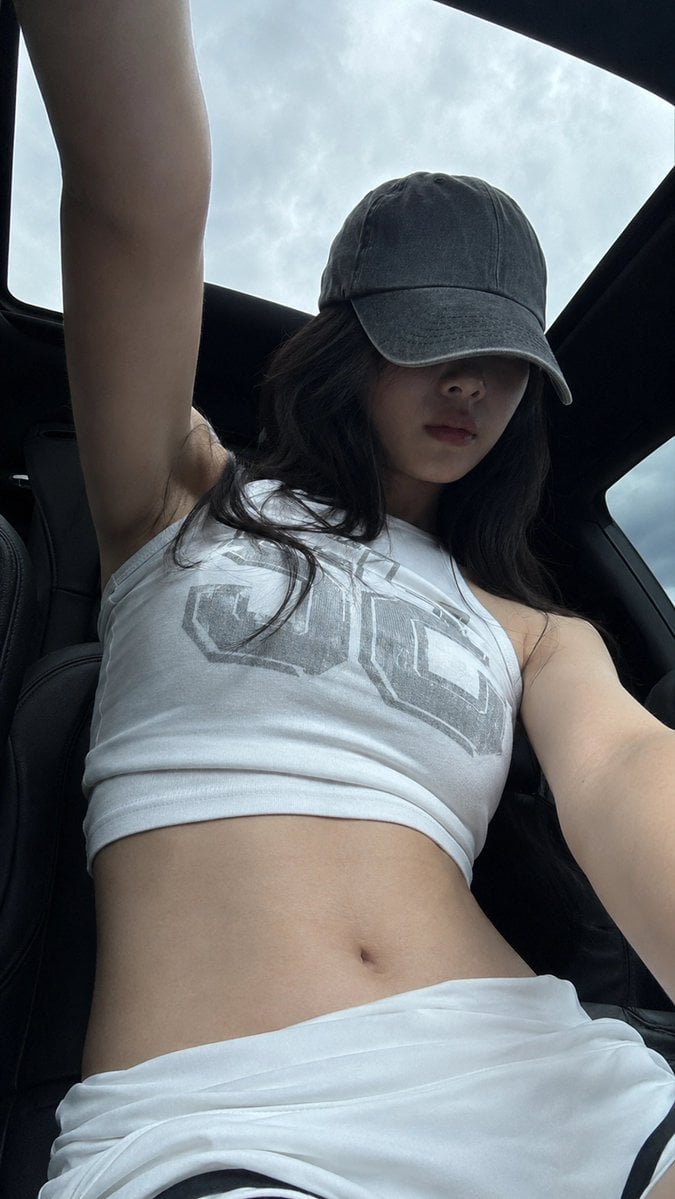
A realistic vertical mobile-phone selfie, 9:16 aspect ratio. A young adult woman in her 20s is inside a car under a panoramic sunroof. The camera is placed low, around waist or seat height, shooting upward. Her body is close to the lens, her head slightly lowered, and one arm extends upward out of frame as if holding the phone or adjusting the angle. The composition should feel slightly off-center and casual, not perfectly staged. She wears a worn gray baseball cap with a low brim hiding her eyes. The upper half of her face falls into the cap shadow, leaving only a soft facial outline, nose bridge, and relaxed closed lips visible. Her expression is calm, unsmiling, low-emotion, and slightly distant, like a casual photo taken right after sitting in the car. Long black hair falls naturally from both sides of the cap, with a few messy strands and real airy texture. She wears a white sleeveless high-neck cropped tank top with a large muted gray block-letter graphic print across the chest. The fabric looks like thin cotton or stretch knit, fitted to the body with subtle horizontal wrinkles and realistic stretch texture. The bottom is a low-waist white sporty skirt or shorts with folded fabric around the waist and a small black inner edge visible. The waist and abdomen are fully visible. Visible skin areas include the neck, shoulders, upper arms, edge of the underarm area, small collarbone area, full abdomen, side waist, and upper hip edge. Her skin tone is fair neutral-cool, slightly grayish in the shaded car interior, smooth but natural, as if cool to the touch, soft, with subtle pores and real underlying contours. The skin must be completely clean: no tattoos, no body markings, no text, no stickers, no patterns on the skin. Lighting comes from overcast daylight entering through the panoramic roof and car windows. The pale blue-gray cloudy sky outside is bright, while the black car roof and curved sunroof frame create strong negative space. The subject stays in the darker car interior; the cap casts a strong shadow across the face, while the shoulders and abdomen receive soft diffused sky light. Keep slight mobile noise, dark shadow compression, bright sky highlights, and a raw phone-camera feeling. Avoid studio lighting, commercial retouching, excessive skin smoothing, and an artificial glossy AI look. Negative prompt: tattoo, body art, skin text, watermark, logo watermark, over-retouched skin, plastic skin, studio lighting, mirror selfie, heavy makeup, extra fingers, distorted hands, bad anatomy, unrealistic body, AI glossy look.

Visual concept

Visual concept

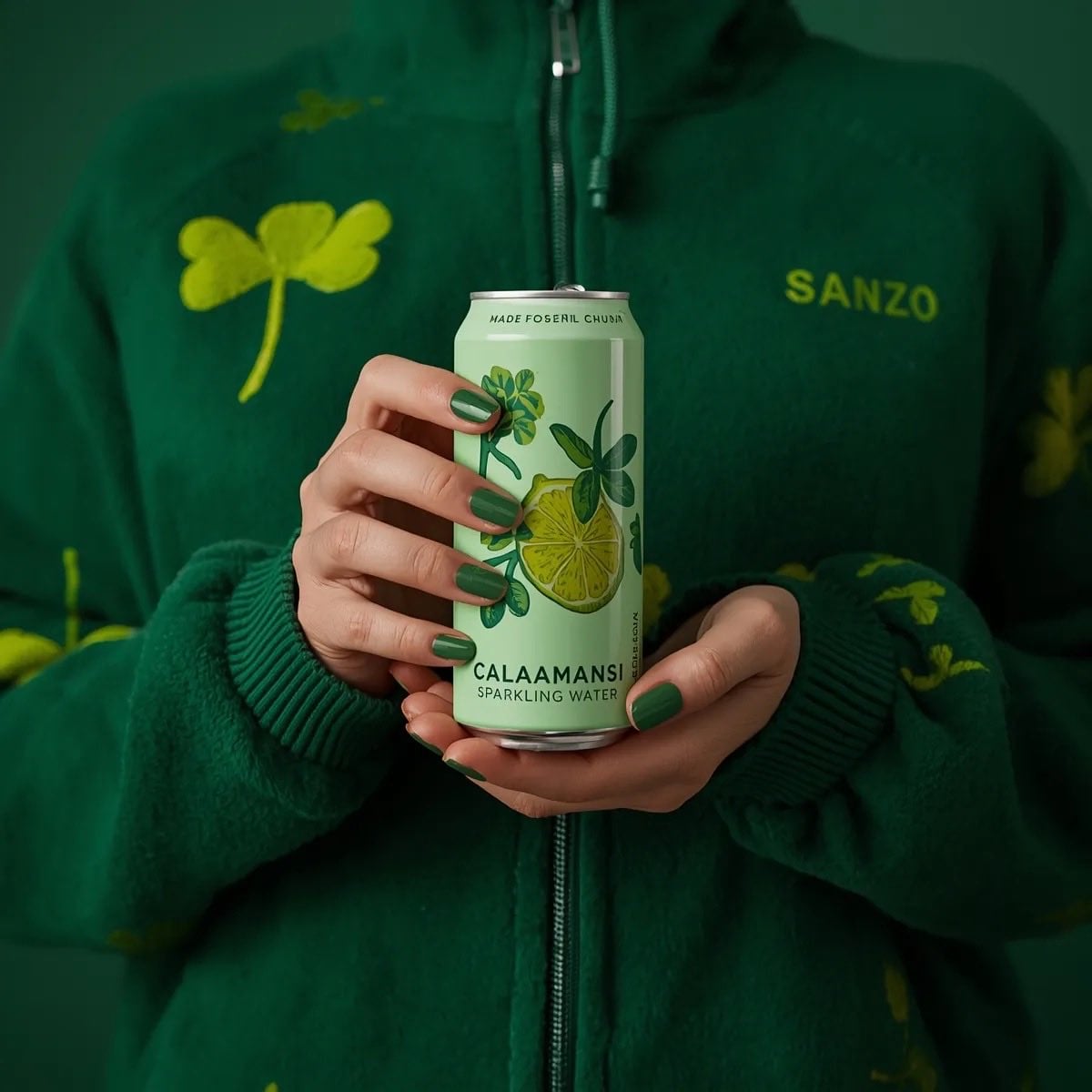
A photorealistic product shot of a person holding a slim, light green can of Sanzo Calamansi Sparkling Water. The person is wearing a dark green, fuzzy fleece zip-up hoodie patterned with light green four-leaf clovers. Both hands are holding the can centrally in front of their torso, displaying perfectly manicured nails painted in a glossy green polish. The can features an illustration of a sliced calamansi lime with green leaves. The background is a solid, moody dark green, creating a striking monochromatic green aesthetic. Soft, professional studio lighting, highly detailed.

Visual concept

Visual concept

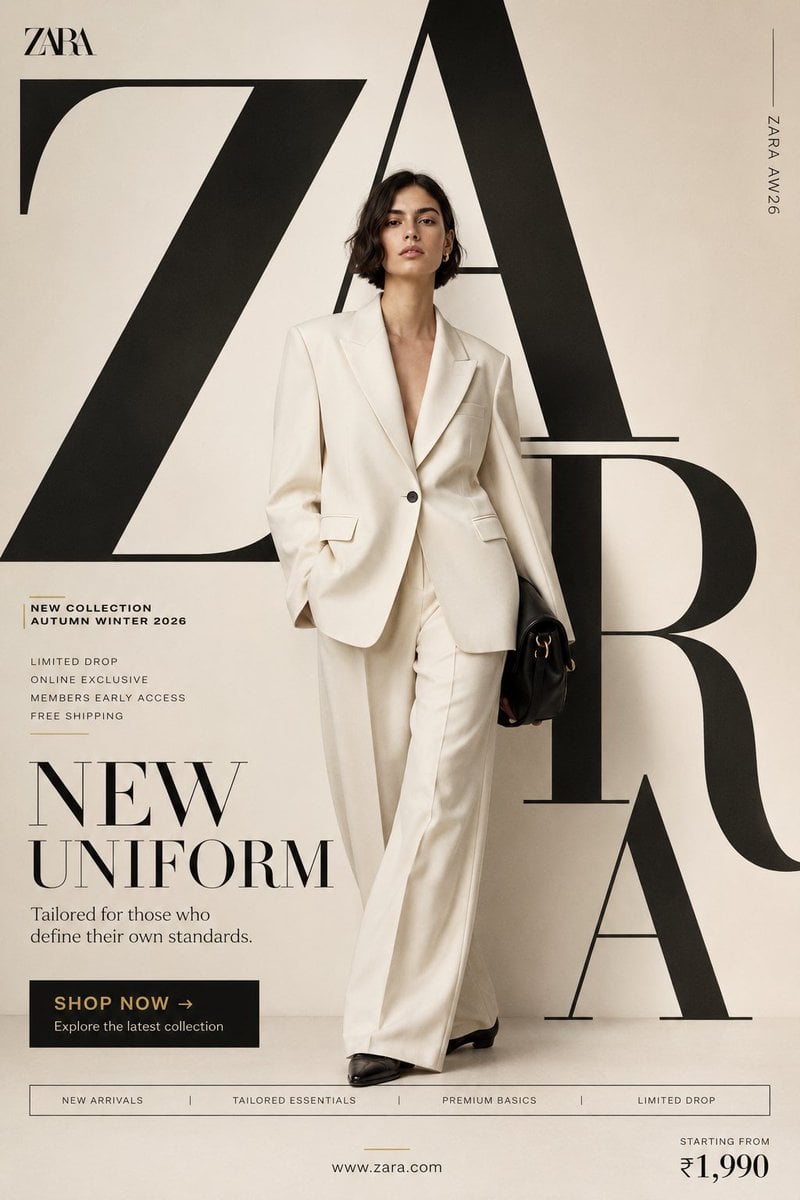
"NEW UNIFORM" FORMAT Ultra-Premium Fashion SMM Promotional Poster Vertical 4:5 Instagram Hero Creative Luxury Fast Fashion Advertising Commercial Fashion Graphic Design Agency-Level Art Direction Behance Front Page Quality 8K UHD Hyper-Realistic Fashion × Graphic Design Fusion Zero AI Slop Zero Generic Fashion Campaigns Zero Editorial-Only Aesthetic CORE STRATEGY This is not a fashion campaign. This is a fashion statement disguised as a promotional poster. The design should feel like Zara's homepage, a luxury magazine cover, and a premium billboard campaign merged into one visual. The graphic design is equally important as the fashion. Typography is not decoration. Typography is architecture. CAMPAIGN IDEA "NEW UNIFORM" Not office uniform. Not school uniform. The uniform of modern taste. The clothes aren't being sold. The identity is. MASTER VISUAL Massive oversized ZARA typography dominates the entire composition. The word: ZARA occupies nearly 75% of the canvas. Typography is integrated into the design. Letters extend beyond frame edges. Some letters cropped. Some hidden behind the model. Some functioning as compositional structures. The typography should feel monumental. HERO SUBJECT Female model. Editorial face. Strong jawline. Minimal makeup. Luxury fashion energy. No smiling. No dramatic posing. Pure confidence. Wardrobe: Oversized ivory blazer. Wide-leg tailored trousers. Premium monochromatic styling. Black leather accessories. Luxury minimalism. POSE Model stepping through the giant typography. One foot slightly forward. Direct eye contact. Hands relaxed. Body partially intersecting typography. The feeling: She owns the space. COMPOSITION Typography occupies 70%. Model occupies 20%. Promotional elements occupy 10%. Visual hierarchy: ZARA ↓ Model ↓ Promotion ↓ CTA Everything feels intentional. COLOR SYSTEM Primary: Ivory Cream Off White Soft Beige Black Accent: Muted Gold No bright colors. No fashion-week color chaos. Luxury restraint. BACKGROUND Clean luxury backdrop. Large soft gradient. Editorial studio environment. Subtle texture. No architecture. No scenery. No distractions. The design itself creates the environment. GRAPHIC DESIGN SYSTEM Floating collection cards. Luxury editorial labels. Minimal grid system. Thin lines. Micro typography. Magazine-inspired information hierarchy. Fashion-week poster energy. PROMOTIONAL ELEMENTS NEW COLLECTION AUTUMN WINTER 2026 LIMITED DROP ONLINE EXCLUSIVE MEMBERS EARLY ACCESS FREE SHIPPING Integrated naturally into layout. Not banner spam. TYPOGRAPHY HIERARCHY Top Left ZARA small luxury wordmark Center Massive Typography Z A R A occupying most of composition luxury serif typography extremely large scale partially cropped Campaign Title NEW UNIFORM bold elegant typography Supporting Copy Tailored for those who define their own standards. PROMOTIONAL CTA BLOCK SHOP NOW → Explore the latest collection BOTTOM FEATURE STRIP NEW ARRIVALS TAILORED ESSENTIALS PREMIUM BASICS LIMITED DROP Bottom Right Starting From ₹1,990 Bottom Center http://zara.com Vertical Edge Text ZARA AW26 LIGHTING Luxury studio lighting. Large soft source. Editorial contrast. Natural skin rendering. Premium fabric highlights. Subtle shadows. Luxury magazine quality. CAMERA ARRI Alexa Mini LF 85mm Lens Editorial fashion photography Shallow depth of field Extremely sharp fabric rendering Ultra-premium commercial quality POST-PRODUCTION Luxury European fashion campaign grading. Rich blacks. Cream highlights. Visible textile texture. Natural skin detail. No excessive retouching. No artificial HDR. No fake luxury effects. FINAL FEEL If Zara, Vogue, and a premium graphic design studio created a promotional social media poster together. Not a fashion photograph. Not a catalogue. A modern luxury fashion advertisement Shot on ARRI Alexa Mini LF, 35mm lens, dynamic commercial perspective, street-fashion energy, magazine-cover quality detail, natural movement capture, authentic contemporary fashion realism, premium advertising production standards. Modern fashion campaign color grading, strong reds, clean whites, visible fabric textures, realistic skin detail, subtle grain, commercial social-media polish, no artificial luxury grading, no fashion-house minimalism, no generic fast-fashion campaign aesthetics, no AI slop, no sterile studio appearance. A fusion of Spotify Wrapped energy, Nike youth-culture storytelling, Pinterest trend aesthetics and world-class graphic design agency execution. Bold, energetic, expressive, commercial, social-first and highly shareable. A true promotional SMM poster communicating that every personality, every mood and every version of yourself can exist within one H&M collection. Behance Front Page quality, award-winning youth-fashion advertising, graphic-design-first commercial masterpiece.

خلاصة في جملة

كيف يبدو هذا النموذج؟

خلاصة في جملة — أنشئ صورا من النص أو حرر حتى 16 صورة مرجعية بموجه لا يتجاوز 20,000 حرف. اختر من بين 13 نسبة أبعاد وإخراج بدقة 1K أو 2K أو 4K. اختر خلفية تلقائية أو شفافة أو معتمة. راجع الحواف والنصوص قبل استخدام النتيجة.

ما الذي يتقنه؟
كيف يبدو هذا النموذج؟ / ما الذي يتقنه؟ — أنشئ صورا من النص أو حرر حتى 16 صورة مرجعية بموجه لا يتجاوز 20,000 حرف. اختر من بين 13 نسبة أبعاد وإخراج بدقة 1K أو 2K أو 4K. اختر خلفية تلقائية أو شفافة أو معتمة. راجع الحواف والنصوص قبل استخدام النتيجة.
لمن يناسب؟
يناسب المهام التي تحتاج إلى توليد من نص خالص أو تحرير بصور مرجعية أو اختيار واضح لمستوى إخراج 1K أو2K أو4K. ويمثل 20,000 محرف و16 صورة حدي الإدخال والرفع، لا كمية موصى بها.
لماذا تستخدمه في Kyeo AI؟
يجمع Kyeo نص الطلب والصور المرجعية ونسبة الأبعاد والدقة في نموذج واحد، ويفحص التركيبات غير المتوافقة ويعرض النقاط قبل الإرسال، لتسهيل مقارنة الإعدادات بالمواد نفسها.

المعلمات الأساسية

يساعدك على تقييم مدى ملاءمة النموذج لسيناريو عملك بسرعة.

فئة النموذج
نموذج لتوليد الصور وتحريرها بالذكاء الاصطناعي
الشركة
OpenAI
عائلة النموذج
GPT Image
الإعدادات المتاحة
إعدادات الموقع الحالية
طريقة التشغيل
مهمة غير متزامنة
حد نص الطلب
20,000 محرف
حد الرفع
حتى 16 صورة

أسماء أخرى

قد يحمل النموذج نفسه أسماء مختلفة في الوثائق الرسمية ونقاشات المجتمع وطبقة تكامل API؛ نجمعها هنا بصورة موحدة.

GPT Image 2.5 Sunburst

أسئلة المستخدمين الشائعة

تركز هذه الأسئلة العملية على المهمة وشروط الإدخال والنتيجة التي ينبغي تأكيدها قبل الاختيار.

كيفية استخدام GPT Image 2.5 Sunburst في Kyeo AI
كم نقطة تستهلك دقات 1K و2K و4K في GPT Image 2.5 Sunburst
كيفية تحرير صورة مرجعية بـ GPT Image 2.5 Sunburst
كم صورة يمكن رفعها إلى GPT Image 2.5 Sunburst وما حجمها
ما نسب الأبعاد المتاحة مع 4K في GPT Image 2.5 Sunburst
ما الدقات التي يدعمها الوضع التلقائي في GPT Image 2.5 Sunburst
ما عناصر تحكم GPT Image 2.5 Sunburst المتاحة حاليًا في Kyeo
ما دقات GPT Image 2.5 Sunburst التي يمكن اختيارها في Kyeo
ما الفرق بين تسعير GPT Image 2.5 Sunburst وGPT Image 1.5
هل حد 16 صورة في GPT Image 2.5 Sunburst هو العدد الموصى به
هل يضمن GPT Image 2.5 Sunburst اتساق النص والشخصيات

دليل الاختيار

هل ما زلت مترددًا في اختيار النموذج؟ ابدأ بهذه النقاط الأساسية.

1
اختره عند الحاجة إلى عناصر التحكم هذه

يمكن إدراج GPT Image 2.5 Sunburst في الاختبار العملي عندما تحتاج المهمة إلى تحرير بصور مرجعية أو نص طلب 20,000 محرف أو حتى 16 صورة أو مستويات سعر واضحة لـ1K/2K/4K.

2
متى تقارن نموذجًا آخر أولًا

إذا فضلت مستويي الجودة medium/high فقارن GPT Image 1.5؛ وإذا احتجت إلى صيغة إخراج أو نسب أبعاد أكثر فقارن Nano Banana Pro، واقبل النتائج بالمهمة نفسها.

3
أقصر مسار للتحقق

وضح أي صورة مسؤولة عن الموضوع أو الخامة أو الخلفية أو التخطيط، وابدأ بعدد قليل من الصور الأساسية. قد تضيف المراجع تعارضًا ولا تحسن الاتساق تلقائيًا. تدعم النسب 27:16 و16:27 و9:8 و8:9 دقة 1K فقط؛ أما النسب الأخرى فتدعم 1K و2K و4K.

المقارنات الشائعة في البحث

قارن البدائل الشائعة في المهمة نفسها لتوضيح الفروق في المدخلات والتحكم والتكلفة.

الفرق بين GPT Image 2.5 Sunburst وGPT Image 1.5
GPT Image 2.5 Sunburst مقابل GPT Image 1.5
الفرق بين GPT Image 2.5 Sunburst وNano Banana Pro
GPT Image 2.5 Sunburst مقابل Nano Banana Pro
الفرق بين GPT Image 2.5 Sunburst وFlux 2 Pro
GPT Image 2.5 Sunburst مقابل Flux 2 Pro

جدول مقارنة النماذج

هل تتردد بين الخيارات؟ يوضح هذا الجدول أهم الفروق بين النموذج الحالي وبدائله بنظرة واحدة.

الموقع الحالي داخل المنصة
GPT Image 2.5 Sunburst
يدعم التوليد والتحرير، ويُسعّر حسب الدقة
GPT Image 1.5
يُسعّر حسب مستويي الجودة medium/high
Nano Banana Pro
يوفر 11 نسبة أبعاد وصيغتي PNG/JPG
أساس التسعير الحالي
GPT Image 2.5 Sunburst
1K=3 / 2K=10 / 4K=16 نقاط
GPT Image 1.5
medium=4 / high=22 نقطة
Flux 2 Pro
يستخدم 1K/2K أسعارًا وعناصر تحكم أخرى
حد الصور المرجعية
GPT Image 2.5 Sunburst
حتى 16 صورة، لا تتجاوز الواحدة في Kyeo نحو 10 MB
Nano Banana Pro
حتى 8 صور مدخلة
Flux 2 Pro
حتى 8 صور مرجعية

تجربة الاستخدام الفعلية

إرشادات عملية تستند إلى مصادر عامة وحدود الموقع الحالية ومهام تمثل الاحتياجات الشائعة.

تحدد عناصر تحكم الموقع الحالية مسار العمل المتاح

تجربة الاستخدام الفعلية / تحدد عناصر تحكم الموقع الحالية مسار العمل المتاح — أنشئ صورا من النص أو حرر حتى 16 صورة مرجعية بموجه لا يتجاوز 20,000 حرف. اختر من بين 13 نسبة أبعاد وإخراج بدقة 1K أو 2K أو 4K. اختر خلفية تلقائية أو شفافة أو معتمة. راجع الحواف والنصوص قبل استخدام النتيجة.

الدقة وحد الإدخال ليسا مستوى جودة

تحدد 1K/2K/4K في Kyeo أساسًا حجم الإخراج والنقاط، بينما تمثل 16 صورة الحد الأقصى للرفع. ولا يرفع المستوى الأعلى أو كثرة المراجع الدقة أو الاتساق أو قابلية الاستخدام تلقائيًا.

تفاصيل القدرات

توليد من النص وتحرير بصور مرجعية

توليد من النص وتحرير بصور مرجعية — تدعم صفحة Kyeo نفسها التوليد من نص خالص وطلبات التحرير بما يصل إلى 16 صورة مرجعية

ثلاث دقات وفحص التركيبات

تفاصيل القدرات / ثلاث دقات وفحص التركيبات — تدعم النسب 27:16 و16:27 و9:8 و8:9 دقة 1K فقط؛ أما النسب الأخرى فتدعم 1K و2K و4K.

حتى 16 صورة مرجعية

حتى 16 صورة مرجعية — حد نص الطلب 20,000 محرف، وحد الصور المرجعية 16 صورة.

الخلفية

اختر خلفية تلقائية أو شفافة أو معتمة. راجع الحواف والنصوص قبل استخدام النتيجة.

الاستخدامات المناسبة

نماذج أولية لصور المنتجات والإعلانات

يمكن توليد خلفيات وتكوينات وأبعاد من النص أو من صورة منتج مرجعية؛ ويجب فحص الشعارات وكتابة العبوة وبنية الأشخاص وتفاصيل المنتج في كل صورة.

تحرير الصور المرجعية

وضح الموضوع الذي يجب حفظه والخلفية أو التكوين أو الخامة المسموح بتعديلها، واستخدم عددًا قليلًا من المراجع الأساسية لاختبار الالتزام.

توليد مشاهد متعددة العناصر

قسّم نص الطلب إلى وصف العناصر والعلاقات المكانية واللقطة والأسلوب، ثم افحص الإغفال وانحراف الموضع وأخطاء الكتابة والمحتوى غير المتوافق.

نصائح الموجّه

تأكد أولًا من صلاحية تركيب الأبعاد والدقة

نصائح الموجّه / تأكد أولًا من صلاحية تركيب الأبعاد والدقة — تدعم النسب 27:16 و16:27 و9:8 و8:9 دقة 1K فقط؛ أما النسب الأخرى فتدعم 1K و2K و4K.

عيّن وظيفة لكل صورة مرجعية

وضح أي صورة مسؤولة عن الموضوع أو الخامة أو الخلفية أو التخطيط، وابدأ بعدد قليل من الصور الأساسية. قد تضيف المراجع تعارضًا ولا تحسن الاتساق تلقائيًا.

افصل بين ما يجب حفظه وما يجب تغييره

في مهام التحرير، اسرد الخصائص التي يجب الحفاظ عليها والمناطق المسموح بتغييرها والمحتوى المحظور؛ ثم افحص الكتابة والعلامات والأيدي والحواف يدويًا.

أسباب اختياره

طريقة التشغيل / GPT Image 2.5 Sunburst — تدعم الصفحة نفسها التوليد من نص خالص والتحرير بصور مرجعية.
الدقة / استهلاك النقاط — أسعار نقاط 1K/2K/4K والتركيبات غير الصالحة واضحة.
حد نص الطلب / حد الرفع — حد نص الطلب 20,000 محرف، وحد الصور المرجعية 16 صورة.
أسباب اختياره — تدعم النسب 27:16 و16:27 و9:8 و8:9 دقة 1K فقط؛ أما النسب الأخرى فتدعم 1K و2K و4K.

ما يجب معرفته قبل الاستخدام

ما يجب معرفته قبل الاستخدام — أنشئ صورا من النص أو حرر حتى 16 صورة مرجعية بموجه لا يتجاوز 20,000 حرف. اختر من بين 13 نسبة أبعاد وإخراج بدقة 1K أو 2K أو 4K. اختر خلفية تلقائية أو شفافة أو معتمة. راجع الحواف والنصوص قبل استخدام النتيجة.
ما يجب معرفته قبل الاستخدام — تدعم النسب 27:16 و16:27 و9:8 و8:9 دقة 1K فقط؛ أما النسب الأخرى فتدعم 1K و2K و4K.
حد الرفع / GPT Image 2.5 Sunburst — تمثل 16 صورة مرجعية حد السعة فقط؛ وكثرة الصور لا تعني اتساقًا أعلى.
طريقة التشغيل / GPT Image 2.5 Sunburst — قد تظل هناك انحرافات في تنسيق النص وتكرار الشخصيات وعناصر العلامة التجارية، وتحتاج النتائج إلى مراجعة بشرية.

المعلمات القابلة للضبط

يساعدك على تقييم مدى ملاءمة النموذج لسيناريو عملك بسرعة.

نسبة الأبعاد
اختياري
نوع المعلمة: قائمة منسدلة
الافتراضي: تلقائية
تلقائي
1:1
3:2
2:3
4:3
3:4
16:9
9:16
21:9
27:16
16:27
9:8
8:9
الدقة
اختياري
نوع المعلمة: قائمة منسدلة
الافتراضي: 1K
1K
2K
4K
الخلفية
اختياري
نوع المعلمة: قائمة منسدلة
تلقائية
شفافة
معتمة

استهلاك النقاط

3–16 نقاط/عملية

يحتسب Kyeo حاليًا التكلفة حسب الدقة: 3 نقاط لـ1K، و10 نقاط لـ2K، و16 نقاط لـ4K؛ وسعر التوليد والتحرير واحد.

نصيحة لتوفير النقاط

قبل توليد الصور أو الفيديو على دفعات، يُنصح بإجراء اختبار A/B بالمواد نفسها بين النموذج الحالي وبدائله من النوع نفسه، ثم بدء التوليد على دفعات بعد تأكيد النتيجة لتجنب هدر النقاط.

الأسئلة الشائعة

نماذج مشابهة موصى بها

لم تقرر بعد؟ قارن أيضًا بهذه البدائل المشابهة.

GPT Image 2

GPT Image 2 / تصنيف القدرة — يدعم GPT Image 2 في Kyeo AI توليد الصور من النص وتحرير الصور المرجعية. ويحتسب Kyeo التكلفة حسب دقة الإخراج: 3 نقاط لـ1K، و5 نقاط لـ2K، و8 نقاط لـ4K.

نموذج لتوليد الصور وتحريرها بالذكاء الاصطناعي
3–8 نقاط/عملية

GPT Image 2.5 Flare

GPT Image 2.5 Flare / تصنيف القدرة — يدعم GPT Image 2.5 Flare في Kyeo AI توليد الصور من النص وتحرير الصور المرجعية. ويحتسب Kyeo التكلفة حسب دقة الإخراج: 3 نقاط لـ1K، و10 نقاط لـ2K، و16 نقاط لـ4K.

نموذج لتوليد الصور وتحريرها بالذكاء الاصطناعي
3–16 نقاط/عملية

GPT Image 1.5

يدعم GPT Image 1.5 في Kyeo النص إلى صورة والصورة إلى صورة، مع اختيار ثلاث نسب أبعاد ومستويي الجودة medium/high. يستخدم مسار الصورة إلى صورة حتى 16 صورة مرجعية بصيغة JPG أوPNG أوWebP، لا تتجاوز الواحدة 10 MB؛ وتكلف medium أربع نقاط وhigh اثنتين وعشرين نقطة. GPT Image 1.5 نموذج صور من الجيل السابق أهملته OpenAI. يحتفظ Kyeo بمدخلي التوليد والتحرير، لكن ذلك لا يعني أن OpenAI لا تزال تعده خيارها الحالي المفضل.

نموذج صور بالذكاء الاصطناعي
4-22 نقطة / عملية

مصادر المعلومات

أُعد محتوى الصفحة استنادًا إلى مواد الشركة المطوّرة ووصف عائلة النموذج وإعداد التكامل في منصة Kyeo AI.

ملاحظة المصدر

أنشئ صورا من النص أو حرر حتى 16 صورة مرجعية بموجه لا يتجاوز 20,000 حرف. اختر من بين 13 نسبة أبعاد وإخراج بدقة 1K أو 2K أو 4K. اختر خلفية تلقائية أو شفافة أو معتمة. راجع الحواف والنصوص قبل استخدام النتيجة.

آخر تحديث: 2026-09-15
مراجعة إعدادات الموقع الحالية
التكامل

تمت مراجعة حدود الإدخال وخيارات نسبة الأبعاد والدقة مقابل عناصر التحكم المتاحة حاليًا على الموقع.