AI 圖片模型
Google
Google Imagen
Google Imagen4
純文字生成圖片. 8 點數/次. 5,000 個字元. 長寬比: 1:1, 16:9, 9:16, 3:4, 4:3, Auto.
能力標籤
純文字生成圖片
點數消耗
8 點數/次
提示詞上限
5,000 個字元
圖片輸入
不支援
30 秒快速瞭解
- 純文字輸入、5,000 個字元主提示詞上限與固定單張輸出邊界明確。
- 長寬比: 1:1, 16:9, 9:16, 3:4, 4:3, Auto.
- Imagen4 與 Imagen4 Fast 的 Kyeo 點數如何比較? Kyeo 目前對每次 Google Imagen4 單圖任務固定收取 8 點數;比例、反向提示詞與 seed 不會改變 Kyeo 點數。
熱門搜尋: 如何在 Kyeo 上使用 Google Imagen4 · Google Imagen4 每次多少點數 · Google Imagen4 提示詞上限是多少
示例
Fantasy scene
Visual concept
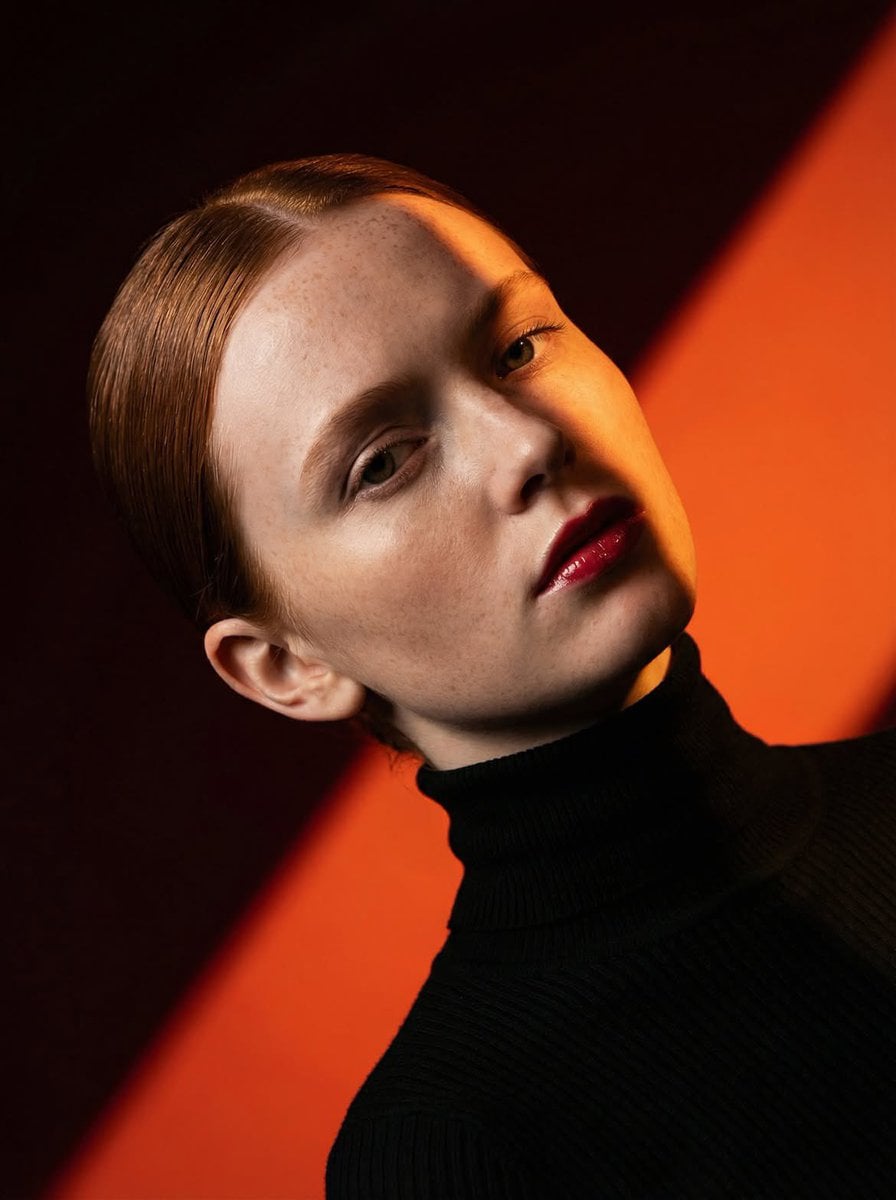
Ultra-high-fashion editorial beauty portrait of a fair-skinned female model with sleek center-parted hair tightly pulled into a low bun, wearing a fitted black ribbed turtleneck sweater. Dramatic studio lighting creates a bold diagonal shadow slicing across the face, emphasizing facial structure, freckles, and glossy deep-red lips. Minimal makeup with natural skin texture, cinematic contrast, rich warm color palette. Background consists of striking geometric color-blocked panels in vibrant orange and deep burgundy red, forming strong diagonal lines. Clean composition, luxury magazine cover aesthetic, contemporary fashion campaign, fine-art portrait photography, sharp focus, ultra-detailed skin, professional studio setup, high dynamic range, moody atmosphere, Vogue-style editorial, medium close-up framing, 85mm lens, f/2.8, photorealistic, 8K quality. Negative Prompt: blurry, low resolution, overexposed highlights, flat lighting, messy hair, smiling expression, heavy accessories, jewelry, cluttered background, text, watermark, logo, extra limbs, distorted face, cartoon, illustration, CGI, oversaturated skin, unnatural anatomy, poor composition, noise, motion blur.
Fantasy scene
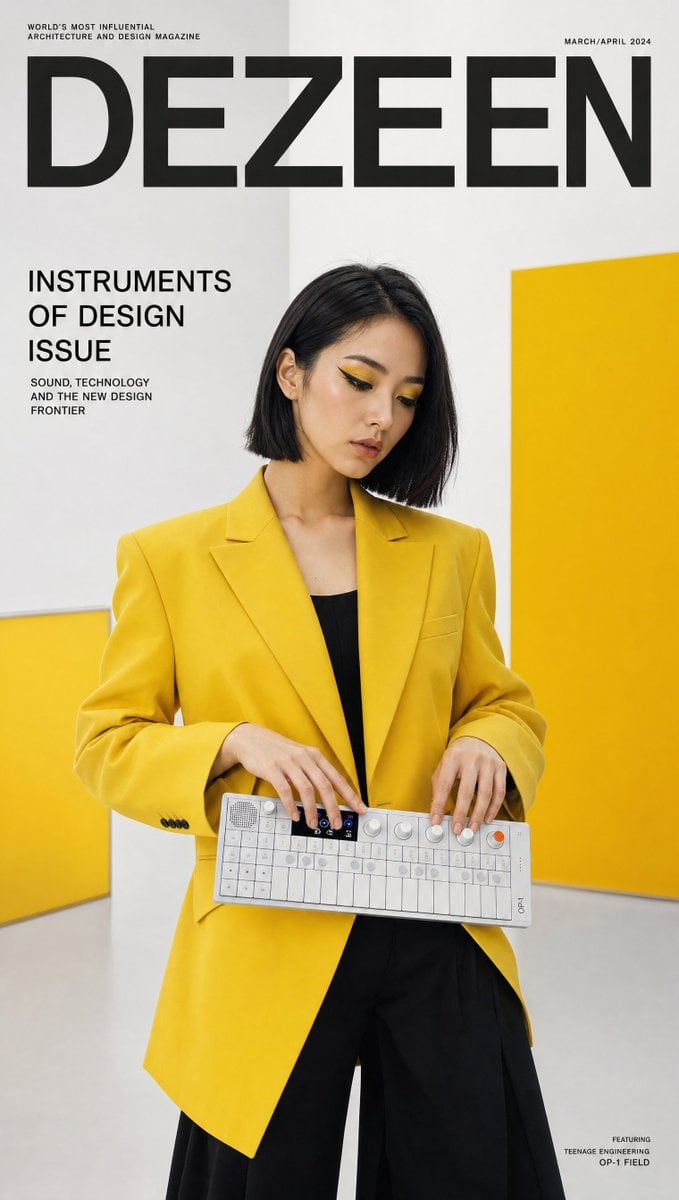
Visual concept
Ultra-realistic design culture magazine cover featuring a creative Korean woman in a bold yellow structured blazer and black wide-leg trousers — matching the product's colorway — holding a Teenage Engineering OP-1 Field synthesizer horizontally with both hands, fingers hovering over the tiny keys mid-composition, deep in creative flow. Bold graphic makeup, sharp geometric liner, yellow eyeshadow accent. Sleek straight bob. Background: clean white Bauhaus-inspired studio with bold yellow color block wall panels, ultra-graphic composition. "DEZEEN" masthead in precise sans-serif with "INSTRUMENTS OF DESIGN ISSUE" callout. 50mm lens, ultra-detailed OP-1 tiny key and OLED display, 8K photorealistic design editorial. Negative: cartoon, blurry, incorrect product shape, watermark, distorted.
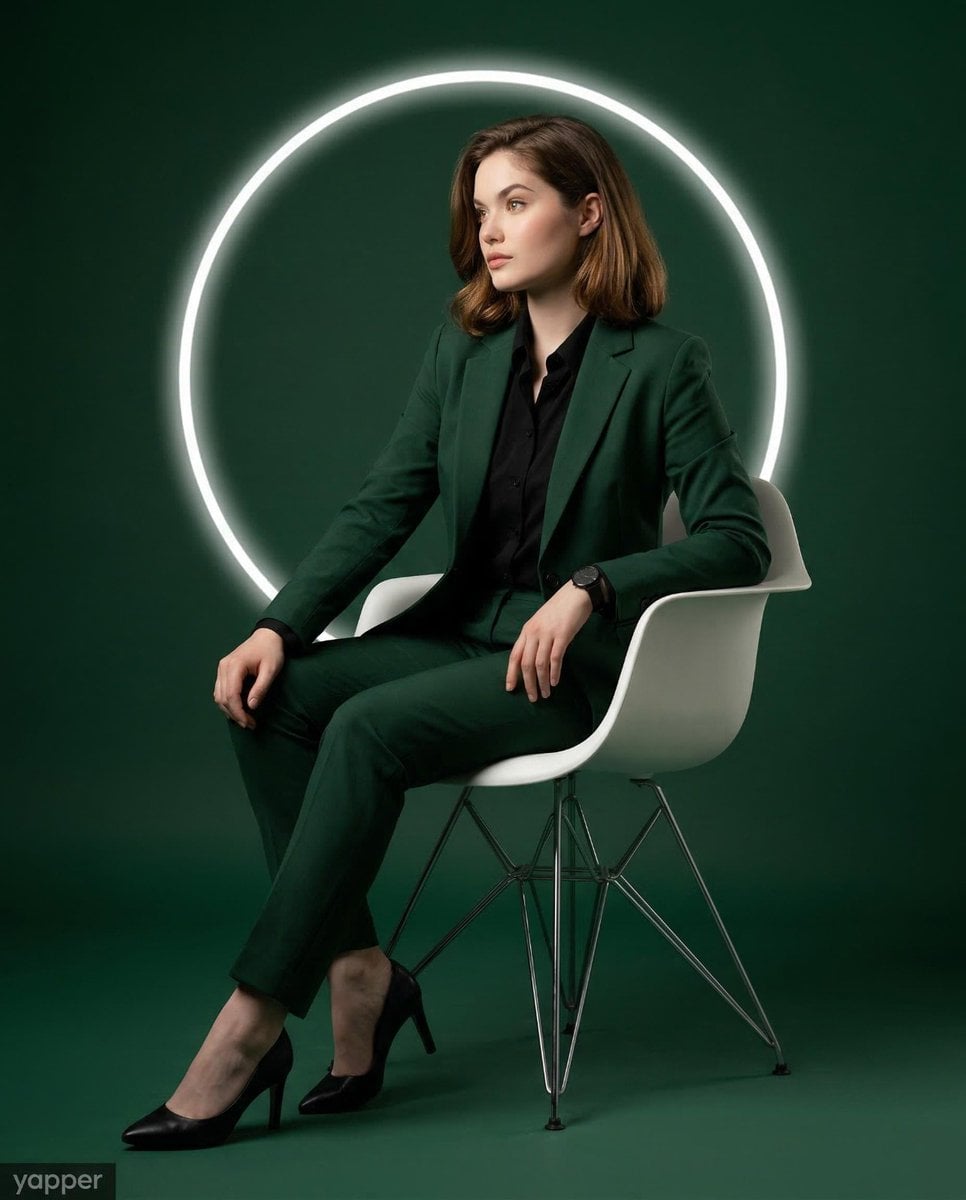
Visual concept
Use the provided image strictly as the reference for the subject’s face, age, and identity. Lock facial identity with the highest priority. Preserve the exact facial structure, proportions, skin tone, jawline, eyes, nose, lips, and overall likeness. Do not beautify, stylise, feminise beyond the natural identity, or alter facial features in any way. Create a modern, high-end studio portrait of a woman in a vertical 4:5 aspect ratio. Full-body seated editorial composition, centre-framed with balanced negative space. The overall visual aesthetic should feel clean, luxurious, powerful, and magazine-quality. The subject is wearing a sharply tailored deep forest green women’s suit with a refined structured blazer and tailored straight-leg trousers, paired with a crisp black fitted button-down shirt, elegant black leather formal heels, and a black wristwatch. The overall color palette is rich deep forest green (#225d57) with a polished luxury editorial aesthetic. The subject is seated in a sleek modern white molded plastic chair with four thin metal legs. Her posture is relaxed and confident, leaning back comfortably with her back supported by the chair rather than sitting rigidly upright. Torso angled slightly toward the viewer’s left side. Head turned left, showing a refined three-quarter profile. Gaze directed toward the left side of the frame, not toward the camera, creating a thoughtful editorial look. Body language: Shoulders relaxed and naturally dropped. Right hand resting near the upper thigh, fingers relaxed and naturally extended. Left elbow resting lightly on the edge of the seat, with the wristwatch visible. Legs extended forward in a relaxed seated stance. Both feet resting naturally on the floor, slightly apart and angled toward the left side of the frame. The pose should feel elegant, grounded, natural, and editorial — never stiff. The chair is placed in a seamless dark green studio environment where the floor and background blend smoothly. Behind the subject’s head and upper torso is a medium-sized glowing white circular LED ring light, centered like a modern halo. This creates a strong graphic visual element and subtle rim-light separation from the background. Use cinematic studio lighting: soft key light from the left side shaping the face, gentle shadow retention for depth, and subtle controlled fill light to preserve detail. The LED ring behind the subject should glow clean and bright without overpowering the subject. The lighting mood should feel dramatic, premium, and polished. Photorealistic, ultra-detailed, premium commercial portrait, sharp focus on facial features, suit texture, shoes, chair surface, and lighting contrast, refined editorial color grading, clean studio finish, no bad anatomy or bad proportions, no distortion, no exaggerated limbs or hands.
一句話瞭解
這個模型表現如何?
反向提示詞最多 5,000 個字元,文字 seed 最多 500 個字元。 純文字生成圖片.
- 它擅長什麼
- 只支援純文字生成,Kyeo 不接受圖片,也未開放編輯、輸出數量、解析度、格式、安全設定或提示詞改寫。
- 適合哪些使用者
- 可先用預設方形生成,再以相同描述比較橫式、直式、3:4 與 4:3;應依實際版位檢查主體位置、裁切、文字與留白。 Auto.
- 為什麼要在 Kyeo AI 使用
- 點數消耗: Kyeo 目前對每次 Google Imagen4 單圖任務固定收取 8 點數;比例、反向提示詞與 seed 不會改變 Kyeo 點數。
關鍵參數總覽
協助你快速評估此模型是否符合你的業務情境。
模型類別
AI 圖片模型
廠商
Google
模型家族
Google Imagen
執行方式
非同步任務
提示詞上限
5,000 個字元
圖片輸入
不支援
其他名稱
同一個模型在官方文件、社群討論與 API 串接層可能有不同稱呼,這裡幫你統一整理。
Google Imagen4
Google Imagen 4
使用者常見問題
從實際任務、輸入條件和結果要求出發,整理選擇模型時最需要確認的問題。
如何在 Kyeo 上使用 Google Imagen4
Google Imagen4 每次多少點數
Google Imagen4 提示詞上限是多少
Google Imagen4 支援哪些比例
Google Imagen4 是否支援圖片輸入
Google Imagen4 反向提示詞最長多少
Google Imagen4 seed 最長多少
Google Imagen4 一次輸出幾張圖片
Google Imagen4 與 Fast 有何不同
Kyeo 開放哪些 Imagen4 控制項
選擇指南
還在猶豫該用哪個模型嗎?先查看這幾個關鍵決策點。
1
需要純文字與 1:1 預設值時選擇
純文字生成圖片. 8 點數/次. 5,000 個字元. 長寬比: 1:1, 16:9, 9:16, 3:4, 4:3, Auto. Kyeo 目前對每次 Google Imagen4 單圖任務固定收取 8 點數;比例、反向提示詞與 seed 不會改變 Kyeo 點數。
2
需要圖片編輯或更多輸出控制時改用其他模型
此入口不接受圖片,也沒有輸出數量、尺寸、格式或安全設定。若要保留原圖主體、局部修改、放大或指定輸出格式,應選擇明確提供相關控制項的模型。
3
同時驗證反向提示詞與文字 seed 邊界
同時驗證反向提示詞與文字 seed 邊界: 反向提示詞最多 5,000 個字元,文字 seed 最多 500 個字元。
使用者常搜尋的比較
把常見候選放在同一任務下比較,協助你確認輸入方式、控制項和成本差異。
Kyeo 的 Imagen4 與 Imagen4 Fast 控制項有何不同?
Imagen4 與 Imagen4 Fast 的 Kyeo 點數如何比較?
Imagen4 與 Ultra 在 Kyeo 的預設比例有何不同?
模型比較表
還在猶豫該選哪一個嗎?這張表協助你快速看清目前模型與替代方案的核心差異。
Kyeo 輸入與輸出
Google Imagen4
純文字輸入,固定單張輸出
Google Imagen4 Fast
純文字輸入,固定單張輸出
Google Imagen4 Ultra
純文字輸入,固定單張輸出
預設長寬比
Google Imagen4
1:1
Google Imagen4 Fast
16:9
Google Imagen4 Ultra
1:1
Kyeo 點數
Google Imagen4
固定 8
Google Imagen4 Fast
固定 4
Google Imagen4 Ultra
固定 12
實際使用體驗
結合公開資料、目前站內邊界和典型任務,說明模型適合與不適合的情況。
Google Imagen
Google Imagen: Kyeo 目前對每次 Google Imagen4 單圖任務固定收取 8 點數;比例、反向提示詞與 seed 不會改變 Kyeo 點數。 反向提示詞最多 5,000 個字元,文字 seed 最多 500 個字元。 長寬比: 1:1, 16:9, 9:16, 3:4, 4:3, Auto.
長寬比
Google Imagen: 長寬比: 1:1, 16:9, 9:16, 3:4, 4:3, Auto. 預設值:1:1.
功能詳解
能力標籤
能力標籤: 純文字輸入、5,000 個字元主提示詞上限與固定單張輸出邊界明確。
長寬比
長寬比: 長寬比: 1:1, 16:9, 9:16, 3:4, 4:3, Auto. 預設值:1:1.
隨機種子
隨機種子: 反向提示詞最多 5,000 個字元,文字 seed 最多 500 個字元。
適合做什麼
以 1:1 為起點的比例比較
以 1:1 為起點的比例比較: 可先用預設方形生成,再以相同描述比較橫式、直式、3:4 與 4:3;應依實際版位檢查主體位置、裁切、文字與留白。 Auto.
反向提示詞與 seed 對照
反向提示詞與 seed 對照: 反向提示詞最多 5,000 個字元,文字 seed 最多 500 個字元。
Google Imagen: Kyeo 的 Imagen4 與 Imagen4 Fast 控制項有何不同?
Google Imagen: Kyeo 的 Imagen4 與 Imagen4 Fast 控制項有何不同?: Kyeo 目前對每次 Google Imagen4 單圖任務固定收取 8 點數;比例、反向提示詞與 seed 不會改變 Kyeo 點數。
提示詞技巧
主提示詞先寫可見內容
依序說明主體、動作、環境、構圖、光線與需要出現的文字。
反向提示詞 / 隨機種子
反向提示詞 / 隨機種子: 反向提示詞最多 5,000 個字元,文字 seed 最多 500 個字元。
seed 測試只改變一個變數
seed 測試只改變一個變數: 反向提示詞最多 5,000 個字元,文字 seed 最多 500 個字元。
選擇它的理由
Google Imagen: 純文字輸入、5,000 個字元主提示詞上限與固定單張輸出邊界明確。
預設值:1:1: 長寬比: 1:1, 16:9, 9:16, 3:4, 4:3, Auto.
每次固定 8 點數,不會因已開放的參數而變動。
使用前須知
Google 已棄用 `imagen-4.0-generate-001` 並建議遷移。
需要圖片編輯或更多輸出控制時改用其他模型: 只支援純文字生成,Kyeo 不接受圖片,也未開放編輯、輸出數量、解析度、格式、安全設定或提示詞改寫。
Imagen4 與 Ultra 在 Kyeo 的預設比例有何不同? 反向提示詞最多 5,000 個字元,文字 seed 最多 500 個字元。
可調整參數
協助你快速評估此模型是否符合你的業務情境。
反向提示詞
選填
參數類型: text
5,000 個字元
長寬比
選填
參數類型: select
預設值:1:1
1:1
16:9
9:16
3:4
4:3
Auto
隨機種子
選填
參數類型: text
反向提示詞最多 5,000 個字元,文字 seed 最多 500 個字元。
點數消耗
8 點數/次
Kyeo 目前對每次 Google Imagen4 單圖任務固定收取 8 點數;比例、反向提示詞與 seed 不會改變 Kyeo 點數。
省點數小技巧
批次生成圖片或影片前,建議先用同一組素材,在目前模型與同類候選模型之間進行 A/B 測試;確認效果後再批次生成,避免浪費點數。
常見問題
同類模型推薦
還沒決定該用哪個嗎?順便比較一下這幾個同類候選模型。
Google Imagen4 Fast
純文字生成圖片. 不支援圖片輸入. 長寬比: 1:1, 16:9, 9:16, 3:4, 4:3, Auto. 4 點數/次.
Google Imagen4 Ultra
純文字生成圖片. 12 點數/次. 5,000 個字元. 長寬比: 1:1, 16:9, 9:16, 3:4, 4:3, Auto.
資訊來源
頁面內容依據廠商資料、模型系列說明與 Kyeo AI 平台串接設定整理。
來源說明
Kyeo 目前對每次 Google Imagen4 單圖任務固定收取 8 點數;比例、反向提示詞與 seed 不會改變 Kyeo 點數。 反向提示詞最多 5,000 個字元,文字 seed 最多 500 個字元。 長寬比: 1:1, 16:9, 9:16, 3:4, 4:3, Auto.
最後更新: 2026-08-26