圖片範本
查看、複製、套用免費;生成扣點數
精選
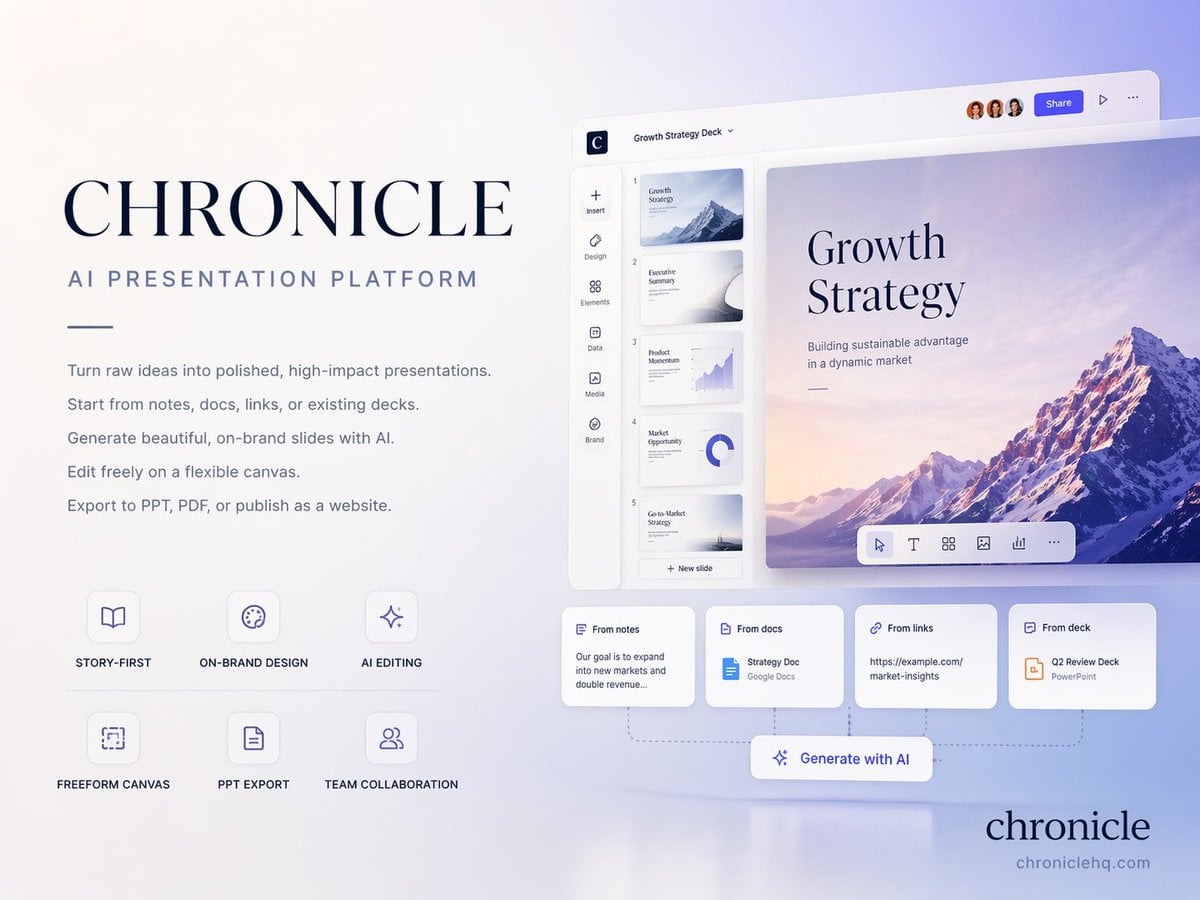
CHRONICLE AI 簡報平台封面
先查看推薦模型、適用情境與使用步驟,再決定如何直接套用。
官方範本1 次瀏覽
海報與封面
電商產品圖
資訊圖表
版面設計
Logo 靈感
社群貼文
極簡
產品
範本類型
圖片範本
使用權限
查看、複製、套用免費;生成扣點數
建立時間
2026/06/15
評分
目前沒有評分
範本總覽
這類範本更適合先保留畫面結構,再替換主體、風格或商業訴求。優先使用 Ideogram V3 起步,再依結果切換至同類型的備選模型。
推薦模型
如果你不確定先用哪個模型,可以先從作者推薦的幾個起點開始。
Ideogram V3
GPT Image 2
GPT Image 1.5
提示詞內容
先查看推薦模型、適用情境與使用步驟,再決定如何直接套用。
為 Chronicle 設計高階 4:3 簡報封面,主題指向 https://t.co/SSfpg45Jtr 的 AI-native presentation platform。整體氣質保持 elegant、minimal、modern、premium startup aesthetic,可參考 Apple / Linear / Notion style 的 high-end brand guideline cover。 版面與背景 背景採 soft gradient with subtle depth,頁面使用 clean whitespace、refined typography、polished editorial layout。 固定封面文案 Main title:CHRONICLE Subtitle:AI PRESENTATION PLATFORM Body copy 使用 small elegant text,以下每一行必須逐字保留: Turn raw ideas into polished, high-impact presentations. Start from notes, docs, links, or existing decks. Generate beautiful, on-brand slides with AI. Edit freely on a flexible canvas. Export to PPT, PDF, or publish as a website. 功能標籤 使用以下固定 small premium labels: STORY-FIRST ON-BRAND DESIGN AI EDITING FREEFORM CANVAS PPT EXPORT TEAM COLLABORATION 右下角放置優雅的 logo 文字 chronicle。 視覺方向 呈現 business-class premium、strategy deck quality、consulting-grade presentation,以及 slightly futuristic but highly professional 的感受。構圖採 clean editorial balance、asymmetrical layout、strong whitespace、presentation software hero shot feeling。 Aspect ratio:4:3。Language:English only。
使用建議
依照這個順序上手,通常比直接複製 prompt 更容易得到可用結果。
1
先選推薦模型
如果你沒有既定偏好,先從 Ideogram V3 開始通常更穩。
2
保留結構,替換關鍵資訊
優先保留構圖、光線、材質與風格結構,再替換主體、品牌資訊與使用情境。
3
至少進行 2 到 3 次比較
圖片範本最有價值的地方是加速嘗試,所以不要只跑一張就做決定。
範本資訊
協助你快速判斷這個範本是否適合目前的任務。
範本類型
圖片範本
使用權限
查看、複製、套用免費;生成扣點數
建立時間
2026/06/15
評分
目前沒有評分
適用情境
這個範本更適合下列幾類任務。
海報與封面
適合活動圖片、社群封面、宣傳海報與視覺 KV。
商品與品牌圖片
適合電商主圖、品牌視覺與商品延伸。
角色與風格探索
適合製作人物、插畫、情境與風格方向樣本。
推薦模型
如果你不確定先用哪個模型,可以先從作者推薦的幾個起點開始。
相關範本
一起比較同類型範本,通常更容易找到最適合你的 prompt 方向。


評分與評價
目前沒有評分
請先登入