Visual concept
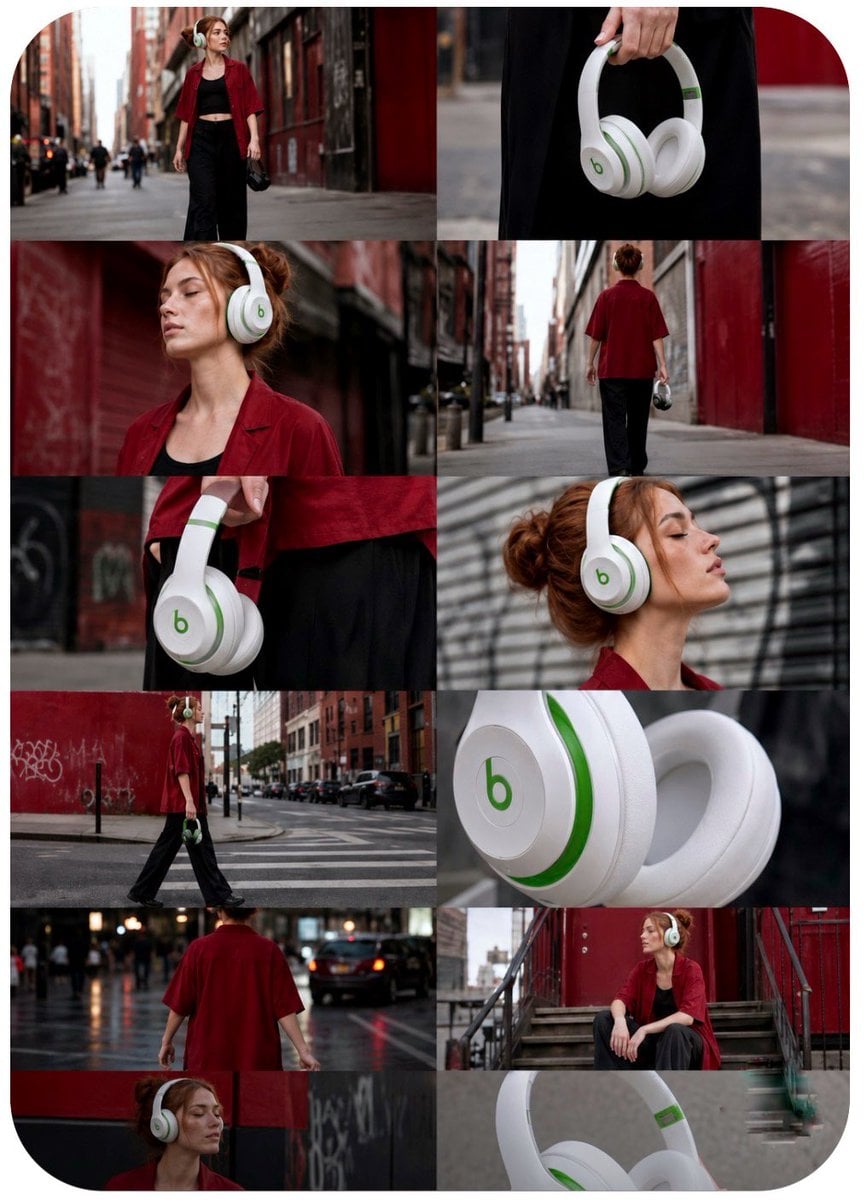
Aspect Ratio: 9:16 Vertical Duration: 15 Seconds Style: Premium street-fashion commercial, cinematic lifestyle advertising, realistic camera physics, luxury tech campaign, viral social-media edit. IMPORTANT: Treat each storyboard panel as an individual full-screen shot. Read left-to-right, top-to-bottom. Do NOT animate the collage. Every frame becomes a separate cinematic scene. Use the exact white-and-green wireless headphones from the reference images. Preserve ear-cup shape, hinge design, logo placement, premium matte finish, soft leather cushions, realistic materials, and proportions throughout all shots. ### Shot 01 (0.0–1.2s) Wide cinematic establishing shot. Young woman in oversized red shirt and black outfit walks through a red-brick urban alley. Headphones hang casually from her hand. Slow handheld push forward. Warm late-afternoon light. Fashion-commercial atmosphere. ### Shot 02 (1.2–2.2s) Macro product detail. Hand raises the white-and-green headphones. Shallow depth of field. Premium texture visible. Soft city bokeh. Gentle camera drift. ### Shot 03 (2.2–3.3s) Medium shot. She places headphones over her ears. Hair moves slightly in the wind. Match cut synchronized to soundtrack beat. Smooth handheld realism. ### Shot 04 (3.3–4.4s) Wide tracking shot. She walks deeper into the alley. Camera follows beside her. Natural parallax from buildings. Urban confidence. ### Shot 05 (4.4–5.5s) Extreme close-up of ear cup. Green accents catch reflected light. Premium material detail. Cinematic rack focus. ### Shot 06 (5.5–6.7s) Medium close-up profile. Eyes closed. Calm expression. Noise-canceling serenity. Slow push-in. Background softly blurred. ### Shot 07 (6.7–7.9s) Low-angle wide shot crossing a city intersection. Golden-hour reflections. Confident stride. Headphones centered naturally within frame. ### Shot 08 (7.9–9.1s) Tight side profile. Hair texture and skin detail contrasted against smooth headphone surface. Passing cars create subtle motion streaks. ### Shot 09 (9.1–10.3s) Medium portrait. She lifts one ear cup slightly. Small smile. Connecting with the city atmosphere. Gentle camera sway. ### Shot 10 (10.3–11.5s) Wide follow shot from behind. Walking toward a graffiti-covered wall. Red-and-black environment complements the green-and-white product. ### Shot 11 (11.5–12.8s) Macro hero product shot. Headphones rotate slowly in her hand. Dynamic reflections reveal premium craftsmanship. Sharp logo visibility. ### Shot 12 (12.8–15.0s) Hero ending. Woman seated on urban staircase. Headphones worn confidently. Soft backlight creates halo around hair. Slight breeze. Slow cinematic push-in. Peaceful yet powerful expression. Product remains crisp, dominant, and aspirational. **Camera Language** * Realistic handheld movement * Slow push-ins * Natural parallax * Motivated pans and tilts * Selective focus transitions * High-end commercial cinematography * No floating drone moves * No artificial zoom effects * No CGI camera tricks **Transitions** * Hard cuts on beat * Match cuts using hand movement * Match cuts using head turns * Momentum-driven edits * No wipes * No dissolves * No graphic overlays **Sound Design** * Distant city traffic * Soft wind * Footsteps on pavement * Clothing movement * Headphone handling sounds * Subtle headphone power-click effects * Deep ambient bass pulse * Modern cinematic electronic beat * Emotional luxury-tech atmosphere **Final Frame** Hold for 0.5 seconds on the seated hero shot. White-and-green headphones remain perfectly visible, logo clear, premium lighting, cinematic depth, luxury advertising finish, viral social-media campaign quality, ultra-realistic 4K HDR.