AI image generator and editor
Google
Nano Banana
Nano Banana
Nano Banana, also known as Gemini 2.5 Flash Image, provides text-to-image generation and natural-language editing on Kyeo AI. Requests without images use `Nano Banana`; requests with images use `Nano Banana`. Both paths cost 3 credits and accept prompts up to 5,000 characters.
Capabilities
Text-to-image and image-to-image
Credit cost
3 credits per request
Prompt limit
5,000 characters
Upload limit
Up to 10 images
30-second overview
- Requests without images use `Nano Banana`; requests with images use `Nano Banana`.
- Text-to-image generation and editing each cost 3 credits per request.
- Prompts allow 5,000 characters, with PNG or JPEG output and 11 aspect-ratio choices.
- The editing interface accepts up to 10 images, but Google recommends no more than 3 inputs for better results with this model.
Popular searches: How do I run Nano Banana on Kyeo AI · What does a Nano Banana request cost on Kyeo AI · How does Nano Banana generate an image without an upload
Examples
Visual concept
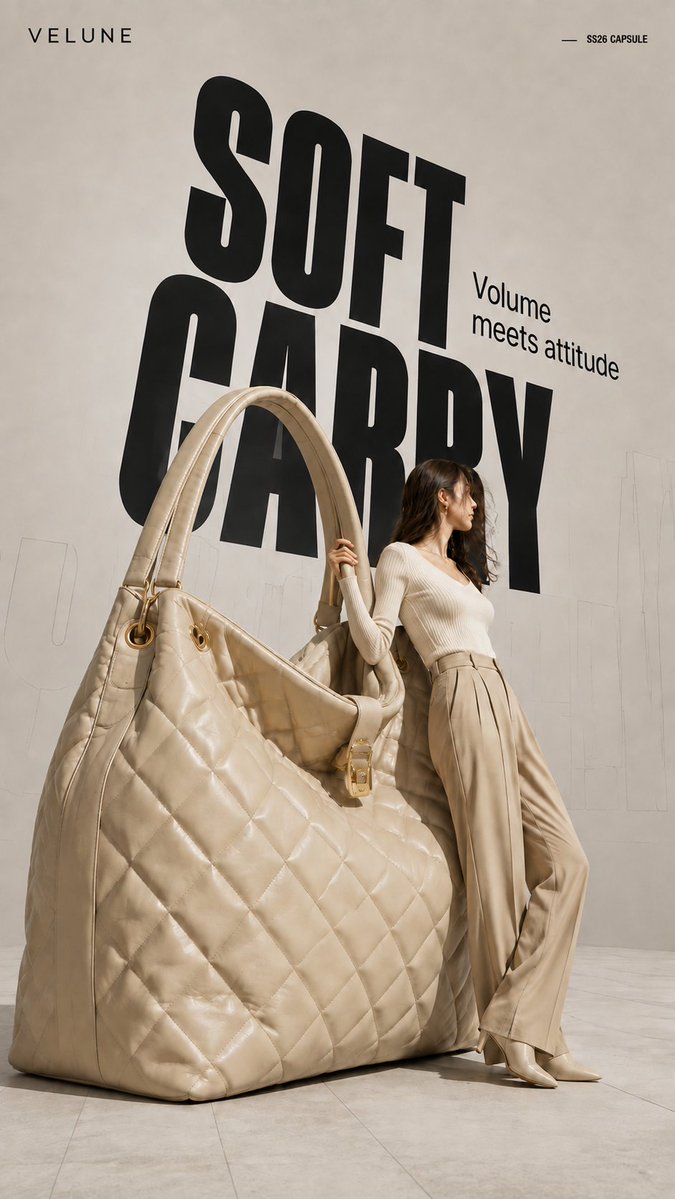
Brand name: [Brand Name] Main title: [Main Title] Subtitle: [Subtitle] Collection label: [Collection Label] Product type: [Product Type] Product material and key details: [Product Material And Key Details] Main color palette: [Main Color Palette] Model styling: [Model Styling] Model interaction: [Model Interaction] Create a 9:16 high-fashion editorial poster featuring an oversized [Product Type] transformed into a giant wearable object installation. Show most of the product clearly and keep its complete silhouette recognizable. Preserve premium product craftsmanship, including realistic material texture, stitching, polished edges, metal hardware, structural joints, reflections, surface finishing, and other details specific to the product. It should look like a real luxury product enlarged to architectural scale, not a rough prop or simplified 3D object. Use an asymmetrical composition: place the oversized product on one side and a realistic full-body adult female model on the other. The model should physically interact with the object by leaning against it, holding it, pushing it, or using it for balance. The pose should show believable weight, contact, and body tension rather than a standard fashion pose. Use a clean neutral studio background with subtle perspective lines, architectural outlines, and soft directional light. Add a large black condensed headline behind the subjects, with partial overlap from the model and product. Place faint oversized outline typography or low-opacity perspective text farther in the background to create depth.
Visual concept
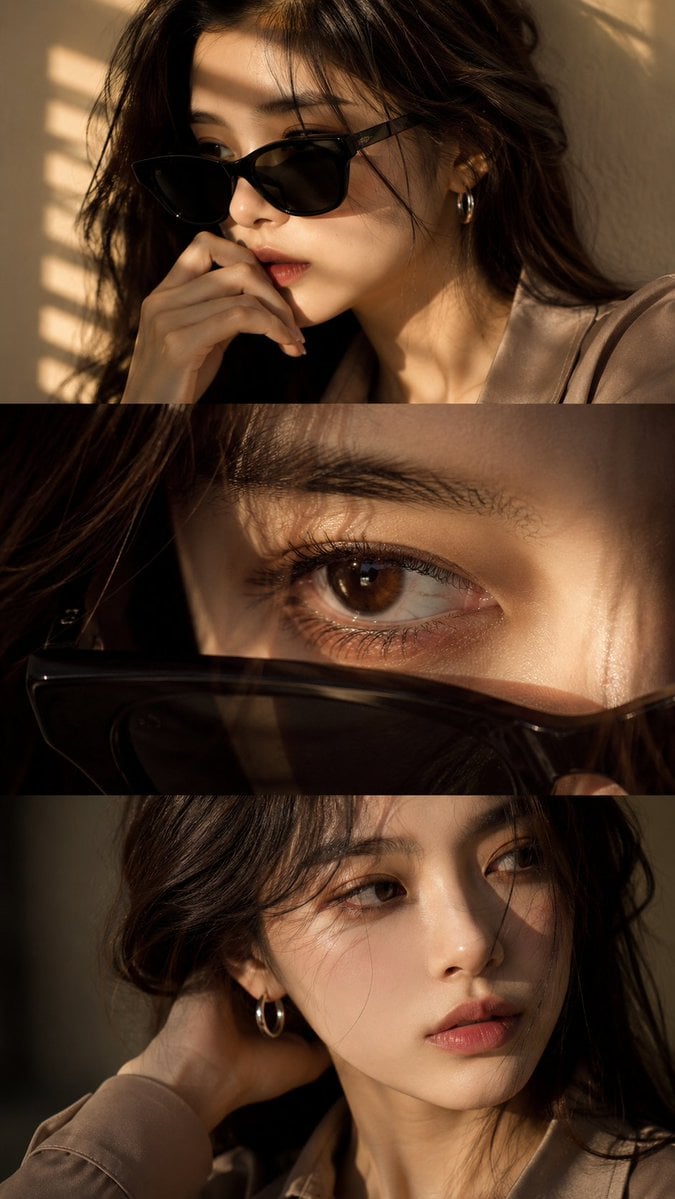
Use the uploaded face reference as a strict identity guide and preserve exact facial features, proportions, skin tone, eye shape, nose, lips, jawline, and overall recognizable identity with very high accuracy. Create an ultra-realistic cinematic high-end fashion editorial vertical triptych portrait in 9:16 format divided into three horizontal panels featuring a young Asian woman with elegant feminine beauty, soft natural styling, luxury aesthetic, silver hoop earring, minimal jewelry, and softly voluminous dark ash-brown wavy hair. Panel 1: medium close-up three-quarter portrait wearing black sunglasses, hand near lips, calm introspective expression, warm golden sunlight through window blinds casting striped shadows, cinematic mood. Panel 2: extreme macro close-up of one eye with sunglasses lowered in foreground, highly detailed iris, lashes, moist reflections, cinematic depth, emotional intimate feel. Panel 3: close-up without sunglasses, head turned toward light, hand behind neck, relaxed lips, soft distant gaze, subtle emotional tension. Outfit: smoky taupe or muted beige tailored silk-viscose blouse, minimal elegant luxury fashion styling, realistic fabric texture. Lighting: warm golden cinematic sunlight, soft indoor blinds shadows, luxury editorial lighting, soft contrast, glowing skin highlights. Camera: DSLR ultra-realism, 85mm lens, f/1.4 shallow depth of field, sharp facial detail, natural skin texture, 8K quality. Color grading: warm golden tones, soft amber highlights, cinematic contrast, filmic glow, luxury finish. Negative: no anime, no CGI, no plastic skin, no over-smoothing, no face change, no distortion, no watermark, no text, no logo.
Visual concept
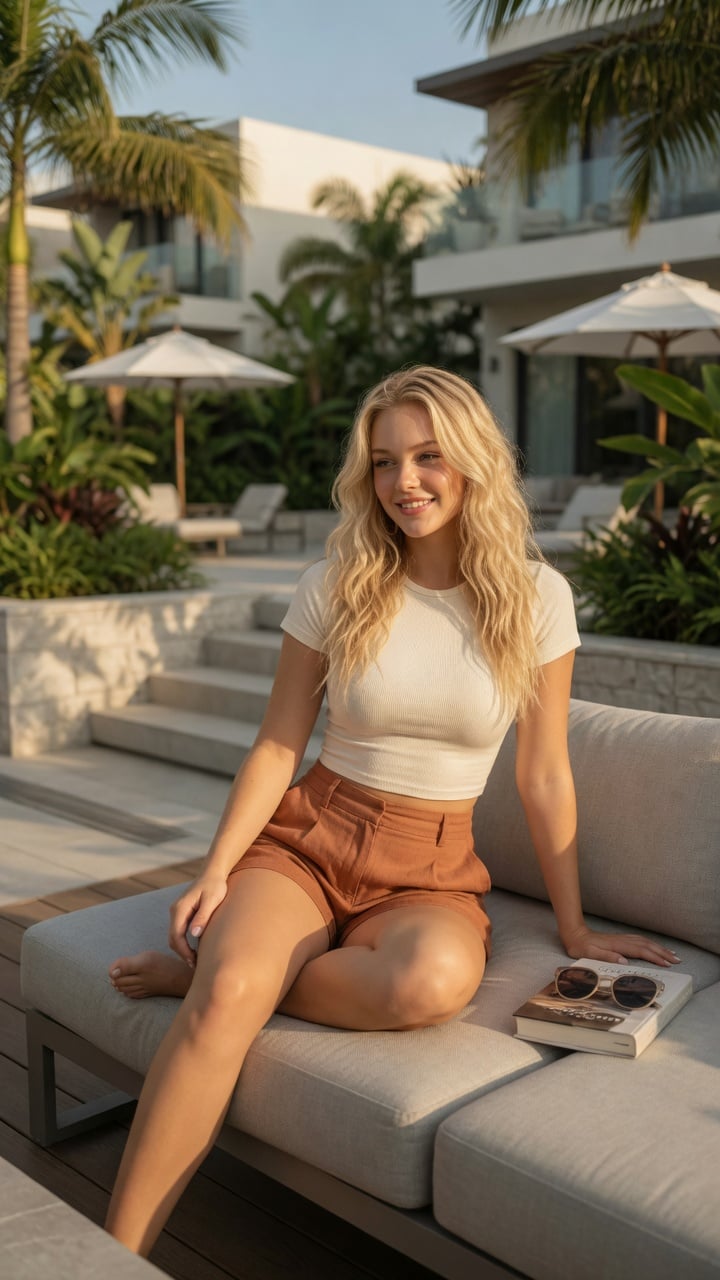
Ultra-realistic lifestyle fashion editorial photograph of a confident young woman relaxing on a contemporary outdoor terrace at an upscale residential complex. She has shoulder-length Blonde colored wavy hair, natural glowing makeup, and a relaxed smile while looking toward the horizon. She is wearing a fitted cream-colored ribbed crop top paired with high-waisted linen shorts in a warm terracotta color.She sits casually on a light gray modular outdoor sofa with one leg folded and the other resting naturally, one hand supporting her body and the other resting on her knee. A hardcover novel and a pair of sunglasses lie beside her, suggesting a peaceful afternoon of reading.The environment features minimalist architecture, lush tropical landscaping, stone planters, modern wooden decking, neutral outdoor furniture, and soft white umbrellas. Bright golden afternoon sunlight creates warm highlights and gentle shadows through nearby palm leaves. The atmosphere is calm, luxurious, and summery.Captured from a slightly low three-quarter angle using an 85mm lens with shallow depth of field. Natural skin texture, realistic anatomy, premium fabric details, cinematic color grading, HDR, soft bokeh, photorealistic, magazine-quality fashion photography, ultra-detailed, 8K. Negative Prompt:low quality, blurry, watermark, logo, text artifacts, bad anatomy, extra limbs, extra fingers, duplicate person, distorted hands, unrealistic proportions, oversaturated, underexposed, overexposed, motion blur, cartoon, anime, illustration, CGI, plastic skin
Visual concept
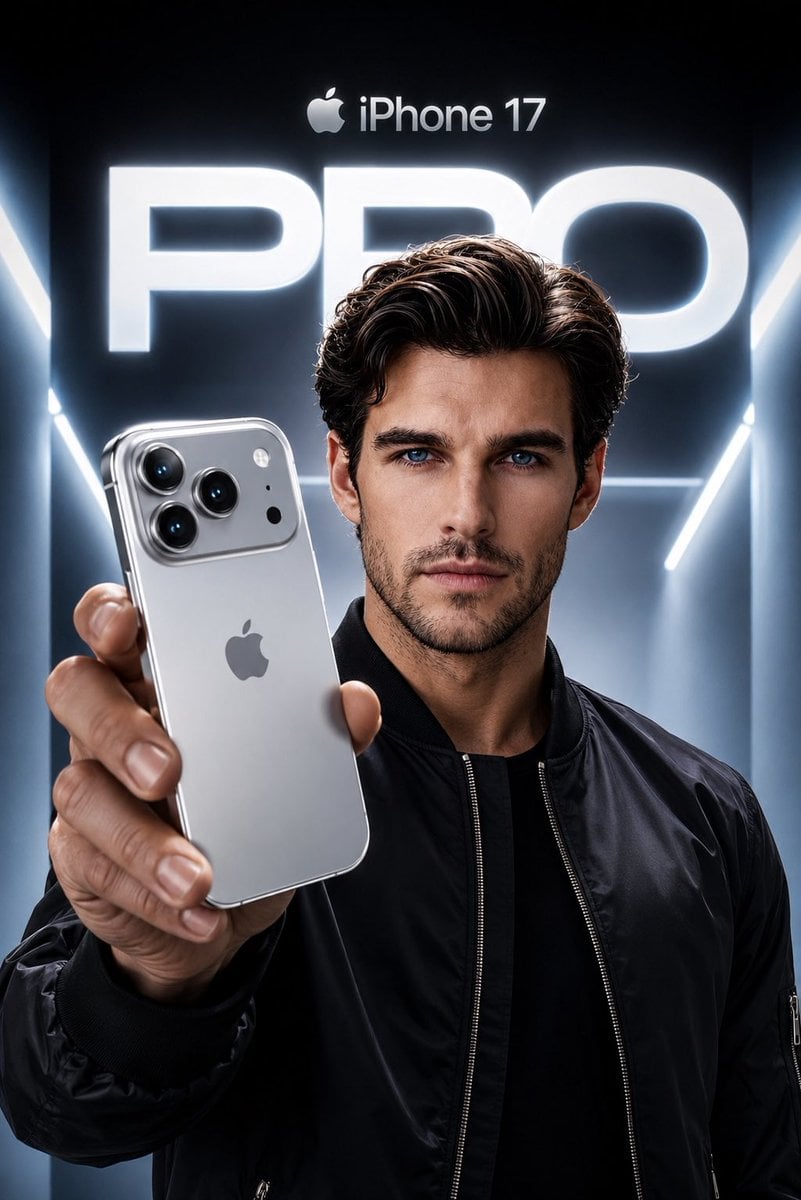
Create an ultra-premium Apple-style product campaign using the uploaded image as the exact facial reference. Preserve my identity with maximum accuracy, including my face shape, hairstyle, beard, eyebrows, skin tone, eye proportions, lips, jawline, and every unique facial feature. Do not alter my age or recognizable appearance. I am wearing a sleek black premium bomber jacket with a minimal futuristic aesthetic. I am confidently holding a Silver iPhone 17 Pro toward the camera in a dramatic low-angle perspective, with the phone dominating the foreground while my face remains perfectly sharp and cinematic. The iPhone features a luxurious brushed titanium silver finish with polished edges, realistic reflections, premium camera lenses, and authentic Apple design language. The background is a futuristic Apple keynote-inspired environment with glowing white and cool blue volumetric lighting, clean architectural lines, and a massive illuminated “PRO” typography behind me. At the top, place a subtle Apple logo with “iPhone 17” in Apple’s minimalist style. Use high-end commercial lighting, realistic skin texture, natural hand proportions, sharp focus, premium depth of field, soft rim lighting, and flawless reflections on the phone. The composition should feel like an official Apple flagship advertisement, ultra-realistic, hyper-detailed, 8K, HDR, IMAX quality, magazine cover worthy, with a cool silver and blue color palette, luxury aesthetic, and perfect cinematic color grading.
Visual concept
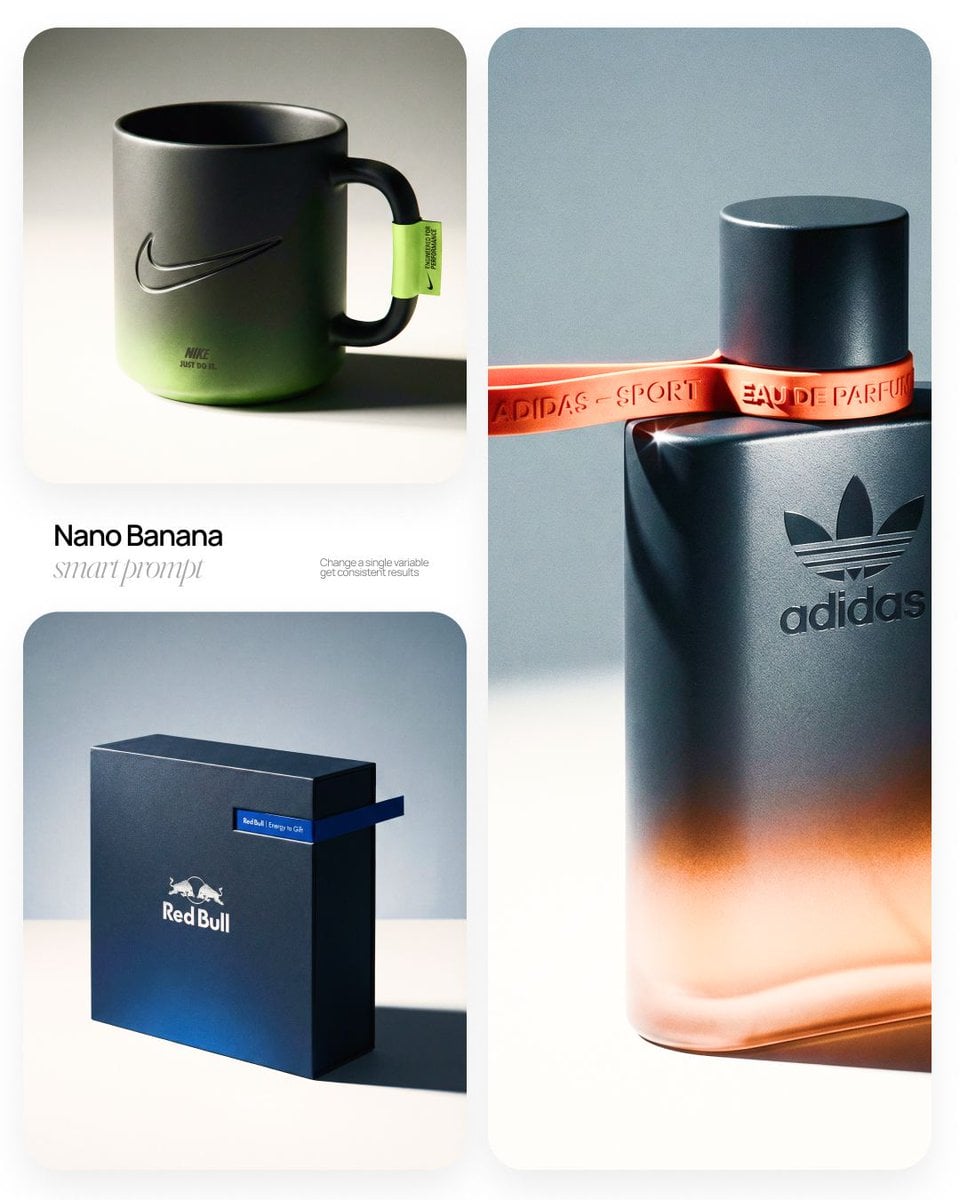
[BRAND NAME] | [OBJECT] Act as a High-End Commercial Product Photographer and Creative Director shooting a luxury editorial campaign (Hypebeast / Highsnobiety /Wallpaper* level). PHASE 1: BRAND INTELLIGENCE The hero subject is a [OBJECT] branded for [BRAND NAME]. Autonomously determine [BRAND NAME]'s full visual identity: signature color palette, typographic DNA, logo mark geometry, material language, and cultural positioning. Apply this identity to the [OBJECT] with precision — do not invent a generic brand, decode the real visual codes. PHASE 2: OBJECT SURFACE & MATERIAL DNA Regardless of the shape of [OBJECT], apply this material system: Base tone: deep neutral — matte dark graphite, warm charcoal, or matte black. Fine-grain surface micro-texture visible under raking light — powder-coat, matte paper, or brushed material feel. Subtle gradient bloom: the base color dissolves in the lower portion of the object's surface into the brand's most iconic accent color — a soft luminous haze from within the material, not a printed graphic. Logo application: embossed, debossed, or metallic foil relief — catching specular light at edges only. Precise. Restrained. Typography: brand-accurate typeface, small tracking, positioned with editorial intentionality. PHASE 3: THE ACCENT BREAKOUT ELEMENT This is the signature design move — adapt it to the natural geometry of [OBJECT]: Identify the most logical "interruption zone" on [OBJECT] — a seam, edge, band, collar, rim, strap, or wrap point. At this zone, apply a narrow saturated accent element in the brand's most iconic hue — vivid, slightly matte. This element must visually "break out" of the object's boundary — extending, protruding, or wrapping beyond the expected edge, creating a deliberate 3D tension between the object and the detail.The accent element carries a micro-typographic brand detail — tagline, model name, or descriptor — small, precise, tracked. PHASE 4: STAGING & COMPOSITION Studio cyclorama. Surface tone: off-white to warm light gray. Background field: cool neutral mid-gray, darker in upper zone. [OBJECT] positioned at 3/4 angle — front face and one secondary surface simultaneously visible. Rule of thirds: object occupies right 60% of frame. Left field: generous negative space — intentional, not empty. Single hard-edged directional shadow cast to the right and slightly downward — crisp penumbra, no diffusion. PHASE 5: LIGHTING Single dominant key light: large softbox, camera-left, elevated at 40°. Specular highlight traces the top-left edge of [OBJECT] — revealing material grain. Shadow side: no fill. Darkness earns depth. Subtle ambient bounce from cyclorama floor — lifts shadow by 15%, no more. Accent element receives micro-specular glint along its dominant edge. Mood: Rembrandt chiaroscuro logic applied to product photography. No lens flare. No atmospheric effects. PHASE 6: TECH SPECS Lens: 85mm equivalent, f/4.5. Depth of field: object fully sharp, background softened. Chromatic aberration: subtle, at extreme frame edges only — optical realism signal. Film grain overlay: 15% opacity — anti-CGI-plastic treatment. Render: Octane / Ray Tracing quality —subsurface scattering where material demands it, global illumination, physically accurate shadow falloff. Aspect ratio: autonomously determine optimal ratio for this [OBJECT] format.
At a glance
Is this model right for you?
This is a fixed-price generation and editing option with no resolution-priced tiers. Google's current Gemini API documentation still lists `gemini-2.5-flash-image` as stable; the retired identifier is the older preview `gemini-2.5-flash-image-preview`. Kyeo uses the current public source generation and editing identifiers, so actual capability is defined by this page's parameters and runtime results.
- What it does best
- Kyeo places Nano Banana's text-to-image and image-editing workflows on one page, but submission still uses a different current public source model ID depending on whether an image is uploaded. Its defining difference is a fixed 3-credit cost rather than higher-resolution tiers or search grounding.
- Who it is for
- Use it to create an image from text, add, remove, replace, or restyle parts of an existing image, or test a composition with a small set of clearly assigned references. Character, product, and brand consistency must be checked rather than assumed.
- Why use it on Kyeo AI
- The form exposes the current boundaries: a 5,000-character prompt, PNG or JPEG output, 11 aspect ratios, and up to 10 images on the editing route. Kyeo selects the matching generation or editing path automatically.
Key facts
Quickly evaluate whether this model fits your business use case.
Category
AI image generator and editor
Developer
Google
Model family
Nano Banana
Integration
Current site integration
Capabilities
Nano Banana — Asynchronous task
Runtime
Asynchronous task
Prompt limit
5,000 characters
Upload limit
Up to 10 images
Other names
The same model may have different names in official documentation, community discussions, and API integrations. This section brings them together for you.
Nano Banana — How can I compare Nano Banana and GPT Image 1.5 editing results
Gemini 2.5 Flash Image
Google Nano Banana
Common questions
These practical questions focus on the task, input conditions, and result requirements you should confirm before choosing.
How do I run Nano Banana on Kyeo AI
What does a Nano Banana request cost on Kyeo AI
How does Nano Banana generate an image without an upload
What happens when I attach an image to Nano Banana
Do generation and editing have the same Nano Banana price
How many images does the Nano Banana editing route accept
When does Nano Banana Pro make more sense than the fixed-price model
How can I compare Nano Banana and GPT Image 1.5 editing results
What should I inspect after editing a product image with Nano Banana
Is Nano Banana the same as Gemini 2.5 Flash Image
Decision guide
Still deciding? Start with these key decision points.
1
Choose it when a fixed request cost matters
If the brief does not require a 1K, 2K, or 4K tier or search grounding, a 3-credit generation or targeted edit is a low-commitment way to test the result before continuing.
2
Compare newer options for resolution or search
Kyeo's Nano Banana 2 and Pro are the relevant comparisons when you need explicit 1K, 2K, or 4K output tiers or search grounding. Use the same source image with GPT Image 1.5 to compare a different vendor's editing behavior.
3
Start with 1 to 3 references
For multi-image edits, assign a clear role to each input and begin with a small set. Add more only when the extra material is necessary and the result remains controllable; a 10-image limit does not mean 10 images will be more reliable.
Popular comparisons
Compare common alternatives on the same task to clarify differences in inputs, controls, and cost.
How does 3-credit Nano Banana compare with resolution-priced Pro
Should I use Pro when a Nano Banana job needs a 4K tier
Which projects are better suited to Nano Banana 2
Does a search-grounded brief call for Nano Banana 2 instead
How should I test Google and OpenAI image editors fairly
How do Nano Banana and GPT Image 1.5 input limits compare
Model comparison table
Not sure which model to choose? Compare the key differences between this model and its alternatives at a glance.
Current role on Kyeo
Nano Banana
Fixed-price image generation and editing
Nano Banana Pro
Resolution-priced option with a 4K tier
GPT Image 1.5
OpenAI image generation and editing option
Workflow structure
Nano Banana
One page switches between generation and editing based on image input
Nano Banana Pro
One model entry accepts either text or image input
GPT Image 1.5
One page selects the matching path for each input type
Current Kyeo price
Nano Banana
3 credits for either generation or editing
Nano Banana Pro
8 credits at 1K or 2K; 14 credits at 4K
Nano Banana 2
5 credits at 1K; 8 at 2K; 12 at 4K
Editing image count
Nano Banana
The current public source interface accepts up to 10; Google recommends no more than 3 for better results
Nano Banana Pro
Currently accepts up to 8 input images
GPT Image 1.5
Currently accepts up to 16 reference images
Best-fit requirement
Nano Banana
Fixed-price generation or targeted edits without a resolution tier
Nano Banana Pro
Work that needs an explicit 1K, 2K, or 4K tier
Nano Banana 2
Work that needs more resolution choices or search grounding
Real-world experience
Practical guidance based on public sources, current on-site limits, and representative tasks.
An interface maximum is not a recommended input count
The current public source editing interface accepts up to 10 images, so a request can carry more source material. Google's Gemini 2.5 Flash Image guidance recommends no more than 3 inputs for better results. In practice, start with the smallest effective input set.
Legacy status does not mean the Kyeo route is offline
Google currently lists `gemini-2.5-flash-image` as stable and only `gemini-2.5-flash-image-preview` as retired. Kyeo uses a different current public source identifier, so the exact version mapping cannot be inferred from the name alone.
Capabilities
Text-to-image generation
When no image is attached, Kyeo sends the prompt to `Nano Banana`. You can choose an output format and aspect ratio, and the request costs a fixed 3 credits.
Natural-language image editing
Attaching an image switches the request to `Nano Banana`. You can describe what to preserve, remove, replace, or restyle, but each output still needs a visual check for instruction adherence.
Format, ratio, and input boundaries
The current workflow offers PNG or JPEG output and 11 aspect ratios. You can submit up to 10 reference images, but Google recommends no more than 3 inputs for better results with this model.
Use cases
Create a new image from a brief
Describe the subject, setting, composition, and visual treatment, then choose a landscape, portrait, or square aspect ratio for the first draft.
Make a targeted change to an existing image
Try adding or removing an object, replacing a background, adjusting color, or changing style. Manually verify untouched details when identity, product accuracy, or brand rules matter.
Compose from a small reference set
Provide separate references for the subject, material, or scene and name each role in the prompt. Begin with 1 to 3 images instead of treating the interface maximum as a target.
Prompt tips
Lead with the subject and the requested action
State what to create or change in one sentence, then list what must remain, what to replace, and what to avoid. Actions are easier to verify than a loose string of style adjectives.
Label the purpose of every reference
Identify which image supplies the subject, material, pose, or background, and start with 1 to 3 inputs. As the set grows, check for mixed-up or omitted elements.
Choose the ratio and format before submitting
Match 1:1, 16:9, 9:16, or another ratio to the intended placement, then select PNG or JPEG. Review text, hands, edges, subject features, and areas that were not meant to change.
Why choose it
Text-to-image generation and editing are available from the same page.
Both routes cost 3 credits per request, making the cost predictable.
Prompts allow 5,000 characters and the form offers 11 aspect ratios.
The editing route can accept multiple images with separately defined roles.
What to know first
Google currently lists `gemini-2.5-flash-image` as stable, but Kyeo uses an current public source identifier, so exact version equivalence cannot be assumed.
The current form has no 1K, 2K, or 4K output tier and no search grounding.
The 10-image upload limit is capacity, not a recommendation or a consistency guarantee.
Text, identity, product details, consistency, and rights still require human review.
Adjustable settings
Quickly evaluate whether this model fits your business use case.
Output format
Optional
Parameter type: Select
Default: png
PNG
JPEG
Aspect ratio
Optional
Parameter type: Select
Default: 1:1
1:1
9:16
16:9
3:4
4:3
3:2
11 choices
Credit cost
3 credits per request
A text-to-image or image-editing request currently costs a fixed 3 credits on Kyeo AI.
Credit-saving tip
Before generating images or videos in bulk, run an A/B test with the same input on this model and similar alternatives. Confirm the result first to avoid wasting credits.
Frequently asked questions
Related models
Still deciding? Take a quick look at these similar alternatives.
Nano Banana Pro
Nano Banana Pro supports text-to-image generation and reference-image editing on Kyeo AI, with 1K, 2K, or 4K output. Each 1K or 2K request costs 8 credits, while 4K costs 14. Resolution is an output-size tier, not a guarantee of quality, accuracy, or detail.
AI image generation and editing model
8–14 credits per request
Nano Banana 2
Kyeo AI offers text-to-image generation and reference-guided editing with Nano Banana 2. You can upload up to 10 reference images, choose from 15 aspect ratios, and output at 1K, 2K, or 4K. Those tiers currently cost 5, 8, and 12 credits, prompts allow 20,000 characters, and the current generation form does not offer web search.
AI image generator and editor
5–12 credits per request
GPT Image 1.5
GPT Image 1.5 on Kyeo supports text-to-image and image-to-image with three aspect ratios and medium/high quality. Image editing accepts up to 16 JPG, PNG, or WebP references at 10 MB each. Medium costs 4 credits and high costs 22 credits. GPT Image 1.5 is OpenAI's deprecated previous image model. Kyeo retains generation and editing access, but that availability does not make it OpenAI's current default choice.
AI image model
4–22 credits per request
Sources
This page is based on vendor materials, model-family documentation, and Kyeo AI integration settings.
Source note
Generate or edit images with Nano Banana on Kyeo AI for 3 credits per request. Prompts allow 5,000 characters; edits accept up to 10 images. A text-to-image or image-editing request currently costs a fixed 3 credits on Kyeo AI.
Last updated: 2026-07-20
Google AI for Developers: Nano Banana
Official
Google AI for Developers: Image generation with Gemini
Official