跳至主要內容
AI 圖片生成與編輯模型
OpenAI
GPT Image

GPT Image 2.5 Sunburst

GPT Image 2.5 Sunburst / 能力標籤 — GPT Image 2.5 Sunburst 在 Kyeo AI 支援文字生成圖片與參考圖編輯。Kyeo 依輸出解析度計費:1K 為 3 點數、2K 為 10 點數、4K 為 16 點數。

能力標籤
文字生成圖片、圖生圖
點數消耗
3–16 點數/次
提示詞上限
20,000 個字元
上傳限制
最多 16 張圖片
30 秒快速瞭解
  • GPT Image 2.5 Sunburst / 能力標籤 — 同一個 Kyeo 頁面支援純文字生成與最多 16 張參考圖的編輯請求
  • GPT Image 2.5 Sunburst / 解析度 / 點數消耗 — 生成與編輯均依解析度計費:1K/2K/4K 為 3/10/16 點數
  • GPT Image 2.5 Sunburst / 上傳限制 — Kyeo 接受 JPEG、PNG、WebP 參考圖,目前限制每張不得超過 10 MB
  • 27:16、16:27、9:8、8:9 僅支援 1K;其餘比例支援 1K、2K、4K。

熱門搜尋: 如何在 Kyeo AI 上使用 GPT Image 2.5 Sunburst · GPT Image 2.5 Sunburst 的 1K、2K、4K 各需要多少點數 · 如何用 GPT Image 2.5 Sunburst 編輯參考圖

示例

Visual concept

Visual concept

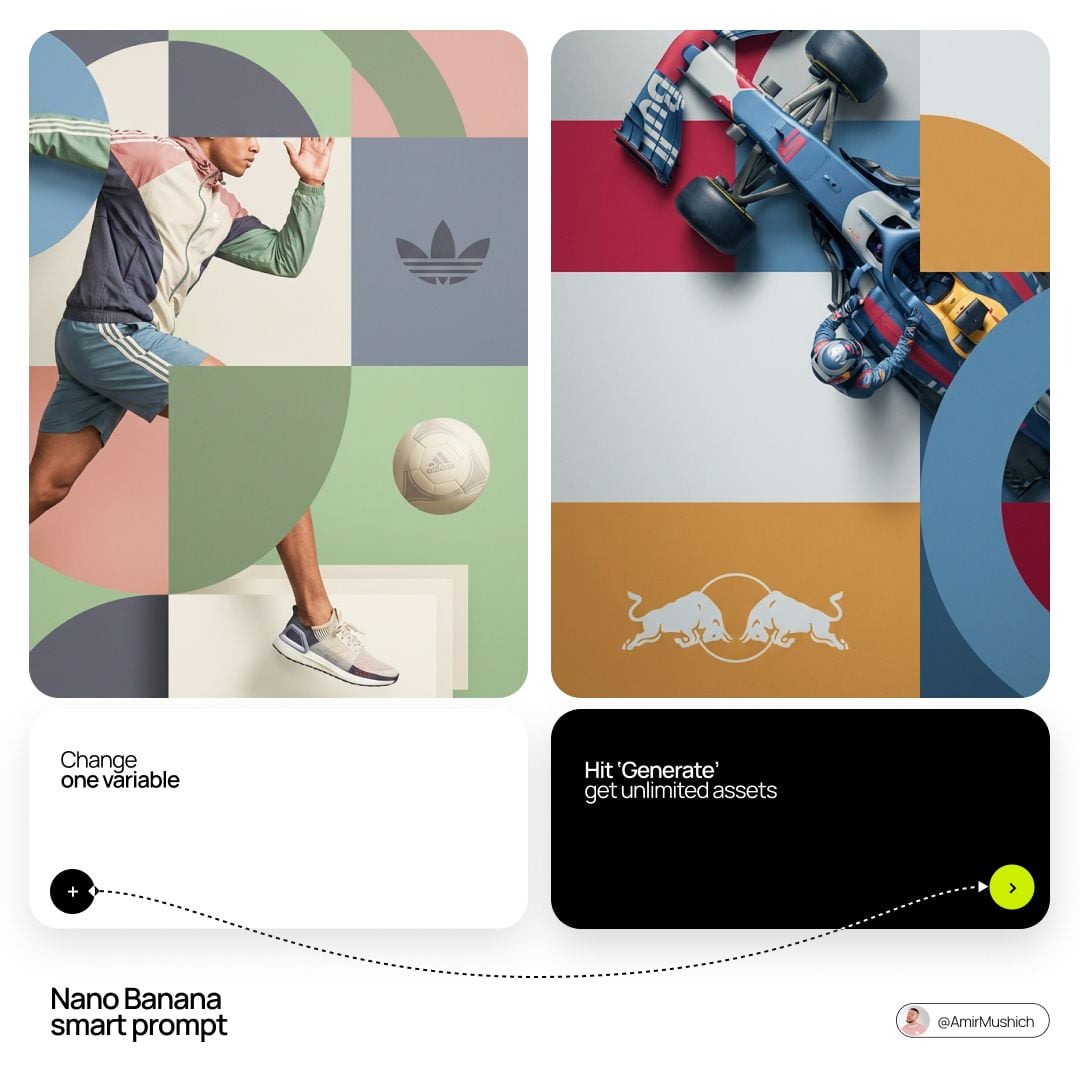
[BRAND NAME]. Act as a World-Class Editorial Designer. PHASE 1: DYNAMIC SUBJECT LOGIC. - Subject Selection: Autonomously analyze [BRAND NAME]. - Layering (The Sandwich Effect): Interweave the subject with background shapes. Some parts of the car/person must be hidden behind geometric blocks, while other parts (wheels, limbs, props) must overlap them to create 3D depth. PHASE 2: GRID & GEOMETRY. - Layout: A clean 2x2 grid composition. - Overlays: Superimpose large, bold geometric arcs and circles over the grid. - Visual Balance: Place one iconic product prop (e.g., a floating key fob for cars or a ball for sports) in a separate quadrant to balance the subject. PHASE 3: SOPHISTICATED MUTED PALETTE. - Color Direction: DO NOT use aggressive neon or oversaturated colors. - Palette: Identify the core colors of [BRAND NAME] and shift them to a "Sophisticated Muted" spectrum. - Tones: Use desaturated, earthy, or "dusty" versions of the brand colors (e.g., instead of hot pink, use dusty rose; instead of bright mint, use sage green; instead of royal blue, use slate blue). - Finish: Matte, flat color blocks with zero gradients. PHASE 4: PHOTOGRAPHY & LIGHTING. - Subject Style: High-end commercial studio photography. - Lighting: Soft, diffused studio lighting with gentle highlights. No harsh shadows. - Integration: The subject must feel physically embedded into the graphic grid. PHASE 5: MINIMALIST BRANDING. - Logo: Place a clean, single-color [BRAND NAME] logo in the center of one background block. No taglines, just the iconic symbol.
Visual concept

Visual concept

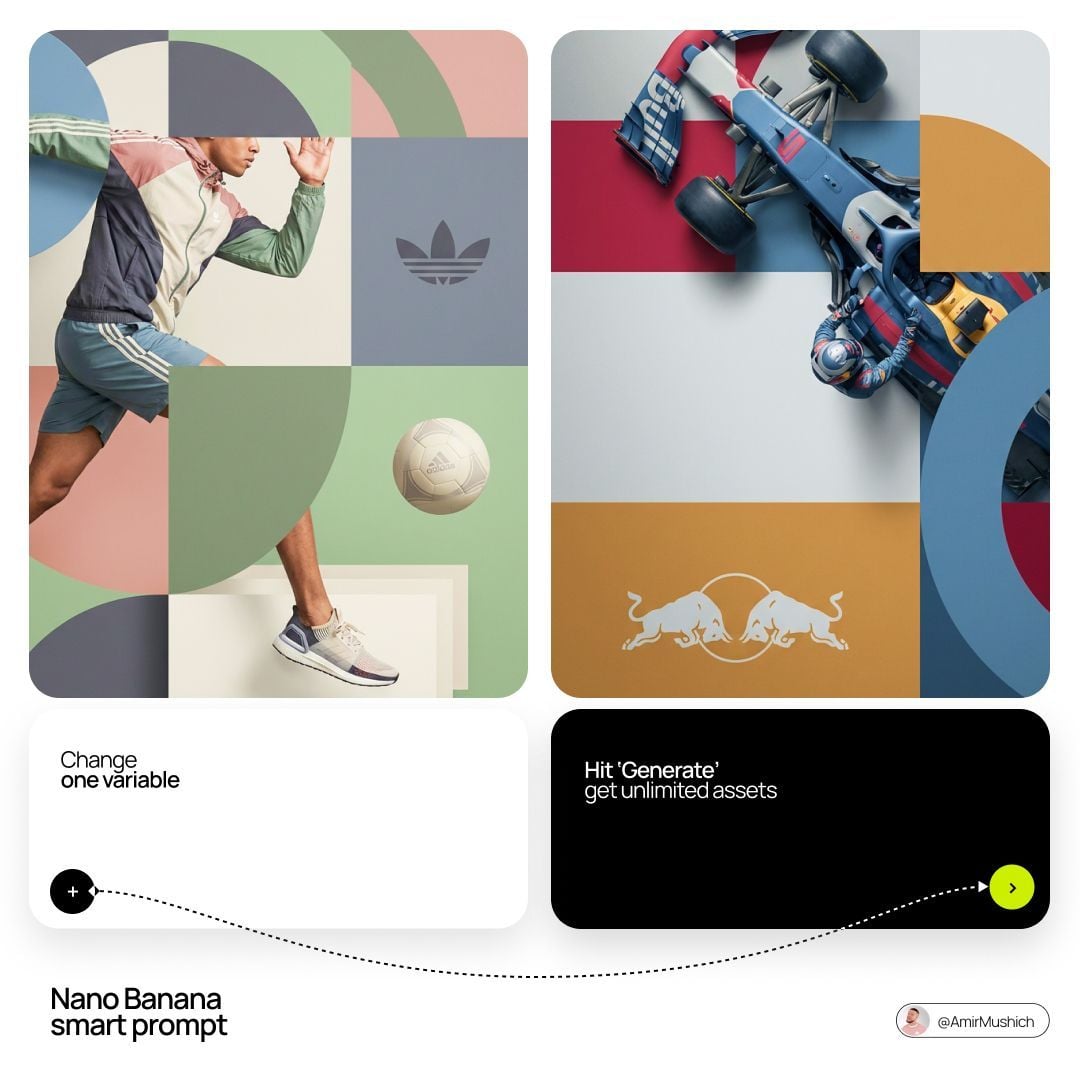
[BRAND NAME]. Act as a World-Class Editorial Designer. PHASE 1: DYNAMIC SUBJECT LOGIC. - Subject Selection: Autonomously analyze [BRAND NAME]. - Layering (The Sandwich Effect): Interweave the subject with background shapes. Some parts of the car/person must be hidden behind geometric blocks, while other parts (wheels, limbs, props) must overlap them to create 3D depth. PHASE 2: GRID & GEOMETRY. - Layout: A clean 2x2 grid composition. - Overlays: Superimpose large, bold geometric arcs and circles over the grid. - Visual Balance: Place one iconic product prop (e.g., a floating key fob for cars or a ball for sports) in a separate quadrant to balance the subject. PHASE 3: SOPHISTICATED MUTED PALETTE. - Color Direction: DO NOT use aggressive neon or oversaturated colors. - Palette: Identify the core colors of [BRAND NAME] and shift them to a "Sophisticated Muted" spectrum. - Tones: Use desaturated, earthy, or "dusty" versions of the brand colors (e.g., instead of hot pink, use dusty rose; instead of bright mint, use sage green; instead of royal blue, use slate blue). - Finish: Matte, flat color blocks with zero gradients. PHASE 4: PHOTOGRAPHY & LIGHTING. - Subject Style: High-end commercial studio photography. - Lighting: Soft, diffused studio lighting with gentle highlights. No harsh shadows. - Integration: The subject must feel physically embedded into the graphic grid. PHASE 5: MINIMALIST BRANDING. - Logo: Place a clean, single-color [BRAND NAME] logo in the center of one background block. No taglines, just the iconic symbol.
Visual concept

Visual concept

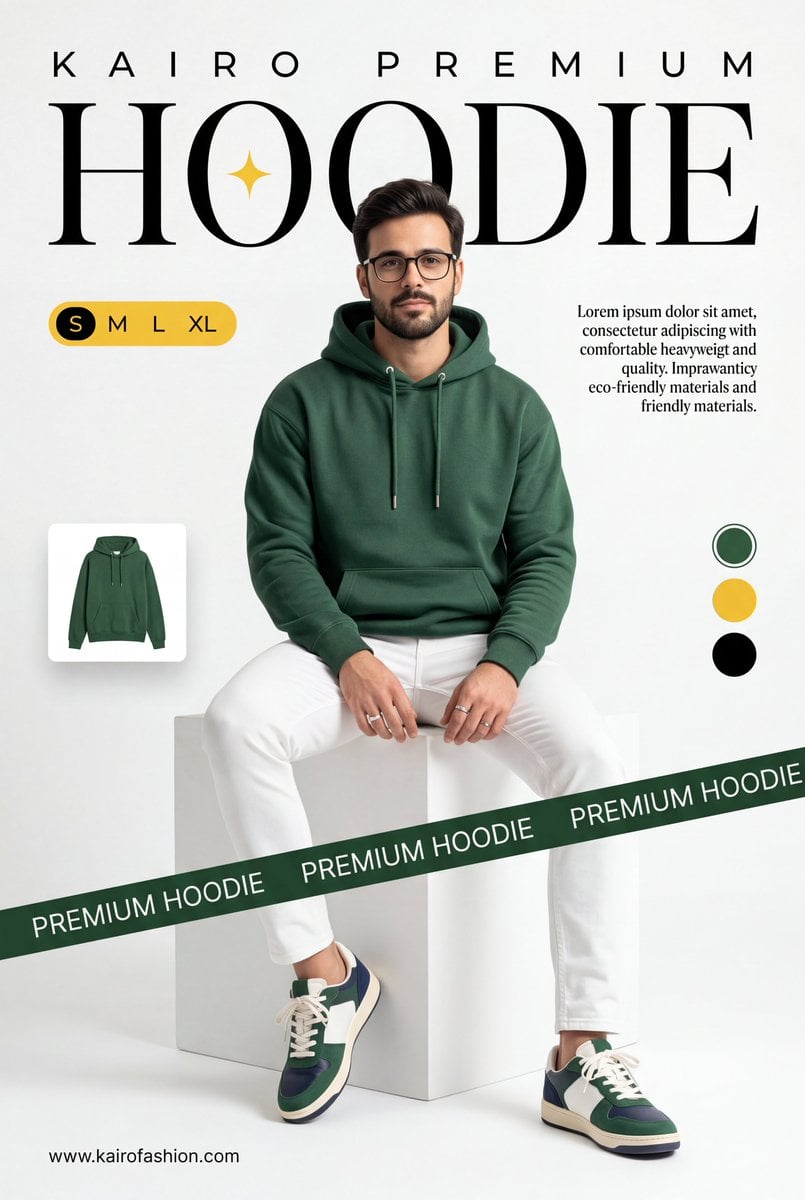
A professional commercial fashion advertisement featuring [a young male model] in the uploaded image, sitting on a minimalist white matte cube. He has a neutral, confident expression and is looking directly at the camera. Attire & Styling: Hoodie: A high-quality, [heavyweight forest green (British Racing Green) hoodie]. It features a relaxed fit, a spacious kangaroo pocket, and metal-tipped drawstrings. Bottoms: Clean, slim-fit white trousers with visible seams. Footwear: Stylish low-top sneakers in a color-blocked design of forest green, navy blue, and white, with off-white midsoles and white laces. Accessories: Simple silver bands/rings on his fingers. Graphic Design & Layout: Typography: The word [HOODIE] is written in a massive, elegant high-contrast serif font across the top. A small, four-pointed yellow spark icon is centered inside the "O". Above this, [K A I R O P R E M I U M] is printed in a wide-spaced sans-serif font. Branding Elements: A dark green diagonal "caution tape" style ribbon crosses the bottom third of the frame, with the words [PREMIUM HOODIE] repeating in white uppercase text. UI Accents: * A yellow pill-shaped size selector labeled "S M L XL" on the left. A small thumbnail of the hoodie floating on the mid-left. Three circular color swatches (Green, Yellow, Black) on the right side. Two blocks of justified serif body text describing the product's comfort and eco-friendly materials. The URL [www.meigen.ai] in the bottom left corner. Environment & Lighting: Setting: A clean, bright, white-on-white minimalist studio cove. Lighting: Soft, diffused studio lighting creates gentle shadows under the model and the cube, emphasizing the rich texture of the green fabric and the crispness of the white pants. Color Palette: Deep forest green, bright white, and golden yellow accents.

Visual concept

Visual concept

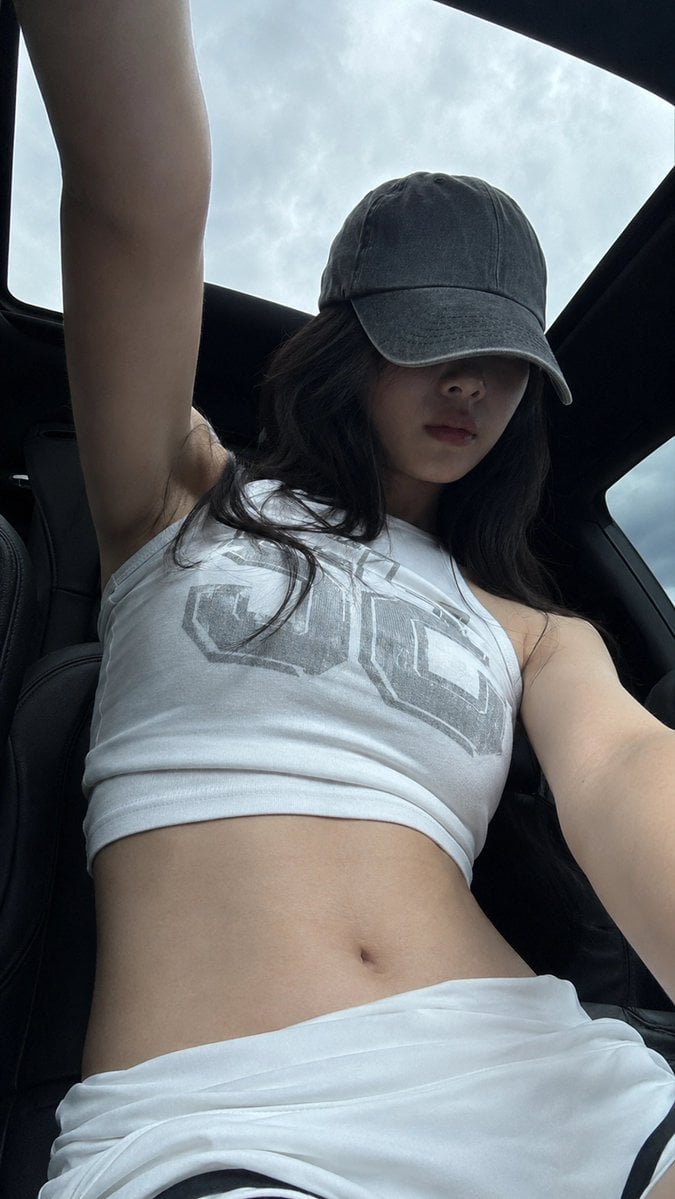
A realistic vertical mobile-phone selfie, 9:16 aspect ratio. A young adult woman in her 20s is inside a car under a panoramic sunroof. The camera is placed low, around waist or seat height, shooting upward. Her body is close to the lens, her head slightly lowered, and one arm extends upward out of frame as if holding the phone or adjusting the angle. The composition should feel slightly off-center and casual, not perfectly staged. She wears a worn gray baseball cap with a low brim hiding her eyes. The upper half of her face falls into the cap shadow, leaving only a soft facial outline, nose bridge, and relaxed closed lips visible. Her expression is calm, unsmiling, low-emotion, and slightly distant, like a casual photo taken right after sitting in the car. Long black hair falls naturally from both sides of the cap, with a few messy strands and real airy texture. She wears a white sleeveless high-neck cropped tank top with a large muted gray block-letter graphic print across the chest. The fabric looks like thin cotton or stretch knit, fitted to the body with subtle horizontal wrinkles and realistic stretch texture. The bottom is a low-waist white sporty skirt or shorts with folded fabric around the waist and a small black inner edge visible. The waist and abdomen are fully visible. Visible skin areas include the neck, shoulders, upper arms, edge of the underarm area, small collarbone area, full abdomen, side waist, and upper hip edge. Her skin tone is fair neutral-cool, slightly grayish in the shaded car interior, smooth but natural, as if cool to the touch, soft, with subtle pores and real underlying contours. The skin must be completely clean: no tattoos, no body markings, no text, no stickers, no patterns on the skin. Lighting comes from overcast daylight entering through the panoramic roof and car windows. The pale blue-gray cloudy sky outside is bright, while the black car roof and curved sunroof frame create strong negative space. The subject stays in the darker car interior; the cap casts a strong shadow across the face, while the shoulders and abdomen receive soft diffused sky light. Keep slight mobile noise, dark shadow compression, bright sky highlights, and a raw phone-camera feeling. Avoid studio lighting, commercial retouching, excessive skin smoothing, and an artificial glossy AI look. Negative prompt: tattoo, body art, skin text, watermark, logo watermark, over-retouched skin, plastic skin, studio lighting, mirror selfie, heavy makeup, extra fingers, distorted hands, bad anatomy, unrealistic body, AI glossy look.

Visual concept

Visual concept

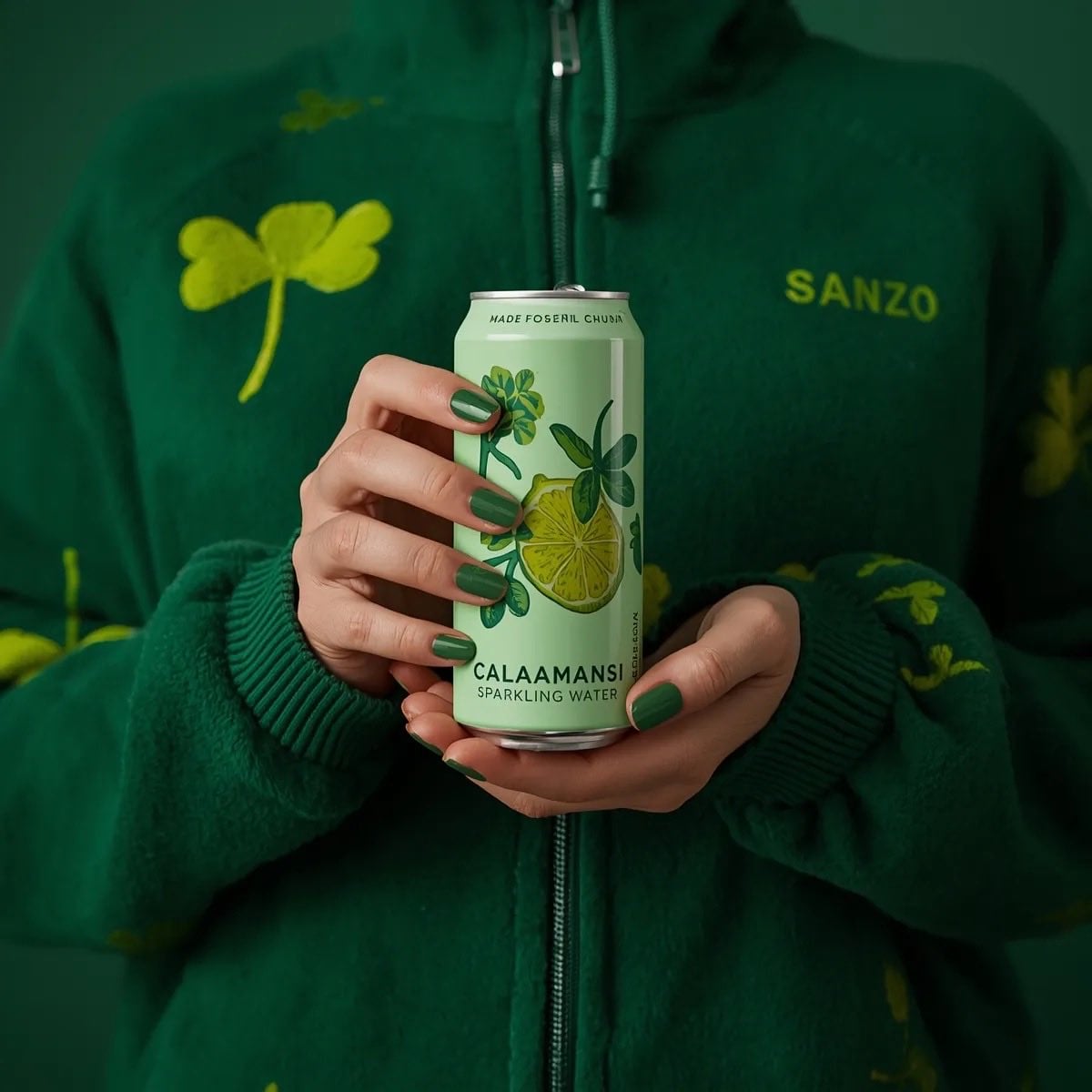
A photorealistic product shot of a person holding a slim, light green can of Sanzo Calamansi Sparkling Water. The person is wearing a dark green, fuzzy fleece zip-up hoodie patterned with light green four-leaf clovers. Both hands are holding the can centrally in front of their torso, displaying perfectly manicured nails painted in a glossy green polish. The can features an illustration of a sliced calamansi lime with green leaves. The background is a solid, moody dark green, creating a striking monochromatic green aesthetic. Soft, professional studio lighting, highly detailed.

Visual concept

Visual concept

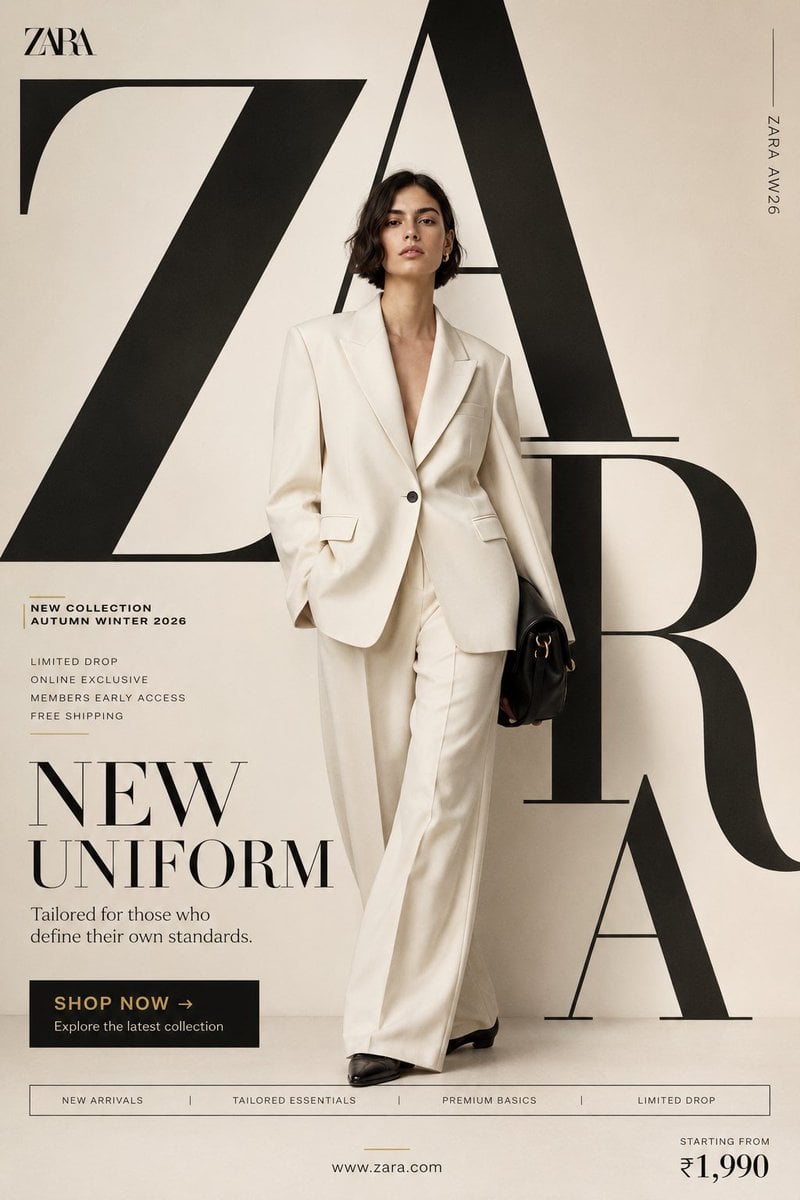
"NEW UNIFORM" FORMAT Ultra-Premium Fashion SMM Promotional Poster Vertical 4:5 Instagram Hero Creative Luxury Fast Fashion Advertising Commercial Fashion Graphic Design Agency-Level Art Direction Behance Front Page Quality 8K UHD Hyper-Realistic Fashion × Graphic Design Fusion Zero AI Slop Zero Generic Fashion Campaigns Zero Editorial-Only Aesthetic CORE STRATEGY This is not a fashion campaign. This is a fashion statement disguised as a promotional poster. The design should feel like Zara's homepage, a luxury magazine cover, and a premium billboard campaign merged into one visual. The graphic design is equally important as the fashion. Typography is not decoration. Typography is architecture. CAMPAIGN IDEA "NEW UNIFORM" Not office uniform. Not school uniform. The uniform of modern taste. The clothes aren't being sold. The identity is. MASTER VISUAL Massive oversized ZARA typography dominates the entire composition. The word: ZARA occupies nearly 75% of the canvas. Typography is integrated into the design. Letters extend beyond frame edges. Some letters cropped. Some hidden behind the model. Some functioning as compositional structures. The typography should feel monumental. HERO SUBJECT Female model. Editorial face. Strong jawline. Minimal makeup. Luxury fashion energy. No smiling. No dramatic posing. Pure confidence. Wardrobe: Oversized ivory blazer. Wide-leg tailored trousers. Premium monochromatic styling. Black leather accessories. Luxury minimalism. POSE Model stepping through the giant typography. One foot slightly forward. Direct eye contact. Hands relaxed. Body partially intersecting typography. The feeling: She owns the space. COMPOSITION Typography occupies 70%. Model occupies 20%. Promotional elements occupy 10%. Visual hierarchy: ZARA ↓ Model ↓ Promotion ↓ CTA Everything feels intentional. COLOR SYSTEM Primary: Ivory Cream Off White Soft Beige Black Accent: Muted Gold No bright colors. No fashion-week color chaos. Luxury restraint. BACKGROUND Clean luxury backdrop. Large soft gradient. Editorial studio environment. Subtle texture. No architecture. No scenery. No distractions. The design itself creates the environment. GRAPHIC DESIGN SYSTEM Floating collection cards. Luxury editorial labels. Minimal grid system. Thin lines. Micro typography. Magazine-inspired information hierarchy. Fashion-week poster energy. PROMOTIONAL ELEMENTS NEW COLLECTION AUTUMN WINTER 2026 LIMITED DROP ONLINE EXCLUSIVE MEMBERS EARLY ACCESS FREE SHIPPING Integrated naturally into layout. Not banner spam. TYPOGRAPHY HIERARCHY Top Left ZARA small luxury wordmark Center Massive Typography Z A R A occupying most of composition luxury serif typography extremely large scale partially cropped Campaign Title NEW UNIFORM bold elegant typography Supporting Copy Tailored for those who define their own standards. PROMOTIONAL CTA BLOCK SHOP NOW → Explore the latest collection BOTTOM FEATURE STRIP NEW ARRIVALS TAILORED ESSENTIALS PREMIUM BASICS LIMITED DROP Bottom Right Starting From ₹1,990 Bottom Center http://zara.com Vertical Edge Text ZARA AW26 LIGHTING Luxury studio lighting. Large soft source. Editorial contrast. Natural skin rendering. Premium fabric highlights. Subtle shadows. Luxury magazine quality. CAMERA ARRI Alexa Mini LF 85mm Lens Editorial fashion photography Shallow depth of field Extremely sharp fabric rendering Ultra-premium commercial quality POST-PRODUCTION Luxury European fashion campaign grading. Rich blacks. Cream highlights. Visible textile texture. Natural skin detail. No excessive retouching. No artificial HDR. No fake luxury effects. FINAL FEEL If Zara, Vogue, and a premium graphic design studio created a promotional social media poster together. Not a fashion photograph. Not a catalogue. A modern luxury fashion advertisement Shot on ARRI Alexa Mini LF, 35mm lens, dynamic commercial perspective, street-fashion energy, magazine-cover quality detail, natural movement capture, authentic contemporary fashion realism, premium advertising production standards. Modern fashion campaign color grading, strong reds, clean whites, visible fabric textures, realistic skin detail, subtle grain, commercial social-media polish, no artificial luxury grading, no fashion-house minimalism, no generic fast-fashion campaign aesthetics, no AI slop, no sterile studio appearance. A fusion of Spotify Wrapped energy, Nike youth-culture storytelling, Pinterest trend aesthetics and world-class graphic design agency execution. Bold, energetic, expressive, commercial, social-first and highly shareable. A true promotional SMM poster communicating that every personality, every mood and every version of yourself can exist within one H&M collection. Behance Front Page quality, award-winning youth-fashion advertising, graphic-design-first commercial masterpiece.

一句話瞭解

這個模型表現如何?

一句話瞭解 — 以文字生成圖片,或使用最多 16 張參考圖編輯;提示詞上限為 20,000 字元。可選 13 種長寬比及 1K、2K、4K 輸出。 背景可選自動、透明或不透明;使用結果前請檢查邊緣與文字。

它擅長什麼
這個模型表現如何? / 它擅長什麼 — 以文字生成圖片,或使用最多 16 張參考圖編輯;提示詞上限為 20,000 字元。可選 13 種長寬比及 1K、2K、4K 輸出。 背景可選自動、透明或不透明;使用結果前請檢查邊緣與文字。
適合哪些使用者
適合需要純文字生成、參考圖編輯,或希望明確選擇 1K、2K、4K 輸出級距的任務。20,000 個字元與 16 張圖片分別是輸入與上傳上限,不是建議用量。
為什麼要在 Kyeo AI 使用
Kyeo 將提示詞、參考圖、長寬比與解析度集中在同一份表單,送出前會檢查不相容組合並顯示點數,方便用相同素材比較設定。

關鍵參數總覽

協助你快速評估此模型是否符合你的業務情境。

模型類別
AI 圖片生成與編輯模型
廠商
OpenAI
模型家族
GPT Image
目前設定
頁面目前可用設定
使用說明
非同步任務
提示詞上限
20,000 個字元
上傳限制
最多 16 張圖片

其他名稱

同一個模型在官方文件、社群討論與 API 串接層可能有不同稱呼,這裡幫你統一整理。

GPT Image 2.5 Sunburst

使用者常見問題

從實際任務、輸入條件和結果要求出發,整理選擇模型時最需要確認的問題。

如何在 Kyeo AI 上使用 GPT Image 2.5 Sunburst
GPT Image 2.5 Sunburst 的 1K、2K、4K 各需要多少點數
如何用 GPT Image 2.5 Sunburst 編輯參考圖
GPT Image 2.5 Sunburst 最多可上傳幾張、多大的圖片
GPT Image 2.5 Sunburst 使用 4K 時可選哪些長寬比
GPT Image 2.5 Sunburst 的自動長寬比支援哪些解析度
Kyeo 目前開放哪些 GPT Image 2.5 Sunburst 控制項
Kyeo 的 GPT Image 2.5 Sunburst 可選擇哪些解析度
GPT Image 2.5 Sunburst 與 GPT Image 1.5 的計費方式有何差異
GPT Image 2.5 Sunburst 的 16 張圖片上限是否為建議數量
GPT Image 2.5 Sunburst 能否保證文字和角色一致性

選擇指南

還在猶豫該用哪個模型嗎?先查看這幾個關鍵決策點。

1
需要哪些控制項時可選它

當任務需要參考圖編輯、20,000 個字元的提示詞、最多 16 張圖片,或明確的 1K/2K/4K 價格級距時,可將 GPT Image 2.5 Sunburst 納入實測。

2
何時應先比較其他模型

如果較希望使用 medium/high 品質級距,可比較 GPT Image 1.5;如果需要輸出格式或更多長寬比選擇,可比較 Nano Banana Pro,並用相同題目驗收。

3
最小驗證流程

說明哪張圖片負責主體、材質、背景或版面,並從少量關鍵圖片開始。增加參考圖可能造成衝突,不會自動提高一致性。 27:16、16:27、9:8、8:9 僅支援 1K;其餘比例支援 1K、2K、4K。

使用者常搜尋的比較

把常見候選放在同一任務下比較,協助你確認輸入方式、控制項和成本差異。

GPT Image 2.5 Sunburst 與 GPT Image 1.5 的差異
GPT Image 2.5 Sunburst vs GPT Image 1.5
GPT Image 2.5 Sunburst 與 Nano Banana Pro 的差異
GPT Image 2.5 Sunburst vs Nano Banana Pro
GPT Image 2.5 Sunburst 與 Flux 2 Pro 的差異
GPT Image 2.5 Sunburst vs Flux 2 Pro

模型比較表

還在猶豫該選哪一個嗎?這張表協助你快速看清目前模型與替代方案的核心差異。

目前站內定位
GPT Image 2.5 Sunburst
支援生成與編輯,依解析度計費
GPT Image 1.5
依 medium/high 品質級距計費
Nano Banana Pro
提供 11 種長寬比和 PNG/JPG 輸出選擇
目前價格
GPT Image 2.5 Sunburst
1K=3 / 2K=10 / 4K=16 點數
GPT Image 1.5
medium=4 / high=22 點數
Flux 2 Pro
1K/2K 使用另一套價格與控制項
參考圖限制
GPT Image 2.5 Sunburst
最多 16 張,每張在 Kyeo 不得超過 10 MB
Nano Banana Pro
最多 8 張輸入圖片
Flux 2 Pro
最多 8 張參考圖片

實際使用體驗

結合公開資料、目前站內邊界和典型任務,說明模型適合與不適合的情況。

可用流程以網站目前控制項為準

實際使用體驗 / 可用流程以網站目前控制項為準 — 以文字生成圖片,或使用最多 16 張參考圖編輯;提示詞上限為 20,000 字元。可選 13 種長寬比及 1K、2K、4K 輸出。 背景可選自動、透明或不透明;使用結果前請檢查邊緣與文字。

解析度與輸入上限都不是品質排名

Kyeo 的 1K/2K/4K 主要決定輸出尺寸與點數,16 張圖片只是上傳數量上限。較高級距或更多參考圖不會自動提升準確度、一致性或可用性。

功能詳解

文字生成與參考圖編輯

文字生成與參考圖編輯 — 同一個 Kyeo 頁面支援純文字生成與最多 16 張參考圖的編輯請求

三種解析度與組合檢查

功能詳解 / 三種解析度與組合檢查 — 27:16、16:27、9:8、8:9 僅支援 1K;其餘比例支援 1K、2K、4K。

最多 16 張參考圖

最多 16 張參考圖 — 提示詞上限為 20,000 個字元,參考圖上限為 16 張。

背景

背景可選自動、透明或不透明;使用結果前請檢查邊緣與文字。

適合做什麼

商品與廣告圖片試作

可從文字或商品參考圖生成背景、構圖與長寬比版本;商標、包裝文字、人物結構及商品細節須逐張核對。

參考圖編輯

可說明必須保留的主體,以及允許調整的背景、構圖或材質,再用少量關鍵參考圖測試模型是否遵循要求。

多物件場景生成

可在提示詞中分段描述物件、空間關係、鏡頭與風格,再檢查遺漏、位置偏差、文字錯誤及不合規內容。

提示詞技巧

先確認有效的長寬比與解析度組合

提示詞技巧 / 先確認有效的長寬比與解析度組合 — 27:16、16:27、9:8、8:9 僅支援 1K;其餘比例支援 1K、2K、4K。

為每張參考圖指定用途

說明哪張圖片負責主體、材質、背景或版面,並從少量關鍵圖片開始。增加參考圖可能造成衝突,不會自動提高一致性。

分開寫保留項目與修改範圍

編輯任務中列出必須保留的特徵、允許變動的區域與禁止出現的內容;生成後人工檢查文字、標誌、手部與邊緣。

選擇它的理由

使用情境 / GPT Image 2.5 Sunburst — 同一頁面支援純文字生成與參考圖編輯。
解析度 / 點數消耗 — 1K/2K/4K 的點數價格與無效組合都很清楚。
提示詞上限 / 上傳限制 — 提示詞上限為 20,000 個字元,參考圖上限為 16 張。
選擇它的理由 — 27:16、16:27、9:8、8:9 僅支援 1K;其餘比例支援 1K、2K、4K。

使用前須知

使用前須知 — 以文字生成圖片,或使用最多 16 張參考圖編輯;提示詞上限為 20,000 字元。可選 13 種長寬比及 1K、2K、4K 輸出。 背景可選自動、透明或不透明;使用結果前請檢查邊緣與文字。
使用前須知 — 27:16、16:27、9:8、8:9 僅支援 1K;其餘比例支援 1K、2K、4K。
上傳限制 / GPT Image 2.5 Sunburst — 最多 16 張參考圖只是容量上限;圖片越多不代表一致性越高。
複核提示 / GPT Image 2.5 Sunburst — 文字排版、重複角色與品牌元素仍可能出現偏差,結果須人工複核。

可調整參數

協助你快速評估此模型是否符合你的業務情境。

長寬比
選填
參數類型: 下拉選單
預設:自動
自動
1:1
3:2
2:3
4:3
3:4
16:9
9:16
21:9
27:16
16:27
9:8
8:9
解析度
選填
參數類型: 下拉選單
預設:1K
1K
2K
4K
背景
選填
參數類型: 下拉選單
自動
透明
不透明

點數消耗

3–16 點數/次

Kyeo 目前依解析度計費:1K 為 3 點數、2K 為 10 點數、4K 為 16 點數;生成與編輯價格相同。

省點數小技巧

批次生成圖片或影片前,建議先用同一組素材,在目前模型與同類候選模型之間進行 A/B 測試;確認效果後再批次生成,避免浪費點數。

常見問題

同類模型推薦

還沒決定該用哪個嗎?順便比較一下這幾個同類候選模型。

GPT Image 2

GPT Image 2 / 能力標籤 — GPT Image 2 在 Kyeo AI 支援文字生成圖片與參考圖編輯。Kyeo 依輸出解析度計費:1K 為 3 點數、2K 為 5 點數、4K 為 8 點數。

AI 圖片生成與編輯模型
3–8 點數/次

GPT Image 2.5 Flare

GPT Image 2.5 Flare / 能力標籤 — GPT Image 2.5 Flare 在 Kyeo AI 支援文字生成圖片與參考圖編輯。Kyeo 依輸出解析度計費:1K 為 3 點數、2K 為 10 點數、4K 為 16 點數。

AI 圖片生成與編輯模型
3–16 點數/次

GPT Image 1.5

GPT Image 1.5 在 Kyeo 支援文字生成圖片與圖生圖,可選 3 種長寬比與 medium/high 品質。圖生圖最多使用 16 張 JPG、PNG 或 WebP 參考圖,單張不超過 10 MB;medium 為 4 點數,high 為 22 點數。 GPT Image 1.5 是 OpenAI 已棄用的上一代圖片模型。Kyeo 仍保留其生成與編輯入口,但這不等於 OpenAI 仍將它列為目前首選。

AI 圖片模型
4-22 點數 / 次

資訊來源

頁面內容依據廠商資料、模型系列說明與 Kyeo AI 平台串接設定整理。

來源說明

以文字生成圖片,或使用最多 16 張參考圖編輯;提示詞上限為 20,000 字元。可選 13 種長寬比及 1K、2K、4K 輸出。 背景可選自動、透明或不透明;使用結果前請檢查邊緣與文字。

最後更新: 2026-09-15
網站目前設定複核
串接

輸入上限、長寬比選項與解析度已和網站目前可用設定逐項核對,並確認一致。