AI image model
Google
Google Imagen
Google Imagen4
Text-only image generation. 8 credits per request. 5,000 characters. Aspect ratio: 1:1, 16:9, 9:16, 3:4, 4:3, Auto.
Capabilities
Text-only image generation
Credit cost
8 credits per request
Prompt limit
5,000 characters
Image input
Not supported
30-second overview
- The text-only input, 5,000-character main-prompt limit, and fixed single-image output are explicit.
- Aspect ratio: 1:1, 16:9, 9:16, 3:4, 4:3, Auto.
- How do Imagen4 and Imagen4 Fast compare on Kyeo credits? Kyeo charges 8 credits for each single-image Google Imagen4 request; the selected ratio, negative prompt, and seed do not change the Kyeo credit cost.
Popular searches: how to use Google Imagen4 on Kyeo · Google Imagen4 credit cost · Google Imagen4 prompt limit
Examples
Fantasy scene
Visual concept
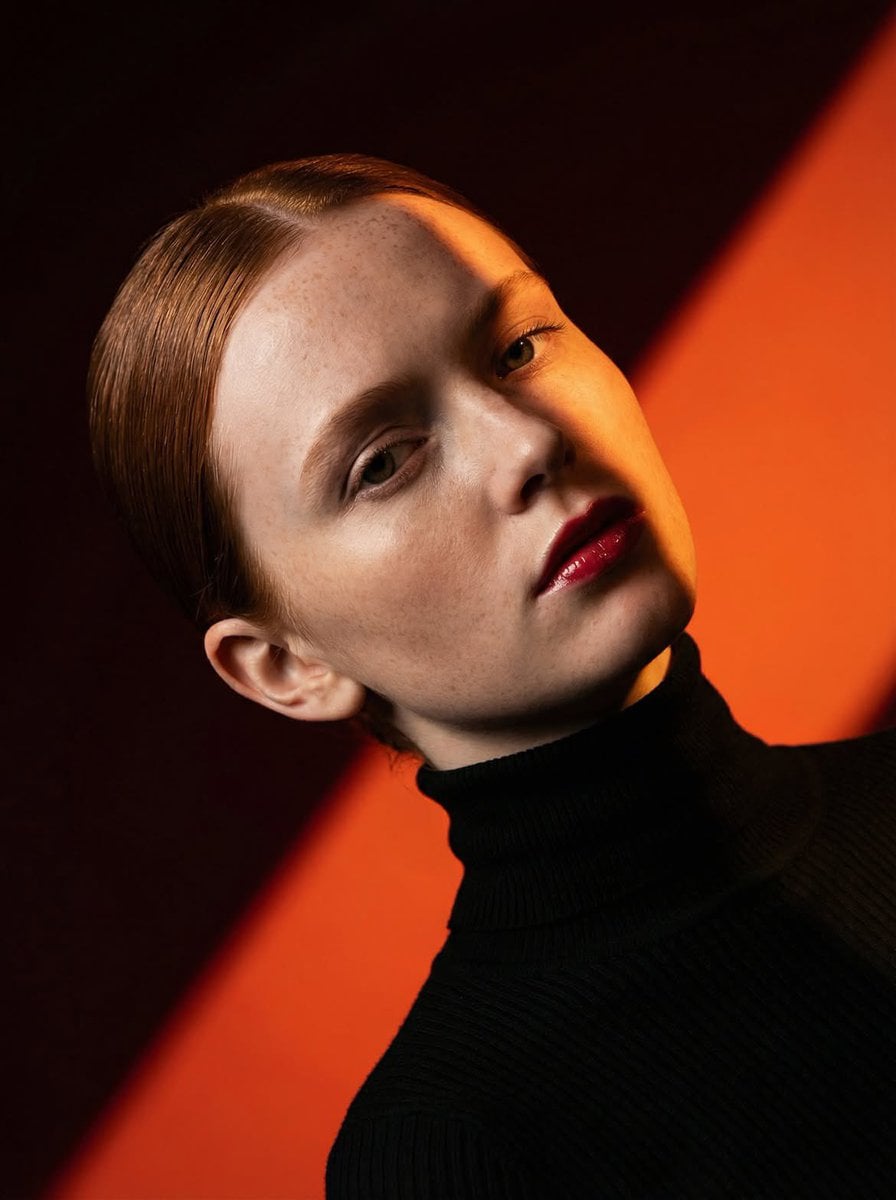
Ultra-high-fashion editorial beauty portrait of a fair-skinned female model with sleek center-parted hair tightly pulled into a low bun, wearing a fitted black ribbed turtleneck sweater. Dramatic studio lighting creates a bold diagonal shadow slicing across the face, emphasizing facial structure, freckles, and glossy deep-red lips. Minimal makeup with natural skin texture, cinematic contrast, rich warm color palette. Background consists of striking geometric color-blocked panels in vibrant orange and deep burgundy red, forming strong diagonal lines. Clean composition, luxury magazine cover aesthetic, contemporary fashion campaign, fine-art portrait photography, sharp focus, ultra-detailed skin, professional studio setup, high dynamic range, moody atmosphere, Vogue-style editorial, medium close-up framing, 85mm lens, f/2.8, photorealistic, 8K quality. Negative Prompt: blurry, low resolution, overexposed highlights, flat lighting, messy hair, smiling expression, heavy accessories, jewelry, cluttered background, text, watermark, logo, extra limbs, distorted face, cartoon, illustration, CGI, oversaturated skin, unnatural anatomy, poor composition, noise, motion blur.
Fantasy scene
Visual concept
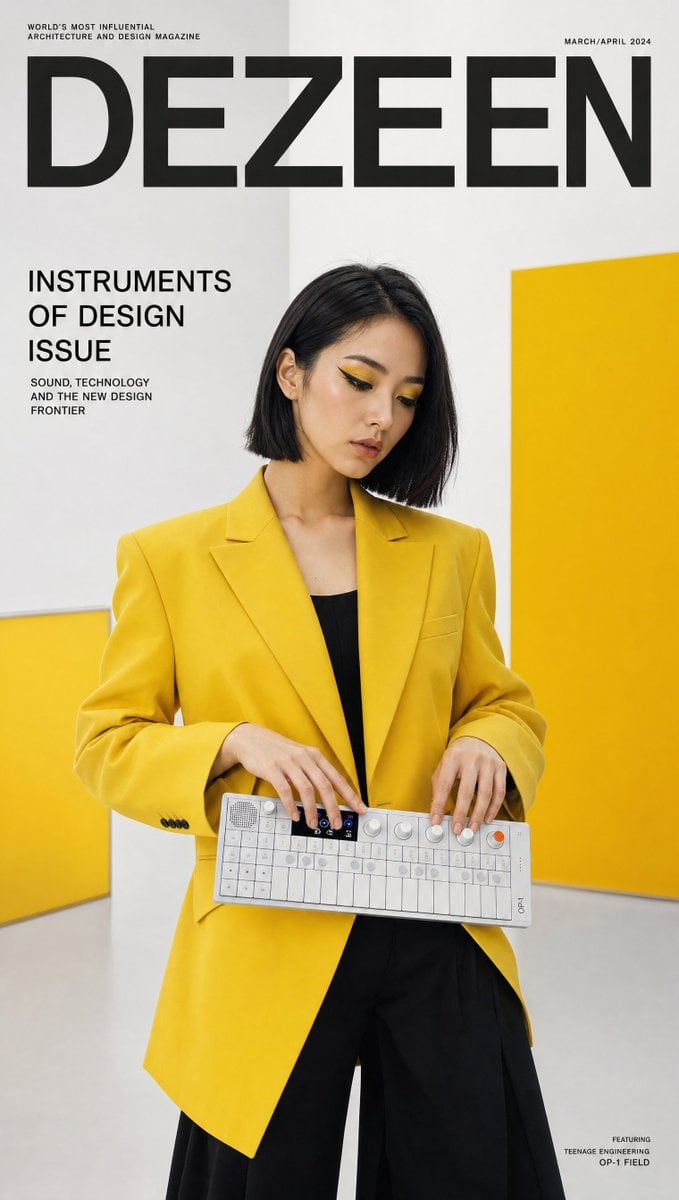
Ultra-realistic design culture magazine cover featuring a creative Korean woman in a bold yellow structured blazer and black wide-leg trousers — matching the product's colorway — holding a Teenage Engineering OP-1 Field synthesizer horizontally with both hands, fingers hovering over the tiny keys mid-composition, deep in creative flow. Bold graphic makeup, sharp geometric liner, yellow eyeshadow accent. Sleek straight bob. Background: clean white Bauhaus-inspired studio with bold yellow color block wall panels, ultra-graphic composition. "DEZEEN" masthead in precise sans-serif with "INSTRUMENTS OF DESIGN ISSUE" callout. 50mm lens, ultra-detailed OP-1 tiny key and OLED display, 8K photorealistic design editorial. Negative: cartoon, blurry, incorrect product shape, watermark, distorted.
Visual concept
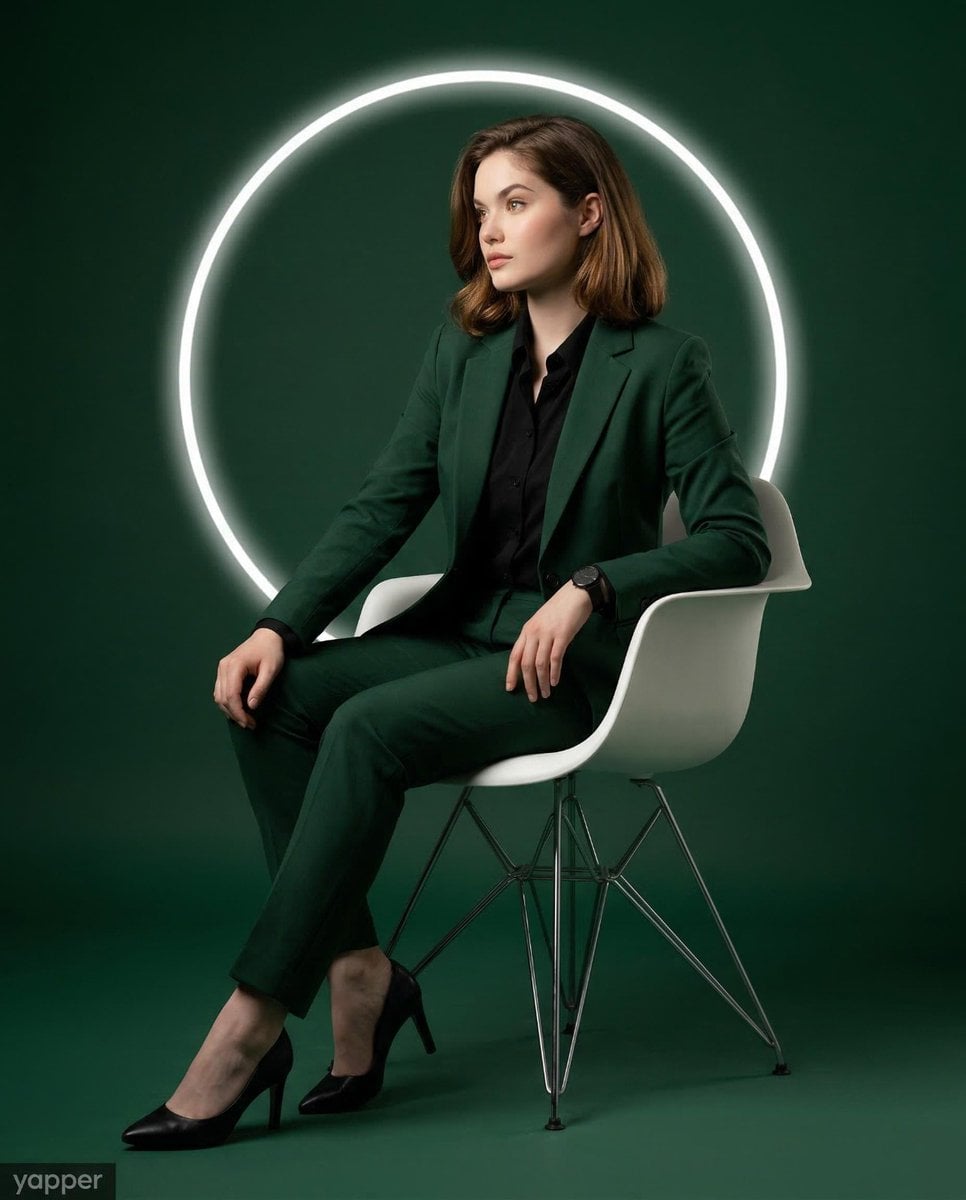
Use the provided image strictly as the reference for the subject’s face, age, and identity. Lock facial identity with the highest priority. Preserve the exact facial structure, proportions, skin tone, jawline, eyes, nose, lips, and overall likeness. Do not beautify, stylise, feminise beyond the natural identity, or alter facial features in any way. Create a modern, high-end studio portrait of a woman in a vertical 4:5 aspect ratio. Full-body seated editorial composition, centre-framed with balanced negative space. The overall visual aesthetic should feel clean, luxurious, powerful, and magazine-quality. The subject is wearing a sharply tailored deep forest green women’s suit with a refined structured blazer and tailored straight-leg trousers, paired with a crisp black fitted button-down shirt, elegant black leather formal heels, and a black wristwatch. The overall color palette is rich deep forest green (#225d57) with a polished luxury editorial aesthetic. The subject is seated in a sleek modern white molded plastic chair with four thin metal legs. Her posture is relaxed and confident, leaning back comfortably with her back supported by the chair rather than sitting rigidly upright. Torso angled slightly toward the viewer’s left side. Head turned left, showing a refined three-quarter profile. Gaze directed toward the left side of the frame, not toward the camera, creating a thoughtful editorial look. Body language: Shoulders relaxed and naturally dropped. Right hand resting near the upper thigh, fingers relaxed and naturally extended. Left elbow resting lightly on the edge of the seat, with the wristwatch visible. Legs extended forward in a relaxed seated stance. Both feet resting naturally on the floor, slightly apart and angled toward the left side of the frame. The pose should feel elegant, grounded, natural, and editorial — never stiff. The chair is placed in a seamless dark green studio environment where the floor and background blend smoothly. Behind the subject’s head and upper torso is a medium-sized glowing white circular LED ring light, centered like a modern halo. This creates a strong graphic visual element and subtle rim-light separation from the background. Use cinematic studio lighting: soft key light from the left side shaping the face, gentle shadow retention for depth, and subtle controlled fill light to preserve detail. The LED ring behind the subject should glow clean and bright without overpowering the subject. The lighting mood should feel dramatic, premium, and polished. Photorealistic, ultra-detailed, premium commercial portrait, sharp focus on facial features, suit texture, shoes, chair surface, and lighting contrast, refined editorial color grading, clean studio finish, no bad anatomy or bad proportions, no distortion, no exaggerated limbs or hands.
At a glance
Is this model right for you?
Negative prompts support up to 5,000 characters, and text seeds up to 500 characters. Text-only image generation.
- What it does best
- Kyeo accepts text only and does not expose image editing, output count, resolution, format, safety settings, or prompt rewriting.
- Who it is for
- Start with the default square output, then use the same brief at landscape, portrait, 3:4, and 4:3. Check subject placement, cropping, text, and negative space against the destination layout. Auto.
- Why use it on Kyeo AI
- Credit cost: Kyeo charges 8 credits for each single-image Google Imagen4 request; the selected ratio, negative prompt, and seed do not change the Kyeo credit cost.
Key facts
Quickly evaluate whether this model fits your business use case.
Category
AI image model
Vendor
Google
Model family
Google Imagen
Runtime
Asynchronous task
Prompt limit
5,000 characters
Image input
Not supported
Other names
The same model may have different names in official documentation, community discussions, and API integrations. This section brings them together for you.
Google Imagen4
Google Imagen 4
Common questions
These practical questions focus on the task, input conditions, and result requirements you should confirm before choosing.
how to use Google Imagen4 on Kyeo
Google Imagen4 credit cost
Google Imagen4 prompt limit
Google Imagen4 supported ratios
does Google Imagen4 accept images
Google Imagen4 negative prompt limit
Google Imagen4 seed limit
how many images does Google Imagen4 return
Google Imagen4 vs Imagen4 Fast
Which Imagen4 controls are available on Kyeo
Decision guide
Still deciding? Start with these key decision points.
1
Choose it for text-only generation with a 1:1 default
Text-only image generation. 8 credits per request. 5,000 characters. Aspect ratio: 1:1, 16:9, 9:16, 3:4, 4:3, Auto. Kyeo charges 8 credits for each single-image Google Imagen4 request; the selected ratio, negative prompt, and seed do not change the Kyeo credit cost.
2
Use another model for editing or output controls
This entry has no image input, output-count setting, size, format, or safety control. Choose a model that explicitly exposes the required control for source-image preservation, local edits, upscaling, or a specific file format.
3
Test both text-field limits
Test both text-field limits: Negative prompts support up to 5,000 characters, and text seeds up to 500 characters.
Popular comparisons
Compare common alternatives on the same task to clarify differences in inputs, controls, and cost.
How do Kyeo's controls differ between Imagen4 and Imagen4 Fast?
How do Imagen4 and Imagen4 Fast compare on Kyeo credits?
Do Imagen4 and Ultra use different default ratios on Kyeo?
Model comparison table
Not sure which model to choose? Compare the key differences between this model and its alternatives at a glance.
Kyeo input and output
Google Imagen4
Text only, fixed single-image output
Google Imagen4 Fast
Text only, fixed single-image output
Google Imagen4 Ultra
Text only, fixed single-image output
Default aspect ratio
Google Imagen4
1:1
Google Imagen4 Fast
16:9
Google Imagen4 Ultra
1:1
Kyeo credits
Google Imagen4
Fixed 8
Google Imagen4 Fast
Fixed 4
Google Imagen4 Ultra
Fixed 12
Real-world experience
Practical guidance based on public sources, current on-site limits, and representative tasks.
Google Imagen
Google Imagen: Kyeo charges 8 credits for each single-image Google Imagen4 request; the selected ratio, negative prompt, and seed do not change the Kyeo credit cost. Negative prompts support up to 5,000 characters, and text seeds up to 500 characters. Aspect ratio: 1:1, 16:9, 9:16, 3:4, 4:3, Auto.
Aspect ratio
Google Imagen: Aspect ratio: 1:1, 16:9, 9:16, 3:4, 4:3, Auto. Default: 1:1.
Capabilities
Capabilities
Capabilities: The text-only input, 5,000-character main-prompt limit, and fixed single-image output are explicit.
Aspect ratio
Aspect ratio: Aspect ratio: 1:1, 16:9, 9:16, 3:4, 4:3, Auto. Default: 1:1.
Seed
Seed: Negative prompts support up to 5,000 characters, and text seeds up to 500 characters.
Use cases
Ratio comparison from a 1:1 baseline
Ratio comparison from a 1:1 baseline: Start with the default square output, then use the same brief at landscape, portrait, 3:4, and 4:3. Check subject placement, cropping, text, and negative space against the destination layout. Auto.
Negative-prompt and seed comparison
Negative-prompt and seed comparison: Negative prompts support up to 5,000 characters, and text seeds up to 500 characters.
Google Imagen: How do Kyeo's controls differ between Imagen4 and Imagen4 Fast?
Google Imagen: How do Kyeo's controls differ between Imagen4 and Imagen4 Fast?: Kyeo charges 8 credits for each single-image Google Imagen4 request; the selected ratio, negative prompt, and seed do not change the Kyeo credit cost.
Prompt tips
Describe visible content in the main prompt
Cover the subject, action, setting, composition, lighting, and required text.
Negative prompt / Seed
Negative prompt / Seed: Negative prompts support up to 5,000 characters, and text seeds up to 500 characters.
Change one variable in seed tests
Change one variable in seed tests: Negative prompts support up to 5,000 characters, and text seeds up to 500 characters.
Why choose it
Google Imagen: The text-only input, 5,000-character main-prompt limit, and fixed single-image output are explicit.
Default: 1:1: Aspect ratio: 1:1, 16:9, 9:16, 3:4, 4:3, Auto.
Each request costs 8 credits regardless of the exposed parameter values.
What to know first
Google deprecated `imagen-4.0-generate-001` and recommended migration.
Use another model for editing or output controls: Kyeo accepts text only and does not expose image editing, output count, resolution, format, safety settings, or prompt rewriting.
Do Imagen4 and Ultra use different default ratios on Kyeo? Negative prompts support up to 5,000 characters, and text seeds up to 500 characters.
Adjustable settings
Quickly evaluate whether this model fits your business use case.
Negative prompt
Optional
Parameter type: text
5,000 characters
Aspect ratio
Optional
Parameter type: select
Default: 1:1
1:1
16:9
9:16
3:4
4:3
Auto
Seed
Optional
Parameter type: text
Negative prompts support up to 5,000 characters, and text seeds up to 500 characters.
Credit cost
8 credits per request
Kyeo charges 8 credits for each single-image Google Imagen4 request; the selected ratio, negative prompt, and seed do not change the Kyeo credit cost.
Credit-saving tip
Before generating images or videos in bulk, run an A/B test with the same input on this model and similar alternatives. Confirm the result first to avoid wasting credits.
Frequently asked questions
Related models
Still deciding? Take a quick look at these similar alternatives.
Google Imagen4 Fast
Text-only image generation. No image input. Aspect ratio: 1:1, 16:9, 9:16, 3:4, 4:3, Auto. 4 credits per request.
AI image model
4 credits per request
Google Imagen4 Ultra
Text-only image generation. 12 credits per request. 5,000 characters. Aspect ratio: 1:1, 16:9, 9:16, 3:4, 4:3, Auto.
AI image model
12 credits per request
4o Image
4o Image / Capabilities — This page offers only three aspect ratios—`1:1 / 3:2 / 2:3`—at a fixed 3 credits per request and does not accept reference images.
AI image model
3 credits per request
Sources
This page is based on vendor materials, model-family documentation, and Kyeo AI integration settings.
Source note
Kyeo charges 8 credits for each single-image Google Imagen4 request; the selected ratio, negative prompt, and seed do not change the Kyeo credit cost. Negative prompts support up to 5,000 characters, and text seeds up to 500 characters. Aspect ratio: 1:1, 16:9, 9:16, 3:4, 4:3, Auto.
Last updated: 2026-08-26
Google Cloud: Imagen 4 model documentation
Official
Google Cloud: Imagen 4 model documentation: Google Imagen.
Google Cloud: Vertex AI release notes
Official
Google Cloud: Vertex AI release notes: Google Imagen.
Google Cloud: Generate images from text
Official
Google Cloud: Generate images from text: Google Imagen.