AI image generation and editing model
OpenAI
GPT Image

GPT Image 2.5 Sunburst

GPT Image 2.5 Sunburst / Capabilities — GPT Image 2.5 Sunburst supports text-to-image generation and reference-image editing on Kyeo AI. Kyeo charges by output resolution: 1K costs 3 credits, 2K costs 10, and 4K costs 8.

Capabilities
Text-to-image and image-to-image
Credit cost
3–16 credits per request
Prompt limit
20,000 characters
Upload limit
Up to 16 images
30-second overview
  • GPT Image 2.5 Sunburst / Capabilities — One Kyeo page supports text-only generation and editing with up to 16 references.
  • GPT Image 2.5 Sunburst / Resolution / Credit cost — Generation and editing share resolution pricing: 1K/2K/4K cost 3/10/16 credits.
  • GPT Image 2.5 Sunburst / Upload limit — Kyeo accepts JPEG, PNG, and WebP references, currently limited to 10 MB each.
  • 27:16, 16:27, 9:8 and 8:9 support 1K only; all other ratios support 1K, 2K and 4K.

Popular searches: How to use GPT Image 2.5 Sunburst on Kyeo AI · How many credits do GPT Image 2.5 Sunburst 1K, 2K, and 4K cost · How to edit a reference image with GPT Image 2.5 Sunburst

Examples

Visual concept

Visual concept

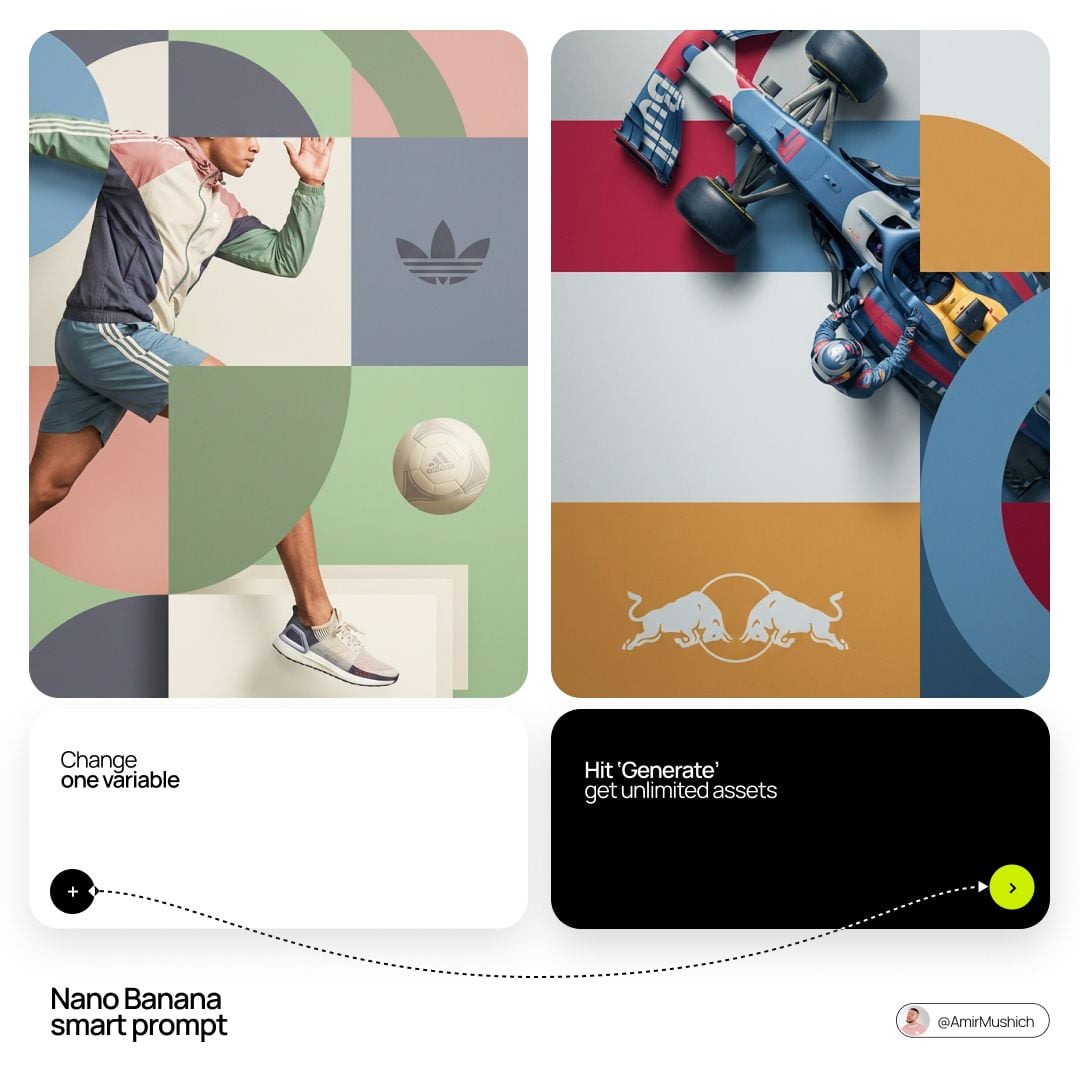
[BRAND NAME]. Act as a World-Class Editorial Designer. PHASE 1: DYNAMIC SUBJECT LOGIC. - Subject Selection: Autonomously analyze [BRAND NAME]. - Layering (The Sandwich Effect): Interweave the subject with background shapes. Some parts of the car/person must be hidden behind geometric blocks, while other parts (wheels, limbs, props) must overlap them to create 3D depth. PHASE 2: GRID & GEOMETRY. - Layout: A clean 2x2 grid composition. - Overlays: Superimpose large, bold geometric arcs and circles over the grid. - Visual Balance: Place one iconic product prop (e.g., a floating key fob for cars or a ball for sports) in a separate quadrant to balance the subject. PHASE 3: SOPHISTICATED MUTED PALETTE. - Color Direction: DO NOT use aggressive neon or oversaturated colors. - Palette: Identify the core colors of [BRAND NAME] and shift them to a "Sophisticated Muted" spectrum. - Tones: Use desaturated, earthy, or "dusty" versions of the brand colors (e.g., instead of hot pink, use dusty rose; instead of bright mint, use sage green; instead of royal blue, use slate blue). - Finish: Matte, flat color blocks with zero gradients. PHASE 4: PHOTOGRAPHY & LIGHTING. - Subject Style: High-end commercial studio photography. - Lighting: Soft, diffused studio lighting with gentle highlights. No harsh shadows. - Integration: The subject must feel physically embedded into the graphic grid. PHASE 5: MINIMALIST BRANDING. - Logo: Place a clean, single-color [BRAND NAME] logo in the center of one background block. No taglines, just the iconic symbol.
Visual concept

Visual concept

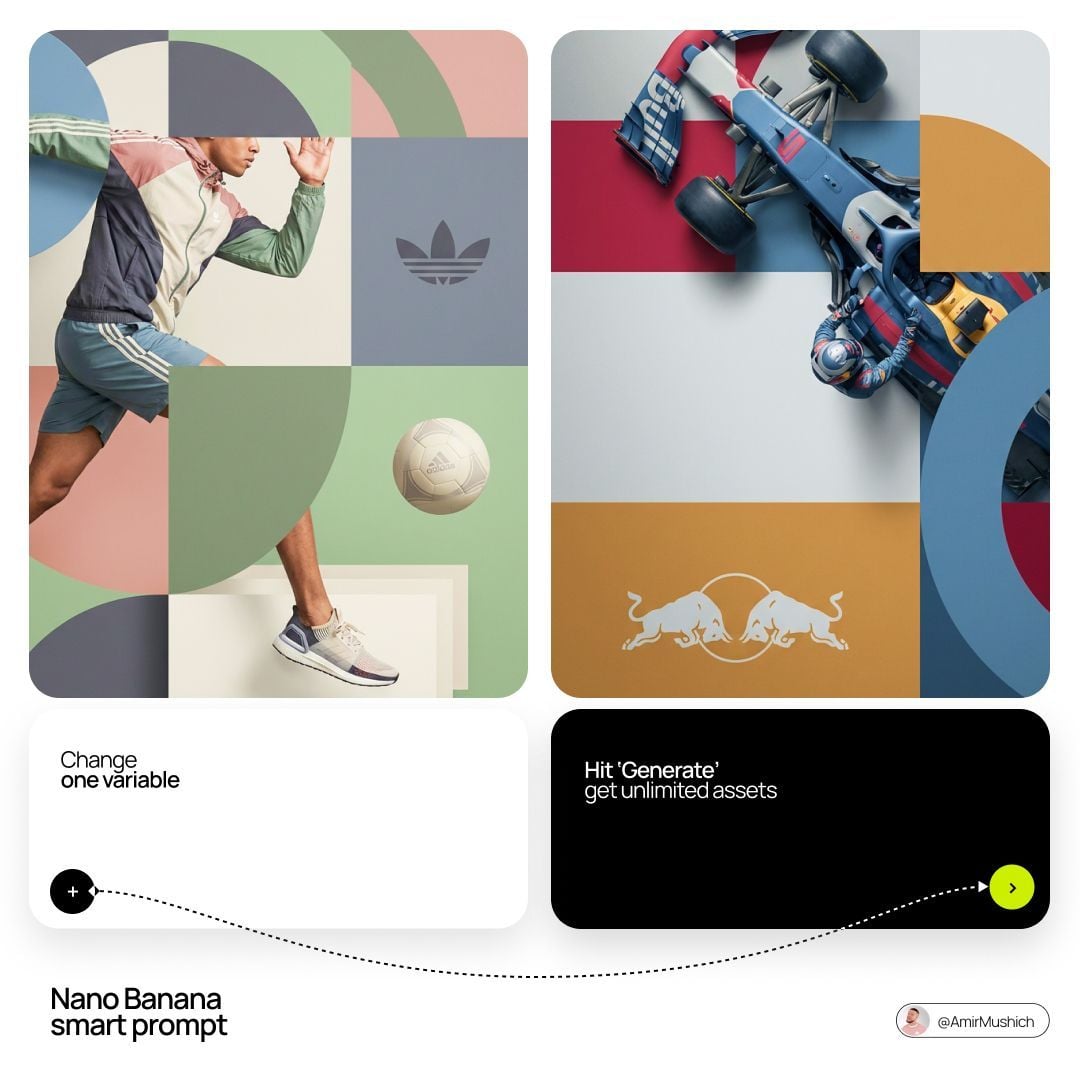
[BRAND NAME]. Act as a World-Class Editorial Designer. PHASE 1: DYNAMIC SUBJECT LOGIC. - Subject Selection: Autonomously analyze [BRAND NAME]. - Layering (The Sandwich Effect): Interweave the subject with background shapes. Some parts of the car/person must be hidden behind geometric blocks, while other parts (wheels, limbs, props) must overlap them to create 3D depth. PHASE 2: GRID & GEOMETRY. - Layout: A clean 2x2 grid composition. - Overlays: Superimpose large, bold geometric arcs and circles over the grid. - Visual Balance: Place one iconic product prop (e.g., a floating key fob for cars or a ball for sports) in a separate quadrant to balance the subject. PHASE 3: SOPHISTICATED MUTED PALETTE. - Color Direction: DO NOT use aggressive neon or oversaturated colors. - Palette: Identify the core colors of [BRAND NAME] and shift them to a "Sophisticated Muted" spectrum. - Tones: Use desaturated, earthy, or "dusty" versions of the brand colors (e.g., instead of hot pink, use dusty rose; instead of bright mint, use sage green; instead of royal blue, use slate blue). - Finish: Matte, flat color blocks with zero gradients. PHASE 4: PHOTOGRAPHY & LIGHTING. - Subject Style: High-end commercial studio photography. - Lighting: Soft, diffused studio lighting with gentle highlights. No harsh shadows. - Integration: The subject must feel physically embedded into the graphic grid. PHASE 5: MINIMALIST BRANDING. - Logo: Place a clean, single-color [BRAND NAME] logo in the center of one background block. No taglines, just the iconic symbol.
Visual concept

Visual concept

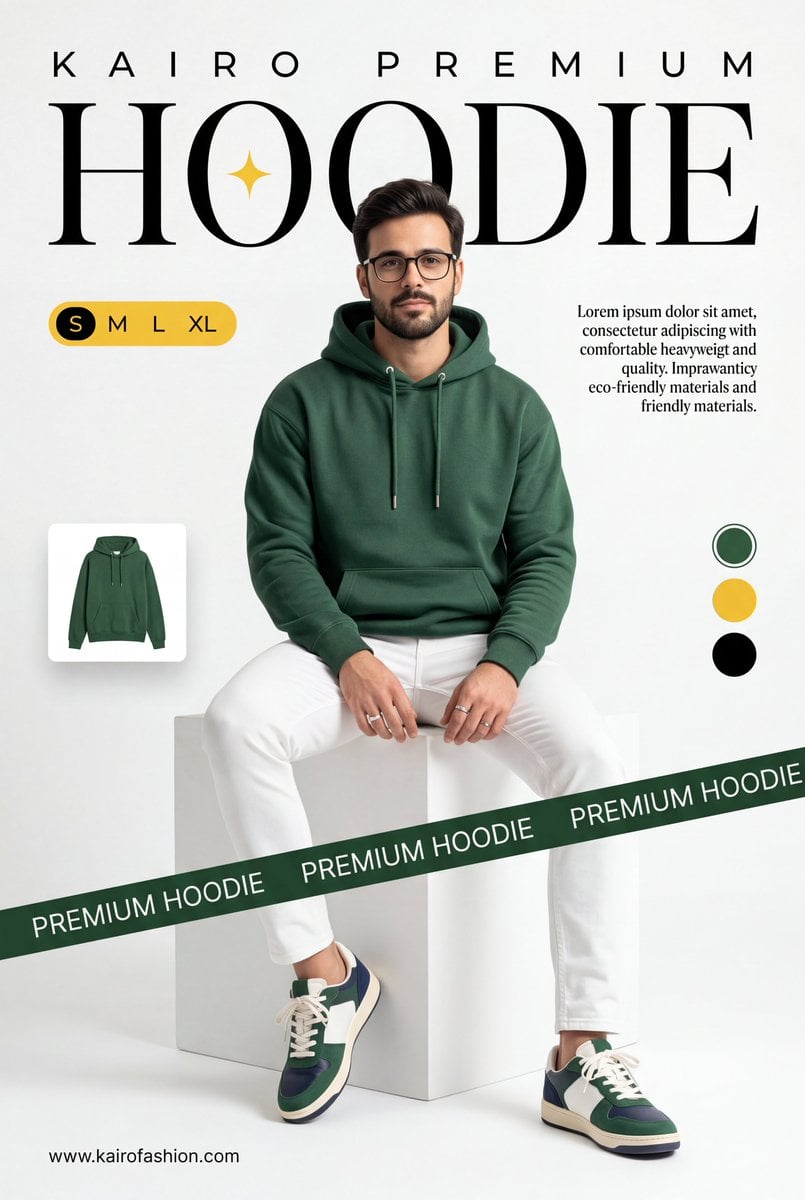
A professional commercial fashion advertisement featuring [a young male model] in the uploaded image, sitting on a minimalist white matte cube. He has a neutral, confident expression and is looking directly at the camera. Attire & Styling: Hoodie: A high-quality, [heavyweight forest green (British Racing Green) hoodie]. It features a relaxed fit, a spacious kangaroo pocket, and metal-tipped drawstrings. Bottoms: Clean, slim-fit white trousers with visible seams. Footwear: Stylish low-top sneakers in a color-blocked design of forest green, navy blue, and white, with off-white midsoles and white laces. Accessories: Simple silver bands/rings on his fingers. Graphic Design & Layout: Typography: The word [HOODIE] is written in a massive, elegant high-contrast serif font across the top. A small, four-pointed yellow spark icon is centered inside the "O". Above this, [K A I R O P R E M I U M] is printed in a wide-spaced sans-serif font. Branding Elements: A dark green diagonal "caution tape" style ribbon crosses the bottom third of the frame, with the words [PREMIUM HOODIE] repeating in white uppercase text. UI Accents: * A yellow pill-shaped size selector labeled "S M L XL" on the left. A small thumbnail of the hoodie floating on the mid-left. Three circular color swatches (Green, Yellow, Black) on the right side. Two blocks of justified serif body text describing the product's comfort and eco-friendly materials. The URL [www.meigen.ai] in the bottom left corner. Environment & Lighting: Setting: A clean, bright, white-on-white minimalist studio cove. Lighting: Soft, diffused studio lighting creates gentle shadows under the model and the cube, emphasizing the rich texture of the green fabric and the crispness of the white pants. Color Palette: Deep forest green, bright white, and golden yellow accents.

Visual concept

Visual concept

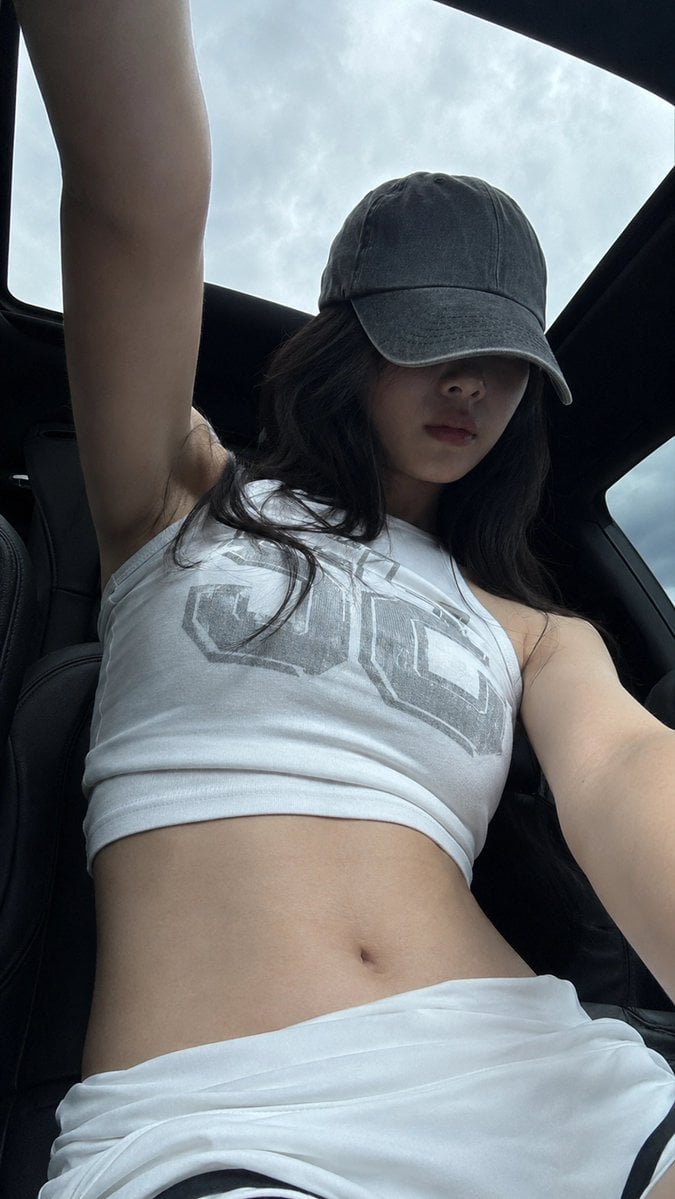
A realistic vertical mobile-phone selfie, 9:16 aspect ratio. A young adult woman in her 20s is inside a car under a panoramic sunroof. The camera is placed low, around waist or seat height, shooting upward. Her body is close to the lens, her head slightly lowered, and one arm extends upward out of frame as if holding the phone or adjusting the angle. The composition should feel slightly off-center and casual, not perfectly staged. She wears a worn gray baseball cap with a low brim hiding her eyes. The upper half of her face falls into the cap shadow, leaving only a soft facial outline, nose bridge, and relaxed closed lips visible. Her expression is calm, unsmiling, low-emotion, and slightly distant, like a casual photo taken right after sitting in the car. Long black hair falls naturally from both sides of the cap, with a few messy strands and real airy texture. She wears a white sleeveless high-neck cropped tank top with a large muted gray block-letter graphic print across the chest. The fabric looks like thin cotton or stretch knit, fitted to the body with subtle horizontal wrinkles and realistic stretch texture. The bottom is a low-waist white sporty skirt or shorts with folded fabric around the waist and a small black inner edge visible. The waist and abdomen are fully visible. Visible skin areas include the neck, shoulders, upper arms, edge of the underarm area, small collarbone area, full abdomen, side waist, and upper hip edge. Her skin tone is fair neutral-cool, slightly grayish in the shaded car interior, smooth but natural, as if cool to the touch, soft, with subtle pores and real underlying contours. The skin must be completely clean: no tattoos, no body markings, no text, no stickers, no patterns on the skin. Lighting comes from overcast daylight entering through the panoramic roof and car windows. The pale blue-gray cloudy sky outside is bright, while the black car roof and curved sunroof frame create strong negative space. The subject stays in the darker car interior; the cap casts a strong shadow across the face, while the shoulders and abdomen receive soft diffused sky light. Keep slight mobile noise, dark shadow compression, bright sky highlights, and a raw phone-camera feeling. Avoid studio lighting, commercial retouching, excessive skin smoothing, and an artificial glossy AI look. Negative prompt: tattoo, body art, skin text, watermark, logo watermark, over-retouched skin, plastic skin, studio lighting, mirror selfie, heavy makeup, extra fingers, distorted hands, bad anatomy, unrealistic body, AI glossy look.

Visual concept

Visual concept

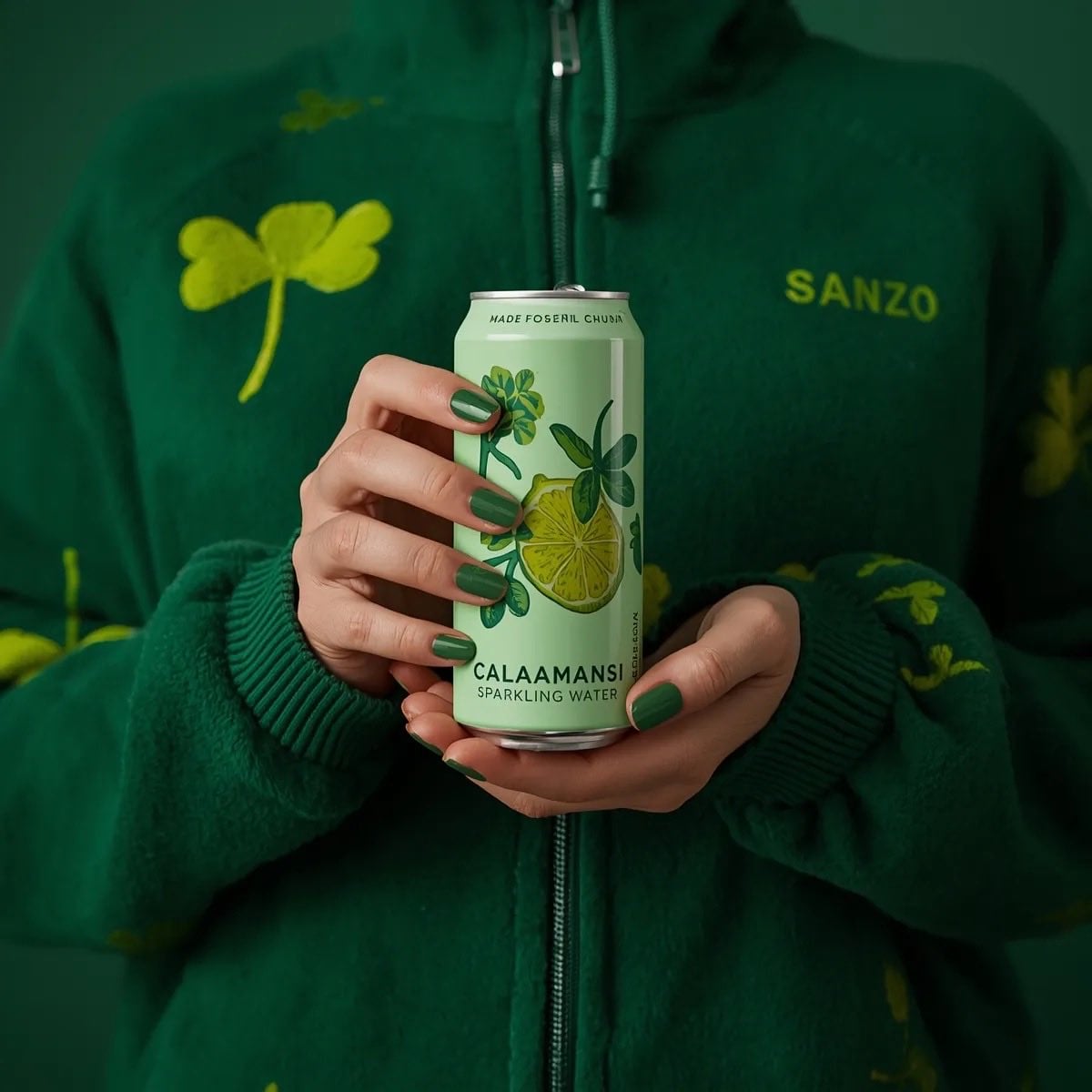
A photorealistic product shot of a person holding a slim, light green can of Sanzo Calamansi Sparkling Water. The person is wearing a dark green, fuzzy fleece zip-up hoodie patterned with light green four-leaf clovers. Both hands are holding the can centrally in front of their torso, displaying perfectly manicured nails painted in a glossy green polish. The can features an illustration of a sliced calamansi lime with green leaves. The background is a solid, moody dark green, creating a striking monochromatic green aesthetic. Soft, professional studio lighting, highly detailed.

Visual concept

Visual concept

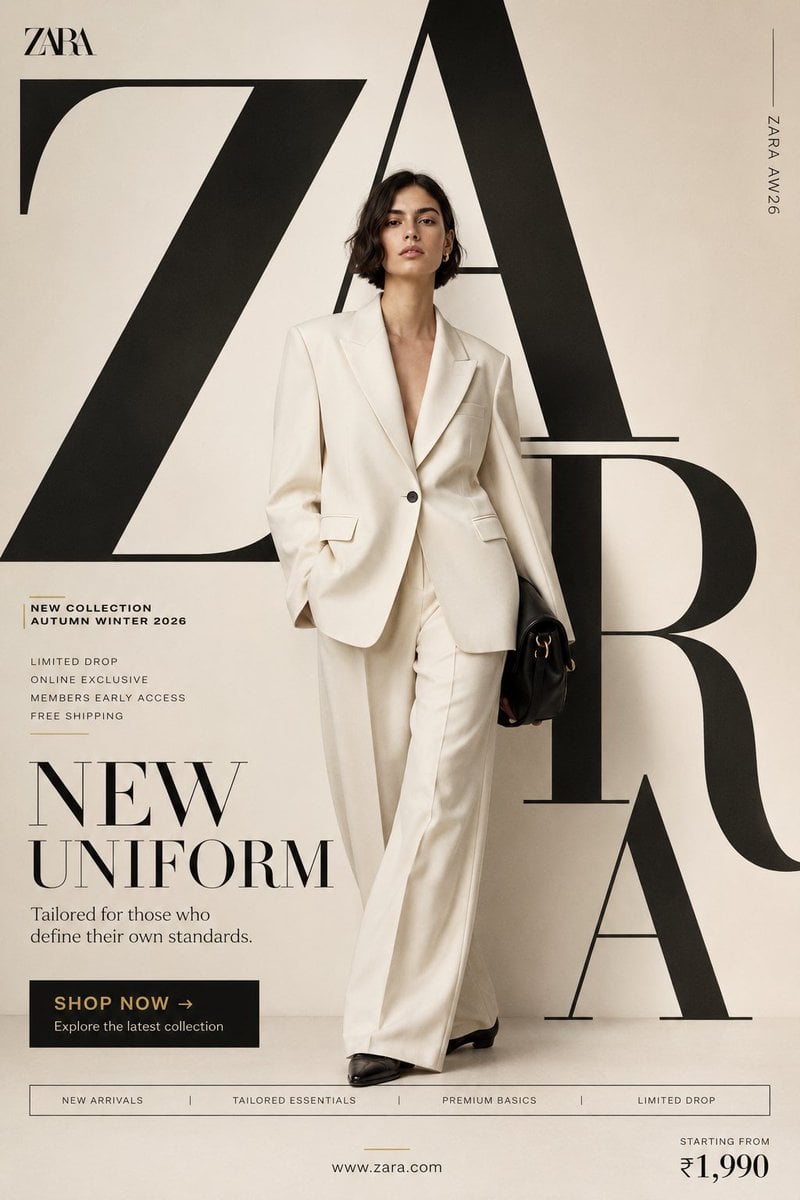
"NEW UNIFORM" FORMAT Ultra-Premium Fashion SMM Promotional Poster Vertical 4:5 Instagram Hero Creative Luxury Fast Fashion Advertising Commercial Fashion Graphic Design Agency-Level Art Direction Behance Front Page Quality 8K UHD Hyper-Realistic Fashion × Graphic Design Fusion Zero AI Slop Zero Generic Fashion Campaigns Zero Editorial-Only Aesthetic CORE STRATEGY This is not a fashion campaign. This is a fashion statement disguised as a promotional poster. The design should feel like Zara's homepage, a luxury magazine cover, and a premium billboard campaign merged into one visual. The graphic design is equally important as the fashion. Typography is not decoration. Typography is architecture. CAMPAIGN IDEA "NEW UNIFORM" Not office uniform. Not school uniform. The uniform of modern taste. The clothes aren't being sold. The identity is. MASTER VISUAL Massive oversized ZARA typography dominates the entire composition. The word: ZARA occupies nearly 75% of the canvas. Typography is integrated into the design. Letters extend beyond frame edges. Some letters cropped. Some hidden behind the model. Some functioning as compositional structures. The typography should feel monumental. HERO SUBJECT Female model. Editorial face. Strong jawline. Minimal makeup. Luxury fashion energy. No smiling. No dramatic posing. Pure confidence. Wardrobe: Oversized ivory blazer. Wide-leg tailored trousers. Premium monochromatic styling. Black leather accessories. Luxury minimalism. POSE Model stepping through the giant typography. One foot slightly forward. Direct eye contact. Hands relaxed. Body partially intersecting typography. The feeling: She owns the space. COMPOSITION Typography occupies 70%. Model occupies 20%. Promotional elements occupy 10%. Visual hierarchy: ZARA ↓ Model ↓ Promotion ↓ CTA Everything feels intentional. COLOR SYSTEM Primary: Ivory Cream Off White Soft Beige Black Accent: Muted Gold No bright colors. No fashion-week color chaos. Luxury restraint. BACKGROUND Clean luxury backdrop. Large soft gradient. Editorial studio environment. Subtle texture. No architecture. No scenery. No distractions. The design itself creates the environment. GRAPHIC DESIGN SYSTEM Floating collection cards. Luxury editorial labels. Minimal grid system. Thin lines. Micro typography. Magazine-inspired information hierarchy. Fashion-week poster energy. PROMOTIONAL ELEMENTS NEW COLLECTION AUTUMN WINTER 2026 LIMITED DROP ONLINE EXCLUSIVE MEMBERS EARLY ACCESS FREE SHIPPING Integrated naturally into layout. Not banner spam. TYPOGRAPHY HIERARCHY Top Left ZARA small luxury wordmark Center Massive Typography Z A R A occupying most of composition luxury serif typography extremely large scale partially cropped Campaign Title NEW UNIFORM bold elegant typography Supporting Copy Tailored for those who define their own standards. PROMOTIONAL CTA BLOCK SHOP NOW → Explore the latest collection BOTTOM FEATURE STRIP NEW ARRIVALS TAILORED ESSENTIALS PREMIUM BASICS LIMITED DROP Bottom Right Starting From ₹1,990 Bottom Center http://zara.com Vertical Edge Text ZARA AW26 LIGHTING Luxury studio lighting. Large soft source. Editorial contrast. Natural skin rendering. Premium fabric highlights. Subtle shadows. Luxury magazine quality. CAMERA ARRI Alexa Mini LF 85mm Lens Editorial fashion photography Shallow depth of field Extremely sharp fabric rendering Ultra-premium commercial quality POST-PRODUCTION Luxury European fashion campaign grading. Rich blacks. Cream highlights. Visible textile texture. Natural skin detail. No excessive retouching. No artificial HDR. No fake luxury effects. FINAL FEEL If Zara, Vogue, and a premium graphic design studio created a promotional social media poster together. Not a fashion photograph. Not a catalogue. A modern luxury fashion advertisement Shot on ARRI Alexa Mini LF, 35mm lens, dynamic commercial perspective, street-fashion energy, magazine-cover quality detail, natural movement capture, authentic contemporary fashion realism, premium advertising production standards. Modern fashion campaign color grading, strong reds, clean whites, visible fabric textures, realistic skin detail, subtle grain, commercial social-media polish, no artificial luxury grading, no fashion-house minimalism, no generic fast-fashion campaign aesthetics, no AI slop, no sterile studio appearance. A fusion of Spotify Wrapped energy, Nike youth-culture storytelling, Pinterest trend aesthetics and world-class graphic design agency execution. Bold, energetic, expressive, commercial, social-first and highly shareable. A true promotional SMM poster communicating that every personality, every mood and every version of yourself can exist within one H&M collection. Behance Front Page quality, award-winning youth-fashion advertising, graphic-design-first commercial masterpiece.

At a glance

Is this model right for you?

At a glance — Generate from text or edit up to 16 references with a 20,000-character prompt. Choose 13 aspect ratios and 1K, 2K or 4K output. Choose an automatic, transparent or opaque background. Review edges and any text before using the result.

What it does best
What is this model like? / What it does best — Generate from text or edit up to 16 references with a 20,000-character prompt. Choose 13 aspect ratios and 1K, 2K or 4K output. Choose an automatic, transparent or opaque background. Review edges and any text before using the result.
Who it is for
It is an option for text generation, reference-image editing, or tasks that need an explicit 1K, 2K, or 4K output tier. The 20,000-character and 16-image limits are input and upload maxima, not recommendations.
Why use it on Kyeo AI
Kyeo combines the prompt, references, aspect ratio, and resolution in one form, displays the credit cost, and checks incompatible combinations before submission, making controlled comparisons easier.

Key facts

Quickly evaluate whether this model fits your business use case.

Category
AI image generation and editing model
Developer
OpenAI
Model family
GPT Image
Available settings
Current site controls
How it works
Asynchronous task
Prompt limit
20,000 characters
Upload limit
Up to 16 images

Other names

The same model may have different names in official documentation, community discussions, and API integrations. This section brings them together for you.

GPT Image 2.5 Sunburst

Common questions

These practical questions focus on the task, input conditions, and result requirements you should confirm before choosing.

How to use GPT Image 2.5 Sunburst on Kyeo AI
How many credits do GPT Image 2.5 Sunburst 1K, 2K, and 4K cost
How to edit a reference image with GPT Image 2.5 Sunburst
How many images can I upload to GPT Image 2.5 Sunburst and how large can they be
Which aspect ratios support GPT Image 2.5 Sunburst 4K
Which resolutions work with GPT Image 2.5 Sunburst automatic aspect ratio
Which GPT Image 2.5 Sunburst controls are currently available on Kyeo
Which GPT Image 2.5 Sunburst resolutions can I select on Kyeo
How does GPT Image 2.5 Sunburst pricing differ from GPT Image 1.5
Is the GPT Image 2.5 Sunburst 16-image limit a recommended count
Does GPT Image 2.5 Sunburst guarantee accurate text and character consistency

Decision guide

Still deciding? Start with these key decision points.

1
Choose it for the controls you need

Include GPT Image 2.5 Sunburst in your test when you need reference-image editing, a 20,000-character prompt, up to 16 images, or explicit 1K/2K/4K price tiers.

2
Compare alternatives by controls

Compare GPT Image 1.5 if medium/high quality tiers are preferable. Compare Nano Banana Pro if output format or a wider aspect-ratio selection matters, and evaluate both on the same brief.

3
Use a minimal, repeatable test

State which image defines the subject, material, background, or layout, and begin with a small set. Adding references can introduce conflicts and does not automatically improve consistency. 27:16, 16:27, 9:8 and 8:9 support 1K only; all other ratios support 1K, 2K and 4K.

Popular comparisons

Compare common alternatives on the same task to clarify differences in inputs, controls, and cost.

What is the difference between GPT Image 2.5 Sunburst and GPT Image 1.5
GPT Image 2.5 Sunburst vs GPT Image 1.5
What is the difference between GPT Image 2.5 Sunburst and Nano Banana Pro
GPT Image 2.5 Sunburst vs Nano Banana Pro
What is the difference between GPT Image 2.5 Sunburst and Flux 2 Pro
GPT Image 2.5 Sunburst vs Flux 2 Pro

Model comparison table

Not sure which model to choose? Compare the key differences between this model and its alternatives at a glance.

Role on Kyeo AI
GPT Image 2.5 Sunburst
Generation and editing priced by resolution
GPT Image 1.5
Pricing based on medium/high quality tiers
Nano Banana Pro
11 aspect ratios and PNG/JPG output controls
Current price
GPT Image 2.5 Sunburst
1K=3 / 2K=10 / 4K=16 credits
GPT Image 1.5
medium=4 / high=22 credits
Flux 2 Pro
Different pricing and controls for 1K/2K
Reference-image limits
GPT Image 2.5 Sunburst
Up to 16 images, each no larger than 10 MB on Kyeo
Nano Banana Pro
Up to 8 input images
Flux 2 Pro
Up to 8 reference images

Real-world experience

Practical guidance based on public sources, current on-site limits, and representative tasks.

Current site controls define the available workflow

Practical usage insights / Current site controls define the available workflow — Generate from text or edit up to 16 references with a 20,000-character prompt. Choose 13 aspect ratios and 1K, 2K or 4K output. Choose an automatic, transparent or opaque background. Review edges and any text before using the result.

Resolution and capacity are not quality rankings

Kyeo's 1K/2K/4K tiers mainly determine output size and credits, while 16 images is only an input maximum. Neither a higher tier nor more references automatically improves accuracy, consistency, or usability.

Capabilities

Text-to-image generation and reference-image editing

Text-to-image generation and reference-image editing — One Kyeo page supports text-only generation and editing with up to 16 references.

Three resolutions with combination checks

Capabilities / Three resolutions with combination checks — 27:16, 16:27, 9:8 and 8:9 support 1K only; all other ratios support 1K, 2K and 4K.

Up to 16 reference images

Up to 16 reference images — The prompt limit is 20,000 characters and the reference limit is 16 images.

Background

Choose an automatic, transparent or opaque background. Review edges and any text before using the result.

Use cases

Product and advertising concepts

Generate background, composition, and aspect-ratio variations from text or a product reference. Verify trademarks, packaging text, anatomy, and product details in every result.

Reference-image edits

Describe the subject that must remain and the background, composition, or material that may change, then test whether the model follows the request with a small reference set.

Multi-object scene generation

Separate objects, spatial relationships, camera direction, and style into clear prompt sections, then review omissions, placement errors, text, and policy-sensitive content.

Prompt tips

Start with a valid aspect-ratio and resolution pair

Prompt tips / Start with a valid aspect-ratio and resolution pair — 27:16, 16:27, 9:8 and 8:9 support 1K only; all other ratios support 1K, 2K and 4K.

Assign a purpose to each reference

State which image defines the subject, material, background, or layout, and begin with a small set. Adding references can introduce conflicts and does not automatically improve consistency.

Separate what must stay from what may change

For editing, list the traits to preserve, the regions that may change, and content to avoid. Manually inspect text, logos, hands, and edges after generation.

Why choose it

Use cases / GPT Image 2.5 Sunburst — One page supports text generation and reference-image editing.
Resolution / Credit cost — The 1K/2K/4K credit prices and invalid combinations are explicit.
Prompt limit / Upload limit — The prompt limit is 20,000 characters and the reference limit is 16 images.
Why choose it — 27:16, 16:27, 9:8 and 8:9 support 1K only; all other ratios support 1K, 2K and 4K.

What to know first

What to know first — Generate from text or edit up to 16 references with a 20,000-character prompt. Choose 13 aspect ratios and 1K, 2K or 4K output. Choose an automatic, transparent or opaque background. Review edges and any text before using the result.
What to know first — 27:16, 16:27, 9:8 and 8:9 support 1K only; all other ratios support 1K, 2K and 4K.
Upload limit / GPT Image 2.5 Sunburst — The 16-image maximum is only a capacity limit; more images do not imply greater consistency.
Review notes / GPT Image 2.5 Sunburst — Text layout, recurring characters, and brand elements can still drift and require human review.

Adjustable settings

Quickly evaluate whether this model fits your business use case.

Aspect ratio
Optional
Parameter type: Select
Default: Automatic
Auto
1:1
3:2
2:3
4:3
3:4
16:9
9:16
21:9
27:16
16:27
9:8
8:9
Resolution
Optional
Parameter type: Select
Default: 1K
1K
2K
4K
Background
Optional
Parameter type: Select
Automatic
Transparent
Opaque

Credit cost

3–16 credits per request

Kyeo currently charges by resolution: 1K costs 3 credits, 2K costs 10, and 4K costs 16 for either generation or editing.

Credit-saving tip

Before generating images or videos in bulk, run an A/B test with the same input on this model and similar alternatives. Confirm the result first to avoid wasting credits.

Frequently asked questions

Related models

Still deciding? Take a quick look at these similar alternatives.

GPT Image 2

GPT Image 2 / Capabilities — GPT Image 2 supports text-to-image generation and reference-image editing on Kyeo AI. Kyeo charges by output resolution: 1K costs 3 credits, 2K costs 5, and 4K costs 8.

AI image generation and editing model
3–8 credits per request

GPT Image 2.5 Flare

GPT Image 2.5 Flare / Capabilities — GPT Image 2.5 Flare supports text-to-image generation and reference-image editing on Kyeo AI. Kyeo charges by output resolution: 1K costs 3 credits, 2K costs 10, and 4K costs 8.

AI image generation and editing model
3–16 credits per request

GPT Image 1.5

GPT Image 1.5 on Kyeo supports text-to-image and image-to-image with three aspect ratios and medium/high quality. Image editing accepts up to 16 JPG, PNG, or WebP references at 10 MB each. Medium costs 4 credits and high costs 22 credits. GPT Image 1.5 is OpenAI's deprecated previous image model. Kyeo retains generation and editing access, but that availability does not make it OpenAI's current default choice.

AI image model
4–22 credits per request

Sources

This page is based on vendor materials, model-family documentation, and Kyeo AI integration settings.

Source note

Generate from text or edit up to 16 references with a 20,000-character prompt. Choose 13 aspect ratios and 1K, 2K or 4K output. Choose an automatic, transparent or opaque background. Review edges and any text before using the result.

Last updated: 2026-09-15
Current site configuration review
Integration

Input limits, aspect-ratio options, and resolutions were checked against the controls currently available on the site.