Visual concept
{
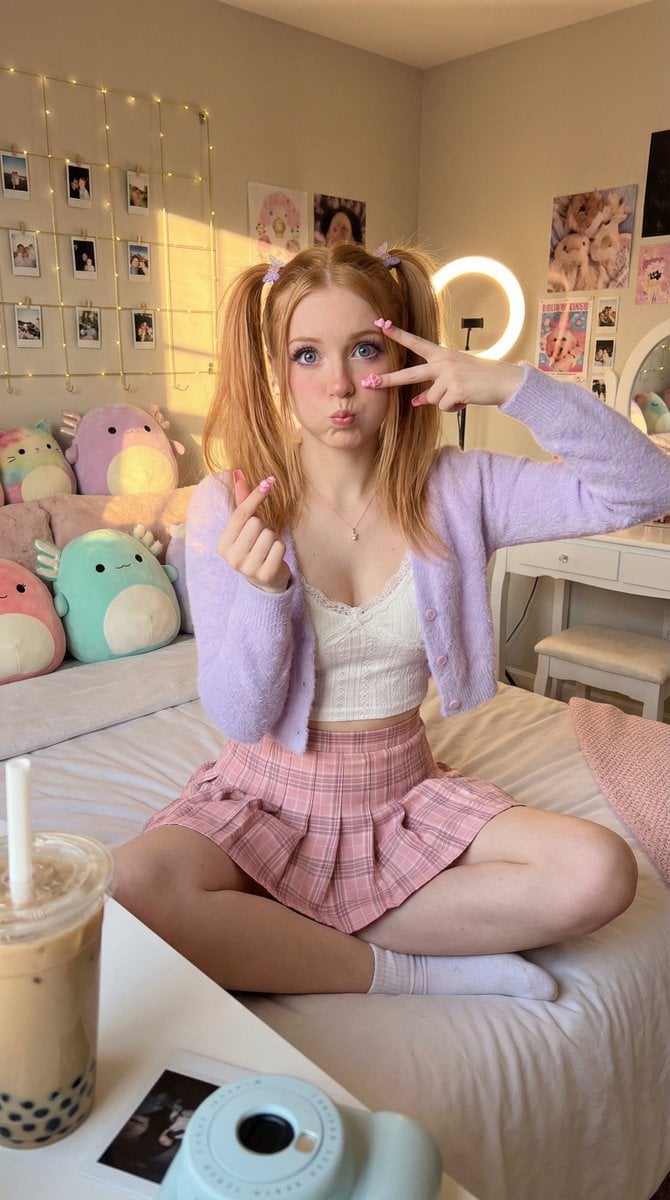
"style": "iPhone smartphone photo, casual high-res content creator aesthetic, non-CGI photorealistic",
"subjects": [
{
"description": "Young Caucasian female content creator/influencer with energetic youthful energy",
"placement": "centered, high-angle selfie perspective",
"pose": "sitting cross-legged on a bed, doing a finger heart pose near her cheek with one hand and a peace sign near her eye with the other",
"expression": "playful cute aegyo expression, soft innocent brow shape, tiny heart-shaped pout, cheeks slightly puffed",
"skin": "true-to-life texture beneath dewy 'glass skin' highlights on cheekbones, microscopic pores, peach fuzz, realistic warm peachy undertone, visible natural freckles across the nose bridge",
"makeup": {
"style": "cute influencer makeup",
"eyes": "glitter cut crease in pink and gold, wispy spiky doll-style false lashes, subtle puppy eyeliner",
"brows": "soft, straight, lightly powdered Korean-style brows, light brown shade, natural individual brushed hairs visible"
},
"eyes": {
"description": "large, naturally reflecting light",
"color": "striking blue-purple",
"catchlights": "messy, realistic reflections of a ring light and window light"
},
"hair": {
"style": "high pigtails with wispy see-through bangs, silky texture with volume at the crown, stray flyaways catching the light",
"color": "strawberry blonde with subtle face-framing lighter highlights",
"accessories": ["pastel silk scrunchies", "tiny metallic butterfly hair clips"]
},
"hands": {
"details": "realistic anatomical joints, natural skin folds on knuckles, subtle veins visible, neat realistic cuticles",
"nails": "intricate, bulky Japanese/Korean-style 3D gel nail art, pink jelly builder gel, embedded tiny iridescent rhinestones, and miniature pearl charms, glossy thick resin finish reflecting the ring light"
},
"clothing": [
{
"item": "cropped fuzzy cardigan with oversized sleeves and loose thread hem",
"color": "pastel lavender",
"material": "faux fur fluffy textures showing distinct, wispy individual loose fibers",
"layer": "outer"
},
{
"item": "lace camisole peeking through",
"color": "white",
"material": "cotton with lace trim",
"layer": "inner"
},
{
"item": "pleated mini skirt with visible safety shorts",
"color": "soft pink and cream check pattern",
"material": "structured cotton or wool blend",
"layer": "bottom"
}
],
"footwear": {
"item": "fluffy bunny ear slippers",
"color": "white with pink inner ear",
"material": "fuzzy fleece"
},
"accessories": [
{
"item": "pearl choker and chunky pastel beads bracelet",
"material": "faux pearl and plastic beads",
"placement": "neck and wrist"
},
{
"item": "pastel pink over-ear headphones (AirPods Max style)",
"material": "matte aluminum and mesh",
"placement": "around neck or on head"
}
]
}
],
"scene": {
"location": "cozy, aesthetic Y2K/90s inspired corner bedroom",
"time": "late afternoon golden hour",
"weather": "clear",
"background_elements": [
"white vintage metal bed frame with pastel pink cloud comforter and oversized plush squishmallows",
"soft cream walls decorated with a fairy light grid, polaroid photo wall, and cute posters",
"white makeup vanity with hollywood mirror and floating shelves holding vinyl figures and plants",
"phone on a tripod recording in the background, star projector lights, stuffed animal collection"
]
},
"lighting": {
"type": "mixed practical lighting",
"direction": "frontal warm white ring light mixed with golden hour sun streaming in from a window",
"secondary": "soft pink RGB LED strips glowing from behind the headboard",
"highlights": "harsh rim light on the hair and shoulders from the window, deep contrast in the shadow of the bed"
},
"camera": {
"angle": "high-angle smartphone selfie perspective",
"lens": "modern smartphone 24mm wide angle lens",
"aspect_ratio": "1:1",
"resolution": "high resolution smartphone output",
"behavior": "slight barrel distortion typical of wide mobile lenses; moderate depth of field keeping the subject sharp while the background bedroom falls into a grainy, digital soft blur; an out-of-focus bubble tea cup with a cute straw and a polaroid camera in the extreme blurry foreground; visible digital noise in the deeper shadow areas; slight over-sharpening typical of computational photography on eyelashes, hair, and nail charms."
},
"color_palette": [
"#E6E6FA",
"#FFB6C1",
"#FFFDD0",
"#FDFD96",
"#C8A2C8"
],
"negative_prompt": [
"CGI",
"3D render",
"illustration",
"digital painting",
"cg art",
"plastic skin",
"airbrushed skin",
"perfectly smooth skin",
"muddy textures",
"plain flat nails",
"harsh arched eyebrows",
"fake digital bokeh",
"artificial bloom glowing effects",
"doll-like proportions",
"anime painting style",
"oil painting",
"vintage sepia",
"dark moody lighting",
"flat lighting",
"harsh shadows",
"watermark",
"logo",
"text",
"bad hands",
"extra fingers",
"fused fingers",
"deformed face",
"cluttered background",
"dirty laundry"
]
}