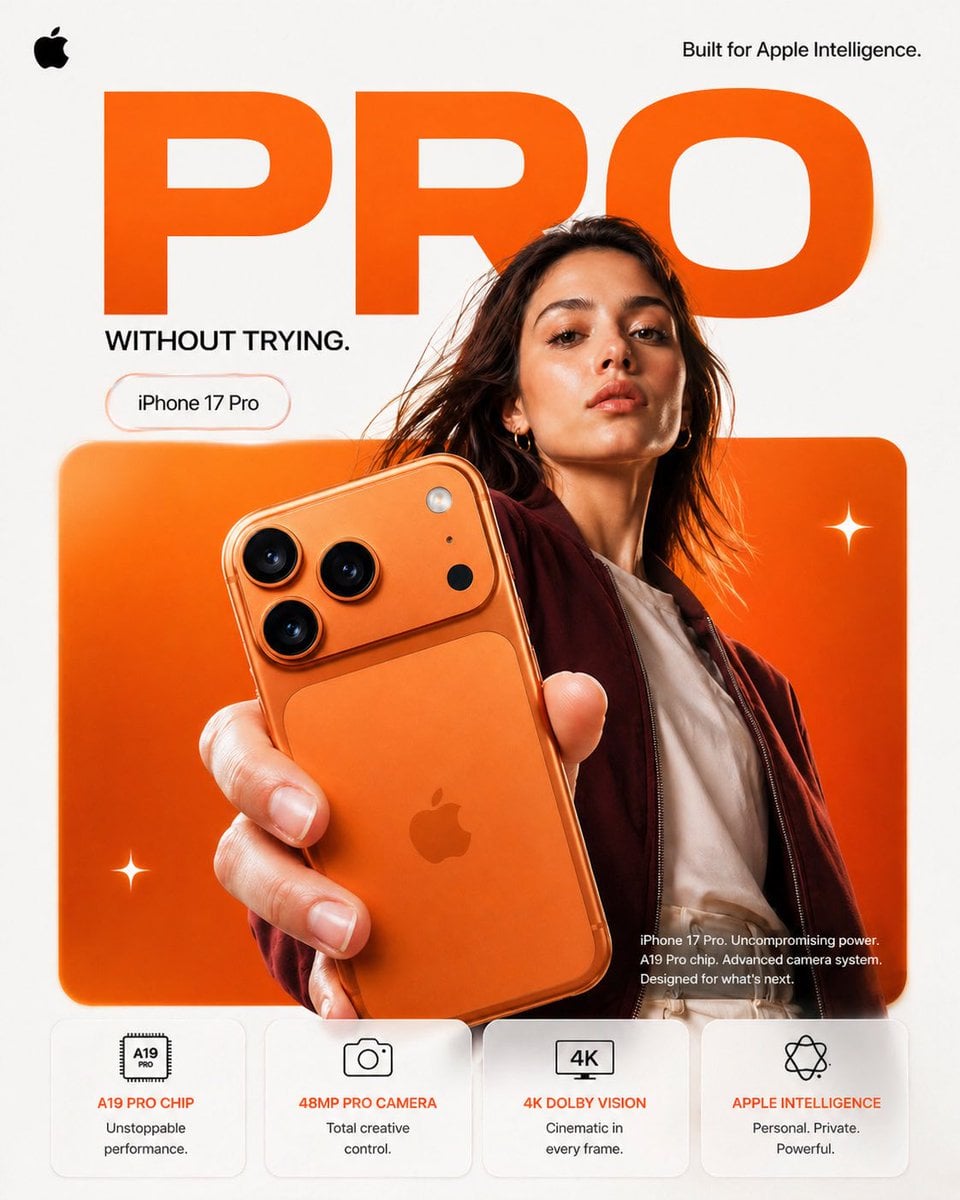
Visual concept
FORMAT: 4:5 vertical premium smartphone campaign poster, ultra-high resolution (8K), global OOH + digital + social ready Style: Apple-level minimalism × bold Gen-Z composition × hyper-real commercial photography 🧠 CORE INTENT: “PRO, WITHOUT TRYING.” Effortless power. Quiet confidence. No noise — just precision. 🎬 SCENE COMPOSITION: BACKGROUND: Pure matte white canvas with a dominant rounded rectangle block in ultra-vibrant burnt orange gradient (top-left → bottom-right glow) GIANT TYPOGRAPHY (BACKGROUND LAYER): “PRO” - ultra-bold geometric sans-serif - stretched wide kerning - partially cropped by frame edges - soft shadow depth - color: deep orange slightly darker than background block - subtle emboss effect 👤 SUBJECT (HUMAN ELEMENT): - Female model, clean editorial look (Apple casting style) - Neutral expression (confident, calm, not smiling) - Hair: natural flow, slightly wind-touched - Outfit: → muted tones (off-white + deep maroon jacket) → minimal styling, no distractions POSE: - Shot from slightly low angle (hero perspective) - One hand extended toward camera holding iPhone - Body slightly angled for depth - Face aligned toward viewer (eye contact) 📱 PRODUCT (HERO FOCUS): DEVICE: iPhone 17 Pro in Titanium Orange finish POSITION: - Extreme foreground (forced perspective) - Slight tilt to reveal camera module depth DETAILING: - triple camera system hyper-sharp - lens reflections physically accurate - brushed titanium edge highlights - micro-scratches + realistic material response - Apple logo centered, subtle reflective gloss REFLECTION: - soft studio reflection on device edges - micro light bloom around camera rings ✨ LIGHTING SYSTEM: MAIN LIGHT: Soft studio key light (front-left) → smooth skin tones → clean product highlights RIM LIGHT: Warm edge light from right → enhances phone silhouette → highlights metallic edges ACCENT LIGHT: Subtle glow from background orange block SHADOW: Soft drop shadow under subject + phone (no harsh contrast) 🎨 COLOR SYSTEM: - Primary: Apple Orange (hero) - Secondary: Clean white - Accent: warm highlights + skin tones - Contrast: deep micro-shadows No over-saturation. No neon. Controlled premium palette. ✨ GRAPHIC ELEMENTS: - Minimal sparkle icons ✦ (2–3 only) - Soft floating UI pill (glass morphism) - Very subtle grain for realism ✍️ TYPOGRAPHY SYSTEM: TOP LEFT: Apple logo (black, small, clean) TOP RIGHT: “Built for Apple Intelligence.” (thin sans-serif) MID LEFT (pill): “iPhone 17 Pro” CENTER DOMINANT: “PRO” (background type) BOTTOM RIGHT (body text): Small paragraph: “iPhone 17 Pro. Uncompromising power. A19 Pro chip. Advanced camera system. Designed for what’s next.” 📊 FEATURE STRIP (BOTTOM GRID): 4 rounded cards (glass-white panels): 1. A19 PRO CHIP “Unstoppable performance.” 2. 48MP PRO CAMERA “Total creative control.” 3. 4K DOLBY VISION “Cinematic in every frame.” 4. APPLE INTELLIGENCE “Personal. Private. Powerful.” Icons minimal line style 📐 COMPOSITION GRID: - Top: brand + statement - Mid: subject + product (dominant) - Background: typography layer - Bottom: feature modules Eye flow: Face → Phone → Camera → “PRO” → Features 🎥 CAMERA SPECS: - ARRI Alexa Mini LF - 50mm anamorphic lens - shallow depth of field - HDR rendering - ultra-real skin + material detail - slight lens distortion for realism