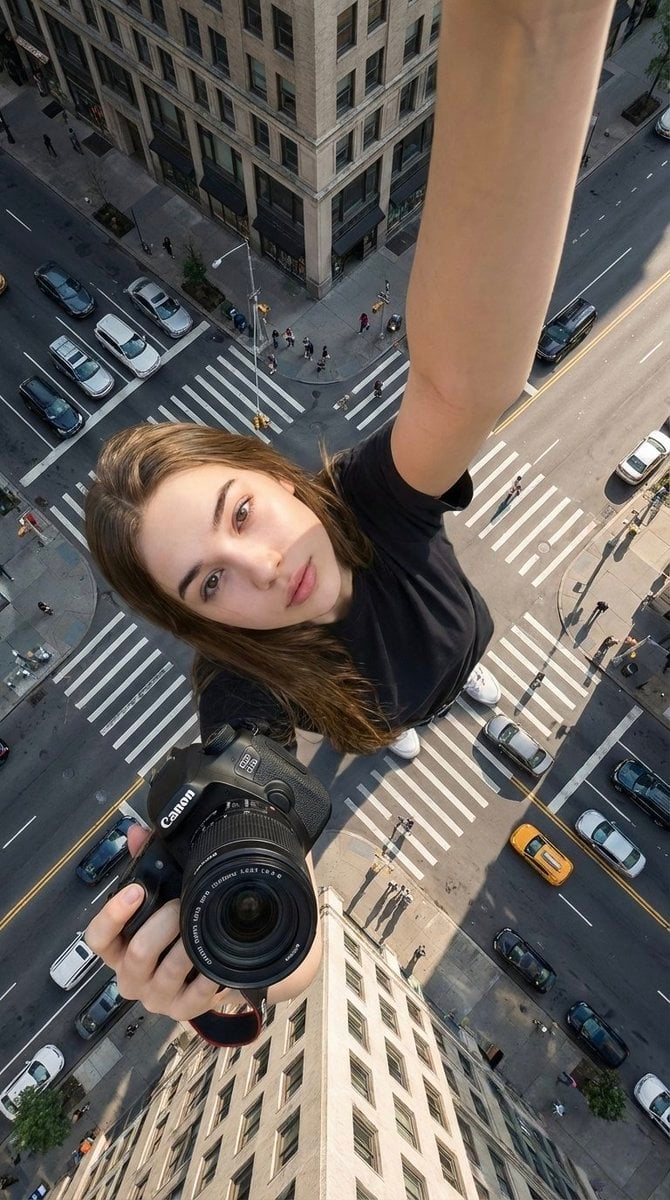
Canon Product Giant Selfie
Start with the recommended models, use cases, and steps, then decide how to apply the template directly.
These templates work best when you keep the visual structure, then replace the subject, style, or commercial goal. Start with Google Imagen4, then switch to a similar alternative based on the result.
If you are unsure which model to use first, start with one of the author's recommendations.
Prompt
Start with the recommended models, use cases, and steps, then decide how to apply the template directly.
Create a 9:16 ultra-realistic cinematic selfie using the identity of the woman in the uploaded reference image. Lock her identity strictly: do not change her face, skin texture, hair, glasses, age, or gender, and do not give her plastic-looking skin or a sculpted appearance. SELFIE POSE & PRODUCT Make the image look like a selfie she took herself. Extend one arm fully upward as if holding the selfie camera, but keep the selfie device itself out of view. Reach the other arm toward the lens while holding the uploaded Canon product. Make that Canon product the closest and most prominent foreground subject. FULL-BODY FORCED PERSPECTIVE Show the woman completely from head to toe, with her feet planted naturally on a city road. Use a natural chest-level selfie perspective, while positioning the camera extremely high and angling it downward to create forced perspective. Make the woman appear gigantic, with surrounding buildings reaching only around her knees. Include a city intersection, crosswalks, road markings, traffic signs, cars, bicycles, and realistically scaled pedestrians in the background. LIGHT & PRODUCT FIDELITY Use natural daylight under a clear or lightly clouded sky, with soft realistic shadows and no fantasy lighting. Reproduce the uploaded Canon product exactly as shown: keep its logo unchanged, do not distort it, and retain only natural reflections and realistic highlights. Restrictions: No AI-art look, No plastic or sculpted skin, No distortion of face or body, No extra limbs or incorrect anatomy, No text or watermarks, No visible selfie camera device.
How to use it
Following this sequence usually produces a usable result faster than copying the prompt without a plan.
If you do not have a preference, starting with Google Imagen4 is usually a reliable choice.
Preserve composition, lighting, materials, and style, then replace the subject, brand information, and use case.
Image templates are most valuable when they speed up iteration, so do not judge the direction from a single result.
Template details
Quickly decide whether this template fits your current task.
Best for
This template works especially well for the following tasks.
Posters and covers
Product and brand images
Character and style exploration
Recommended models
If you are unsure which model to use first, start with one of the author's recommendations.
These templates work best when you keep the visual structure, then replace the subject, style, or commercial goal. Start with Google Imagen4, then switch to a similar alternative based on the result.
These templates work best when you keep the visual structure, then replace the subject, style, or commercial goal. Start with Google Imagen4, then switch to a similar alternative based on the result.
These templates work best when you keep the visual structure, then replace the subject, style, or commercial goal. Start with Google Imagen4, then switch to a similar alternative based on the result.
Related templates
Compare templates of the same type to find the prompt direction that fits you best.

K-Pop Idol Nine-Panel Portrait Grid
No ratings yet

(G)I-DLE Yuqi Golden-Light Fashion Selfie
No ratings yet

Japanese Negative-Film Rooftop Summer Portrait
No ratings yet
Ratings and feedback
Please sign in first