Image template
Free to view, copy, and apply; generation uses credits
Featured
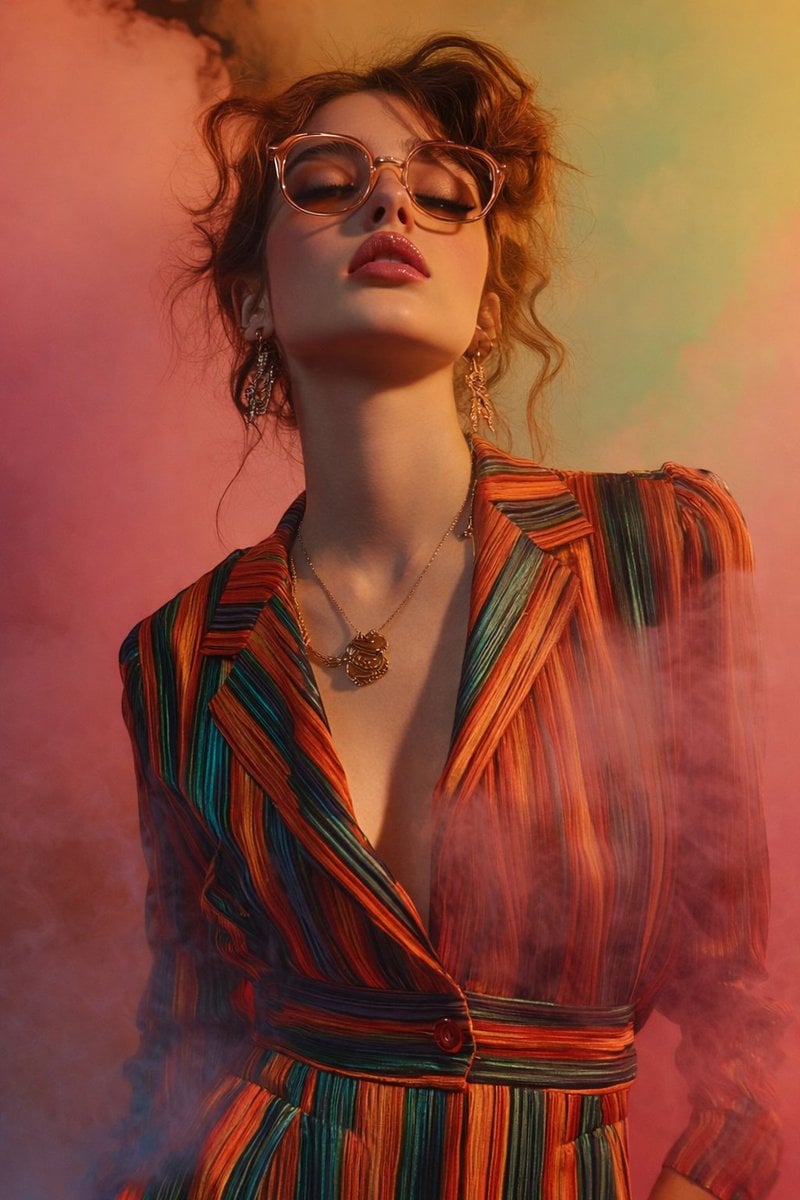
Low-Angle Fashion Portrait with Glasses and Colored Smoke
Start with the recommended models, use cases, and steps, then decide how to apply the template directly.
Official template0 views
Portrait Photography
Food and Drink
Realistic Photography
Cinematic
Film Look
Person
Depth of Field
Fashion
Template type
Image template
Usage access
Free to view, copy, and apply; generation uses credits
Created
06/15/2026
Rating
No ratings yet
Template overview
These templates work best when you keep the visual structure, then replace the subject, style, or commercial goal. Start with Google Imagen4, then switch to a similar alternative based on the result.
Recommended models
If you are unsure which model to use first, start with one of the author's recommendations.
Google Imagen4
GPT Image 2
GPT Image 1.5
Prompt
Start with the recommended models, use cases, and steps, then decide how to apply the template directly.
Create fashion portrait photography at a resolution_target of 8K Ultra HD with an aspect_ratio of vertical (portrait). composition: Use a medium close-up portrait, cropped from the upper chest to slightly above the head. Keep the subject_position centered. Set the camera_angle to low angle slightly upward-facing, using a dramatic upward perspective to emphasize the neck and jawline. Keep the depth_of_field shallow with soft background blur. subject: Portray a female-presenting young adult with a skin_tone of fair/light. pose: Tilt the head slightly back with the chin raised upward and the shoulders relaxed, facing forward. facial_expression: Keep the eyes closed and the mouth slightly parted, with a mood that feels calm, confident, and introspective. face_details: Use an oval face, a soft but defined jawline, subtly defined cheekbones, and smooth, evenly lit skin texture. hair: Use reddish-brown / auburn, medium-length hair, loosely styled in soft waves and slightly tousled, with flyaways visible around the head and neck. eyewear: Add rounded eyeglasses with a translucent frame, a light amber / peach-tinted frame_color, and clear lenses. makeup: Use deep pink / rose glossy lips and subtle warm-toned eye_makeup. Keep the look natural, with emphasis on the lips. accessories: Add dangling metallic earrings with an intricate elongated design and a chain necklace with an ornamental pendant in gold-toned metal. clothing: Use a tailored jacket or dress with lapels, a deep V-neck, and a structured yet flowing fit. The fabric should be smooth and slightly reflective, with vertical multicolored stripes in orange, red, green, teal, and yellow. Include a visible front button at mid-torso. lighting: Use studio lighting that is soft and frontal with slight side emphasis and moderate contrast. Add gentle highlights on the face and glasses, with soft shadows beneath the chin and neck. background: Build a studio setup with colored smoke or mist in a palette of pink, coral, peach, and soft green, creating an abstract atmospheric backdrop. atmosphere: Keep the result cinematic and fashion-forward, with floating colored smoke surrounding the subject. The subject must remain sharp while the background stays diffused. Use warm color_grading with rich but balanced saturation and an overall_palette of harmonized warm and pastel tones. For image_quality, preserve high detail on facial features, clothing texture, and accessories, with noise none visible and a finish that is clean, professional, and editorial-grade.
How to use it
Following this sequence usually produces a usable result faster than copying the prompt without a plan.
1
Start with a recommended model
If you do not have a preference, starting with Google Imagen4 is usually a reliable choice.
2
Keep the structure, replace the details
Preserve composition, lighting, materials, and style, then replace the subject, brand information, and use case.
3
Compare at least 2 or 3 results
Image templates are most valuable when they speed up iteration, so do not judge the direction from a single result.
Template details
Quickly decide whether this template fits your current task.
Template type
Image template
Usage access
Free to view, copy, and apply; generation uses credits
Created
06/15/2026
Rating
No ratings yet
Best for
This template works especially well for the following tasks.
Posters and covers
Useful for event graphics, social covers, campaign posters, and key visuals.
Product and brand images
Useful for ecommerce main images, brand visuals, and product variations.
Character and style exploration
Create samples for characters, illustrations, scenes, and style directions.
Recommended models
If you are unsure which model to use first, start with one of the author's recommendations.
Google Imagen4
IMAGE
These templates work best when you keep the visual structure, then replace the subject, style, or commercial goal. Start with Google Imagen4, then switch to a similar alternative based on the result.
GPT Image 2
IMAGE
These templates work best when you keep the visual structure, then replace the subject, style, or commercial goal. Start with Google Imagen4, then switch to a similar alternative based on the result.
GPT Image 1.5
IMAGE
These templates work best when you keep the visual structure, then replace the subject, style, or commercial goal. Start with Google Imagen4, then switch to a similar alternative based on the result.
Related templates
Compare templates of the same type to find the prompt direction that fits you best.

Image template
Featured
K-Pop Idol Nine-Panel Portrait Grid
No ratings yet
Portrait Photography
Realistic Photography
Cinematic

Image template
Featured
(G)I-DLE Yuqi Golden-Light Fashion Selfie
No ratings yet
Scene Photography
Realistic Photography
Cinematic

Image template
Featured
Japanese Negative-Film Rooftop Summer Portrait
No ratings yet
Portrait Photography
Realistic Photography
Cinematic
Ratings and feedback
No ratings yet
Please sign in first