Image template
Free to view, copy, and apply; generation uses credits
Featured
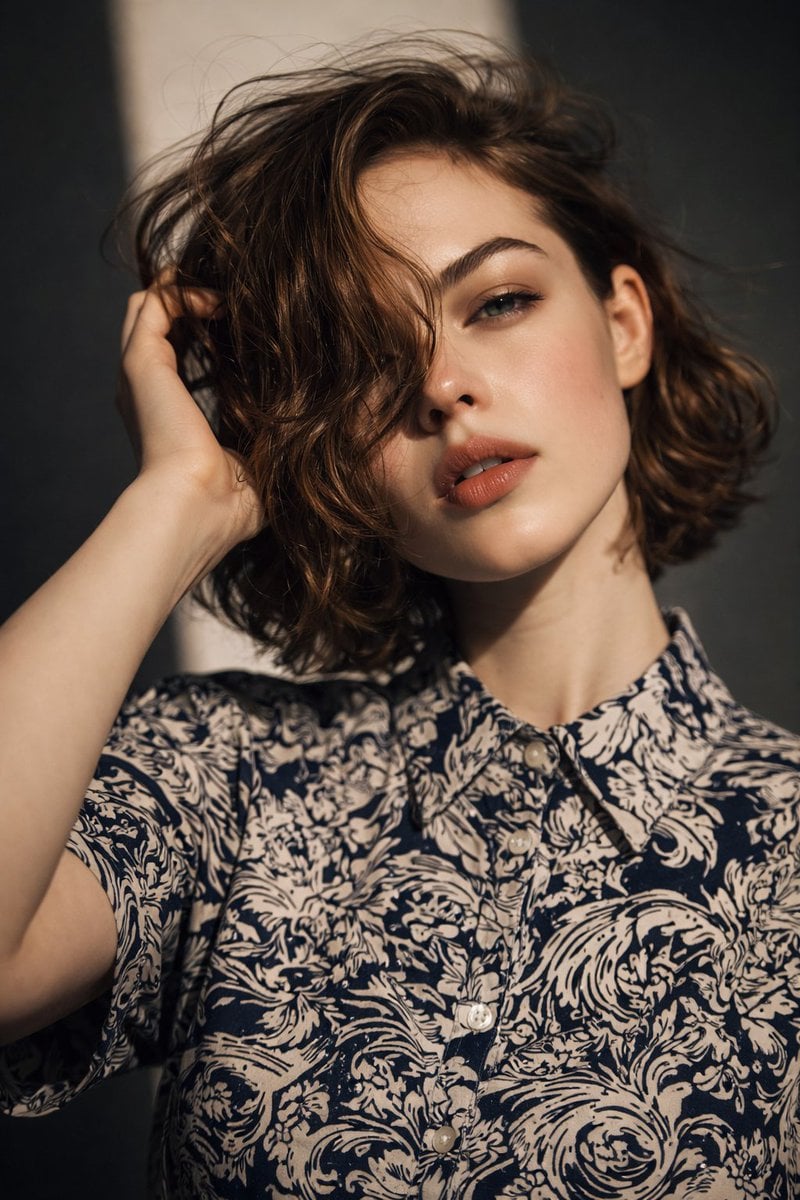
Natural-Light Brown-Hair Close-Up Editorial Portrait
Start with the recommended models, use cases, and steps, then decide how to apply the template directly.
Official template1 views
Portrait Photography
Scene Photography
Realistic Photography
Cinematic
Film Look
Person
Depth of Field
Product
Template type
Image template
Usage access
Free to view, copy, and apply; generation uses credits
Created
06/15/2026
Rating
No ratings yet
Template overview
These templates work best when you keep the visual structure, then replace the subject, style, or commercial goal. Start with Google Imagen4, then switch to a similar alternative based on the result.
Recommended models
If you are unsure which model to use first, start with one of the author's recommendations.
Google Imagen4
GPT Image 2
GPT Image 1.5
Prompt
Start with the recommended models, use cases, and steps, then decide how to apply the template directly.
Create an 8K ultra-high-resolution, photorealistic portrait. SUBJECT & POSE: Portray a young adult with a feminine presentation, head slightly tilted, one hand raised to touch the hair near the side of the head, and upper torso visible. Use a neutral, soft, relaxed expression with slightly parted lips and direct eye contact with the camera. FACE: Use an oval face, smooth with visible natural skin texture; a soft matte finish with subtle highlights; natural blush; a straight, medium-sized nose with a softly rounded tip; full lips in a muted warm rose or nude matte finish; a softly defined jawline; and a rounded chin. EYES & BROWS: Use almond-shaped eyes that appear green or hazel under the lighting, with a visible natural crease and natural, unexaggerated lashes. Make the brows well groomed, medium-full, and dark brown, with a natural arch. HAIR: Style the medium-to-dark-brown hair at a short-to-medium length. Make it wavy, loose, slightly tousled, and parted off center. Let some strands fall across the forehead and partly cover one eye, with a visible natural sheen. MAKEUP: Use natural, skin-like foundation, soft peach-pink blush, matte lipstick, and minimal eye makeup. Keep the overall look clean, understated, and realistic. CLOTHING: Dress the subject in a relaxed-fit button-up shirt made from lightweight fabric with an abstract floral or ornamental pattern. Use dark navy or charcoal as the primary color and off-white or light beige as the secondary color, with visible light neutral buttons and a standard pointed collar. LIGHTING & BACKGROUND: Use natural side lighting with soft-to-medium contrast. Add gentle highlights to the cheekbones, nose, and lips, and soft shadows for facial depth. Keep the background out of focus, minimal, and neutral in dark gray and muted tones. Use a shallow depth of field with no distractions. CAMERA & FINISH: Frame an eye-level close-up portrait with the face in sharp focus, a soft bokeh background, and a crop covering the head and upper torso. Maintain a calm, intimate mood, editorial portrait photography, high visual cleanliness, no visible artifacts, and minimal, natural color grading.
How to use it
Following this sequence usually produces a usable result faster than copying the prompt without a plan.
1
Start with a recommended model
If you do not have a preference, starting with Google Imagen4 is usually a reliable choice.
2
Keep the structure, replace the details
Preserve composition, lighting, materials, and style, then replace the subject, brand information, and use case.
3
Compare at least 2 or 3 results
Image templates are most valuable when they speed up iteration, so do not judge the direction from a single result.
Template details
Quickly decide whether this template fits your current task.
Template type
Image template
Usage access
Free to view, copy, and apply; generation uses credits
Created
06/15/2026
Rating
No ratings yet
Best for
This template works especially well for the following tasks.
Posters and covers
Useful for event graphics, social covers, campaign posters, and key visuals.
Product and brand images
Useful for ecommerce main images, brand visuals, and product variations.
Character and style exploration
Create samples for characters, illustrations, scenes, and style directions.
Recommended models
If you are unsure which model to use first, start with one of the author's recommendations.
Google Imagen4
IMAGE
These templates work best when you keep the visual structure, then replace the subject, style, or commercial goal. Start with Google Imagen4, then switch to a similar alternative based on the result.
GPT Image 2
IMAGE
These templates work best when you keep the visual structure, then replace the subject, style, or commercial goal. Start with Google Imagen4, then switch to a similar alternative based on the result.
GPT Image 1.5
IMAGE
These templates work best when you keep the visual structure, then replace the subject, style, or commercial goal. Start with Google Imagen4, then switch to a similar alternative based on the result.
Related templates
Compare templates of the same type to find the prompt direction that fits you best.

Image template
Featured
K-Pop Idol Nine-Panel Portrait Grid
No ratings yet
Portrait Photography
Realistic Photography
Cinematic

Image template
Featured
(G)I-DLE Yuqi Golden-Light Fashion Selfie
No ratings yet
Scene Photography
Realistic Photography
Cinematic

Image template
Featured
Japanese Negative-Film Rooftop Summer Portrait
No ratings yet
Portrait Photography
Realistic Photography
Cinematic
Ratings and feedback
No ratings yet
Please sign in first