Image template
Free to view, copy, and apply; generation uses credits
Featured
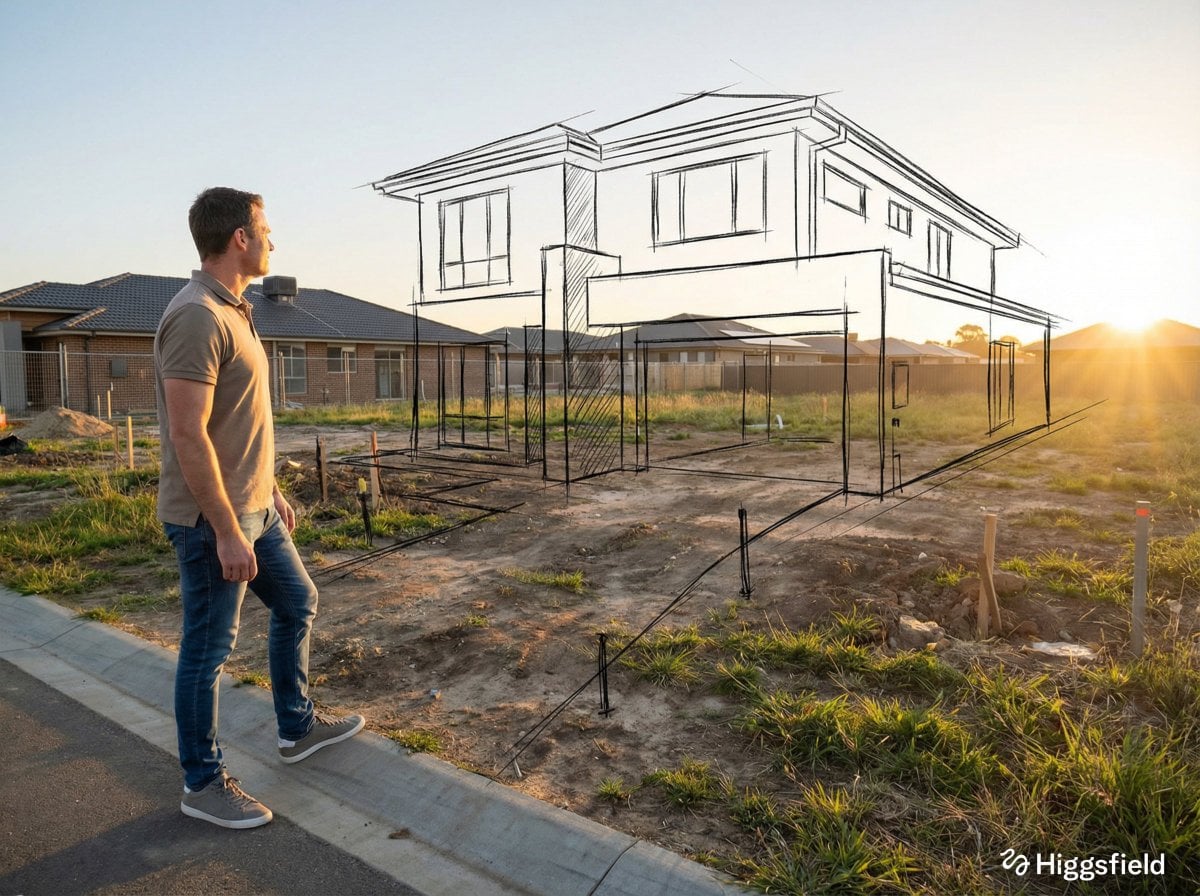
Real Space and Hand-Drawn Planning-Line Fusion
Start with the recommended models, use cases, and steps, then decide how to apply the template directly.
Official template0 views
Portrait Photography
Scene Photography
Realistic Photography
Cinematic
Film Look
Person
Depth of Field
Fashion
Template type
Image template
Usage access
Free to view, copy, and apply; generation uses credits
Created
06/15/2026
Rating
No ratings yet
Template overview
These templates work best when you keep the visual structure, then replace the subject, style, or commercial goal. Start with Google Imagen4, then switch to a similar alternative based on the result.
Recommended models
If you are unsure which model to use first, start with one of the author's recommendations.
Google Imagen4
GPT Image 2
GPT Image 1.5
Prompt
Start with the recommended models, use cases, and steps, then decide how to apply the template directly.
Place a full-body [person type] near the edge of the frame, slightly to the left, within [real-world incomplete / empty / damaged environment]. Position the camera behind and slightly to the right of the person, shooting from a three-quarter rear angle. Give the subject a calm, thoughtful posture as they look into the space ahead. Describe the environment as it actually exists, drawing on conditions such as empty, unfinished, decayed, rigid, or lifeless. Set the atmosphere to [emotional tone: quiet, dry, historical, minimal, raw]. Let natural light illuminate the scene, creating realistic shadows and depth. Overlay floating hand-drawn sketch lines over and within the environment, aligning them precisely with the perspective of the real space. The lines should represent [what is missing / what once existed / what could exist in the future]. Keep the sketch lines black, clean, and hand-drawn, referencing [architectural / interior / restoration / urban planning] concept sketches. They may resemble pencil or ink planning lines, with expressive, slightly imperfect, organic strokes rather than rigid or mechanical marks. Let the hand-drawn elements occupy the foreground and midground, appearing visually closer to the person than expected. Some lines may subtly overlap the person's silhouette and real surfaces, blending imagination with reality. The final image should convey [vision / restoration / transformation / potential] coming to life.
How to use it
Following this sequence usually produces a usable result faster than copying the prompt without a plan.
1
Start with a recommended model
If you do not have a preference, starting with Google Imagen4 is usually a reliable choice.
2
Keep the structure, replace the details
Preserve composition, lighting, materials, and style, then replace the subject, brand information, and use case.
3
Compare at least 2 or 3 results
Image templates are most valuable when they speed up iteration, so do not judge the direction from a single result.
Template details
Quickly decide whether this template fits your current task.
Template type
Image template
Usage access
Free to view, copy, and apply; generation uses credits
Created
06/15/2026
Rating
No ratings yet
Best for
This template works especially well for the following tasks.
Posters and covers
Useful for event graphics, social covers, campaign posters, and key visuals.
Product and brand images
Useful for ecommerce main images, brand visuals, and product variations.
Character and style exploration
Create samples for characters, illustrations, scenes, and style directions.
Recommended models
If you are unsure which model to use first, start with one of the author's recommendations.
Google Imagen4
IMAGE
These templates work best when you keep the visual structure, then replace the subject, style, or commercial goal. Start with Google Imagen4, then switch to a similar alternative based on the result.
GPT Image 2
IMAGE
These templates work best when you keep the visual structure, then replace the subject, style, or commercial goal. Start with Google Imagen4, then switch to a similar alternative based on the result.
GPT Image 1.5
IMAGE
These templates work best when you keep the visual structure, then replace the subject, style, or commercial goal. Start with Google Imagen4, then switch to a similar alternative based on the result.
Related templates
Compare templates of the same type to find the prompt direction that fits you best.

Image template
Featured
K-Pop Idol Nine-Panel Portrait Grid
No ratings yet
Portrait Photography
Realistic Photography
Cinematic

Image template
Featured
(G)I-DLE Yuqi Golden-Light Fashion Selfie
No ratings yet
Scene Photography
Realistic Photography
Cinematic

Image template
Featured
Japanese Negative-Film Rooftop Summer Portrait
No ratings yet
Portrait Photography
Realistic Photography
Cinematic
Ratings and feedback
No ratings yet
Please sign in first