Image template
Free to view, copy, and apply; generation uses credits
Featured
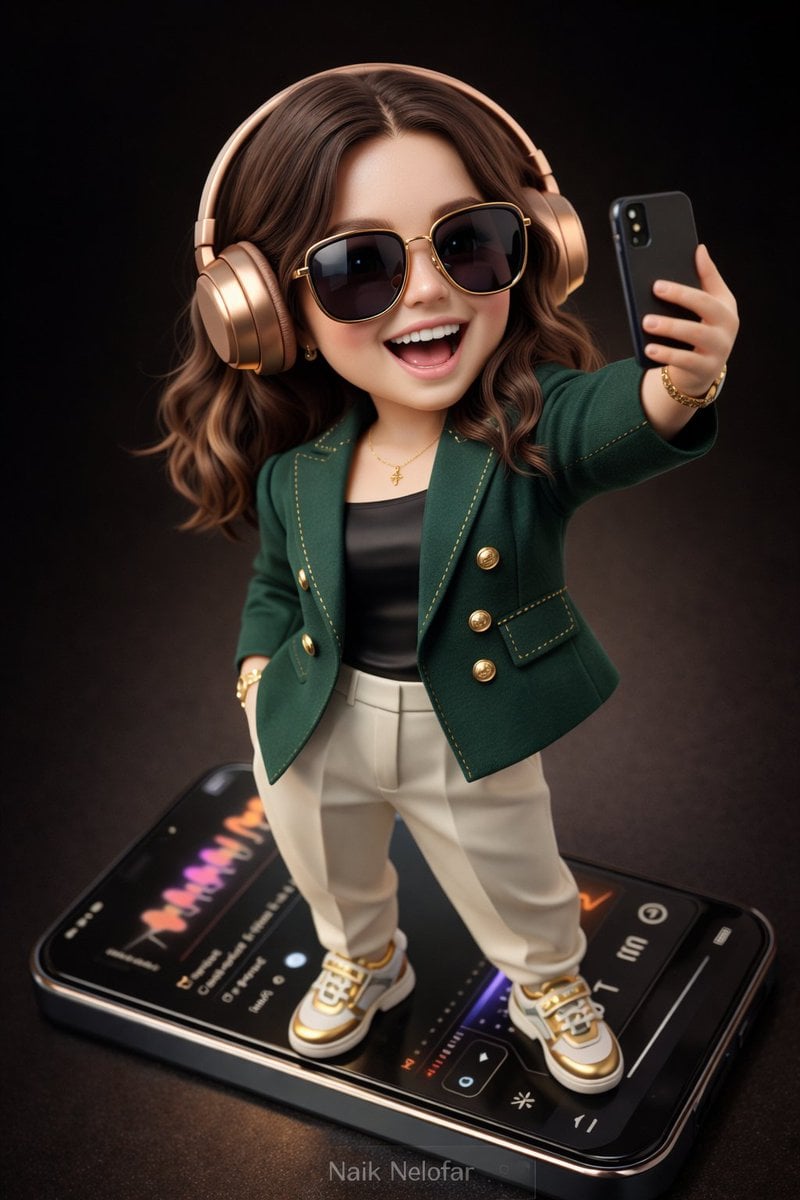
Rose-Gold Headphones Fashion Chibi Figure
Start with the recommended models, use cases, and steps, then decide how to apply the template directly.
Official template0 views
3D and Illustration
Portrait Photography
3D Render
Anime Style
Character
Surreal
Dreamy
Isometric
Template type
Image template
Usage access
Free to view, copy, and apply; generation uses credits
Created
06/15/2026
Rating
No ratings yet
Template overview
These templates work best when you keep the visual structure, then replace the subject, style, or commercial goal. Start with Flux 2 Pro, then switch to a similar alternative based on the result.
Recommended models
If you are unsure which model to use first, start with one of the author's recommendations.
Flux 2 Pro
GPT Image 2
Prompt
Start with the recommended models, use cases, and steps, then decide how to apply the template directly.
Create a high-detail, semi-realistic 3D chibi character. Keep the proportions cute and slightly exaggerated, but render the face photorealistically with natural skin pores, realistic lighting, and finely detailed hair strands. Style the character like a collectible designer toy figure with smooth surfaces, premium materials, and ultra-clean edges. Build a fashion-forward outfit around a deep emerald-green tailored designer jacket with gold stitching accents, layered over a sleek fitted top in black silk. Add matte ivory high-fashion tapered trousers and white-and-gold designer sneakers or footwear. Use ultra-fashionable accessories: oversized sunglasses with glossy black lenses and a gold frame, a wristwatch with a metallic-gold case and elegant dial, a subtle designer bracelet, and minimal accent pieces. Pose the character confidently atop a giant modern smartphone like a collectible display piece. Add stylish metallic rose-gold wireless over-ear headphones. Have the character hold a phone slightly forward while taking a playful, joyful selfie, smiling and laughing with abundant energy. Show a realistic modern music-player interface on the giant phone screen, complete with colorful waveform animations and elegant UI elements. Set the scene against a deep cinematic dark-brown gradient studio backdrop. Use soft studio lighting, subtle reflections, and rim light. Emphasize premium fabric textures, polished metals, and realistic plastics. Blend a collectible-toy aesthetic with semi-realistic chibi design. Use an aerial or top-down camera angle, slight cinematic depth of field, an 8K ultra-detailed 3D render, smooth shading, hyper-clean edges, and high clarity. At the bottom, preserve the small elegant watermark text “Naik Nelofar ”, subtle but clearly readable. Use a vertical 3:4 composition.
How to use it
Following this sequence usually produces a usable result faster than copying the prompt without a plan.
1
Start with a recommended model
If you do not have a preference, starting with Flux 2 Pro is usually a reliable choice.
2
Keep the structure, replace the details
Preserve composition, lighting, materials, and style, then replace the subject, brand information, and use case.
3
Compare at least 2 or 3 results
Image templates are most valuable when they speed up iteration, so do not judge the direction from a single result.
Template details
Quickly decide whether this template fits your current task.
Template type
Image template
Usage access
Free to view, copy, and apply; generation uses credits
Created
06/15/2026
Rating
No ratings yet
Best for
This template works especially well for the following tasks.
Posters and covers
Useful for event graphics, social covers, campaign posters, and key visuals.
Product and brand images
Useful for ecommerce main images, brand visuals, and product variations.
Character and style exploration
Create samples for characters, illustrations, scenes, and style directions.
Recommended models
If you are unsure which model to use first, start with one of the author's recommendations.
Flux 2 Pro
IMAGE
These templates work best when you keep the visual structure, then replace the subject, style, or commercial goal. Start with Flux 2 Pro, then switch to a similar alternative based on the result.
GPT Image 2
IMAGE
These templates work best when you keep the visual structure, then replace the subject, style, or commercial goal. Start with Flux 2 Pro, then switch to a similar alternative based on the result.
Related templates
Compare templates of the same type to find the prompt direction that fits you best.

Image template
Featured
K-Pop Idol Nine-Panel Portrait Grid
No ratings yet
Portrait Photography
Realistic Photography
Cinematic

Image template
Featured
Japanese Negative-Film Rooftop Summer Portrait
No ratings yet
Portrait Photography
Realistic Photography
Cinematic

Image template
Featured
On-Trend Product Advertisement Redesign
No ratings yet
Ecommerce Product Images
Food
Drink
Ratings and feedback
No ratings yet
Please sign in first