Image template
Free to view, copy, and apply; generation uses credits
Featured
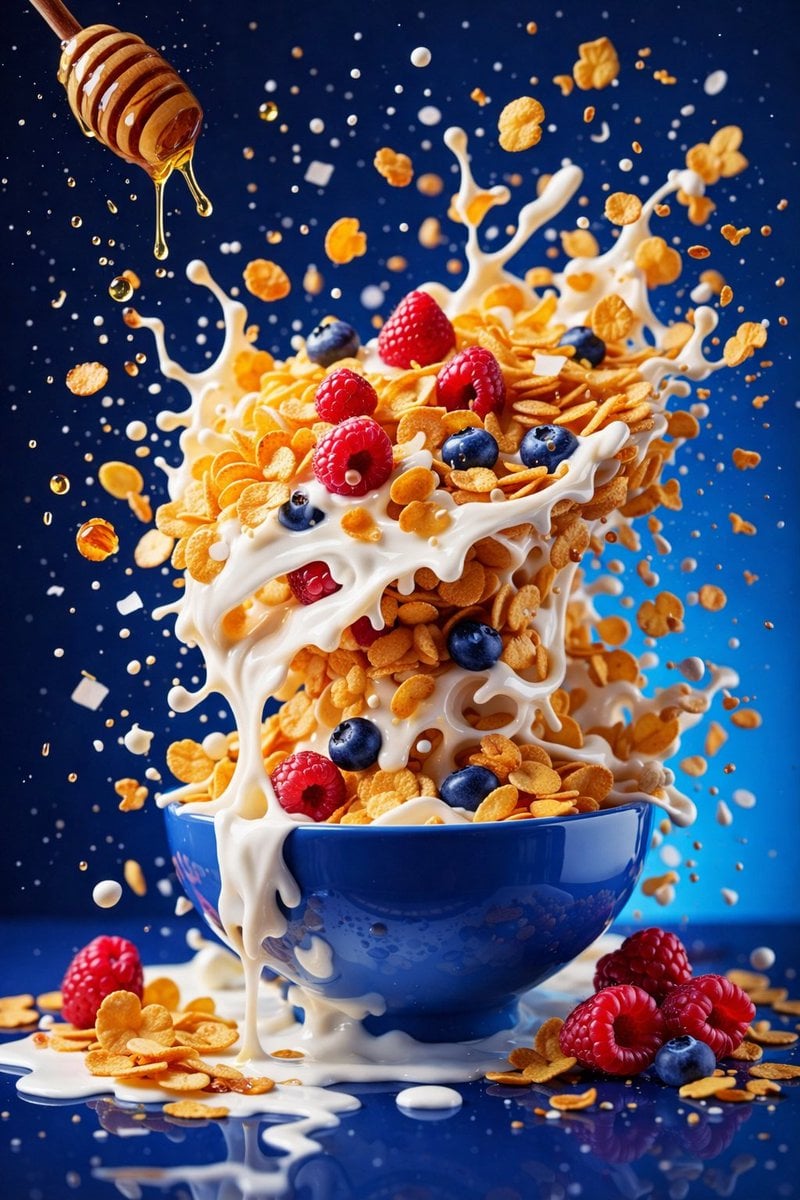
Three Breakfast Bowls in High-Speed Splash Photography
Start with the recommended models, use cases, and steps, then decide how to apply the template directly.
Official template0 views
Food and Drink
Ecommerce Product Images
Food
Drink
Menu Creative
Product Scene
Packaging Display
Macro
Template type
Image template
Usage access
Free to view, copy, and apply; generation uses credits
Created
06/15/2026
Rating
No ratings yet
Template overview
These templates work best when you keep the visual structure, then replace the subject, style, or commercial goal. Start with Google Imagen4, then switch to a similar alternative based on the result.
Recommended models
If you are unsure which model to use first, start with one of the author's recommendations.
Google Imagen4
GPT Image 2
GPT Image 1.5
Prompt
Start with the recommended models, use cases, and steps, then decide how to apply the template directly.
Create hyper-realistic commercial food photography in 8K UHD and a 3:4 format. Maintain ultra-high detail, sharp focus, studio-grade clarity, soft but controlled studio lighting, and crisp splash definition throughout. Freeze ingredients in midair. Vary the solid or smooth-gradient background by module. Use a high-speed photography look with shallow-to-medium depth of field, then finish with balanced contrast, natural saturation, and no artificial glow. Module 1 — berry smoothie explosion: Float a glossy deep-blue ceramic bowl at the center. Fill it with a thick, creamy berry smoothie in deep purple-magenta, with visible swirl marks. Suspend banana slices, blueberries, raspberries, fresh mint leaves, and small droplets around an upward and outward burst of berry smoothie. Use a seamless bright-pink background. Module 2 — minimal pink smoothie bowl: Float a matte light-pink ceramic bowl with dark speckles at the center. Fill it with a thick, smooth, soft-pink smoothie carrying purple undertones. Let granola, small black seeds, halved strawberries, raspberries, and blackberries drift gently around it. Use a pastel-lavender background with a subtle soft gradient. Module 3 — cereal milk honey splash: Fill a glossy blue ceramic bowl with golden cornflakes stacked vertically. Splash and drip white milk over the flakes, adding raspberries and blueberries. Suspend a wooden honey dipper as honey drips through the air. Freeze the milk in dramatic arcs, with flakes and droplets floating around the bowl. Use a high-contrast deep-blue background.
How to use it
Following this sequence usually produces a usable result faster than copying the prompt without a plan.
1
Start with a recommended model
If you do not have a preference, starting with Google Imagen4 is usually a reliable choice.
2
Keep the structure, replace the details
Preserve composition, lighting, materials, and style, then replace the subject, brand information, and use case.
3
Compare at least 2 or 3 results
Image templates are most valuable when they speed up iteration, so do not judge the direction from a single result.
Template details
Quickly decide whether this template fits your current task.
Template type
Image template
Usage access
Free to view, copy, and apply; generation uses credits
Created
06/15/2026
Rating
No ratings yet
Best for
This template works especially well for the following tasks.
Posters and covers
Useful for event graphics, social covers, campaign posters, and key visuals.
Product and brand images
Useful for ecommerce main images, brand visuals, and product variations.
Character and style exploration
Create samples for characters, illustrations, scenes, and style directions.
Recommended models
If you are unsure which model to use first, start with one of the author's recommendations.
Google Imagen4
IMAGE
These templates work best when you keep the visual structure, then replace the subject, style, or commercial goal. Start with Google Imagen4, then switch to a similar alternative based on the result.
GPT Image 2
IMAGE
These templates work best when you keep the visual structure, then replace the subject, style, or commercial goal. Start with Google Imagen4, then switch to a similar alternative based on the result.
GPT Image 1.5
IMAGE
These templates work best when you keep the visual structure, then replace the subject, style, or commercial goal. Start with Google Imagen4, then switch to a similar alternative based on the result.
Related templates
Compare templates of the same type to find the prompt direction that fits you best.

Image template
Featured
K-Pop Idol Nine-Panel Portrait Grid
No ratings yet
Portrait Photography
Realistic Photography
Cinematic

Image template
Featured
(G)I-DLE Yuqi Golden-Light Fashion Selfie
No ratings yet
Scene Photography
Realistic Photography
Cinematic

Image template
Featured
Japanese Negative-Film Rooftop Summer Portrait
No ratings yet
Portrait Photography
Realistic Photography
Cinematic
Ratings and feedback
No ratings yet
Please sign in first