Image template
Free to view, copy, and apply; generation uses credits
Featured
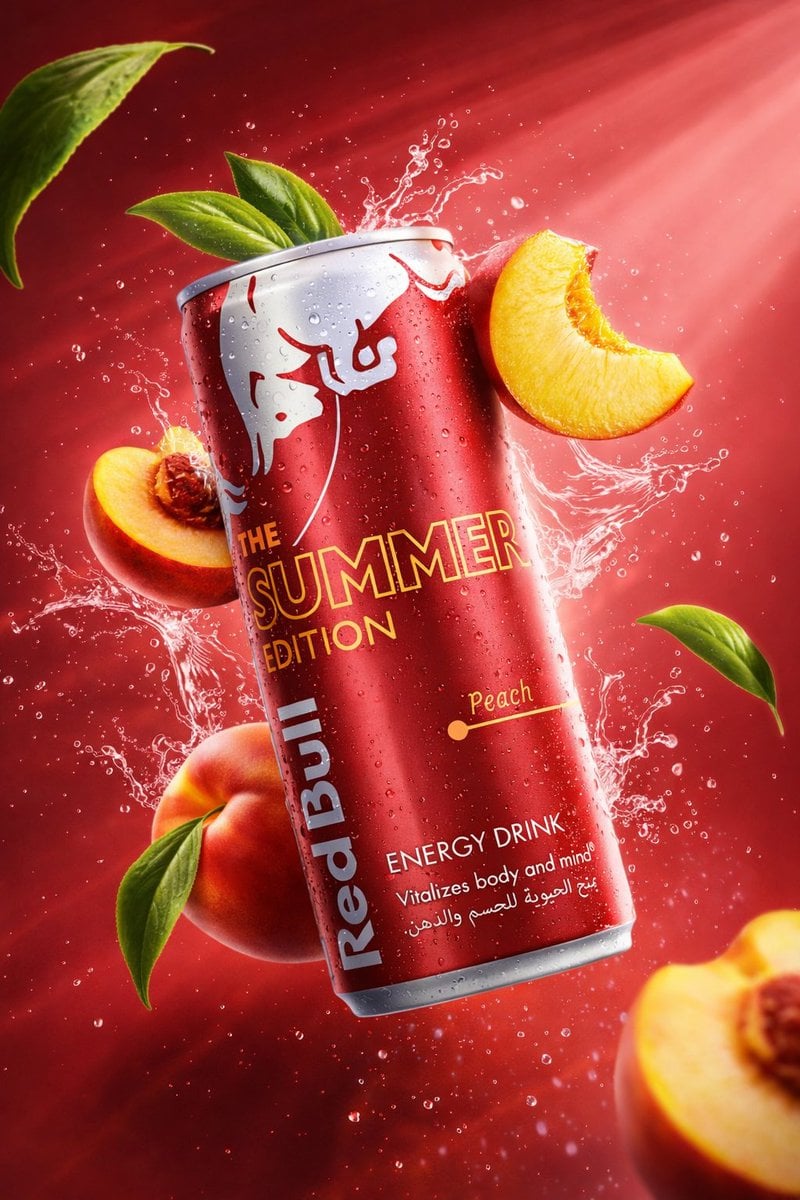
Three Energy Drink Splash Commercial Photos
Start with the recommended models, use cases, and steps, then decide how to apply the template directly.
Official template0 views
Food and Drink
Ecommerce Product Images
Food
Drink
Menu Creative
Product Scene
Packaging Display
Macro
Template type
Image template
Usage access
Free to view, copy, and apply; generation uses credits
Created
06/15/2026
Rating
No ratings yet
Template overview
These templates work best when you keep the visual structure, then replace the subject, style, or commercial goal. Start with Google Imagen4, then switch to a similar alternative based on the result.
Recommended models
If you are unsure which model to use first, start with one of the author's recommendations.
Google Imagen4
GPT Image 2
GPT Image 1.5
Prompt
Start with the recommended models, use cases, and steps, then decide how to apply the template directly.
Create advertising-grade, AI-edited product photography. For global_settings, use 8K ultra-high definition, a 3:4 format, hyper-realistic commercial product photography, a sharp foreground, controlled depth of field, cinematic studio lighting with volumetric rays, frozen-action splash photography, and ultra-detailed rendering. module_1_purple_acai_style: Set primary_subject to a slim aluminum energy-drink can, floating in midair with a slight clockwise tilt. Give it a matte metallic-purple surface covered in fine water droplets. Under branding, text_visible must include THE PURPLE EDITION, Açaí Berry, and ENERGY DRINK; set graphics to a stylized white bull illustration. Use a deep-purple gradient background with bright diagonal light rays in the upper right and a misty atmosphere of fine water particles. Surround the can with blueberries—some whole and one halved—with glossy skins and visible pulp, small green leaves still attached to the berries, and clear water splashes forming arcs around the can. Set motion_details to dynamic splash trails frozen in midair with micro droplets. Use a palette of purple, violet, deep blue, white, and fresh green. module_2_white_coconut_berry_style: Use another slim aluminum energy-drink can, floating with a slight counterclockwise tilt. Give the surface a white metallic finish with condensation droplets. Set text_visible to THE WHITE EDITION, Coconut & Berry, and ENERGY DRINK; set graphics to a gray bull illustration. Use a sky-blue gradient background with strong sunlight beams in the upper right, creating a clean, airy, refreshing mood. Under fruits, include whole blueberries and broken coconut pieces, showing smooth reflective berry skins and white coconut flesh inside dark-brown shells. Set ice to transparent cubes with sharp edges and visible internal cracks, and liquid to clear water splashes. Shape the water into curved splash paths wrapping around the can, and suspend the ice in midair with subtle rotation. Use a palette of white, light blue, cyan, natural brown, and cool gray. module_3_green_lemon_mojito_style: Float a tall soda can with a slight clockwise tilt. Give it a dark-green metallic body and a lighter-green label. Preserve LEMON SODA, MOJITO, and L’ORIGINALE MOJITO ANALCOLICO ITALIANO under text_visible, and set logo to a CRODO emblem at the top. Use a vibrant green gradient background with an intense sun flare in the upper right. Add whole limes and sliced wedges with visible citrus pulp and glossy rinds, fresh mint leaves with visible veins, and sparkling-water splashes. Set motion to explosive splash bursts around the can with a dense spray of fine droplets. Use a palette of lime green, dark green, yellow-green, and white.
How to use it
Following this sequence usually produces a usable result faster than copying the prompt without a plan.
1
Start with a recommended model
If you do not have a preference, starting with Google Imagen4 is usually a reliable choice.
2
Keep the structure, replace the details
Preserve composition, lighting, materials, and style, then replace the subject, brand information, and use case.
3
Compare at least 2 or 3 results
Image templates are most valuable when they speed up iteration, so do not judge the direction from a single result.
Template details
Quickly decide whether this template fits your current task.
Template type
Image template
Usage access
Free to view, copy, and apply; generation uses credits
Created
06/15/2026
Rating
No ratings yet
Best for
This template works especially well for the following tasks.
Posters and covers
Useful for event graphics, social covers, campaign posters, and key visuals.
Product and brand images
Useful for ecommerce main images, brand visuals, and product variations.
Character and style exploration
Create samples for characters, illustrations, scenes, and style directions.
Recommended models
If you are unsure which model to use first, start with one of the author's recommendations.
Google Imagen4
IMAGE
These templates work best when you keep the visual structure, then replace the subject, style, or commercial goal. Start with Google Imagen4, then switch to a similar alternative based on the result.
GPT Image 2
IMAGE
These templates work best when you keep the visual structure, then replace the subject, style, or commercial goal. Start with Google Imagen4, then switch to a similar alternative based on the result.
GPT Image 1.5
IMAGE
These templates work best when you keep the visual structure, then replace the subject, style, or commercial goal. Start with Google Imagen4, then switch to a similar alternative based on the result.
Related templates
Compare templates of the same type to find the prompt direction that fits you best.

Image template
Featured
K-Pop Idol Nine-Panel Portrait Grid
No ratings yet
Portrait Photography
Realistic Photography
Cinematic

Image template
Featured
(G)I-DLE Yuqi Golden-Light Fashion Selfie
No ratings yet
Scene Photography
Realistic Photography
Cinematic

Image template
Featured
Japanese Negative-Film Rooftop Summer Portrait
No ratings yet
Portrait Photography
Realistic Photography
Cinematic
Ratings and feedback
No ratings yet
Please sign in first