Image template
Free to view, copy, and apply; generation uses credits
Featured
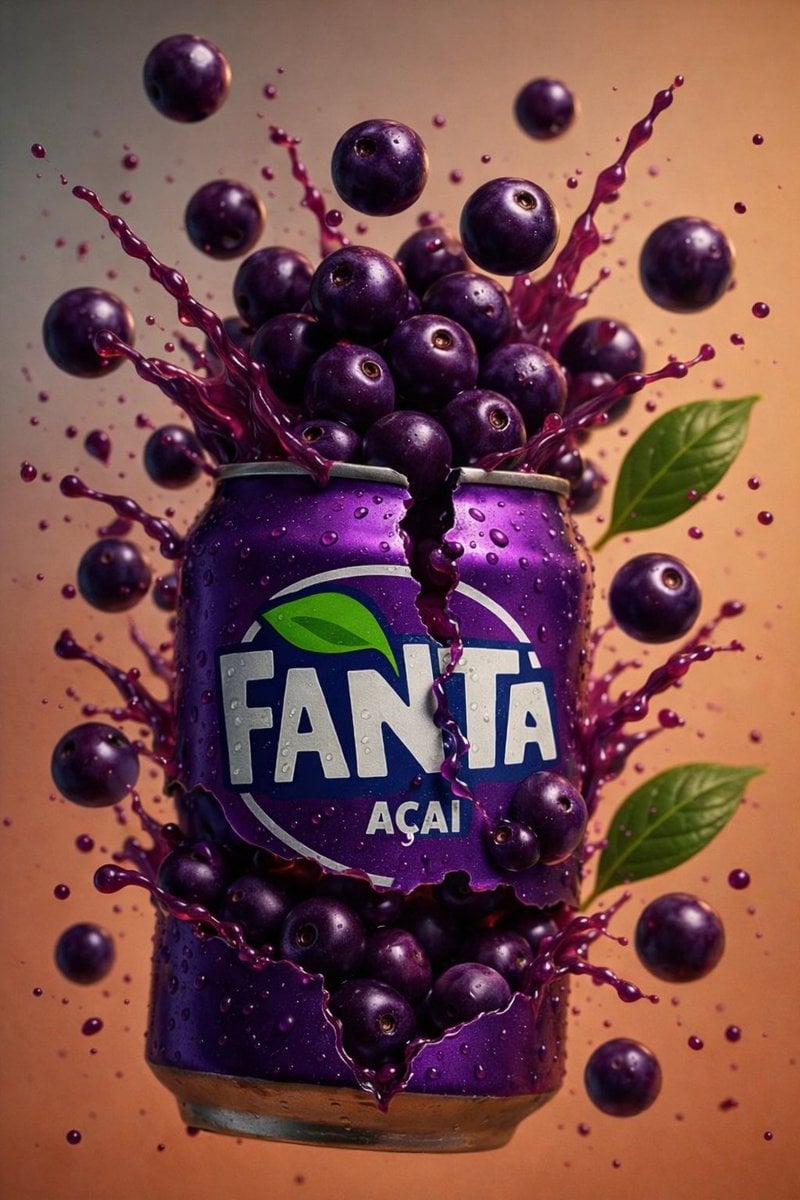
Three-Flavor Cracked-Can Soda Burst Advertisement
Start with the recommended models, use cases, and steps, then decide how to apply the template directly.
Official template0 views
Food and Drink
Ecommerce Product Images
Food
Drink
Menu Creative
Product Scene
Packaging Display
Macro
Template type
Image template
Usage access
Free to view, copy, and apply; generation uses credits
Created
06/15/2026
Rating
No ratings yet
Template overview
These templates work best when you keep the visual structure, then replace the subject, style, or commercial goal. Start with Google Imagen4, then switch to a similar alternative based on the result.
Recommended models
If you are unsure which model to use first, start with one of the author's recommendations.
Google Imagen4
GPT Image 2
GPT Image 1.5
Prompt
Start with the recommended models, use cases, and steps, then decide how to apply the template directly.
Create AI-edited, hyper-realistic commercial product photography in 8K UHD and a 3:4 format. Use a straight-on frontal view, a macro-commercial lens look, ultra-sharp center focus, and shallow depth of field with soft background falloff. Apply studio lighting with strong frontal soft light and subtle edge highlights. Add specular highlights to the droplets and metal can surfaces. Render highly detailed aluminum, realistic liquid physics, sharp fruit-skin textures, and visible condensation. Maintain extreme detail, photorealism, AI-enhanced clarity, no motion blur, and a clean background. Module 1 — Orange flavored soda can: Tear the top of the aluminum can open with jagged sharp cracks, an irregularly split upper rim, and metal bent outward. Cover the surface in condensation. Float several whole oranges behind and above the can, placing a halved orange slice near the top center and leaving green citrus leaves on some fruit. Burst bright-orange liquid upward and outward from the can, freezing droplets in midair. Pool and splash orange liquid at the bottom. Use a solid warm-orange background with slight tonal variation. Module 2 — Açaí flavored soda can: Split the can horizontally into two broken sections with jagged tears and sharp folded metal along the edges. Add condensation to the surface. Erupt dark-purple berries from the can, sending them upward and outward with green leaves visible along the sides. Radiate an explosive deep-purple liquid splash outward, suspending fine droplets in the air. Use a warm-beige to light-brown gradient background. Module 3 — Guava flavored soda can: Split the can vertically down the center with uneven torn edges exposing the interior. Cover the surface with water droplets. Surround it with guava halves showing pink interiors, whole green guavas, and scattered green guava leaves. Burst red guava juice upward and sideways, suspending dense red droplets in midair. Use a solid deep-red background that creates strong contrast with the fruit and liquid.
How to use it
Following this sequence usually produces a usable result faster than copying the prompt without a plan.
1
Start with a recommended model
If you do not have a preference, starting with Google Imagen4 is usually a reliable choice.
2
Keep the structure, replace the details
Preserve composition, lighting, materials, and style, then replace the subject, brand information, and use case.
3
Compare at least 2 or 3 results
Image templates are most valuable when they speed up iteration, so do not judge the direction from a single result.
Template details
Quickly decide whether this template fits your current task.
Template type
Image template
Usage access
Free to view, copy, and apply; generation uses credits
Created
06/15/2026
Rating
No ratings yet
Best for
This template works especially well for the following tasks.
Posters and covers
Useful for event graphics, social covers, campaign posters, and key visuals.
Product and brand images
Useful for ecommerce main images, brand visuals, and product variations.
Character and style exploration
Create samples for characters, illustrations, scenes, and style directions.
Recommended models
If you are unsure which model to use first, start with one of the author's recommendations.
Google Imagen4
IMAGE
These templates work best when you keep the visual structure, then replace the subject, style, or commercial goal. Start with Google Imagen4, then switch to a similar alternative based on the result.
GPT Image 2
IMAGE
These templates work best when you keep the visual structure, then replace the subject, style, or commercial goal. Start with Google Imagen4, then switch to a similar alternative based on the result.
GPT Image 1.5
IMAGE
These templates work best when you keep the visual structure, then replace the subject, style, or commercial goal. Start with Google Imagen4, then switch to a similar alternative based on the result.
Related templates
Compare templates of the same type to find the prompt direction that fits you best.

Image template
Featured
K-Pop Idol Nine-Panel Portrait Grid
No ratings yet
Portrait Photography
Realistic Photography
Cinematic

Image template
Featured
(G)I-DLE Yuqi Golden-Light Fashion Selfie
No ratings yet
Scene Photography
Realistic Photography
Cinematic

Image template
Featured
Japanese Negative-Film Rooftop Summer Portrait
No ratings yet
Portrait Photography
Realistic Photography
Cinematic
Ratings and feedback
No ratings yet
Please sign in first