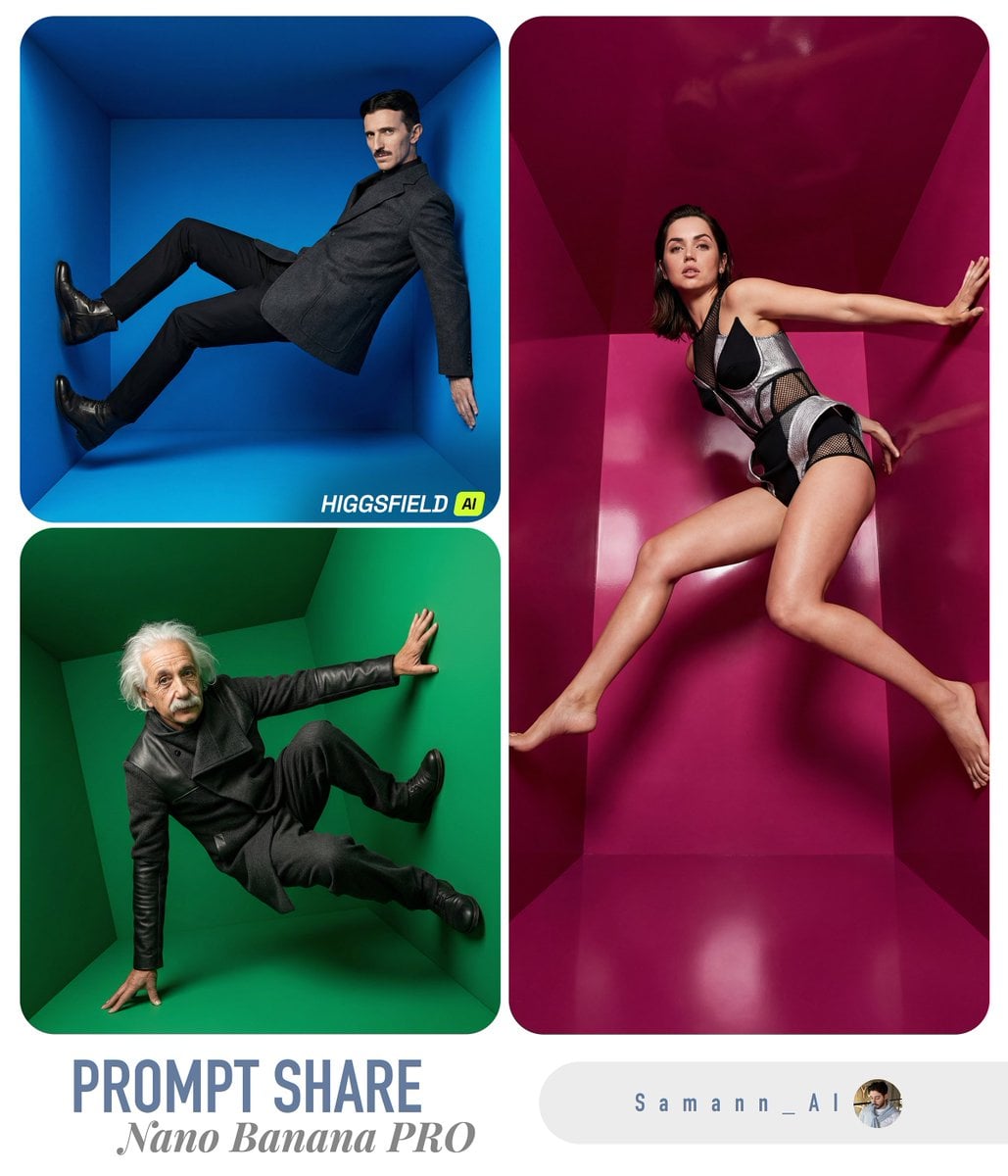
USER_PHOTO in a Color-Box Fashion Editorial
Start with the recommended models, use cases, and steps, then decide how to apply the template directly.
These templates work best when you keep the visual structure, then replace the subject, style, or commercial goal. Start with Ideogram V3, then switch to a similar alternative based on the result.
If you are unsure which model to use first, start with one of the author's recommendations.
Prompt
Start with the recommended models, use cases, and steps, then decide how to apply the template directly.
Use the person in [INPUT IMAGE: USER_PHOTO] as the only subject, clearly preserving their identity and facial features. Place them in a hyper-realistic high-fashion editorial scene inside a surreal 3D geometric color-box room, such as a hollow cube or tilted cube set. For every generation, randomly select one striking solid-color box and keep the environment saturated and monochrome. Randomly choose a dynamic, cool fashion pose, such as weightlessness, an extreme stretch, a jump, or a sideways brace against the wall. Also vary the dramatic camera angle, using options such as a 24–35mm wide angle, tilted horizon, and strong perspective. Show the full body clearly. Use avant-garde fashion styling with a modern editorial sensibility, a clean silhouette, stylish layering, and premium yet appropriate fabrics. Make the studio light crisp and cinematic, with a strong key light, controlled soft shadows, a subtle rim light, and realistic reflections and bounce from the colored walls. Center the subject within generous negative space and strong geometric lines, using the box perspective to frame the figure. Choose a different vivid hue for the box each time and contrast the clothing against it. Output hyper-realistic 8K fashion-advertising quality with an undistorted face, natural proportions, a sharp subject, and no motion blur.
How to use it
Following this sequence usually produces a usable result faster than copying the prompt without a plan.
If you do not have a preference, starting with Ideogram V3 is usually a reliable choice.
Preserve composition, lighting, materials, and style, then replace the subject, brand information, and use case.
Image templates are most valuable when they speed up iteration, so do not judge the direction from a single result.
Template details
Quickly decide whether this template fits your current task.
Best for
This template works especially well for the following tasks.
Posters and covers
Product and brand images
Character and style exploration
Recommended models
If you are unsure which model to use first, start with one of the author's recommendations.
These templates work best when you keep the visual structure, then replace the subject, style, or commercial goal. Start with Ideogram V3, then switch to a similar alternative based on the result.
These templates work best when you keep the visual structure, then replace the subject, style, or commercial goal. Start with Ideogram V3, then switch to a similar alternative based on the result.
These templates work best when you keep the visual structure, then replace the subject, style, or commercial goal. Start with Ideogram V3, then switch to a similar alternative based on the result.
Related templates
Compare templates of the same type to find the prompt direction that fits you best.

K-Pop Idol Nine-Panel Portrait Grid
No ratings yet

Japanese Negative-Film Rooftop Summer Portrait
No ratings yet
On-Trend Product Advertisement Redesign
No ratings yet
Ratings and feedback
Please sign in first