Image template
Free to view, copy, and apply; generation uses credits
Featured
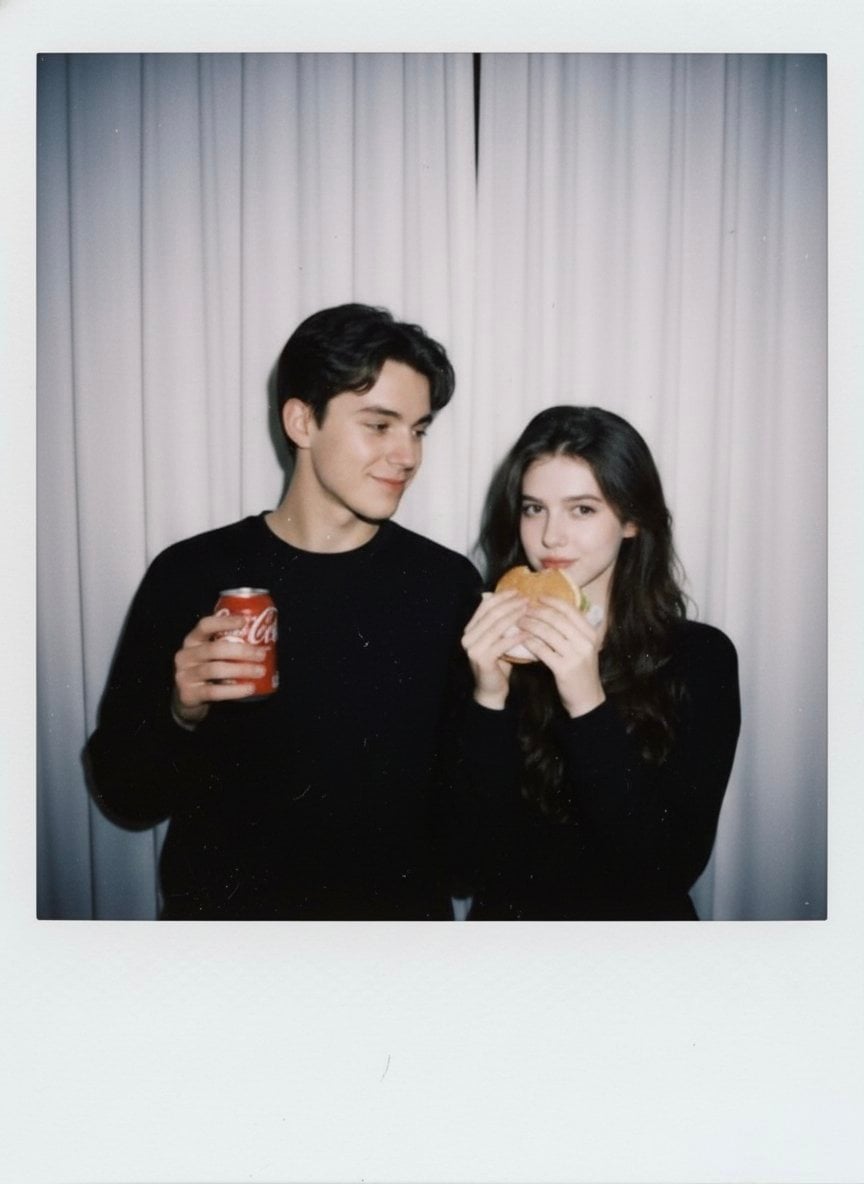
White-Curtain Polaroid Couple Photo with Cola and Burger
Start with the recommended models, use cases, and steps, then decide how to apply the template directly.
Official template0 views
Portrait Photography
Scene Photography
Realistic Photography
Cinematic
Film Look
Person
Depth of Field
Product
Template type
Image template
Usage access
Free to view, copy, and apply; generation uses credits
Created
06/15/2026
Rating
No ratings yet
Template overview
These templates work best when you keep the visual structure, then replace the subject, style, or commercial goal. Start with Google Imagen4, then switch to a similar alternative based on the result.
Recommended models
If you are unsure which model to use first, start with one of the author's recommendations.
Google Imagen4
GPT Image 2
GPT Image 1.5
Prompt
Start with the recommended models, use cases, and steps, then decide how to apply the template directly.
Generate Polaroid-style candid photography that looks like an ordinary snapshot from a Polaroid instant camera. Add slight blur, soft focus, the glow of a dark room lit by flash, light scattering from the on-camera flash, subtle film grain, and slight exposure falloff. Identity Preservation: Enable identity_preservation and set use_reference_images=true, strict_identity_lock=true, and alter_face=false. Never change or distort either person's facial features, expressions, or proportions. Subjects: Use female identity=user, standing beside the boy in a cute casual pose, holding a burger, with a natural, playful, candid expression. Use male identity=boy from reference, posing cutely and casually next to the girl, holding a red Coca-Cola can with the same natural sense of playfulness. Relationship: Keep their dynamic friendly and cute. Set body_language to standing close together, relaxed, and slightly leaning toward each other. Environment: Use an indoor room with plain white curtains as the background. Light the scene with a single on-camera flash and consistent frontal flash. Keep the mood cozy, intimate, and nostalgic. Composition: Use a medium shot at eye level with a centered, casual snapshot composition. Aesthetic: Emphasize a cute, nostalgic, intimate, classic instant-film look. Retain minor blur, soft edges, and natural exposure inconsistencies. Restrictions: No changes to faces, no dramatic posing, no artificial glamour or studio look, and no text or watermarks. The result must look like a real Polaroid photo.
How to use it
Following this sequence usually produces a usable result faster than copying the prompt without a plan.
1
Start with a recommended model
If you do not have a preference, starting with Google Imagen4 is usually a reliable choice.
2
Keep the structure, replace the details
Preserve composition, lighting, materials, and style, then replace the subject, brand information, and use case.
3
Compare at least 2 or 3 results
Image templates are most valuable when they speed up iteration, so do not judge the direction from a single result.
Template details
Quickly decide whether this template fits your current task.
Template type
Image template
Usage access
Free to view, copy, and apply; generation uses credits
Created
06/15/2026
Rating
No ratings yet
Best for
This template works especially well for the following tasks.
Posters and covers
Useful for event graphics, social covers, campaign posters, and key visuals.
Product and brand images
Useful for ecommerce main images, brand visuals, and product variations.
Character and style exploration
Create samples for characters, illustrations, scenes, and style directions.
Recommended models
If you are unsure which model to use first, start with one of the author's recommendations.
Google Imagen4
IMAGE
These templates work best when you keep the visual structure, then replace the subject, style, or commercial goal. Start with Google Imagen4, then switch to a similar alternative based on the result.
GPT Image 2
IMAGE
These templates work best when you keep the visual structure, then replace the subject, style, or commercial goal. Start with Google Imagen4, then switch to a similar alternative based on the result.
GPT Image 1.5
IMAGE
These templates work best when you keep the visual structure, then replace the subject, style, or commercial goal. Start with Google Imagen4, then switch to a similar alternative based on the result.
Related templates
Compare templates of the same type to find the prompt direction that fits you best.

Image template
Featured
K-Pop Idol Nine-Panel Portrait Grid
No ratings yet
Portrait Photography
Realistic Photography
Cinematic

Image template
Featured
(G)I-DLE Yuqi Golden-Light Fashion Selfie
No ratings yet
Scene Photography
Realistic Photography
Cinematic

Image template
Featured
Japanese Negative-Film Rooftop Summer Portrait
No ratings yet
Portrait Photography
Realistic Photography
Cinematic
Ratings and feedback
No ratings yet
Please sign in first