AI image model
Ideogram
Ideogram Character
Character is Ideogram V3's character-reference generation path. The reference anchors who the subject is while the prompt defines the new image; it is neither fidelity-preserving editing nor multi-person identity management. 12 / 18 / 24 credits per image; 1–4 outputs
Capabilities
Single-character reference generation
Credit cost
Credit cost — 12 / 18 / 24 credits per image; 1–4 outputs
Prompt limit
5,000 characters
Upload limit
1 image
30-second overview
- Ideogram Character / Capabilities — Start here when one approved character image must guide a different action, environment, or camera view while retaining recognizable traits.
- Ideogram Character / Style — Character consistency is an objective, not a guarantee; facial, clothing, and accessory details can drift.
- Ideogram Character / Credit cost — TURBO/BALANCED/QUALITY cost 12/18/24 credits per image; the total follows the selected output count.
- Ideogram Character / Rendering speed — Rendering tier, MagicPrompt, seed, and negative prompt enable controlled comparisons.
Popular searches: how to use Ideogram Character · how many credits does Ideogram Character cost · how to choose an Ideogram Character reference image
Examples
Editorial design

Editorial design
Visual transformation
Visual concept
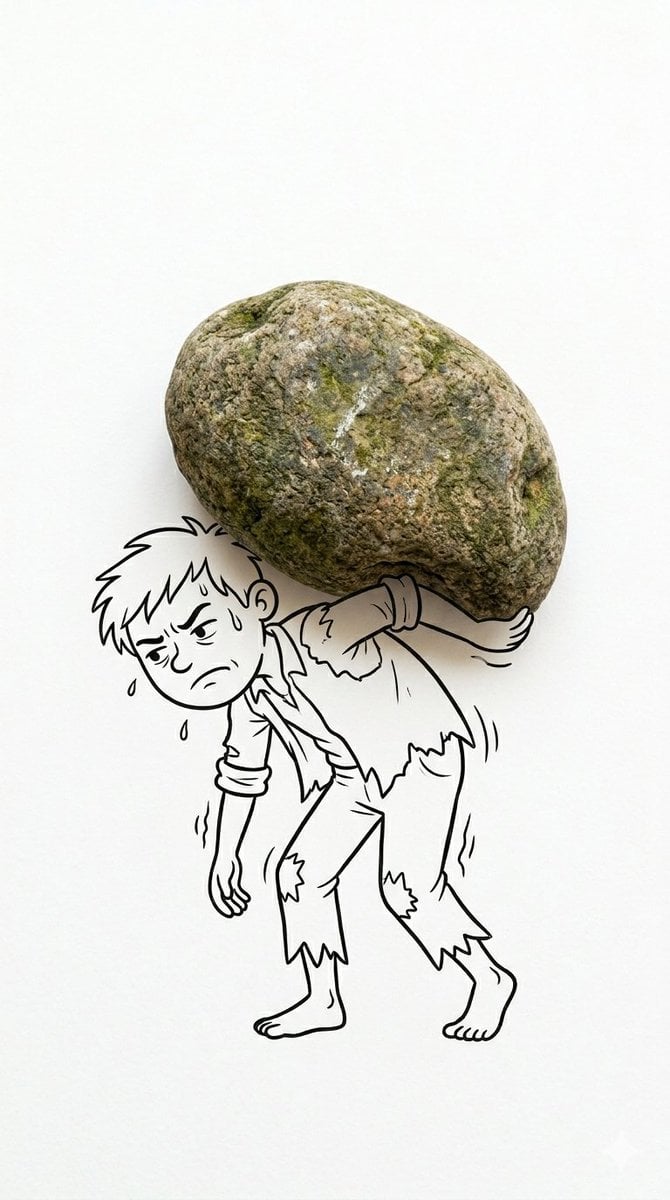
Creative composite photograph, 9:16 vertical aspect ratio, clean minimalist white background, studio lighting, high detail, sharp focus. A real-life [EVERYDAY OBJECT] is physically placed and perfectly integrated as a key part of a hand-drawn black ink cartoon illustration. The drawing is simple, expressive line art with minimal shading, like a quick sketch on paper. The [OBJECT] represents [CLEVER PART OF THE SCENE - e.g. hair, weapon, body part, clothing, etc.], cleverly completing the visual pun or concept. The cartoon character interacts dynamically with the object in a humorous, meaningful, or surprising way. Photorealistic object + bold black line drawing style, perfect seamless blend between real object and illustration, clean negative space, artistic and witty concept, high quality product photography mixed with doodle art. • How to edit super easy Just replace the placeholders: [EVERYDAY OBJECT] → what real thing you'll use (tomato, onion, chips, etc.) [CLEVER PART OF THE SCENE] → what the object becomes in the drawing Then customize the character and concept
Cinematic scene
At a glance
Is this model right for you?
Start here when one approved character image must guide a different action, environment, or camera view while retaining recognizable traits. TURBO, BALANCED, and QUALITY cost 12, 18, and 24 credits per image. The total is the per-image rate multiplied by the selected 1–4 outputs, rounded up to whole credits.
- What it does best
- Character is Ideogram V3's character-reference generation path. The reference anchors who the subject is while the prompt defines the new image; it is neither fidelity-preserving editing nor multi-person identity management.
- Who it is for
- It fits mascot concepts, original characters, game or story scene drafts, and series work that needs to evaluate one subject's recognizability across images.
- Why use it on Kyeo AI
- Compare Remix when the objective is a generative reinterpretation of the source, or Reframe when the objective is outpainting and canvas adaptation. Their input goals and review criteria both differ from Character.
Key facts
Quickly evaluate whether this model fits your business use case.
Category
AI image model
Vendor
Ideogram
Model family
Ideogram
Runtime
Asynchronous task
Prompt limit
5,000 characters
Upload limit
1 image
Other names
The same model may have different names in official documentation, community discussions, and API integrations. This section brings them together for you.
Ideogram Character API
Ideogram character reference
Common questions
These practical questions focus on the task, input conditions, and result requirements you should confirm before choosing.
how to use Ideogram Character
how many credits does Ideogram Character cost
how to choose an Ideogram Character reference image
how many reference images does Ideogram Character support
how to test Ideogram Character consistency
Ideogram Character supported image sizes
Ideogram Character rendering speed comparison
Ideogram Character realistic vs fictional style
Ideogram Character vs Remix
can Ideogram Character make a character series
Decision guide
Still deciding? Start with these key decision points.
1
Choose Character for a known subject in a new scene
Choose Character for a known subject in a new scene — Start here when one approved character image must guide a different action, environment, or camera view while retaining recognizable traits.
2
Switch paths for a style change or a larger canvas
Switch paths for a style change or a larger canvas — Compare Remix when the objective is a generative reinterpretation of the source, or Reframe when the objective is outpainting and canvas adaptation. Their input goals and review criteria both differ from Character.
3
Run three controlled scene tests first
Run three controlled scene tests first — Cross-scene recognizability is the useful metric. Review facial structure, silhouette, hair color, clothing, and signature elements separately instead of selecting only the most striking output.
Popular comparisons
Compare common alternatives on the same task to clarify differences in inputs, controls, and cost.
What is the difference between Ideogram Character and Ideogram V3 Remix?
Ideogram Character vs Ideogram V3 Remix
What is the difference between Ideogram Character and Ideogram V3 Reframe?
Ideogram Character vs Ideogram V3 Reframe
What is the difference between Ideogram Character and Nano Banana Pro?
Ideogram Character vs Nano Banana Pro
Model comparison table
Not sure which model to choose? Compare the key differences between this model and its alternatives at a glance.
Primary goal
Ideogram Character
Generate a new scene from one character reference
Ideogram V3 Remix
Generatively remix a source image with a prompt
Input focus
Ideogram Character
One clear, single-character reference
Ideogram V3 Remix
One source image; strength adjusts source influence
Prompt requirement
Ideogram Character
Required, up to 5,000 characters
Ideogram V3 Remix
Required, with negative prompt and strength controls
Credits per request
Ideogram Character
12 / 18 / 24 per image; 1–4 outputs
Ideogram V3 Remix
4 / 7 / 10 by rendering tier
Primary review target
Ideogram Character
Face, hair, clothing, and signature details
Ideogram V3 Remix
Style change and source-image influence
Real-world experience
Practical guidance based on public sources, current on-site limits, and representative tasks.
One strong image does not make a usable series
Ideogram Character / One strong image does not make a usable series — Cross-scene recognizability is the useful metric. Review facial structure, silhouette, hair color, clothing, and signature elements separately instead of selecting only the most striking output.
The same input type can serve three different jobs
Ideogram Character / The same input type can serve three different jobs — Character uses the reference to define who appears, Remix reinterprets how the source looks, and Reframe extends where the image ends. Choose the job before comparing prices or controls.
Capabilities
Single-character reference generation
Single-character reference generation — Start here when one approved character image must guide a different action, environment, or camera view while retaining recognizable traits.
Style and prompt expansion
Style and prompt expansion — Realistic and Fictional modes accommodate photographic and illustrated references.
Size and repeatability controls
Size and repeatability controls — Six sizes cover common square, portrait, and landscape series formats.
Use cases
Mascot scene concepts
Place one mascot in seasonal, event, or product settings to compare creative directions before designers normalize the final details.
Story and social sequences
Explore poses, camera views, and backgrounds for one protagonist, then retain only the outputs whose identity traits pass review.
Game or IP character pitches
Build new-scene proposals from an approved character sheet, then verify design rules, rights, and brand requirements before publication.
Prompt tips
Use a clear single-character reference
Use a clear single-character reference — Start here when one approved character image must guide a different action, environment, or camera view while retaining recognizable traits.
Describe the change, not a new identity
Describe the change, not a new identity — Focus on action, setting, composition, camera, and lighting. Appearance details that conflict with the reference can increase character drift.
Hold controls steady while measuring drift
Hold controls steady while measuring drift — Cross-scene recognizability is the useful metric. Review facial structure, silhouette, hair color, clothing, and signature elements separately instead of selecting only the most striking output.
Why choose it
Runtime / Ideogram Character — The character-reference objective is easier to test than a general-purpose remix.
Style — Realistic and Fictional modes accommodate photographic and illustrated references.
Image size — Six sizes cover common square, portrait, and landscape series formats.
Rendering speed — Rendering tier, MagicPrompt, seed, and negative prompt enable controlled comparisons.
What to know first
Ideogram Character / Capabilities — Character consistency is an objective, not a guarantee; facial, clothing, and accessory details can drift.
Upload limit / Output count — Only one reference image is accepted, but each task can create 1–4 outputs; multiple references are not supported.
Output count — Generate one representative sample with the selected parameters and confirm that it meets the goal before expanding the batch.
Runtime / Ideogram Character — AI output does not grant rights to a person, trademark, character, or training material; publication still requires human review.
Adjustable settings
Quickly evaluate whether this model fits your business use case.
Rendering speed
Optional
Parameter type: select
Default: BALANCED
TURBO
BALANCED
QUALITY
Style
Optional
Parameter type: select
Default: AUTO
Auto
Realistic
Fictional
MagicPrompt
Optional
Parameter type: select
Default: true
On
Off
Image size
Optional
Parameter type: select
Default: square_hd
Square
Square HD
Portrait 3:4
Portrait 9:16
Landscape 4:3
Landscape 16:9
Output count
Optional
Parameter type: select
Default: 1
1
2
3
4
Seed
Optional
Parameter type: number
Negative prompt
Optional
Parameter type: text
Maximum 5,000 characters
Credit cost
12 / 18 / 24 credits per image; 1–4 outputs
TURBO, BALANCED, and QUALITY cost 12, 18, and 24 credits per image. The total is the per-image rate multiplied by the selected 1–4 outputs, rounded up to whole credits.
Credit-saving tip
Before generating images or videos in bulk, run an A/B test with the same input on this model and similar alternatives. Confirm the result first to avoid wasting credits.
Frequently asked questions
Related models
Still deciding? Take a quick look at these similar alternatives.
Ideogram V3 Remix
Ideogram V3 Remix — Upload one JPEG, PNG, or WebP image, describe what should stay or change, then choose speed, style, MagicPrompt, size, strength, and 1–4 outputs. It suits experiments with style, setting, material, or content based on an existing poster, illustration, product concept, or social asset.
AI image model
4 / 7 / 10 credits per image; 1–4 outputs
Nano Banana Pro
Nano Banana Pro supports text-to-image generation and reference-image editing on Kyeo AI, with 1K, 2K, or 4K output. Each 1K or 2K request costs 8 credits, while 4K costs 14. Resolution is an output-size tier, not a guarantee of quality, accuracy, or detail.
AI image generation and editing model
8–14 credits per request
GPT Image 2.5 Flare
GPT Image 2.5 Flare / Capabilities — GPT Image 2.5 Flare supports text-to-image generation and reference-image editing on Kyeo AI. Kyeo charges by output resolution: 1K costs 3 credits, 2K costs 10, and 4K costs 8.
AI image generation and editing model
3–16 credits per request
Sources
This page is based on vendor materials, model-family documentation, and Kyeo AI integration settings.
Source note
This page describes the current public Ideogram Character capabilities using Ideogram official documentation.
Last updated: 2026-08-26
Ideogram Developer Docs
Official
Ideogram Character API Reference
Official